1. المقدمة
The ATEN VE8950T is a 4K HDMI Over IP Transmitter designed for extending 4K audio/video signals over a standard Gigabit Ethernet network. This device delivers visually lossless 4K AV signals with low latency, making it suitable for long-distance transmission in various professional environments. Its design focuses on ease of setup and operation, providing a scalable and flexible solution for multi-display 4K signal distribution.
The VE8950T offers an economical digital signage solution, addressing common challenges in AV over IP system implementation. Key benefits include limitless scalability, flexible deployment, simplified IP setup without the need for additional server PCs or software, and support for daisy-chaining to extend reach efficiently.
2. الميزات الرئيسية
- 4K HDMI Over IP Extender: Functions as a transmitter for extending HDMI signals over an IP network.
- نقل الفيديو عالي الجودة: Supports visually lossless video up to 4K at 60 Hz (4:2:0) and 4K at 30 Hz (4:4:4).
- ضغط الفيديو المتقدم: Utilizes ATEN's advanced video lossless compression technology for stunning video quality.
- EDID Expert Technology: Automatically selects optimal EDID settings for smooth power-up, high-quality display, and best video resolution across various screens.
- Flexible AV Connections: Extends AV connections from simple point-to-point to complex multi-point to multi-point setups via LAN, without distance limitations.
3. وصف الأجهزة
3.1. اللوحة الأمامية
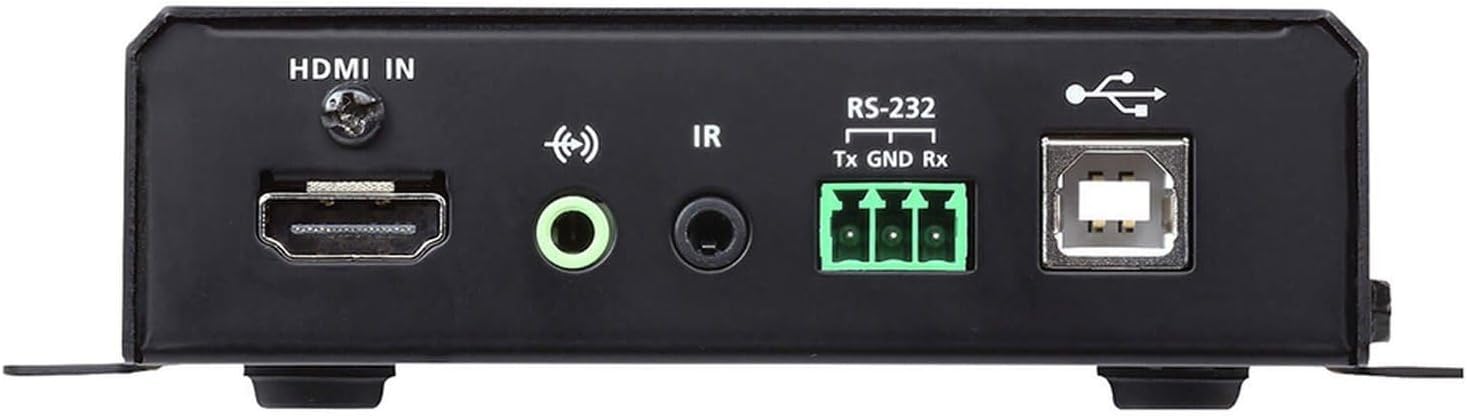
الشكل 1: Front Panel of the ATEN VE8950T Transmitter.
- مدخل HDMI: يتصل بجهاز مصدر HDMI.
- مدخل الصوت: مقبس 3.5 ملم لإدخال الصوت التناظري.
- إير: 3.5mm jack for IR receiver connection.
- RS-232: Serial port for control and configuration.
- USB: USB Type B port for connecting to a computer or other USB host device.
3.2. اللوحة الخلفية

الشكل 2: Rear Panel of the ATEN VE8950T Transmitter.
- LAN: منفذ إيثرنت RJ-45 للاتصال بالشبكة.
- تيار مستمر 5 فولت: Power input jack for the 5V DC power adapter.
3.3. اللوحة العلوية

الشكل 3: Top Panel of the ATEN VE8950T Transmitter.
- ID NUMBER Display: Three-digit LED display showing the device's ID.
- +/- الأزرار: Used to adjust the device ID or navigate menu options.
- رابط LED: Indicates network link status.
- ليد اشارة: يشير إلى حالة الطاقة.
4. الإعداد والتثبيت
Follow these steps to set up your ATEN VE8950T Transmitter:
- أجهزة إيقاف التشغيل: Ensure all devices, including the HDMI source, display, and the VE8950T, are powered off before making any connections.
- قم بتوصيل مصدر HDMI: Use an HDMI cable to connect your HDMI source device (e.g., Blu-ray player, PC) to the هدمي إن port on the VE8950T Transmitter.
- إتصال شبكة: Connect an Ethernet cable from your Gigabit network switch to the شبكة محلية port on the VE8950T Transmitter. Ensure the network switch supports Gigabit speeds.
- توصيل الطاقة: قم بتوصيل محول الطاقة المرفق بجهد 5 فولت تيار مستمر بـ تيار مستمر 5 فولت port on the VE8950T Transmitter, then plug the adapter into a power outlet.
- تشغيل الطاقة: Power on the VE8950T Transmitter. The قوة LED should illuminate.
- Configure ID (Optional): If using multiple transmitters and receivers, configure the unique ID for each transmitter using the +/- buttons on the top panel. This ID must match the ID set on the corresponding receiver(s).
- Connect Receiver (Sold Separately): For a complete system, connect a compatible ATEN VE8950R Receiver (sold separately) to your display and the same network.
- Power On Source and Display: Power on your HDMI source device and the display.
For advanced configurations, including web GUI management and video wall setups, refer to the comprehensive user manual available on the ATEN webموقع.
5. التشغيل
Once the VE8950T Transmitter and its corresponding receiver(s) are properly connected and powered on, the system will automatically begin transmitting the HDMI signal over the IP network.
- انتقال الإشارة: The HDMI video and audio from the source connected to the VE8950T will be extended to the display connected to the receiver.
- مؤشرات الحالة: لاحظ وصلة و قوة LEDs on the top panel. The POWER LED should be solid, and the LINK LED should indicate active network connection and data transmission.
- Web إدارة واجهة المستخدم الرسومية: The VE8950T supports management via a web-based Graphical User Interface (GUI). Access the web GUI by entering the device's IP address into a web browser on a computer connected to the same network. The web GUI allows for advanced configuration, monitoring, and control, including video wall setup and firmware updates.
- التحكم RS-232: The RS-232 port can be used for serial control from a control system. Refer to the detailed product manual for RS-232 command protocols.
- التحكم بالأشعة تحت الحمراء: If an IR receiver is connected, you can extend IR remote control signals from the display location back to the source device.
6. الصيانة
To ensure optimal performance and longevity of your ATEN VE8950T Transmitter, follow these maintenance guidelines:
- تنظيف: استخدم قطعة قماش ناعمة وجافة لتنظيف الجهاز. لا تستخدم منظفات سائلة أو بخاخات.
- تهوية: Ensure proper ventilation around the device to prevent overheating. Do not block any ventilation openings.
- بيئة: Operate the device within the specified temperature and humidity ranges. Avoid exposing it to direct sunlight, excessive dust, or moisture.
- تحديثات البرامج الثابتة: تحقق من جهاز ATEN بشكل دوري website for firmware updates. Keeping the firmware up-to-date can improve performance, add new features, and resolve potential issues.
- إدارة الكابلات: Ensure all cables are securely connected and properly routed to prevent accidental disconnections or damage.
7. استكشاف الأخطاء وإصلاحها
If you encounter issues with your ATEN VE8950T Transmitter, refer to the following troubleshooting tips:
| مشكلة | السبب المحتمل | حل |
|---|---|---|
| لا يوجد إخراج فيديو على الشاشة. |
|
|
| جودة الفيديو رديئة أو يوجد وميض. |
|
|
| لا يمكن الوصول Web واجهة المستخدم الرسومية. |
|
|
If the problem persists, please contact ATEN technical support for further assistance.
8. المواصفات
| رقم الموديل | في إي 8950 تي |
| تكنولوجيا الاتصال | HDMI, Ethernet (IP) |
| ترميز الفيديو | ح.265 |
| الحد الأقصى للدقة | 4K (3840 x 2160) @ 60Hz (4:2:0), 4K (3840 x 2160) @ 30Hz (4:4:4) |
| وضع إخراج الصوت | ستيريو، محيطي |
| الصوت المحيطي | 5.1 تكوين القناة |
| إجمالي منافذ HDMI | 1 (إدخال) |
| طريقة التحكم | Remote (IR), RS-232, Web واجهة المستخدم الرسومية |
| أبعاد المنتج | 9.5 × 6.5 × 6.3 بوصة |
| وزن العنصر | 10.14 رطل |
9. الضمان والدعم
ATEN is committed to providing high-quality products and excellent customer service. For support regarding your VE8950T Transmitter, please refer to the following:
- الدعم الفني: ATEN offers free technical support. For assistance, please contact ATEN's support team. They aim to respond to customer inquiries within 4 hours.
- خدمة الضمان: Information regarding standard warranty coverage and extended warranty service packages can be found on the official ATEN webالموقع أو عن طريق الاتصال بخدمة العملاء.
- خدمة RMA: ATEN provides localized repair centers for Return Merchandise Authorization (RMA) services.
- الموارد المتاحة على الإنترنت: Visit the official ATEN website for product documentation, FAQs, driver downloads, and firmware updates.
For the most current and detailed warranty information, please visit the متجر ATEN الرسمي أو شركتهم webموقع.


