كتيبات وأدلة المستخدم الخاصة بـ LTC
تتيح شركة LTC مجموعة متنوعة من الإلكترونيات الاستهلاكية، وتتخصص في ملحقات الألعاب مثل لوحات المفاتيح والفأرات الميكانيكية، إلى جانب أجهزة الصوت والتبريد المنزلية.
حول كتيبات LTC Manuals.plus
LTC is a versatile consumer electronics brand known for delivering affordable and functional technology solutions. The brand operates prominently in the gaming sector, offering enthusiast-grade peripherals such as the Nimbleback series of mechanical keyboards and precision wireless mice. These products often feature tri-mode connectivity (Bluetooth, 2.4G, Wired), hot-swappable switches, and customizable RGB lighting tailored for gamers.
In addition to gaming gear, LTC manufactures home electronics including floor fans, portable cooling devices, and audio equipment like public address amplifiers and waterproof speakers. Whether facilitating a high-performance gaming setup or improving home comfort, LTC products are designed for ease of use and reliability.
كتيبات LTC
أحدث الأدلة من manuals+ مُختار خصيصًا لهذه العلامة التجارية.
ال تي سي اوديو MFA1200-USB-BT Ampمكبر مع دليل مستخدم وظيفة بلوتوث
LTC AUDIO MEGA20W مكبر صوت 20 وات قابل لإعادة الشحن مع دليل مستخدم وظيفة التسجيل
إل تي سي أوديو هاي فاي ستيريو Ampمكبر 2 × 50 واط مزود بدليل مستخدم FM وبلوتوث وكاريوكي
دليل مستخدم ماوس الألعاب LTC MKM071
LTC GM-031 Wired Gaming Mouse Quick Guide
دليل البدء السريع للفأرة اللاسلكية LTC OM021
دليل مستخدم سماعة الألعاب LTC Sound Slave SS-502
دليل مستخدم فأرة الألعاب اللاسلكية LTC Mosh Pit WHM-01
دليل البدء السريع لمصابيح LED من نوع LTC 1909 و2209 و2409
دليل سريع لجهاز LTC Nimbleback NB-981: الوسائط المتعددة وعناصر التحكم الأساسية
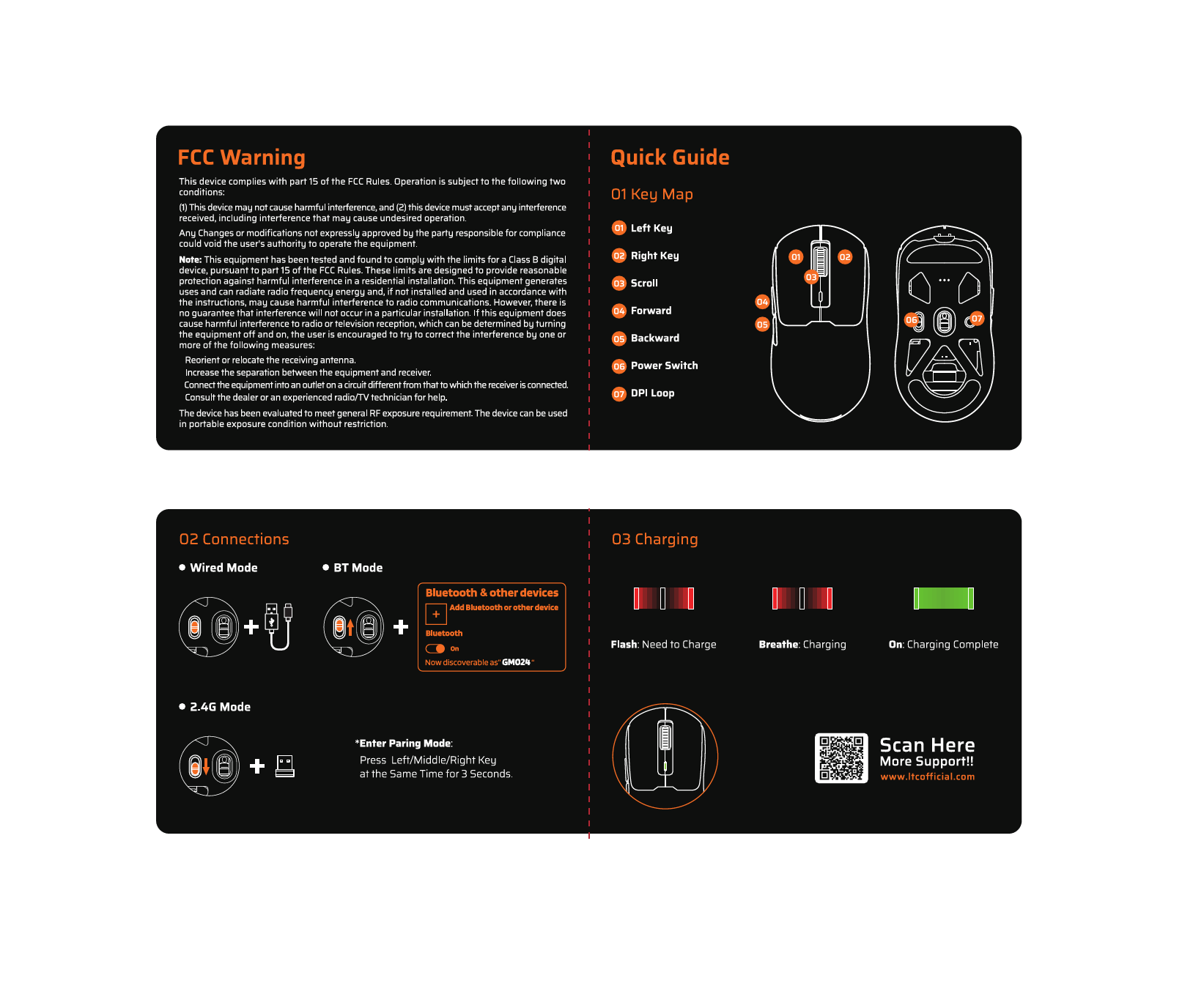
دليل البدء السريع للفأرة اللاسلكية LTC GM024 وتحذير لجنة الاتصالات الفيدرالية
دليل مستخدم مبرد LTC Smart Living COOL 30/50 المحمول القابل لإعادة الشحن
دليل التثبيت السريع لجهاز التوجيه اللاسلكي LTC 4G
لوحة المفاتيح اللاسلكية LTC MK-791: الميزات، والاتصال، والامتثال لمعايير لجنة الاتصالات الفيدرالية
دليل مستخدم لوحة مفاتيح LTC NB-1041 Nimbleback - الميزات والإعداد والدعم
كتيبات LTC من تجار التجزئة عبر الإنترنت
دليل مستخدم لوحة المفاتيح الميكانيكية اللاسلكية LTC Nimbleback NB832 ذات الحشية بنسبة 75%
LTC NB1041 Nimbleback Wired Mechanical Keyboard User Manual
LTC Nimbleback NB682 PRO 65% Wireless Mechanical Keyboard Instruction Manual
LTC MC741 Gaming Mini PC Instruction Manual
دليل مستخدم لوحة المفاتيح الميكانيكية اللاسلكية LTC Nimbleback NB841 PRO بنسبة 75%
LTC GM-041 Wired Gaming Mouse Instruction Manual
LTC OM021 Wireless AI Mouse Instruction Manual
LTC Nimbleback LK-301 Low Profile دليل مستخدم لوحة المفاتيح الميكانيكية
LTC GM023 Tri-Mode Wireless Gaming Mouse Instruction Manual
LTC GM051 Wireless Ergonomic Vertical Mouse Instruction Manual
دليل مستخدم لوحة المفاتيح الميكانيكية اللاسلكية LTC Nimbleback NB831 بنسبة 75% وثلاثة أوضاع
دليل مستخدم لوحة المفاتيح الميكانيكية اللاسلكية LTC Nimbleback NB841 PRO بنسبة 75%
أدلة فيديو LTC
شاهد مقاطع الفيديو الخاصة بالإعداد والتثبيت واستكشاف الأخطاء وإصلاحها لهذه العلامة التجارية.
LTC support FAQ
الأسئلة الشائعة حول الأدلة والتسجيل والدعم لهذه العلامة التجارية.
-
How do I pair my LTC wireless mouse?
To enter pairing mode on many LTC mice, press and hold the designated mode button, or hold the Left, Middle, and Right buttons simultaneously for about 3 seconds until the LED flashes rapidly.
-
Where can I download software for my LTC keyboard?
Drivers and configuration software for LTC gaming keyboards and mice can typically be found on the official website at ltcofficial.com.
-
How do I assemble my LTC standing fan?
Attach the base to the vertical riser using the included screws. Place the motor on the arm, secure the rear grille cover with the locking nut, attach the propeller blade, and finally snap the front grille frame onto the rear frame.
-
Does my LTC fan have a timer?
Yes, digital display models like the LXWT114 typically feature a programmable timer (e.g., up to 12 hours) accessible via the control panel or remote.