مقدمة
Thank you for choosing the FiiO EH11 Retro On-Ear Bluetooth Headphones. These headphones combine classic design with modern wireless technology, offering high-resolution audio and versatile connectivity. This manual provides essential information for the proper use, setup, and maintenance of your EH11 headphones.
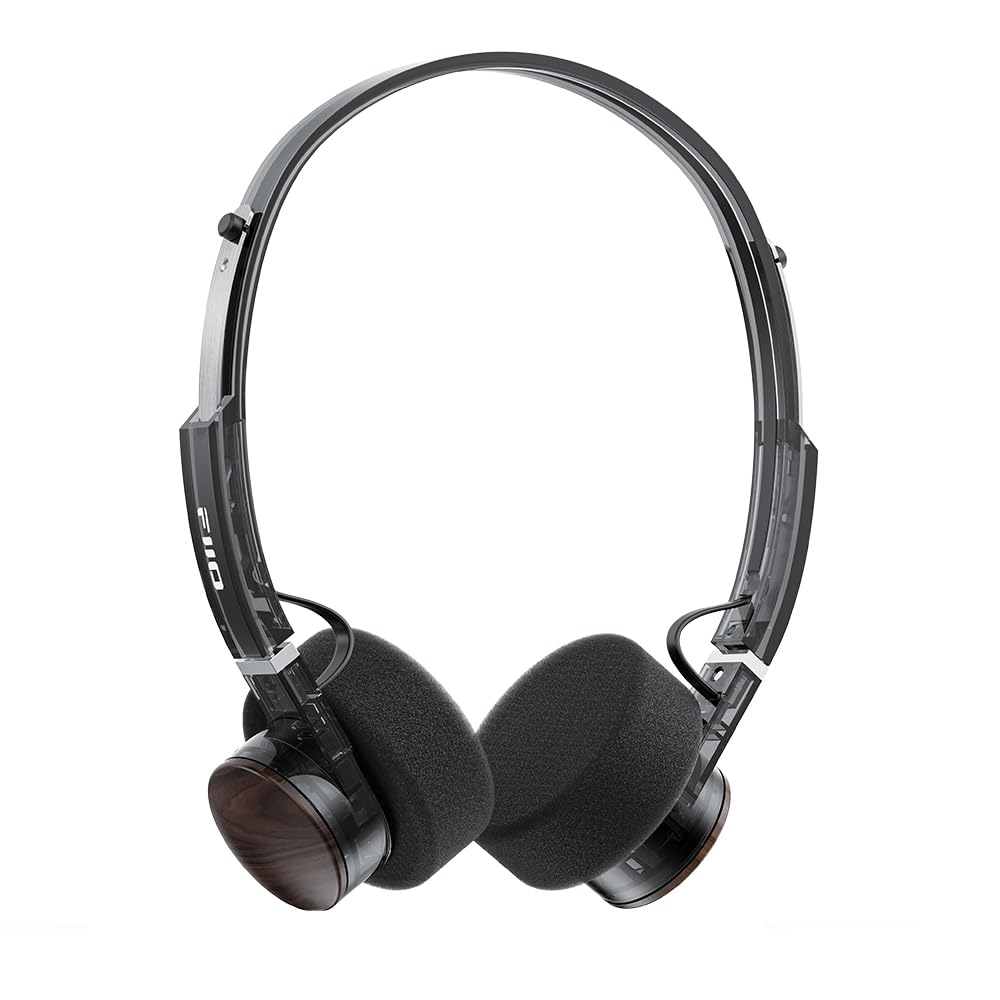
Image: FiiO EH11 Retro On-Ear Bluetooth Headphones, Transparent Black variant. This image displays the overall design of the headphones, highlighting the on-ear form factor and retro aesthetic.
معلومات السلامة
- لا تعرض سماعات الرأس لدرجات حرارة عالية أو رطوبة أو بيئات تآكلية.
- تجنب الاستماع إلى مستويات صوت عالية لفترات طويلة لمنع تلف السمع.
- لا تقم بتفكيك الجهاز أو إصلاحه أو تعديله بنفسك. اتصل بفنيي الصيانة المعتمدين للحصول على المساعدة.
- احتفظ بالجهاز بعيدًا عن متناول الأطفال والحيوانات الأليفة.
- تخلص من المنتج وبطاريته بطريقة مسؤولة وفقًا للوائح المحلية.
محتويات الحزمة
يرجى التأكد من وجود جميع العناصر في الحزمة الخاصة بك:
- FiiO EH11 Retro On-Ear Bluetooth Headphones
- Foam earpads (2 pairs)
- USB A to Type-C charging cable (1)
- Quick guide (1)
المنتج انتهىview
Familiarize yourself with the main components and controls of your FiiO EH11 headphones.
الضوابط والمنافذ
- زر الطاقة/متعدد الوظائف: تُستخدم لتشغيل/إيقاف الطاقة، والتشغيل/الإيقاف المؤقت، والرد على المكالمات/إنهاؤها.
- مقبض الصوت: Rotatable knob for volume adjustment and track control.
- منفذ USB من النوع C: لشحن سماعات الرأس.
- ميكروفون: Built-in for calls and voice commands.
- مؤشر LED: يعرض حالة الطاقة والشحن والبلوتوث.
Note: Specific button functions and LED indicator behaviors are detailed in the 'Operating' section.
يثبت
1. شحن سماعات الرأس
- قم بتوصيل كابل الشحن من النوع C USB بمنفذ الشحن الموجود على سماعات الرأس.
- قم بتوصيل الطرف الآخر من الكابل بمحول طاقة USB (غير متضمن) أو بمنفذ USB الخاص بالكمبيوتر.
- سيوضح مؤشر LED حالة الشحن (على سبيل المثال، اللون الأحمر أثناء الشحن، وإيقاف التشغيل عند الشحن الكامل).
- يستغرق الشحن الكامل حوالي ساعتين ويوفر ما يصل إلى 30 ساعة من التشغيل.
Description: Connect the provided USB-C cable to the headphone's charging port and a power source to charge the internal battery.
2. تشغيل / إيقاف التشغيل
- تشغيل الطاقة: Press and hold the Power/Multi-function button for approximately 3 seconds until the LED indicator lights up and you hear a power-on prompt.
- إيقاف التشغيل: اضغط مع الاستمرار على زر الطاقة/الوظائف المتعددة لمدة 5 ثوانٍ تقريبًا حتى ينطفئ مؤشر LED وتسمع صوت تنبيه إيقاف التشغيل.
3. اقتران بلوتوث
- تأكد من إيقاف تشغيل سماعات الرأس.
- اضغط مع الاستمرار على زر الطاقة/الوظائف المتعددة لمدة 5-7 ثوانٍ تقريبًا حتى يومض مؤشر LED باللونين الأحمر والأزرق بالتناوب، مما يشير إلى وضع الاقتران.
- على جهازك (الهاتف الذكي، الجهاز اللوحي، الكمبيوتر)، قم بتمكين البلوتوث وابحث عن الأجهزة المتاحة.
- Select "FiiO EH11" from the list of found devices.
- Once connected, the LED indicator will flash blue periodically, and you will hear a connection prompt.
4. اتصال الجهاز المزدوج
The EH11 supports simultaneous connection to two Bluetooth devices.
- قم بإقران سماعات الرأس بالجهاز الأول كما هو موضح أعلاه.
- قم بتعطيل البلوتوث على الجهاز الأول. ستعود سماعات الرأس إلى وضع الاقتران.
- قم بإقران سماعات الرأس بالجهاز الثاني.
- أعد تفعيل البلوتوث على الجهاز الأول. ستتصل سماعات الرأس تلقائيًا بكلا الجهازين.
- You can now seamlessly switch between audio sources from the two connected devices.
5. تطبيق التحكم FiiO
Download the FiiO Control App from your device's app store to unlock additional features and customization options, including EQ presets and gaming mode settings.
- بحث عن "FiiO Control" in the App Store (iOS) or Google Play Store (Android).
- Install the app and ensure your EH11 headphones are connected via Bluetooth.
- Open the app to access settings such as EQ, gaming mode, and firmware updates.
تعليمات التشغيل
تشغيل الموسيقى
- تشغيل/إيقاف مؤقت: اضغط ضغطة قصيرة على زر التشغيل/الوظائف المتعددة.
- رفع الصوت: Rotate the Volume knob clockwise.
- اخفض الصوت: Rotate the Volume knob counter-clockwise.
- المسار التالي: Double-click the Volume knob.
- المسار السابق: Triple-click the Volume knob.
استدعاء إدارة
- الرد/إنهاء المكالمة: اضغط ضغطة قصيرة على زر التشغيل/الوظائف المتعددة.
- رفض المكالمة: اضغط مع الاستمرار على زر التشغيل/الوظائف المتعددة لمدة 2 ثوانٍ.
وضع اللعب
Activate Gaming Mode via the FiiO Control App to enhance in-game audio cues like footsteps and gunshots for a more immersive experience. This mode also optimizes latency.
LDAC High-Resolution Audio
The FiiO EH11 supports LDAC codec for high-resolution wireless audio. Ensure your source device also supports LDAC and that it is enabled in your device's Bluetooth settings for the best audio quality.
صيانة
تنظيف
- امسح سماعات الرأس بقطعة قماش ناعمة وجافة وخالية من الوبر.
- لا تستخدم كيماويات مركزة أو محاليل التنظيف أو المنظفات القوية.
- تجنب دخول الرطوبة إلى أي فتحات.
استبدال وسائد الأذن
The foam ear pads are detachable for easy cleaning and replacement. Gently pull the ear pads off the earcups to remove them. Align the new ear pads with the earcups and press them firmly into place until they are securely attached.
Two pairs of different-colored official ear pads are included in the package for customization.
تخزين
When not in use, store the headphones in a cool, dry place, away from direct sunlight and extreme temperatures. Avoid placing heavy objects on the headphones.
استكشاف الأخطاء وإصلاحها
- لا يوجد طاقة:
- تأكد من شحن سماعات الرأس بالكامل.
- Try connecting to a different charging cable or power source.
- لا يمكن الاقتران بالجهاز:
- تأكد من أن سماعات الرأس في وضع الاقتران (يومض مؤشر LED باللونين الأحمر والأزرق).
- تأكد من تمكين البلوتوث على جهازك.
- قم بتقريب سماعات الرأس من جهازك.
- حاول إعادة تشغيل كل من سماعات الرأس وجهازك.
- امسح اتصالات البلوتوث السابقة على جهازك.
- لا يوجد صوت أو مستوى الصوت منخفض:
- تحقق من مستوى الصوت في كل من سماعات الرأس والجهاز المتصل.
- تأكد من توصيل سماعات الرأس بجهازك بشكل صحيح.
- حاول تشغيل الصوت من تطبيق أو مصدر مختلف.
- ضعف جودة الصوت:
- تأكد من عدم وجود أي عوائق بين سماعات الرأس وجهازك.
- ابتعد عن مصادر التداخل (على سبيل المثال، أجهزة توجيه Wi-Fi، وأجهزة Bluetooth الأخرى).
- If using LDAC, ensure your source device supports it and it is enabled.
تحديد
| ميزة | مواصفة |
|---|---|
| اسم الموديل | إي إتش 11 |
| تكنولوجيا الاتصال | بلوتوث |
| تكنولوجيا الاتصالات اللاسلكية | بلوتوث |
| نوع برنامج تشغيل الصوت | محرك ديناميكي (40 مم) |
| شكل سماعة الأذن | على الأذن |
| عمر البطارية | حتى ساعتين |
| وقت الشحن | حوالي 1.5 ساعات |
| وزن | تقريبا. 92 جرام (3.25 أونصة) |
| ميزة خاصة | LDAC High-Resolution Bluetooth Audio, Dual Device Connection, FiiO Control App Support, Gaming Mode |
| المكونات المضمنة | Foam earpads*2, Quick guide*1, USB A to Type-C charging cable*1 |
الضمان والدعم
FiiO products come with a limited warranty. For detailed warranty information, technical support, or service inquiries, please refer to the official FiiO webالموقع أو اتصل بالموزع المحلي لديك.
يمكنك العثور على مزيد من المعلومات وتفاصيل الاتصال على FiiO Official Store.


