1. المقدمة
This manual provides essential information for setting up, operating, and maintaining your NiPoGi P2-3300U Mini PC. Please read it thoroughly before using the device to ensure optimal performance and longevity.
انتهىview عرض فيديوasing the compact design, AMD Ryzen 3300U processor, memory and storage expansion, multiple display output, various ports, efficient cooling, and diverse usage scenarios of the NiPoGi P2-3300U Mini PC.
المميزات الرئيسية:
- المعالج: AMD Ryzen 3 3300U (up to 3.5GHz, 4 Cores/4 Threads)
- نظام التشغيل: ويندوز 11 برو
- ذاكرة: ذاكرة DDR16 سعة 4 جيجابايت (قابلة للتوسيع حتى 32 جيجابايت)
- تخزين: 512GB M.2 2280 SSD (expandable up to 4TB)
- الرسومات: Integrated Graphics with 4K@60Hz support
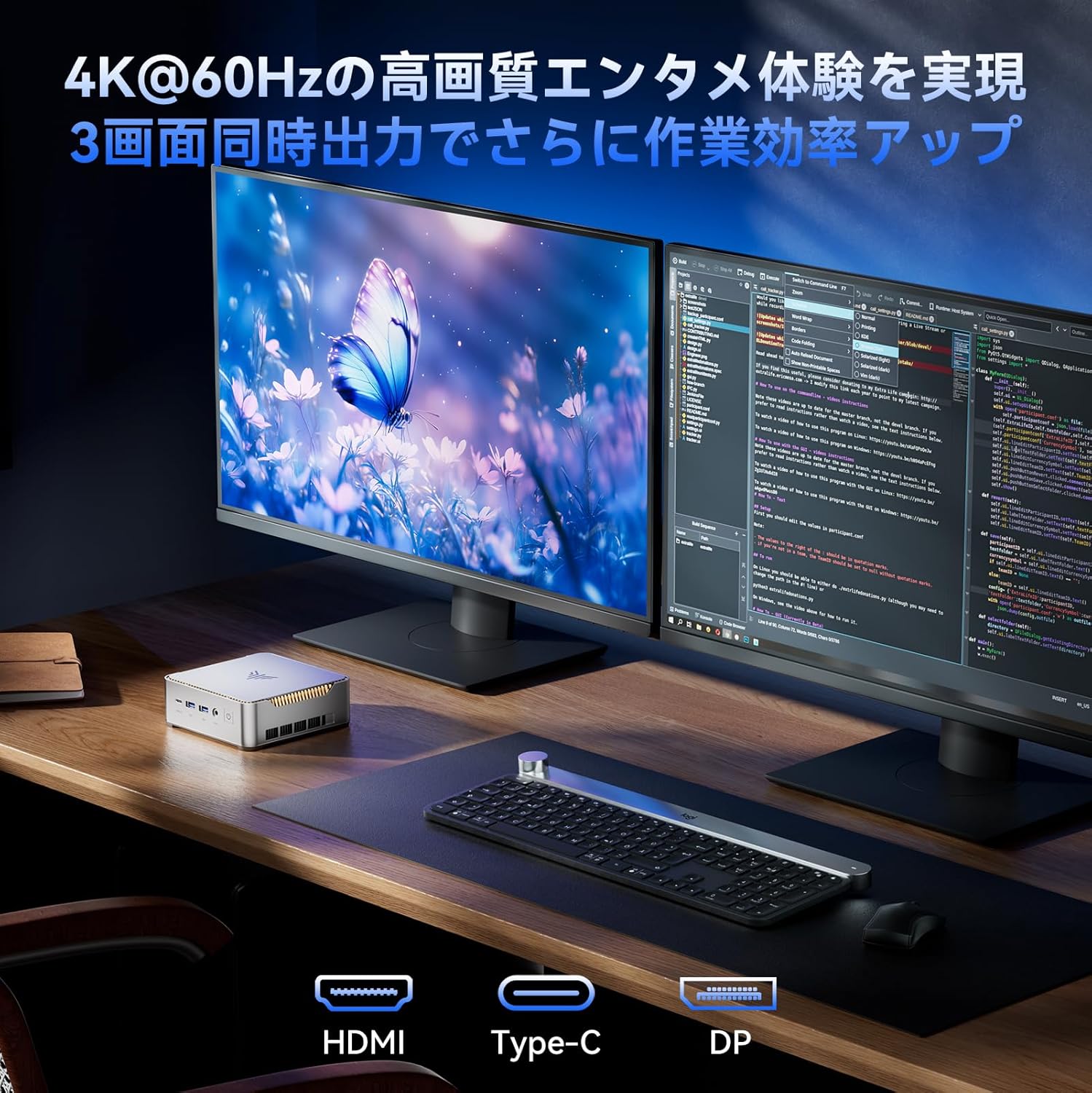
- عرض الإخراج: Supports up to 3 screens simultaneously (HDMI 2.0, DisplayPort 1.4, USB 3.2 Gen1 Type-C)
- الاتصال: USB 3.2 x6, USB 3.2 Gen1 Type-C x1, 1000Mbps Wired LAN, Wi-Fi 5GHz, Bluetooth 4.2
- تبريد: Efficient and silent cooling fan system
- حماية: TPM 2.0 chip for enhanced data protection
- تصميم: Ultra-compact and lightweight (approx. 128.2×128.2×44mm), VESA mount compatible

Diagram showing the compact size and key features like 4K output, Windows 11 Pro, 512GB SSD, 16GB DDR4, LAN, Bluetooth 4.2, and WiFi 5.
2. محتويات العبوة
قبل متابعة الإعداد، يرجى التأكد من تضمين جميع العناصر المدرجة أدناه في الحزمة الخاصة بك:
- NiPoGi P2-3300U Mini PC
- محول الطاقة
- كابل HDMI
- VESA Mount
- Screws for VESA Mount
- دليل المستخدم

Image showing the package contents, including the mini PC, power adapter, HDMI cable, VESA mount, and user manual.
3. دليل الإعداد
3.1 توصيل الأجهزة الطرفية
Identify the various ports on your Mini PC to connect your display, keyboard, mouse, and other devices.

مفصل view of the mini PC's ports, including USB, HDMI, DP, LAN, and Type-C.
- قوة: Connect the power adapter to the DC port on the Mini PC and then to a power outlet.
- عرض: Connect your monitor(s) using the HDMI 2.0, DisplayPort 1.4, or USB 3.2 Gen1 Type-C ports. The Mini PC supports up to three displays simultaneously.
- فأرة لوحة المفاتيح: Connect your USB keyboard and mouse to any of the available USB 3.2 ports.
- شبكة: For a wired connection, connect an Ethernet cable to the RJ45 LAN port. For wireless, the device supports Wi-Fi 5GHz.
- صوتي: قم بتوصيل سماعات الرأس أو مكبرات الصوت بمقبس الصوت مقاس 3.5 ملم.
3.2 تركيب حامل VESA
The Mini PC can be mounted on the back of a VESA-compatible monitor to save desk space.
- Attach the VESA mount bracket to the back of your monitor using the provided screws.
- Slide the Mini PC onto the mounted bracket until it clicks securely into place.

Mini PC mounted on the back of a monitor using a VESA mount.
3.3 التمهيد الأولي وإعداد Windows 11 Pro
After connecting all necessary peripherals and power, press the power button to turn on the Mini PC. Follow the on-screen instructions to complete the initial setup of Windows 11 Pro.
4. تعليمات التشغيل
4.1 التشغيل الأساسي
The NiPoGi P2-3300U Mini PC is designed for smooth performance across various daily tasks:
- Web التصفح: Enjoy fast and stable internet access with Wi-Fi 5GHz or wired LAN.
- إنشاء المستند: Efficiently work on office applications for documents, spreadsheets, and presentations.
- الاجتماعات عبر الإنترنت: Participate in video conferences with reliable connectivity.
- تشغيل الفيديو: Stream 4K content smoothly.

Various usage scenarios: video conferencing, light gaming, data analysis, and movie watching.
4.2 Multitasking and Multi-Display
The AMD Ryzen 3 3300U processor ensures efficient multitasking, allowing you to run multiple applications simultaneously without significant slowdowns.

Multiple application windows open on a screen, illustrating the mini PC's multitasking capabilities.
With support for up to three 4K@60Hz displays, you can expand your workspace for enhanced productivity.

Mini PC connected to multiple monitors, demonstrating multi-display capability.
4.3 إعدادات BIOS المتقدمة
The unlocked BIOS provides access to advanced settings, including:
- Auto-boot: Configure the system to automatically power on when connected to power.
- RTC Wake: Schedule the PC to wake up at a specific time.
- الاستيقاظ على شبكة LAN: Power on the PC remotely over a network connection.
5. الصيانة والترقيات
5.1 نظام تبريد فعال
The Mini PC features an efficient and silent cooling fan system to prevent overheating and maintain stable performance even during extended use. The design ensures heat is effectively dissipated from the interior.
داخلي view of the mini PC highlighting the cooling fan and heat dissipation system.

Image depicting a user working on the mini PC at night while a child sleeps, emphasizing silent operation.
5.2 توسيع التخزين والذاكرة
The Mini PC comes with 16GB DDR4 RAM and a 512GB M.2 2280 SSD. Both can be upgraded:
- ذاكرة: Expandable up to 32GB DDR4 SO-DIMM.
- تخزين: The M.2 2280 SSD can be replaced with a larger capacity drive, up to 4TB.
For detailed instructions on how to access and upgrade these components, please refer to the technical support section or contact customer service.

Diagram illustrating the internal memory (DDR4) and storage (M.2 2280 SSD) expansion capabilities.
6. استكشاف الأخطاء وإصلاحها
If you encounter any issues with your NiPoGi P2-3300U Mini PC, please try the following general troubleshooting steps:
- لا يوجد طاقة: تأكد من توصيل محول الطاقة بإحكام بكل من جهاز الكمبيوتر الصغير ومأخذ كهربائي يعمل. جرب مأخذًا كهربائيًا آخر إذا لزم الأمر.
- لا يوجد عرض: Verify that the monitor is powered on and the display cable (HDMI, DP, or Type-C) is firmly connected to both the Mini PC and the monitor. Try a different cable or port.
- لم يتم اكتشاف الجهاز الطرفي: Ensure USB devices are properly plugged into the correct ports. Try connecting them to different USB ports.
- الأداء البطيء: Close unnecessary applications. Check for available Windows updates. Ensure the cooling vents are not obstructed.
- مشاكل الشبكة: For wired connections, check the Ethernet cable and router. For Wi-Fi, ensure you are connected to the correct network and the signal is strong.
إذا استمرت المشكلة، يرجى الرجوع إلى قسم الضمان والدعم للحصول على مزيد من المساعدة.
7. المواصفات
| ميزة | التفاصيل |
|---|---|
| ماركة | نيبوجي |
| رقم الموديل | P2-3300U-16+512-NEW |
| أبعاد المنتج | 128.2 × 128.2 × 44 ملم |
| وزن العنصر | 1.11 كيلوغرام |
| العلامة التجارية وحدة المعالجة المركزية | أيه إم دي |
| نوع وحدة المعالجة المركزية | رايزن 3 3300U |
| سرعة وحدة المعالجة المركزية | 2.1 GHz (up to 3.5 GHz Max Turbo) |
| عدد المعالجات | 4 |
| RAM Memory Type | ذاكرة الوصول العشوائية DDR4 SDRAM |
| حجم ذاكرة الوصول العشوائي المثبتة | 16 جيجا بايت |
| الحد الأقصى للذاكرة المدعومة | 32 جيجا بايت |
| حجم القرص الصلب | 512 جيجا بايت |
| نوع القرص الصلب | SSD (M.2 2280) |
| واجهة القرص الصلب | eSATA (Note: M.2 is NVMe/SATA, eSATA is an external interface, likely a translation error in source data) |
| كروت | الرسومات المتكاملة |
| وصف بطاقة الرسوميات | مدمج |
| VRAM Type | ذاكرة الوصول العشوائية DDR4 SDRAM |
| واجهة بطاقة الرسوميات | مدمج |
| دقة | 3840 × 2160 (4K) |
| منافذ USB 3.0 | 6 |
| منافذ HDMI | 1 |
| نوع محرك الأقراص الضوئية | لا أحد |
| نظام التشغيل | ويندوز 11 برو |
| الاتصال | Wi-Fi 5, Bluetooth 4.2, 1000Mbps LAN |
| المميزات الخاصة | VESA Support, TPM 2.0 |
8. الضمان والدعم
Your NiPoGi P2-3300U Mini PC comes with an ضمان لمدة 18 شهرًا from the date of purchase. This warranty covers manufacturing defects and malfunctions under normal use. In the event of a defect or malfunction, NiPoGi offers free replacement or return services.
For technical support, warranty claims, or any questions regarding your product, please contact NiPoGi customer service through the official channels provided at the time of purchase or on the NiPoGi webيرجى تجهيز طراز المنتج ومعلومات الشراء عند الاتصال بالدعم.


