المنتج انتهىview والميزات الرئيسية
The BSEED WiFi Smart Thermostat ST-01 offers advanced climate control for your home, combining energy efficiency with smart technology. It features a user-friendly touch screen interface and remote control capabilities.
- Flexible Programming & Energy Efficiency: This WiFi-enabled thermostat includes a 7-day programmable timeline and automatic Home/Away settings. It intelligently adjusts room temperatures to ensure comfort while reducing HVAC energy consumption.
- Digital Control Interface: The intuitive digital control panel allows for easy temperature and setting adjustments. Features include WiFi auto-reconnection, child safety lock, fan adjustment, weather updates, and air filter change alerts.
- التحكم عن بعد والتحكم الصوتي: Manage and monitor your thermostat from anywhere using the Tuya App. It integrates seamlessly with Alexa and Google Home for convenient hands-free voice control.
- سهولة التركيب: Detailed step-by-step online guides and video tutorials facilitate installation in 20 minutes or less. Compatible with most home HVAC systems, a C-wire adapter is included.
- محتويات الحزمة: The package includes the thermostat unit, C-wire adapter, instruction manual, screws, certificate of conformity, and wire labeling stickers.
الإعداد والتثبيت
Before beginning installation, ensure the power to your HVAC system is turned off at the circuit breaker to prevent electrical hazards.
- Review Existing Wiring: Carefully remove your old thermostat's faceplate. Take a clear photo of the wiring connections for reference. Label each wire with the provided stickers according to its terminal.
- تركيب اللوحة الخلفية: Secure the new thermostat's backplate to the wall using the provided screws. Ensure it is level for proper aesthetic and functional alignment.
- التوصيلات السلكية: Connect the wires from your HVAC system to the corresponding terminals on the new thermostat's backplate. If your system lacks a C-wire, use the included C-wire adapter as detailed in the installation manual. The C-wire is essential for powering the smart thermostat.
- Attach Thermostat Faceplate: Once wiring is complete and secure, attach the BSEED Smart Thermostat faceplate to the mounted backplate.
- اعادة الطاقة: أعد تشغيل الطاقة لنظام التدفئة والتهوية وتكييف الهواء (HVAC) من قاطع الدائرة الكهربائية.
- الإعداد الأولي: Follow the on-screen prompts on the thermostat to complete the initial setup, including connecting to your home's Wi-Fi network.
For visual guidance, refer to the detailed step-by-step online guides and video tutorials provided by BSEED.

Image: Diagram illustrating the connection of the C-wire converter to the heat pump control main unit circuit and the C-wire terminal of the thermostat. This is crucial for providing power to the thermostat if an existing C-wire is not present.
تعليمات التشغيل
The BSEED Smart Thermostat offers multiple ways to control your home's climate.
Using the Digital Touch Screen
- ضبط درجة الحرارة: Use the intuitive digital control panel to set your desired temperature.
- وضع النظام: Select between Cool, Heat, or Off modes. The thermostat can also operate in an automatic system mode, switching between cooling and heating ranges without manual intervention.
- وضع المروحة: Adjust fan settings to On, Auto, or Circulate.
- قفل أمان للأطفال: Activate the child safety lock feature to prevent unauthorized changes to settings.
- عرض المعلومات: The screen displays current indoor/outdoor temperature, humidity, time, and weather updates.
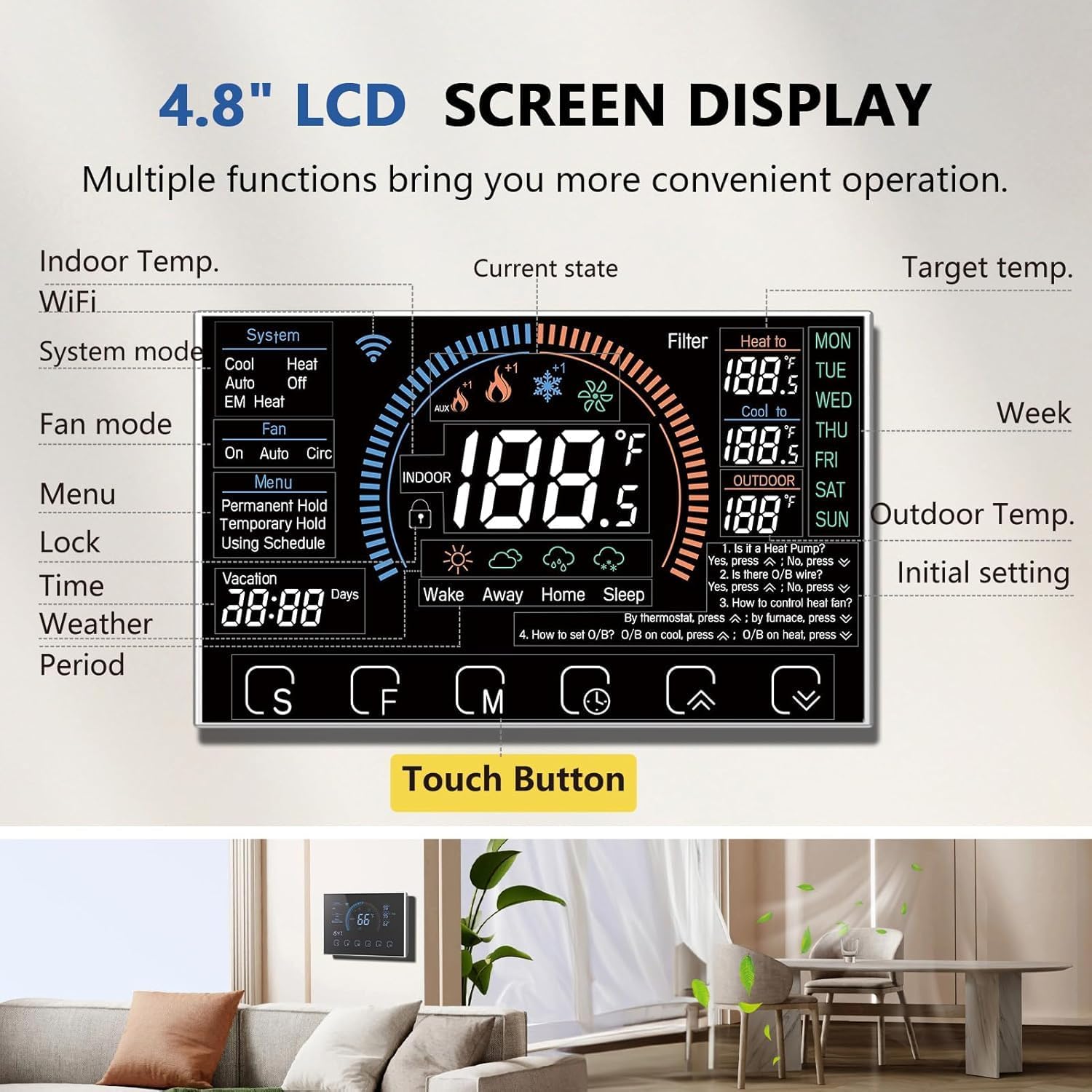
Image: A close-up of the 4.8-inch LCD screen display of the BSEED Smart Thermostat, highlighting various functions like indoor/outdoor temperature, system mode, fan mode, menu, time, weather, and touch buttons for navigation.
Remote Control via Tuya App
Download the Tuya App on your smartphone to manage and monitor your thermostat from anywhere.
- التحكم في درجة الحرارة عن بعد: Adjust settings, change modes, and monitor temperatures remotely.
- 7-Day Programmable Timeline: Set custom schedules for heating and cooling throughout the week.
- وضع العطلة: Utilize the Holiday Mode setting to adjust temperatures for extended periods when you are away, optimizing energy savings.
- Auto Home/Away Settings: The app supports automatic adjustments based on your presence.

Image: A person interacting with the Tuya App on a smartphone to control the BSEED Smart Thermostat, with an Amazon Alexa device nearby, illustrating remote and voice control capabilities.
تكامل التحكم الصوتي
The thermostat works seamlessly with popular voice assistants.
- Alexa & Google Home: Connect your thermostat to Alexa or Google Home devices for convenient hands-free voice commands.
- سيري: The thermostat is also compatible with Siri for voice control.
صيانة
Regular maintenance ensures optimal performance and longevity of your BSEED Smart Thermostat.
- Air Filter Change Alerts: The thermostat will provide alerts when it's time to change your air filter, helping to maintain HVAC system efficiency and air quality.
- تنظيف الشاشة: Gently wipe the touch screen with a soft, dry cloth. Avoid abrasive cleaners or harsh chemicals.
استكشاف الأخطاء وإصلاحها
إذا واجهت مشاكل مع منظم الحرارة الخاص بك، فجرب خطوات استكشاف الأخطاء وإصلاحها الأساسية التالية:
- لا يوجد طاقة/الشاشة مطفأة: Check the circuit breaker for your HVAC system. Ensure the C-wire or C-wire adapter is correctly installed and providing power.
- قطع الاتصال بالواي فاي: Verify your home Wi-Fi network is active. Attempt to reconnect the thermostat via the Wi-Fi setup menu in the settings or through the Tuya App.
- قراءات درجة الحرارة غير الصحيحة: Ensure the thermostat is not exposed to direct sunlight or drafts, which can affect sensor accuracy.
- النظام لا يستجيب: Check all wiring connections for looseness or corrosion. Ensure the system mode (Heat/Cool/Off) is correctly selected.
- مشكلات اتصال التطبيق: Ensure your smartphone has an active internet connection and the Tuya App is updated to the latest version.
For further assistance, please contact BSEED customer support.
تحديد
Detailed technical specifications for the BSEED WiFi Smart Thermostat ST-01.
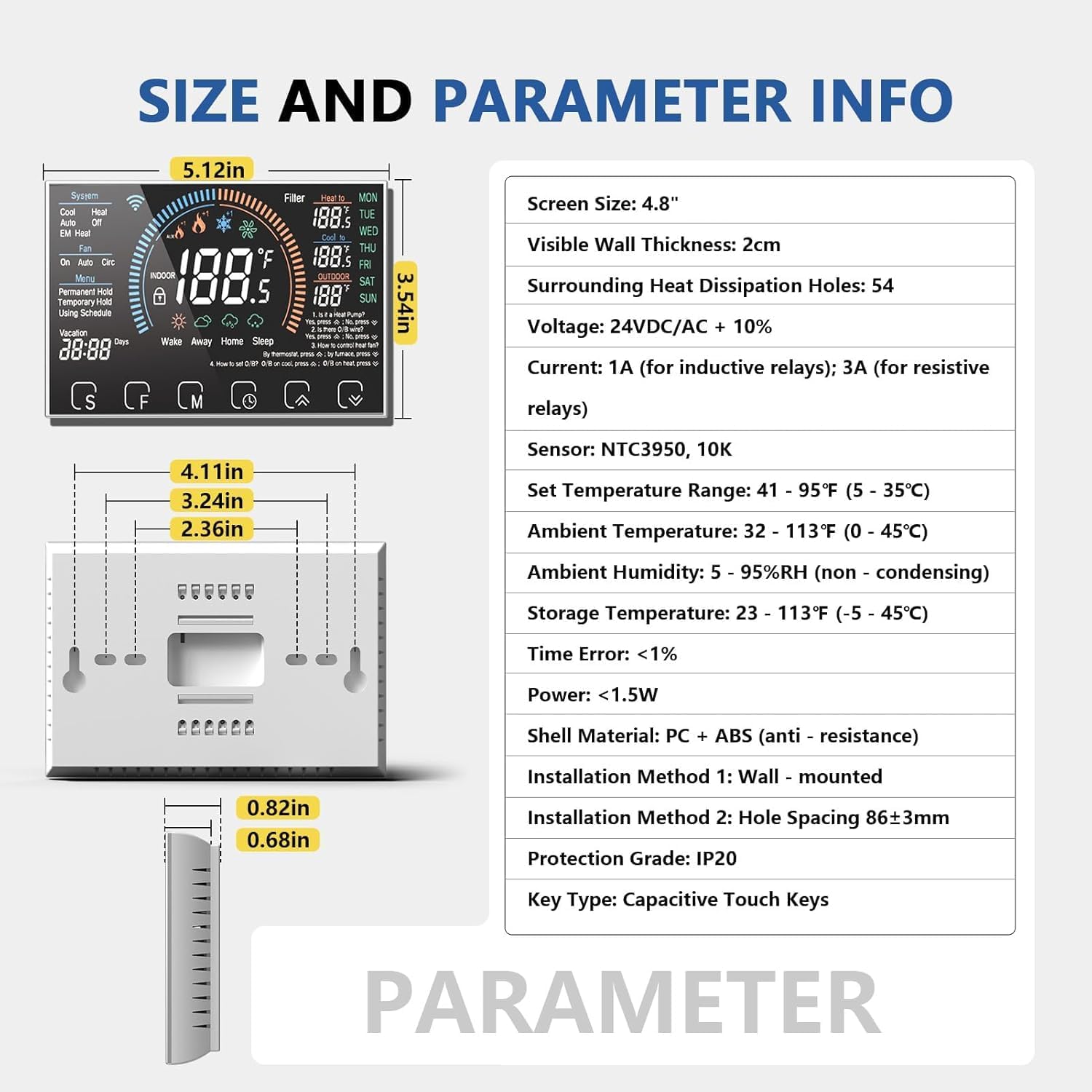
Image: A diagram showing the dimensions and technical parameters of the BSEED Smart Thermostat, including screen size, voltage, current, sensor type, temperature ranges, and installation details.
| ميزة | مواصفة |
|---|---|
| حجم الشاشة | 4.8 بوصة |
| Visible Wall Thickness | 2سم |
| Surrounding Heat Dissipation Holes | 54 |
| المجلدtage | 24VDC/AC + 10% |
| حاضِر | 1A (for inductive relays); 3A (for resistive relays) |
| المستشعر | NTC3950 ، 10 كيلو |
| ضبط نطاق درجة الحرارة | 41 - 95 درجة فهرنهايت (5 - 35 درجة مئوية) |
| درجة الحرارة المحيطة | 32 - 113 درجة فهرنهايت (0 - 45 درجة مئوية) |
| الرطوبة المحيطة | 5 - 95%RH (non-condensing) |
| درجة حرارة التخزين | 23 - 113°F (-5 - 45°C) |
| خطأ في الوقت | <1% |
| قوة | <1.5 واط |
| مادة الغلاف | PC + ABS (anti-resistance) |
| طريقة التثبيت | مثبت على الحائط |
| تباعد فتحة التثبيت | 86±3 مم |
| درجة الحماية | IP20 |
| نوع المفتاح | مفاتيح تعمل باللمس بالسعة |
يدعم
For any inquiries or technical assistance regarding your BSEED WiFi Smart Thermostat, please do not hesitate to contact us at any time. Our support team is ready to help.


