1. المقدمة
The SONOFF AirGuard CO2 Smart Indoor Air Quality Monitor (Model: SAWF-08P) is designed to provide real-time monitoring of carbon dioxide (CO2) levels, temperature, and humidity in your indoor environment. This device supports Matter compatibility, allowing seamless integration with various smart home platforms. It features a high-accuracy NDIR sensor for reliable readings and a triple-alert system to notify you of significant changes in air quality. This manual provides detailed instructions for setup, operation, and maintenance of your AirGuard CO2 monitor.
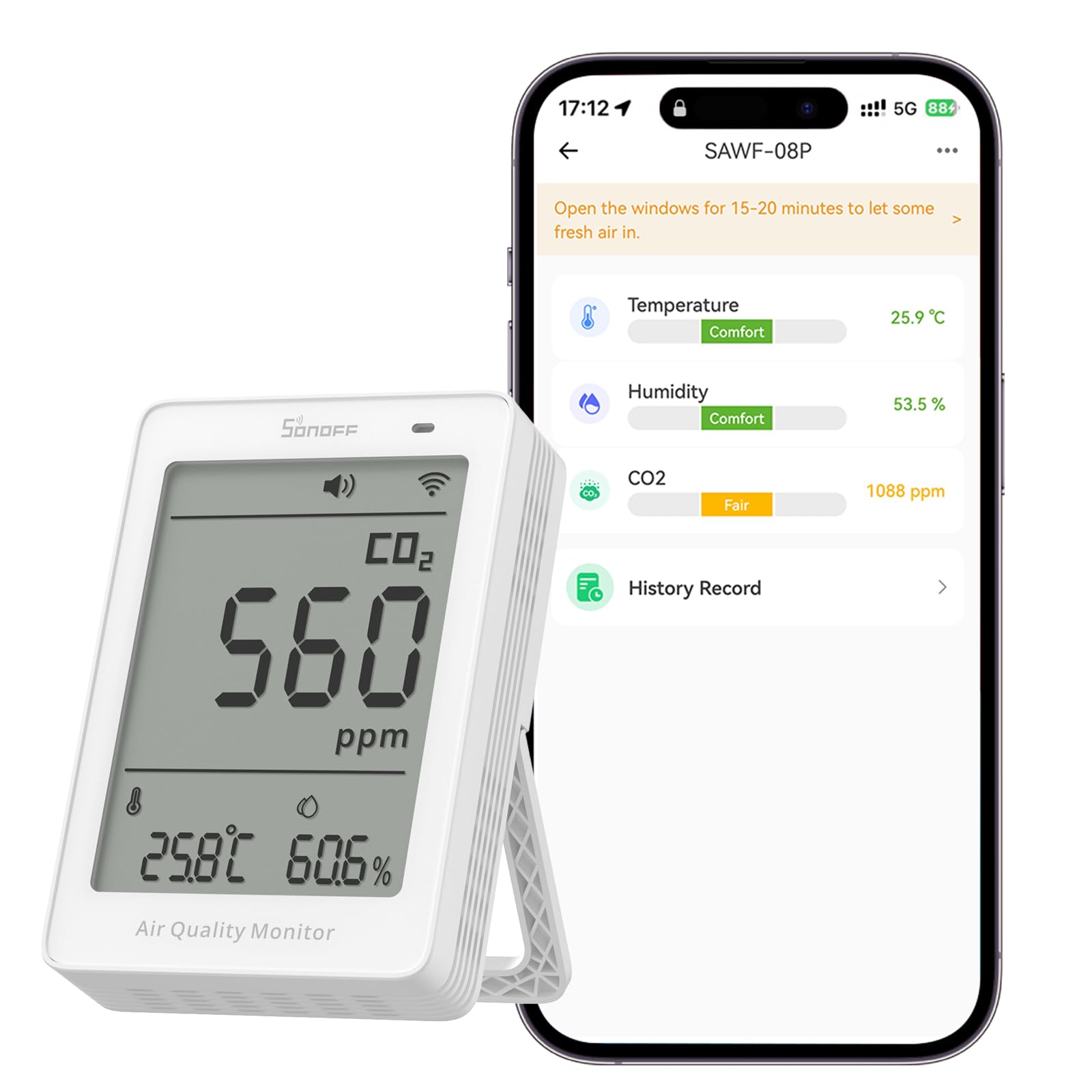
Image: The SONOFF AirGuard CO2 monitor showing its display with CO2, temperature, and humidity readings.
2. ماذا يوجد في الصندوق
عند فتح العبوة، تأكد من وجود جميع العناصر التالية:
- SONOFF AirGuard CO2 Monitor (SAWF-08P)
- كابل USB-C
- دليل المستخدم (دليل البدء السريع)
Note: A USB-A power adapter is required but not included in the package.

Image: The SONOFF AirGuard CO2 monitor, USB-C cable, and user manual laid out from the box.
فيديو فتح العلبة
Video: A detailed unboxing of the SONOFF AirGuard CO2 monitor, showing all included components and initial handling.
3. انتهى المنتجview
الميزات الرئيسية
- توافق المادة: Seamlessly integrates with smart home platforms like Apple Home, Amazon Alexa, Google Home, SmartThings, and Home Assistant.
- High Accuracy & Fast Response: Equipped with a built-in NDIR sensor, providing ±(50ppm + 5%) accuracy for CO2 (400–5000ppm) with data updates every 5 seconds.
- All-in-One Air Quality Display: Monitors and displays CO2, temperature, and humidity simultaneously on a 3.73-inch screen.
- Triple-Alert System: Notifies users via sound alarm, multi-color LED indicator, and app alerts when CO2, temperature, or humidity thresholds are exceeded.
- Year-Long Data Tracking & Export: Access up to 12 months of historical data with graphical charts in the app, allowing for deeper analysis and informed decisions.
- التحكم الصوتي: Check CO2 levels using simple voice commands through Siri or Google Assistant.

الصورة: أكثر منview of the monitor's features including Matter compatibility, 3-in-1 monitoring, data logging, and alert systems.

الصورة: داخلية view of the monitor emphasizing the NDIR sensor for high accuracy and fast response.

Image: The monitor's 3.73-inch display showing real-time CO2, temperature, and humidity readings.

Image: Visual representation of the three customizable alert methods: sound, LED indicator, and app notifications.

Image: A table summarizing the feature compatibility across different smart home platforms.
4. الإعداد
4.1 التشغيل
- Connect the provided USB-C cable to the port on the back of the AirGuard CO2 monitor.
- Plug the other end of the USB-C cable into a compatible USB-A power adapter (not included).
- The device will power on automatically and begin displaying readings.
4.2 App Pairing and Matter Integration
To integrate your AirGuard CO2 monitor with your smart home system, follow these steps:
- تأكد من أن هاتفك الذكي متصل بشبكة Wi-Fi بتردد 2.4 جيجاهرتز.
- Download and open the eWeLink app (or your preferred Matter-compatible smart home app like Apple Home, Google Home, Alexa, or SmartThings).
- On the AirGuard CO2 monitor, long-press the Wi-Fi button (labeled with a Wi-Fi icon) until the icon starts flashing, indicating pairing mode.
- In your smart home app, select the option to add a new device. You may need to scan the QR code located on the back of the AirGuard CO2 monitor.
- Follow the on-screen prompts in the app to complete the pairing process and connect the device to your Wi-Fi network.
How-to Video for Setup
Video: A step-by-step guide on how to set up and pair the SONOFF AirGuard CO2 monitor with your smart home system.
5. تعليمات التشغيل
5.1 Reading Values
The large display on the front of the AirGuard CO2 monitor shows the current CO2 concentration in parts per million (ppm), temperature in Celsius or Fahrenheit, and relative humidity percentage. The multi-color LED indicator on the top provides a quick visual cue of the air quality status (e.g., green for good, yellow for moderate, red for poor).
5.2 Menu Mode Operation (Local Control)
If you prefer not to use the app, or for quick adjustments, you can operate the device directly using the buttons on the top:
- Entering Menu Mode: Short-press the Setting button (middle button) until the "temperature unit" starts flashing. This indicates you have entered Menu Mode.
- Switching Editable Parameters: While in Menu Mode, short-press the Setting button to cycle through the available parameters for adjustment. The currently selected parameter will flash.
- تبديل وحدة درجة الحرارة: When the temperature unit is flashing, short-press the "+" or "-" buttons to switch between Celsius (°C) and Fahrenheit (°F).
- معايرة درجة الحرارة: When the temperature value is flashing, short-press the "+" or "-" buttons to manually calibrate the temperature.
- معايرة الرطوبة: When the humidity value is flashing, short-press the "+" or "-" buttons to manually calibrate the humidity.
- Exiting Menu Mode: If there is no button operation for 3 seconds, the device will automatically save the current settings and exit Menu Mode. Alternatively, you can short-press the Setting button again after cycling through all available parameters to exit.
5.3 ضبط المنبه
The AirGuard CO2 monitor features an audible buzzer and an indicator light for alerts:
- تبديل الجرس: When the buzzer is off, short-press the buzzer button (rightmost button) to turn it on or off. If the buzzer goes off, short-press once to silence it for 30 minutes. Short-press again to turn it off completely.
- مفتاح ضوء المؤشر: Long-press the buzzer button for 3 seconds to turn the indicator light on or off.
6. المواصفات
| ميزة | التفاصيل |
|---|---|
| نموذج | SAWF-08P |
| أبعاد المنتج | 2.76 × 4.06 × 1.02 بوصة |
| وزن العنصر | 6.7 أونصات |
| نطاق الكشف عن ثاني أكسيد الكربون | 400-5000 جزء في المليون |
| دقة ثاني أكسيد الكربون | ±(50ppm + 5%) |
| نطاق الكشف عن درجة الحرارة | 0-50 درجة مئوية / 32-122 درجة فهرنهايت |
| دقة درجة الحرارة | ±0.5°C; ±1°F |
| نطاق الكشف عن الرطوبة | 5-95٪ رطوبة نسبية ، بدون تكاثف |
| دقة الرطوبة | ±3% |
| اتصال لاسلكي | IEEE 802.11 b / g / n 2.4GHz |
| مدخل | 5V === 1A (Type-C) |
| التوافق مع المنزل الذكي | Matter, Apple Home, Amazon Alexa, Google Home, SmartThings, Home Assistant |
| البطاريات المطلوبة | No (Powered via USB-C) |

Image: Detailed technical specifications and physical dimensions of the AirGuard CO2 monitor.
7. الصيانة
- تنظيف: استخدم قطعة قماش ناعمة وجافة لتنظيف الجهاز. لا تستخدم المنظفات السائلة أو البخاخات.
- الموقع: Place the monitor in an area with good air circulation, away from direct sunlight, heat sources, or areas with high humidity to ensure accurate readings. Avoid placing it near vents or windows where drafts might affect readings.
- تحديثات البرامج الثابتة: قم بالتحقق بانتظام من تطبيق eWeLink بحثًا عن تحديثات البرامج الثابتة لضمان الأداء الأمثل والوصول إلى الميزات الجديدة.
8. استكشاف الأخطاء وإصلاحها
- قراءات غير دقيقة:
- Ensure the device is placed in an appropriate location, away from direct air currents, heat sources, or areas with concentrated CO2 (e.g., directly above a person's breathing zone).
- Perform a manual calibration for temperature and humidity via the Menu Mode if you suspect inaccuracies. For CO2, expose the device to fresh outdoor air (around 400ppm) for a period to allow for self-calibration.
- الجهاز لا يعمل:
- Verify the USB-C cable is securely connected to both the monitor and the power adapter.
- Ensure the USB-A power adapter is functional and providing 5V/1A output.
- مشكلات الاتصال بشبكة Wi-Fi:
- Confirm your Wi-Fi network is 2.4GHz. The device does not support 5GHz networks.
- تأكد من أن الجهاز يقع ضمن نطاق جهاز توجيه الواي فاي الخاص بك.
- Re-enter pairing mode on the device and attempt to pair again through the app.
- التطبيق لا يعرض البيانات:
- Check if the device is connected to Wi-Fi (Wi-Fi icon on display should be solid).
- تأكد من أن هاتفك الذكي لديه اتصال نشط بالإنترنت.
- Restart the app or the device.
9. الضمان والدعم
The SONOFF AirGuard CO2 Smart Indoor Air Quality Monitor comes with a ضمان لمدة سنتين. For any technical assistance, product inquiries, or warranty claims, please contact SONOFF customer support:
- البريد الإلكتروني لدعم العملاء: support@itead.cc
- سياسة العائدات: 30-day refund/replacement policy through Amazon.
10. معلومات السلامة
- لا تعرض الجهاز لدرجات حرارة عالية، أو أشعة الشمس المباشرة، أو الرطوبة العالية.
- احتفظ بالجهاز بعيدًا عن الماء والسوائل الأخرى.
- لا تحاول تفكيك الجهاز أو إصلاحه بنفسك. استشر فنيًا مؤهلًا للصيانة.
- Use only the specified power input (5V/1A) to avoid damage.
- هذا الجهاز مخصص للاستخدام الداخلي فقط.


