1. المقدمة
This manual provides instructions for the safe and effective operation of the OWON ADS824A Digital Oscilloscope. The ADS824A is a 200MHz, 4-channel, 12-bit digital oscilloscope designed for high-precision testing. It features a 1.25GSa/s real-time sampling rate and a 50M storage depth, making it suitable for signal integrity verification, circuit fault identification, digital circuit design, debugging, and automotive electronics testing. This device integrates an oscilloscope, frequency counter, voltmeter, and FFT spectrum analyzer into a single unit.
2. انتهى المنتجview
2.1 الميزات الرئيسية
- 200MHz bandwidth with four analog channels.
- 1.25GSa/s real-time sampling rate and 50M storage depth.
- Up to 700,000wfms/s waveform refresh rate.
- 12-bit vertical resolution (4096 levels) for capturing microvolt-level signal fluctuations.
- Integrated functions: oscilloscope, frequency counter, voltmeter, and FFT spectrum analyzer.
- Supports 43 automatic measurements with advanced math functions and a built-in glossary.
- 7-inch multi-touch TFT-LCD display.
- Communication interfaces: HDMI, USB device, USB Host, Trig Out(P/F), LAN.
- Supports various triggering modes including edge, video, pulse width, slope, Nth edge, and logic.
- Includes 2-channel hardware decoding for RS-232/UART, I2C, SPI, CAN, and LIN protocols.
2.2 محتويات الصندوق
The OWON ADS824A package typically includes:
- OWON ADS824A Digital Oscilloscope Unit
- محول الطاقة
- دليل المستخدم
- كابل يو اس بي
2.3 الإفراط الجسديview

الشكل 2.3.1: الجبهة view of the OWON ADS824A Digital Oscilloscope, showing the display and control panel.

Figure 2.3.2: Front panel highlighting key specifications such as 4 channels, 1.25GSa/s, 200MHz bandwidth, and 700,000 wfms/s refresh rate.

الشكل 2.3.3: الصورة عن قرب view of the control knobs for horizontal and vertical adjustments.
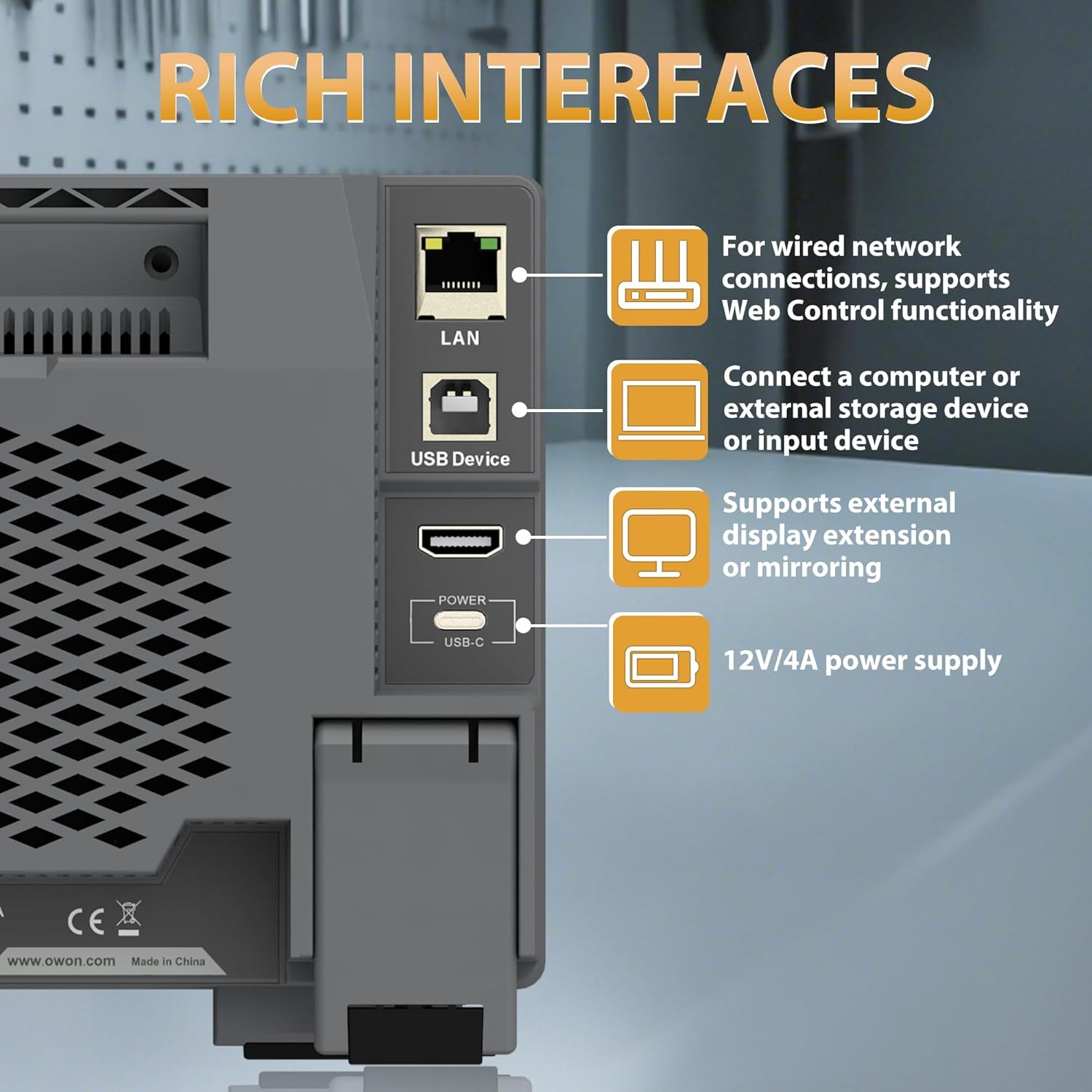
Figure 2.3.4: Rear panel showing the LAN, USB Device, HDMI, and USB-C Power interfaces.

الشكل 2.3.5: الجزء العلوي والخلفي view illustrating the overall dimensions and port layout.
3. الإعداد
3.1 توصيل الطاقة
- Connect the provided power adapter to the USB-C Power interface on the rear panel of the oscilloscope.
- قم بتوصيل محول الطاقة بمأخذ كهربائي مناسب يعمل بالتيار المتردد.
- اضغط على زر الطاقة الموجود على اللوحة الأمامية لتشغيل الجهاز.
3.2 اتصال مسبار
- Connect the BNC connector of the oscilloscope probe to one of the four input channels (CH1-CH4) on the front panel.
- Ensure the probe's ground clip is securely connected to the ground reference of the circuit under test.
- Attach the probe tip to the test point on the circuit.
4. تعليمات التشغيل
4.1 التشغيل الأساسي
The ADS824A features a 7-inch multi-touch display for intuitive control.

Figure 4.1.1: The 7-inch multi-touch TFT-LCD display allows for direct interaction with the waveform and menu settings.
- تشغيل/إيقاف التشغيل: اضغط على زر الطاقة على اللوحة الأمامية.
- ملاحة: Use the multi-touch screen or the physical control knobs to navigate menus and adjust settings.
- Autoset: Press the 'Autoset' button to automatically adjust horizontal and vertical settings for optimal waveform display.
4.2 Waveform Display and Control
- أدوات التحكم الأفقية: Adjust the time base (s/div) and horizontal position using the dedicated knobs.
- أدوات التحكم الرأسية: ضبط مستوى الصوتtage scale (V/div) and vertical position for each channel using their respective knobs.
- تكبير: The device supports zoom windows for detailed waveform analysis.

Figure 4.2.1: Illustration of the waveform capture rate, showing the ability to display complex signals effectively.
4.3 وظائف القياس
The ADS824A offers extensive measurement capabilities:
- Auto Measurements: Access 43 automatic measurement functions. A built-in glossary assists in understanding technical terms for quick setup.
- Parametric Statistics: Supports measurement indicators and cursor gating for detailed analysis.
- Cursor Gating: Utilize visual indicators and zoom windows for precise cursor measurements in FFT and XY modes.

Figure 4.3.1: Display showing the interface for 43 auto measurements and the technical terms glossary.

Figure 4.3.2: Screen views demonstrating parametric statistics and cursor gating with visual indicators.
4.4 التحفيز
The oscilloscope supports various triggering options to capture specific events:
- أنواع المحفزات: Edge, Video, Pulse Width, Slope, Nth Edge, Logic, Under-amplitude, Over-amplitude, and Timeout.
- يثبت: Access trigger settings via the dedicated 'Trigger' button or on-screen menu.

Figure 4.4.1: Interface showing advanced triggering options and hardware decoding capabilities.
4.5 وظائف متقدمة
- FFT Spectrum Analyzer: Perform 1M-point FFT analysis for accurate frequency component display.
- Digital Voltmeter (DVM): Integrated 4-digit voltmeter for ACrms, DC, and AC+DCrms measurements.
- عداد التردد: Integrated 6-digit digital frequency counter.
- Protocol Decoding: Supports 2-channel hardware decoding for common serial protocols including RS-232/UART, I2C, SPI, CAN, and LIN.
- دقة عالية: The 12-bit vertical resolution (4096 levels) allows for capturing minute signal fluctuations, crucial for power ripple and noise analysis.

Figure 4.5.1: Display illustrating the FFT spectrum analysis and 256-level grayscale display features.

Figure 4.5.2: Screen views demonstrating 50Mpts storage depth settings, 4-digit voltmeter, and 6-digit frequency counter.

Figure 4.5.3: Comparison illustrating the enhanced detail provided by the 12-bit high-resolution display compared to a standard oscilloscope.
4.6 اتصال الأجهزة الخارجية
The ADS824A supports various external devices:
- مضيف USB: Connect a mouse or keyboard for enhanced control and efficiency.
- جهاز USB: Connect to a computer for data transfer or remote control.
- LAN: For wired network connections and Web وظيفة التحكم.
- HDMI: Connect to an external display for extended or mirrored viewعمل.
5. الصيانة
5.1 التنظيف
للحفاظ على أداء الجهاز ومظهره:
- امسحي الجزء الخارجي بقطعة قماش ناعمة.amp قطعة قماش.
- Avoid using abrasive cleaners or solvents that may damage the casing أو الشاشة.
- تأكد من عدم دخول أي سوائل إلى فتحات الجهاز.
5.2 التخزين
When not in use, store the oscilloscope in a clean, dry environment away from direct sunlight and extreme temperatures.
5.3 العناية بالبطارية
The ADS824A includes a built-in lithium battery for portability. Proper battery care ensures longevity:
- اشحن البطارية بالكامل قبل الاستخدام لأول مرة.
- تجنب تفريغ البطارية بالكامل بشكل متكرر.
- If storing for extended periods, charge the battery to approximately 50% and recharge every few months.
- The built-in battery helps avoid issues caused by ground loops, providing a safe floating ground for measurements.

Figure 5.3.1: Information regarding the built-in lithium battery, emphasizing portability and ground loop avoidance.
6. استكشاف الأخطاء وإصلاحها
This section addresses common issues you might encounter with the OWON ADS824A oscilloscope.
| مشكلة | السبب المحتمل | حل |
|---|---|---|
| لا يوجد طاقة | Power adapter not connected or faulty; battery discharged. | Check power connections. Ensure adapter is working. Charge the battery. |
| لم يتم عرض أي شكل موجي | Probe not connected; signal too small/large; incorrect trigger settings. | Verify probe connection. Adjust vertical scale (V/div). Press 'Autoset'. Check trigger level and mode. |
| شكل موجة غير مستقر | Incorrect trigger level or mode; noisy signal. | Adjust trigger level. Change trigger mode. Use averaging acquisition mode. |
| الشاشة لا تستجيب | خلل مؤقت في البرنامج. | أعد تشغيل الجهاز. إذا استمرت المشكلة، فاتصل بالدعم الفني. |
7. المواصفات
Detailed technical specifications for the OWON ADS824A Digital Oscilloscope.

Figure 7.1.1: Table detailing key oscilloscope specifications including bandwidth, sampling rate, and vertical resolution.
| المعلمة | قيمة |
|---|---|
| النطاق الترددي | 200 ميجا هرتز |
| القنوات | 4 |
| Sampمعدل لينغ | 1.25 GSa/s (Real-time) |
| Max. Waveform Capture Rate | 700,000 واط/ثانية |
| Max Memory Depth | 50 ميجا بايت |
| الدقة الرأسية | 12 بت |
| Vertical Sensitivity Range | 500 uV/div - 10 V/div |
| معاوقة الإدخال | 1 MΩ±2%, parallel with 20 pF±5 pF |
| نطاق قاعدة الوقت | 1 نانوثانية/قسم - 1000 ثانية/قسم |
| دقة قاعدة الوقت | ±(0.01% + 0.1tdv) |
| Bus Decoding | RS232/UART, I2C, SPI, CAN, LIN |
| اقتران المدخلات | DC, AC, Ground |
| أبعاد المنتج | 10.25 × 3.07 × 6.3 بوصة |
| وزن العنصر | 3.3 رطل |
8. الضمان والدعم
For warranty information and technical support, please refer to the documentation provided with your purchase or visit the official OWON webتتوفر عادةً تفاصيل الاتصال بخدمة العملاء على صفحة دعم الشركة المصنعة.