المنتج انتهىview
The iHome 3-in-1 Magnetic Wireless Charging Mount provides a versatile solution for securing and charging your smartphone in your vehicle. This device offers multiple mounting options for your dashboard, windshield, or air vent, ensuring your phone remains accessible and powered during your travels. It features MagSafe-compatible magnetic attachment and delivers 15W fast wireless charging for compatible devices.
ماذا يوجد في الصندوق
- iHome Magnetic Wireless Charging Base
- Extendable Arm with Lockable Suction Cup Base
- Vent Clip Attachment
- USB-C Charging Cable (Power adapter not included)
الإعداد والتثبيت
This mount offers three primary installation methods: vent, dashboard, and windshield. Choose the method that best suits your vehicle and preference.
1. Vent Mount Installation
- Attach the vent clip to the back of the magnetic wireless charging base. Ensure it clicks securely into place.
- Locate a suitable air vent in your vehicle. The vent clip features silicone padding for a secure grip.
- Gently push the vent clip onto one of the vent slats until it is firmly attached.
- Adjust the angle of the magnetic charging base for optimal viewعمل.
2. تركيب حامل لوحة القيادة/الزجاج الأمامي
- Attach the extendable arm with the lockable suction cup base to the back of the magnetic wireless charging base. Ensure it clicks securely into place.
- Clean the desired mounting surface on your dashboard or windshield thoroughly. Ensure it is free of dust and grease.
- Press the suction cup firmly onto the clean surface.
- Engage the lock lever on the suction cup base to create a strong vacuum seal.
- Adjust the extendable arm (from 3.5" to 5.5") and pivot the magnetic base (240°) to achieve your preferred viewزاوية جي.
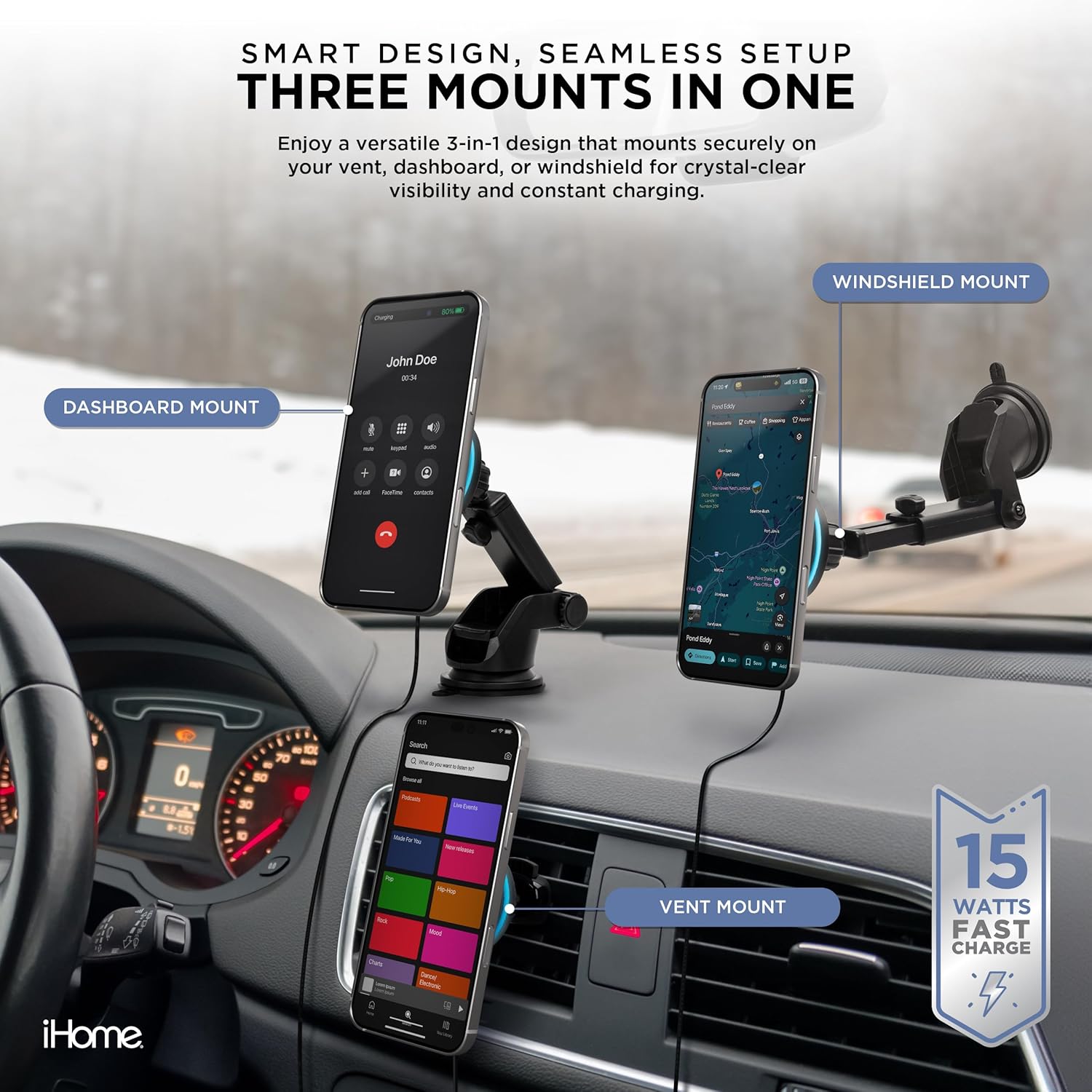
Image: The iHome 3-in-1 Magnetic Wireless Charging Mount demonstrating its versatility with dashboard, windshield, and vent mounting configurations.
عملية
1. توصيل هاتفك
- Ensure your smartphone is MagSafe-compatible (iPhone 12 or newer) or has a MagSafe-compatible case.
- Simply bring your phone close to the magnetic charging base. The powerful magnets will automatically align and secure your phone in place.
2. الشحن اللاسلكي
- Connect the provided USB-C cable to the charging base and plug the other end into a compatible car charger (not included).
- Once your phone is magnetically attached, wireless charging will begin automatically, indicated by a charging icon on your phone screen. The mount delivers up to 15W fast wireless charging.

Image: A smartphone is shown securely attached to the iHome magnetic wireless charging mount, illustrating the active charging process.
3. Adjusting the Mount
- The magnetic base allows for easy rotation of your phone between portrait and landscape orientations.
- If using the extendable arm, loosen the adjustment knobs to extend or retract the arm and pivot the head to find your ideal viewing angle. Tighten the knobs to secure the position.
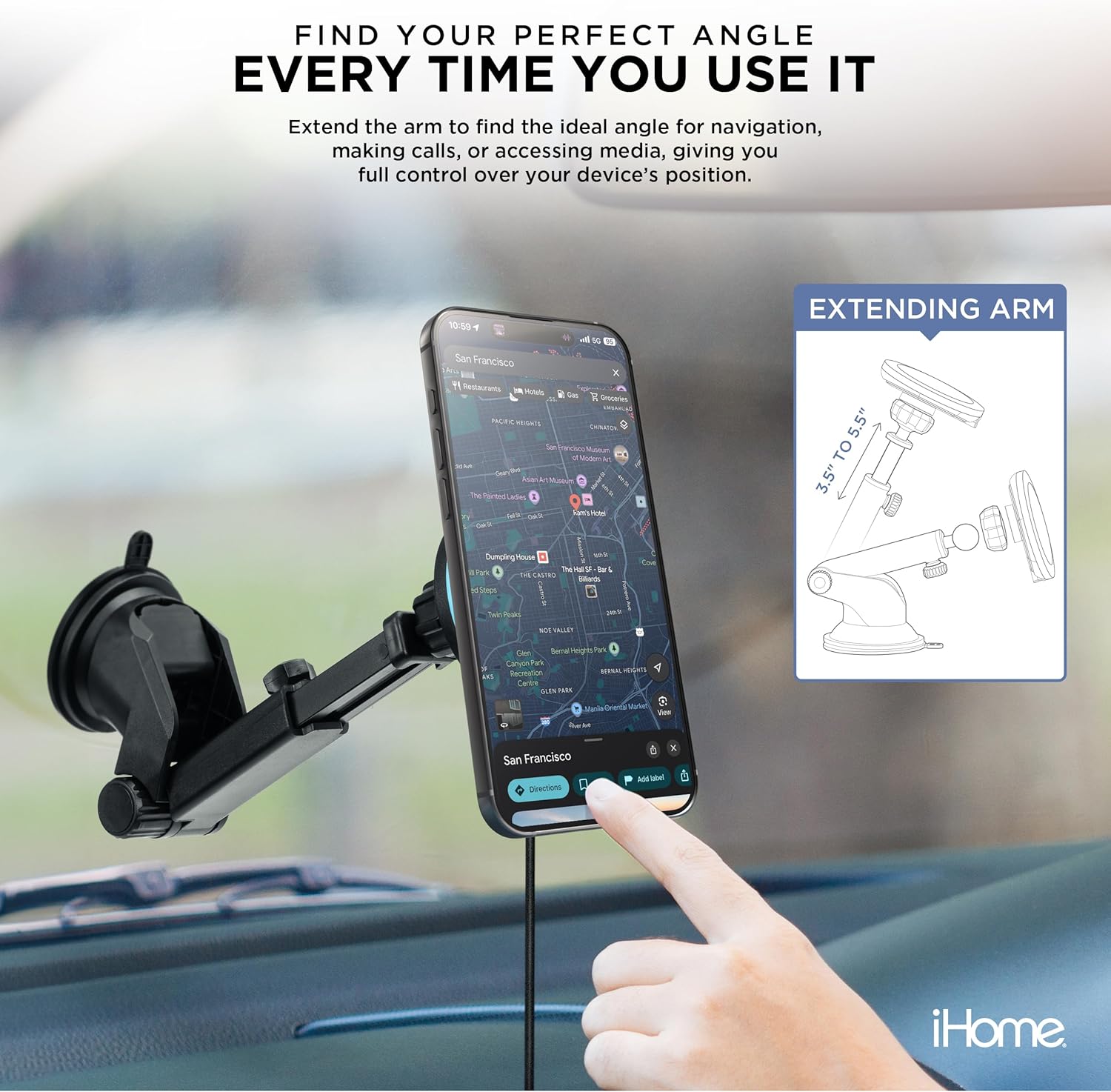
Image: The iHome mount with its extendable arm holding a smartphone, demonstrating its adjustability for navigation and media viewعمل.
العناية والصيانة
- Keep the magnetic charging surface clean and free of debris to ensure optimal magnetic connection and charging efficiency.
- امسح الحامل بقطعة قماش ناعمة.amp قماش. تجنب استخدام المواد الكيميائية القاسية أو المنظفات الكاشطة.
- For the suction cup base, if it loses stickiness, rinse it with warm water and let it air dry. This can help restore its adhesive properties.
- Avoid exposing the mount to extreme temperatures for prolonged periods, as this may affect its materials and performance.
استكشاف الأخطاء وإصلاحها
الهاتف لا يشحن
- Ensure the USB-C cable is securely connected to both the mount and a functioning car charger.
- Verify that your car charger is providing sufficient power (a 15W or higher output car charger is recommended for fast charging).
- Check if your phone is MagSafe-compatible or if your phone case is MagSafe-compatible. Thick or non-magnetic cases may interfere with charging.
- Ensure there are no foreign objects (e.g., metal plates, credit cards) between your phone and the charging surface.
Mount Not Holding Securely
- Vent Mount: Ensure the vent clip is fully inserted and tightened onto a vent slat.
- جبل كأس شفط: Clean the dashboard/windshield surface thoroughly before application. Ensure the lock lever is fully engaged after pressing the suction cup down. If the suction cup is dirty, clean it with water and let it air dry.
Phone Not Attaching Magnetically
- Confirm your phone model is iPhone 12 or newer, or that you are using a MagSafe-compatible case.
- Remove any non-MagSafe cases or accessories that might block the magnetic connection.
تحديد
| رقم الموديل | 2IHCM1008-BLK-G7 |
| ماركة | اي هوم |
| لون | أسود |
| الأجهزة المتوافقة | Smartphones (MagSafe-compatible, iPhone 12 or newer) |
| نوع التركيب | Vent, Dashboard, Windshield |
| إخراج الشحن اللاسلكي | Up to 15W Fast Charge |
| طول الذراع القابل للتمديد | من 3.5 بوصة إلى 5.5 بوصة |
| وزن العنصر | 10.6 أونصات |
| أبعاد الحزمة | 9.06 × 5.16 × 2.68 بوصة |
| الشركة المصنعة | مجموعة لايف ووركس للتكنولوجيا، ذ.م.م. |
الضمان والدعم
معلومات الضمان
This product is covered by a limited manufacturer's warranty. Please refer to the packaging or the official iHome webالموقع للحصول على شروط وأحكام الضمان التفصيلية.
دعم العملاء
لمزيد من المساعدة أو تسجيل المنتج أو view additional iHome products, please visit the official iHome store: