1. المقدمة
Thank you for choosing the Xzeal XZ-420 Type-C Gamepad. This manual provides detailed instructions for setting up, operating, and maintaining your new gamepad. Please read this manual thoroughly before use to ensure proper functionality and to maximize your gaming experience.
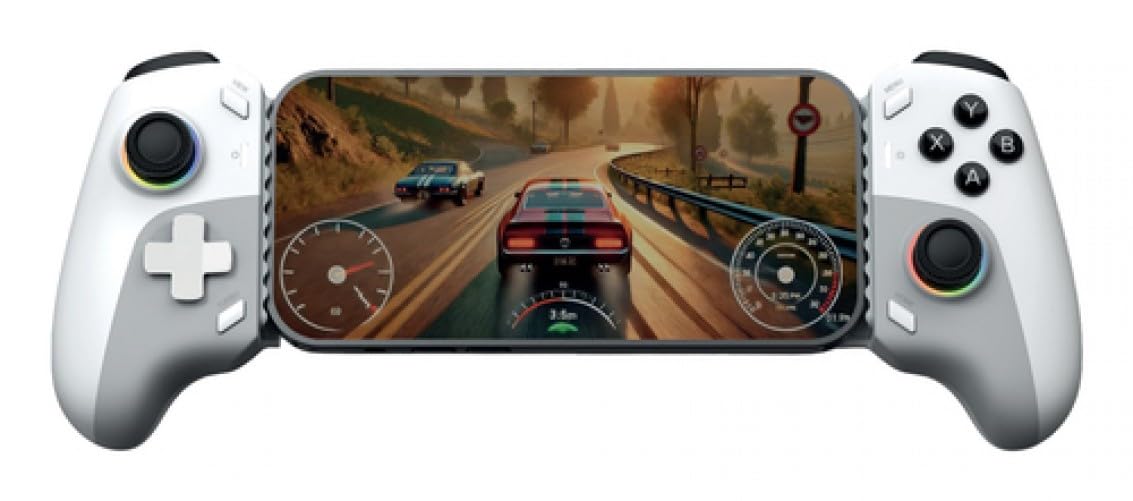
الصورة 1.1: الجبهة view of the Xzeal XZ-420 Type-C Gamepad. The gamepad features a white and gray color scheme with standard button layout, including dual analog sticks, a D-pad, action buttons, and shoulder triggers.
2. معلومات هامة حول السلامة
- Do not expose the gamepad to extreme temperatures, humidity, or direct sunlight.
- تجنب إسقاط وحدة التحكم أو تعريضها لصدمات قوية.
- Do not attempt to disassemble or modify the gamepad. This will void the warranty.
- Keep the gamepad away from water and other liquids.
- Use only the provided or recommended Type-C cable for connection.
- If the gamepad malfunctions, discontinue use and contact customer support.
3. محتويات العبوة
يرجى التحقق من محتويات الحزمة للتأكد من وجود جميع العناصر:
- Xzeal XZ-420 Type-C Gamepad
- كابل USB Type-C
- دليل المستخدم (هذا المستند)
4. انتهى المنتجview
Familiarize yourself with the buttons and features of your Xzeal XZ-420 Gamepad.
Image 4.1: Diagram of the Xzeal XZ-420 Gamepad with key components labeled. (Note: Actual image would show labels for D-pad, Left/Right Analog Sticks, Action Buttons (A, B, X, Y), Start/Select buttons, Home button, L1/R1, L2/R2 triggers, and Type-C port.)
- عصا التحكم التناظرية اليسرى: للتحكم في الاتجاه.
- D- الوسادة: Directional Pad for precise input.
- زر الصفحة الرئيسة: Returns to system menu or main screen.
- Select/Back Button: Secondary function button.
- زر البدء/القائمة: Primary function button.
- عصا التحكم التناظرية اليمنى: For camera control or secondary directional input.
- أزرار الإجراءات (A، B، X، Y): Primary interaction buttons.
- L1/R1 (أزرار الكتف): Top shoulder buttons.
- L2/R2 (أزرار الزناد): Analog trigger buttons.
- ميناء من النوع C: For connecting the gamepad to your device.
5. الإعداد
5.1 الاتصال بجهازك
The Xzeal XZ-420 Gamepad connects via a USB Type-C cable. It is designed for plug-and-play compatibility with most supported platforms.
- Locate the USB Type-C port on your Xzeal XZ-420 Gamepad.
- Connect one end of the provided USB Type-C cable to the gamepad.
- Connect the other end of the USB Type-C cable to an available USB port on your gaming console or computer.
- The gamepad should be automatically recognized by your system. If prompted, allow the system to install any necessary drivers.
5.2 Driver Installation (If Required)
For most modern operating systems and consoles, the XZ-420 is plug-and-play. However, if your system does not automatically recognize the gamepad:
- للكمبيوتر الشخصي: Check your operating system's device manager to see if the gamepad is listed. If there's an issue, visit the official Xzeal support website for potential driver downloads or troubleshooting guides.
- For Consoles: Ensure your console's firmware is up to date. Refer to your console's manual for updating instructions.
6. تشغيل لوحة الألعاب
6.1 الضوابط الأساسية
Once connected, the gamepad functions as a standard input device for compatible games and applications. The button layout is intuitive and follows common industry standards.
- العصي التناظرية: Use for movement, camera control, or aiming, depending on the game.
- D- الوسادة: Ideal for menu navigation or precise 2D movement.
- أزرار الإجراءات (A، B، X، Y): Perform in-game actions such as jumping, attacking, interacting, or confirming selections.
- أزرار الكتف (L1، R1): Often used for quick actions, weapon switching, or secondary attacks.
- أزرار الزناد (L2، R2): Typically used for aiming, firing, accelerating, or braking, offering analog input for varying pressure.
- أزرار البدء/الاختيار: Access in-game menus, pause the game, or perform specific functions as defined by the game.
- زر الصفحة الرئيسة: Returns to the system dashboard or main menu of your console/PC.
6.2 التوافق
The Xzeal XZ-420 Gamepad is designed for use with various gaming platforms, including video consoles and personal computers. Compatibility may vary depending on the specific game or operating system. For optimal performance, ensure your games and system software are up to date.
7. الصيانة
7.1 التنظيف
To keep your gamepad in optimal condition:
- Wipe the surface of the gamepad with a soft, dry cloth.
- بالنسبة للأوساخ العنيدة، قم بإزالة الأوساخ برفق.ampen the cloth with water or a mild, non-abrasive cleaner. Do not spray cleaner directly onto the gamepad.
- تجنب استخدام المواد الكيميائية القاسية أو المذيبات أو المواد الكاشطة، لأنها قد تتلف الطبقة النهائية.
- Ensure the gamepad is completely dry before reconnecting it to a device.
7.2 التخزين
When not in use, store the gamepad in a cool, dry place, away from direct sunlight and extreme temperatures. Avoid placing heavy objects on top of the gamepad.
8. استكشاف الأخطاء وإصلاحها
If you encounter issues with your Xzeal XZ-420 Gamepad, please refer to the following common solutions:
| مشكلة | الحل المحتمل |
|---|---|
| لم يتعرف الجهاز على وحدة التحكم. |
|
| الأزرار أو العصي التناظرية لا تستجيب. |
|
| Gamepad disconnects intermittently. |
|
9. المواصفات
| ميزة | التفاصيل |
|---|---|
| رقم الموديل | XZGP01WG |
| ماركة | XZEAL |
| لون | White - Gray |
| الاتصال | سلكي (USB من النوع C) |
| التوافق مع المنصة | Videoconsola (Gaming Console), PC |
| الأبعاد (الطول × العرض × الارتفاع) | 26 × 7 × 15 سم (تقريبًا) |
| وزن | 3 كيلوغرام |
| مصدر الطاقة | Cable electrical (Powered via USB Type-C) |
10. الضمان والدعم
The Xzeal XZ-420 Gamepad comes with a standard manufacturer's warranty. For detailed warranty terms and conditions, please refer to the warranty card included in your product packaging or visit the official Xzeal website. For technical support, troubleshooting assistance, or service inquiries, please contact Xzeal customer support through their official channels.
الدعم عبر الإنترنت: Visit the XZEAL Store on Amazon


