1. المقدمة
The Fender Mustang LTX100 is a 100-watt modeling combo amplifier designed for guitarists seeking versatile tone and performance. This ampميزات مكبر 25 amp models, 25 studio-quality effects, and 100 preset slots for extensive sound customization. It is equipped with a 12-inch Celestion G12FSD-100 speaker, an integrated color display with a chromatic tuner, Bluetooth audio streaming, and USB-C connectivity for recording and app control. This manual provides essential information for the proper setup, operation, and maintenance of your Mustang LTX100 ampمكبر.

Figure 1.1: Fender Mustang LTX100 Ampمكبر صوت مع الملحقات المرفقة.
2. معلومات السلامة
Please read and understand all safety instructions before operating your Fender Mustang LTX100 ampاحتفظ بهذا الدليل للرجوع إليه في المستقبل.
- تحذير: To reduce the risk of fire or electric shock, do not expose this appliance to rain or moisture. Do not remove the cover. Refer servicing to qualified personnel only.
- حذر: لمنع حدوث صدمة كهربائية، لا تستخدم هذا القابس (المستقطب) مع سلك تمديد أو وعاء أو أي منفذ آخر ما لم يتم إدخال الشفرات بالكامل لمنع تعرض الشفرة.
- تحذير: يحتوي هذا المنتج على مواد كيميائية معروفة في ولاية كاليفورنيا بأنها تسبب السرطان والعيوب الخلقية أو غيرها من الأضرار التناسلية.
- تأكد من amplifier is connected to a grounded power outlet.
- Do not block ventilation openings. Maintain adequate space around the amplifier لتدفق الهواء المناسب.
- تجنب وضع amplifier near heat sources such as radiators, heat registers, stoves, or other apparatus (including ampالمُضخِّمات) التي تنتج الحرارة.
- احمِ سلك الطاقة من أن يدوس عليه أحد أو يضغط عليه، وخاصةً عند المقابس ومنافذ التوصيل الكهربائية ونقطة خروجها من الجهاز.
- افصل هذا الجهاز أثناء العواصف الرعدية أو عند عدم استخدامه لفترات طويلة من الزمن.
3. الإعداد
3.1 التفريغ والتنسيب
قم بإزالة amplifier and all accessories from the packaging. Inspect the unit for any signs of damage. Place the amplifier on a stable, level surface, ensuring adequate space for ventilation.
3.2 توصيل الطاقة
- تأكد من ampيوجد مفتاح الطاقة الخاص بالمُضخِّم في وضع إيقاف التشغيل.
- Connect the provided power cord to the INPUT POWER receptacle on the rear panel of the ampمكبر.
- Plug the other end of the power cord into a suitable grounded AC power outlet.
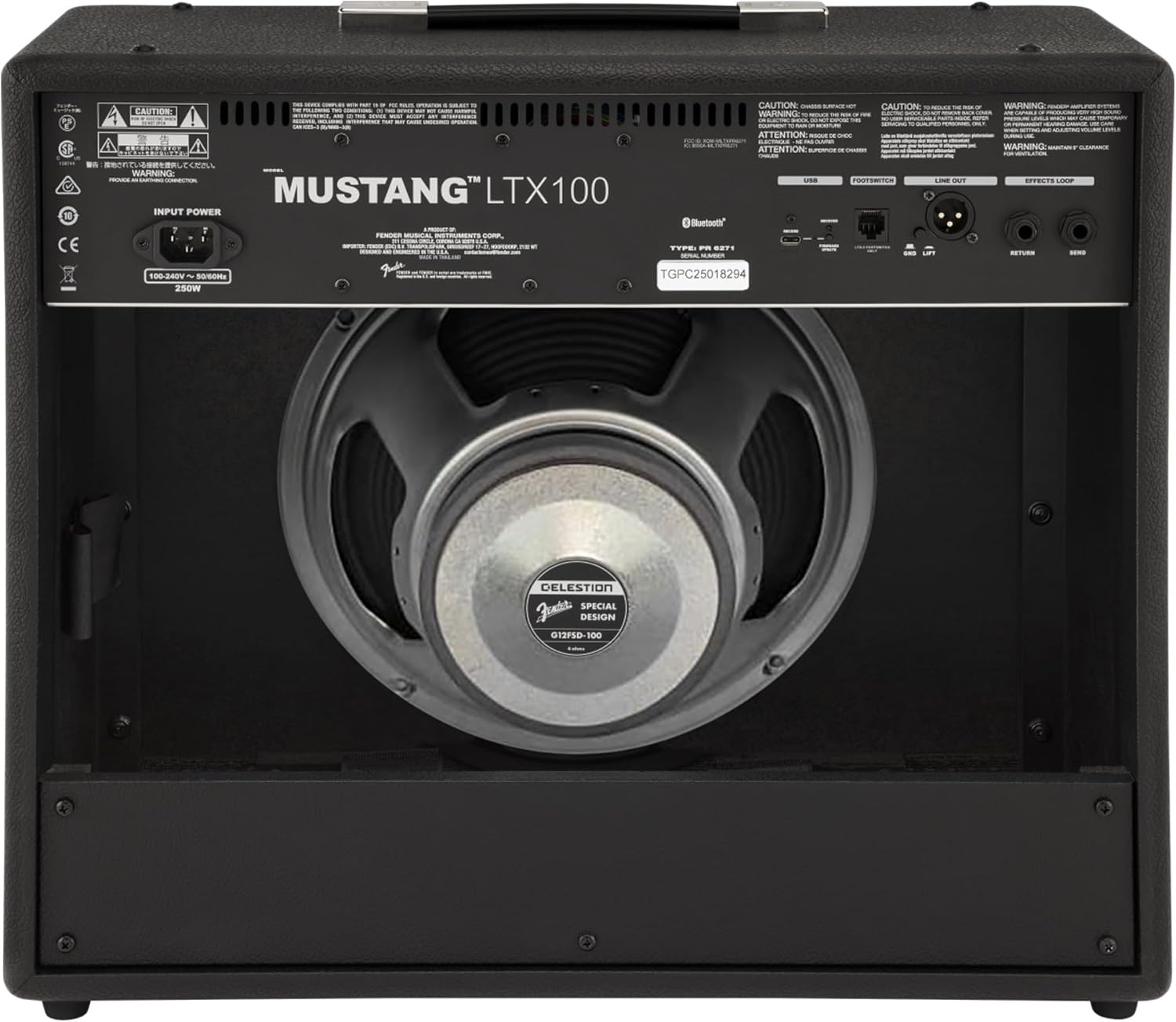
الشكل 3.1: توصيلات اللوحة الخلفية
3.3 توصيلات الأجهزة والملحقات
- مدخلات الآلة: Connect your guitar using a standard 1/4-inch instrument cable to the INPUT jack on the front panel.
- المدخل المساعد: For connecting external audio devices (e.g., MP3 player, phone), use a 3.5mm stereo cable to the AUX input on the front panel.
- مخرج سماعة الرأس: For silent practice, connect headphones to the HEADPHONE OUT jack on the rear panel.
- مخرج خط XLR: For connecting to a PA system or recording interface, use XLR cables to the LINE OUT jacks on the rear panel. A ground lift switch is provided to eliminate hum.
- حلقة التأثيرات: External effects pedals can be connected via the SEND and RETURN jacks on the rear panel.
- يو اس بي سي: Connect to a computer for recording, firmware updates, and Fender Tone 3.0 app control.
4. تعليمات التشغيل
4.1 عناصر التحكم في اللوحة الأماميةview

الشكل 4.1: عناصر التحكم في اللوحة الأمامية
- إدخال: مقبس مقاس 1/4 بوصة لتوصيل الجيتار الخاص بك.
- مساعد: مدخل ستيريو مقاس 3.5 ملم للأجهزة الصوتية الخارجية.
- ربح: Controls the input level and amount of overdrive/distortion for the selected amp نموذج.
- حجم التداول: Adjusts the output level of the selected amp نموذج.
- ثلاثية: ضبط استجابة التردد العالي.
- وسط: يضبط استجابة التردد المتوسط.
- صوت عميق: ضبط استجابة التردد المنخفض.
- رئيسي: يتحكم في حجم الإخراج الإجمالي لملف ampمكبر.
- عرض: Color LCD screen for navigating menus, selecting amp models, effects, and viewing tuner.
- ENCODER KNOB: Used to scroll through menus and adjust parameters on the display. Press to select.
- الى الخلف: للعودة إلى القائمة أو الشاشة السابقة.
- يحفظ: Stores current settings as a preset.
- MENU: Accesses the main menu for system settings, global parameters, and more.
- مقبض: Used for setting delay and modulation effect tempos. Hold to activate the chromatic tuner.
- تشغيل/إيقاف: مفتاح الطاقة ل ampمكبر.
4.2 التشغيل والتشغيل الأساسي
- Ensure all connections are secure and the MASTER volume is set to a low level.
- Press the ON/OFF switch to power on the amplifier. The display will illuminate.
- حدد amp model and effect using the encoder knob and display.
- Adjust the GAIN, VOLUME, TREBLE, MIDDLE, and BASS knobs to shape your desired tone.
- Gradually increase the MASTER volume to achieve the desired listening level.
4.3 باستخدام Amp النماذج والتأثيرات
The Mustang LTX100 offers 25 distinct amp models and 25 studio-quality effects. Use the encoder knob to browse through the available options on the display. Once an amp model or effect is selected, its parameters can be adjusted using the encoder knob or the dedicated tone knobs (Treble, Middle, Bass) if applicable.
4.4 المسبقة
ال amplifier comes with 70 factory presets and allows for 100 user-defined presets. To save your custom settings:
- Dial in your desired amp model, effects, and tone settings.
- اضغط على زر حفظ.
- Use the encoder knob to select a user preset slot.
- Press the encoder knob to confirm and save your preset.
4.5 بث الصوت عبر البلوتوث
To stream audio from a mobile device:
- قم بتفعيل البلوتوث على جهازك المحمول.
- على amplifier, navigate to the Bluetooth menu via the display.
- Select "Pair New Device" and choose "Mustang LTX100" from your device's Bluetooth list.
- Once paired, you can play audio through the ampمكبر.
4.6 Fender Tone 3.0 App
The Fender Tone 3.0 app (available for iOS and Android) provides wireless control over your amplifier. It allows you to edit, save, and share presets, as well as access additional features. Connect your amplifier to your mobile device via Bluetooth to use the app.
5. الصيانة
5.1 التنظيف
- افصل دائمًا ملف amplifier from the power outlet before cleaning.
- استخدم قطعة قماش ناعمة وجافة لتنظيف الأسطح الخارجية.
- لا تستخدم المنظفات الكاشطة أو المذيبات أو الشمع، لأنها قد تتلف الطبقة النهائية.
- Avoid spraying liquids directly onto the ampمكبر.
5.2 التخزين
- قم بتخزين ampضع جهاز التكييف في بيئة جافة وباردة، بعيدًا عن أشعة الشمس المباشرة ودرجات الحرارة القصوى.
- If storing for an extended period, cover the ampغطاء لحمايته من الغبار.
6. استكشاف الأخطاء وإصلاحها
| مشكلة | السبب المحتمل | حل |
|---|---|---|
| لا يوجد طاقة | سلك الطاقة غير متصل؛ منفذ الطاقة غير نشط؛ Amplifier power switch off | Check power cord connection; Test outlet with another device; Ensure power switch is ON |
| لا يوجد صوت | Instrument cable faulty/disconnected; Guitar volume off; Amplifier volume/master low; Headphones connected | Check/replace instrument cable; Turn up guitar volume; Increase amplifier volume/master; Disconnect headphones |
| صوت مشوه | Gain too high; Master volume too high; Faulty cable/instrument | Reduce GAIN; Reduce MASTER volume; Test with different cable/instrument |
| مشاكل اتصال البلوتوث | الجهاز ليس في وضع الاقتران؛ Amplifier not discoverable; Interference | Ensure device is in pairing mode; Re-initiate pairing on amplifier; Move closer to amplifier; Restart both devices |
7. المواصفات
| ميزة | التفاصيل |
|---|---|
| اسم الموديل | Mustang LTX100 |
| رقم الموديل | 2311800000 |
| انتاج الطاقة | 100 واط |
| المتحدث | 1 x 12″ Celestion G12FSD-100 |
| Amp نماذج | 25 |
| التأثيرات | 25 (distortion, overdrive, compression, modulation, delay, reverb, octave, etc.) |
| الإعدادات المسبقة | 70 factory presets + 100 user slots |
| عرض | Color LCD with onboard chromatic tuner |
| الاتصال | Bluetooth audio, USB-C bidirectional audio |
| المخرجات | XLR line out (with ground lift), headphone out |
| المدخلات | 1/4″ instrument input, 3.5 mm aux input |
| دعم التطبيق | Fender Tone 3.0 app (iOS/Android) |
| بناء | كومبو amplifier, rugged build |
| وزن العنصر | 26.4 رطل |
| أبعاد المنتج | 22.3 × 19.9 × 12.3 بوصة |
| مادة | معدن |
| مصدر الطاقة | كهرباء سلكية |
8. الضمان والدعم
For detailed warranty information, product registration, and technical support, please visit the official Fender website. You can also find FAQs, software updates, and additional resources there.
Official Fender Store: Fender Store on Amazon


