1. المقدمة
The Nitecore TUP2 is a compact and powerful rechargeable keychain flashlight designed for everyday carry. It features a maximum output of 1200 lumens, multiple color temperature options (warm, neutral, cool white), an OLED real-time display, and USB-C fast charging. This manual provides detailed instructions for the proper use, maintenance, and care of your TUP2 flashlight.
2. محتويات العبوة
- Nitecore TUP2 Flashlight
- كابل شحن USB-C
- مفتاح المشبك
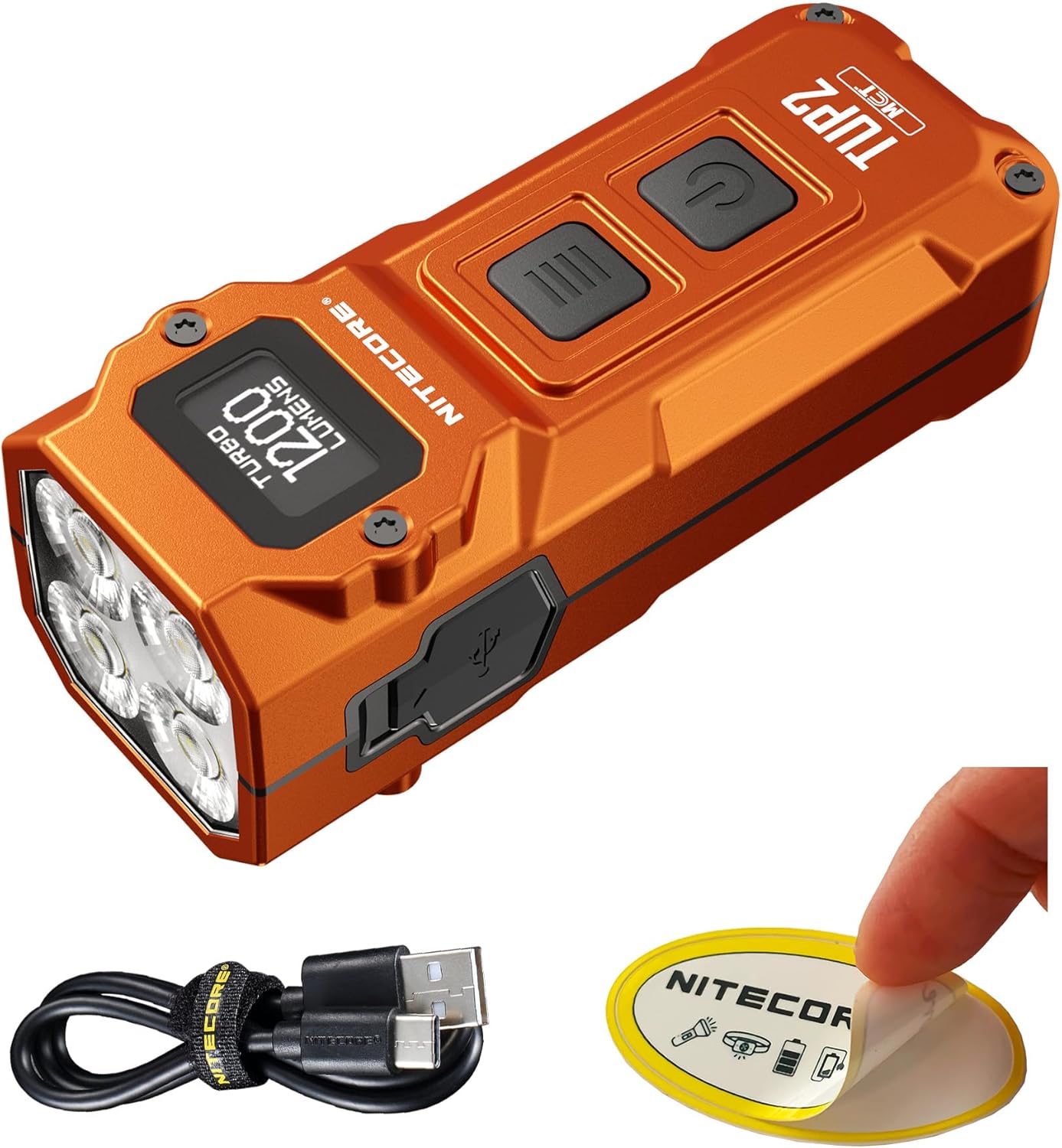
Image: The Nitecore TUP2 flashlight, along with its included USB-C charging cable and a Nitecore sticker.
3. الميزات الرئيسية
- Powerful 1200 Lumens Output: Delivers an ultra-bright beam reaching up to 136 yards.
- Multi-Color Temperature LEDs: Easily switch between warm (3000K), neutral white (4500K), and cool white (6500K) lighting.
- OLED Display & Smart Interface: Real-time screen shows brightness, color temperature, remaining runtime, and battery status.
- USB-C Fast Charging: Built-in rechargeable battery charges fully in under 1.5 hours.
- Compact & Durable Design: Measures only 2.76" and weighs 2.05 oz; IP54 water-resistant and impact-resistant up to 2 meters.

Image: The Nitecore TUP2, emphasizing its Multiple Color Temperatures (MCT) and 1200 lumen output.

Image: A visual representation of the TUP2's four LEDs, capable of producing three distinct color temperatures: 3000K Warm Light, 4500K Neutral White, and 6500K Cool White.

Image: The OLED display of the Nitecore TUP2, illustrating its ability to show real-time information such as current color temperature, unlock prompts, battery level, current brightness level, remaining runtime, and lockout mode status.
4. تعليمات التشغيل
4.1 تشغيل/إيقاف التشغيل
- لتشغيل: Short press the Power Button (
 ).
). - لإيقاف التشغيل: Short press the Power Button () while the light is on.
مستويات سطوع 4.2
When the light is on, short press the Mode Button ( ) to cycle through brightness levels: ULTRALOW - LOW - MID - HIGH.
4.3 Direct Access Modes
- منخفض للغاية: When the light is off, long press the Power Button () to directly access ULTRALOW mode.
- توربيني: When the light is on, long press the Mode Button () to directly access TURBO mode.
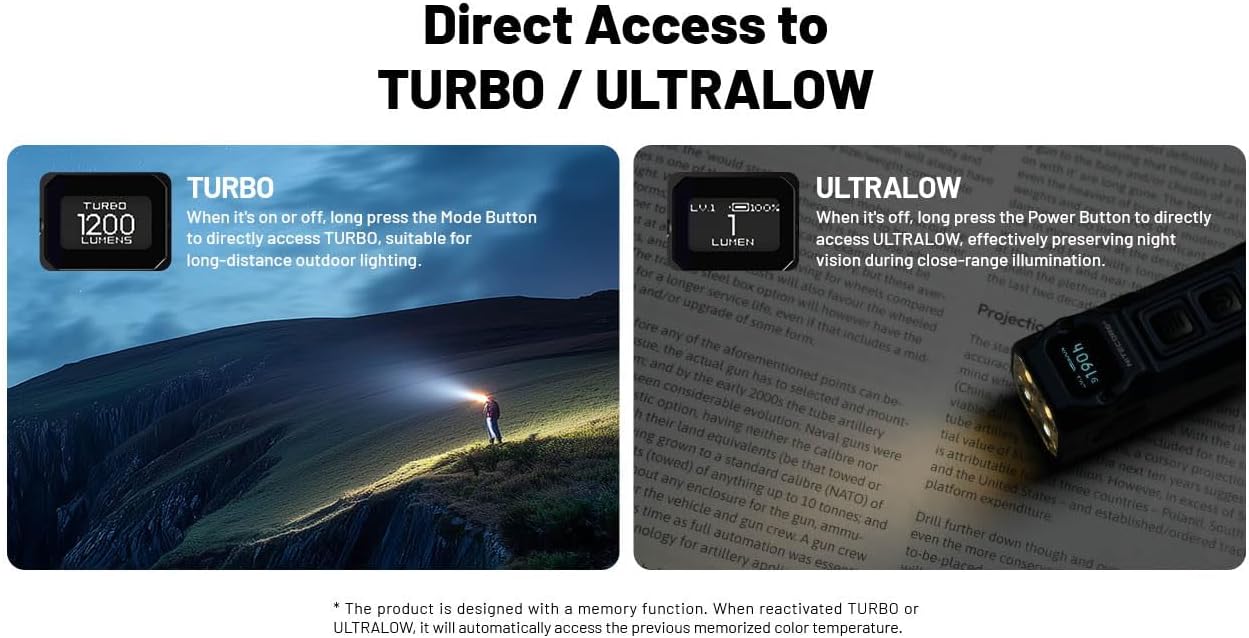
Image: The Nitecore TUP2 demonstrating direct access to its TURBO mode (1200 lumens) for long-distance lighting and ULTRALOW mode (1 lumen) for close-range illumination.
4.4 Color Temperature Switching
When the light is on, press and hold both the Mode Button () and Power Button () simultaneously to cycle through the three color temperatures: Warm (3000K), Neutral White (4500K), and Cool White (6500K).
4.5 أوضاع القفل
The TUP2 features two lockout modes to prevent accidental activation.
- وضع القفل شبه الكامل: When the light is off, press and hold the Power Button () until "SEMI LOCK" appears on the OLED display. In this mode, only direct access to TURBO is available.
- وضع الإغلاق الكامل: When the light is off, press and hold both the Mode Button () and Power Button () simultaneously until "FULL LOCK" appears on the OLED display. All buttons are locked.
- لإلغاء القفل: In either lockout mode, press and hold both the Mode Button () and Power Button () simultaneously until the display shows the current battery level.

Image: The Nitecore TUP2's dual-button interface, detailing the Mode and Power buttons, and explaining the Semi Lockout and Full Lockout modes for secure carrying or storage.
4.6 مقاطع فيديو رسمية للمنتج
فيديو: تقرير مفصلview of the Nitecore TUP2, showcasing its features, operation, and performance. This video is provided by Lumen Tactical, a seller of the product.
5. الشحن
The Nitecore TUP2 features a built-in rechargeable battery with USB-C fast charging capability.
- منفذ الشحن: The USB-C charging port is located on the side of the flashlight, protected by a rubber cover.
- عملية الشحن: Connect the provided USB-C cable to the flashlight and a power source. The OLED display will show the charging status and battery level.
- وقت الشحن: تستغرق الشحنة الكاملة حوالي 1.5 ساعات.
- مؤشر الشحن: The OLED display provides real-time battery status during charging.

Image: The Nitecore TUP2 being charged via its USB-C port, with an emphasis on the protective cover for water, dust, and impact resistance.
6. المواصفات
The following table outlines the technical data for the Nitecore TUP2 flashlight, measured according to ANSI/PLATO FL 1-2019 standards using a built-in 1,300mAh Li-ion battery in a 26°C (79°F) ambient environment.
| معيار FL1 | توربيني | عالي | منتصف | قليل | منخفض للغاية |
|---|---|---|---|---|---|
| سطوع | 1200 لومن | 300 لومن | 80 لومن | 15 لومن | 1 لومن |
| وقت التشغيل | - | 2h | 7ساعة و 15دقيقة | 30 ساعة | 190 ساعة |
| مسافة الشعاع | 125م | 64م | 33م | 15م | 4m |
| شدة ذروة الشعاع | 3,900 شمعة | 1,049 شمعة | 274 شمعة | 56 شمعة | 5 شمعة |
| مقاومة التأثير | 2m | ||||
| مقاومة الماء | IP54 | ||||
Note: The stated data is measured using the built-in Li-ion battery (1,300mAh) in accordance with international flashlight testing standards. Data may vary in real-world use due to different environmental conditions.

Image: A table displaying the technical specifications of the Nitecore TUP2, including lumen output, runtime, beam distance, and impact resistance across different lighting modes (Turbo, High, Mid, Low, Ultralow).
6.1 المواصفات الإضافية
- مادة: الألومنيوم
- نوع مصدر الضوء: قاد
- مصدر الطاقة: تعمل بالبطارية (بطارية ليثيوم أيون واحدة متضمنة)
- أبعاد المنتج: 1.06 بوصة عمق × 1.18 بوصة عرض × 2.76 بوصة ارتفاع
- وزن السلعة: 2.08 أونصات
Video: A demonstration of the Nitecore TUP2's brightness and beam throw in various outdoor settings, showcasing its performance across different light levels and color temperatures. This video is provided by Gear Review Depot, a public reviewاه.
7. الصيانة
To ensure the longevity and optimal performance of your Nitecore TUP2 flashlight, follow these maintenance guidelines:
- تنظيف: Wipe the flashlight body with a clean, soft cloth. Avoid using harsh chemicals or abrasive materials.
- منفذ الشحن: Keep the USB-C charging port clean and free of debris. Ensure the rubber cover is properly sealed when not charging to maintain water resistance.
- تخزين: Store the flashlight in a cool, dry place away from direct sunlight and extreme temperatures. Recharge the battery periodically if not used for extended periods to prevent deep discharge.
8. استكشاف الأخطاء وإصلاحها
If you encounter any issues with your Nitecore TUP2, please refer to the following common troubleshooting steps:
- المصباح اليدوي لا يعمل: Check if the flashlight is in lockout mode. Refer to section 4.5 for unlocking instructions. Ensure the battery is charged.
- لا يشحن: Verify that the USB-C cable is securely connected to both the flashlight and the power source. Try a different USB-C cable or power adapter.
- انخفاض في شدة الإضاءة: This may indicate a low battery. Recharge the flashlight. If the issue persists after a full charge, contact customer support.
- شاشة OLED لا تعمل: Ensure the flashlight is charged. If the display remains unresponsive, contact customer support.
9. الضمان والدعم
The Nitecore TUP2 comes with a Limited Warranty. For specific warranty terms and conditions, please refer to the warranty card included in your package.
For further assistance, technical support, or to explore other Nitecore products, please visit the official Nitecore store:


