1. المقدمة
This manual provides detailed instructions for the safe and efficient operation of your Bigme B6 Color Ebook Reader. Please read this manual thoroughly before using the device and retain it for future reference.
محتويات الحزمة
- قارئ الكتب الإلكترونية Bigme B6
- حافظة حماية
- دليل المستخدم (هذا المستند)
- كابل الشحن

Image 1.1: Bigme B6 Color Ebook Reader and included protective case.
2. انتهى المنتجview
Familiarize yourself with the components and features of your Bigme B6 device.
الميزات الرئيسية
- عرض: 6-inch Color E-paper display, 300 PPI resolution.
- المعالج: Octa-core CPU for responsive performance.
- تخزين الذاكرة: 4GB RAM and 64GB internal storage, expandable via Micro-SD card (up to 1TB).
- نظام التشغيل: Android 14, providing access to various applications.
- الاتصال: Bluetooth and Wi-Fi for wireless communication.
- صوتي: Integrated Hi-Fi Speakers.
- تصميم: نحيف للغاية للمحترفينfile at 6.98mm.
- راحة العين: Features Zero Blue Light and Flicker-Free technology, TUV Rheinland certified for reduced eye strain.

الصورة 2.1: انتهىview of the Bigme B6 Ebook Reader's main features.
3. الإعداد
3.1 الشحن الأولي
Before first use, fully charge your Bigme B6. Connect the device to a power source using the provided charging cable. The charging indicator will show the charging status.
3.2 تشغيل/إيقاف التشغيل
- لتشغيل الجهاز: اضغط مع الاستمرار على زر التشغيل حتى تضيء الشاشة.
- To power off: Press and hold the power button, then select "Power Off" from the options.
- To sleep/wake: Briefly press the power button.
3.3 اتصال الشبكة (Wi-Fi)
- من الشاشة الرئيسية، انتقل إلى إعدادات.
- يختار الشبكات والانترنت.
- تبديل واي فاي إلى ON.
- حدد شبكة Wi-Fi المطلوبة من القائمة.
- أدخل كلمة المرور إذا طُلب منك ذلك ثم انقر فوق يتصل.
3.4 التكوين الأولي للنظام
Upon first power-on or after a factory reset, follow the on-screen prompts to select your language, connect to Wi-Fi, and set up your Google account (optional, for app store access).
4. تعليمات التشغيل
4.1 الملاحة الأساسية
- شاشة اللمس: Tap to select items, swipe to scroll, pinch to zoom.
- الشاشة الرئيسية: Displays installed applications and widgets.
- لوحة الإشعار: اسحب لأسفل من أعلى الشاشة للوصول إلى الإعدادات السريعة والإشعارات.
- مركز التحكم: Access system settings like Wi-Fi, Bluetooth, brightness, and refresh modes.
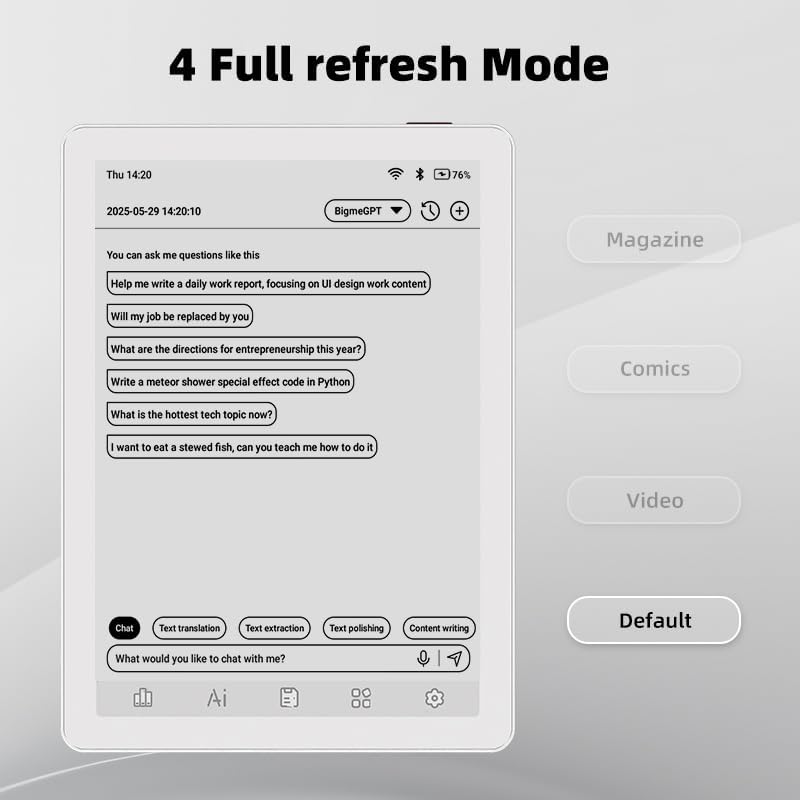
Image 4.1: The Bigme B6 home screen displaying various application icons.

Image 4.2: Accessing the Control Center for quick adjustments to device settings.
4.2 Reading eBooks
The Bigme B6 supports over 19 eBook formats, including PDF, TXT, EPUB, MOBI, and more. You can load books via USB or download them directly through reading applications.
- Open a reading application (e.g., the default reader or a downloaded app like Kindle or Libby).
- Select the book you wish to read from your library.
- Tap the left or right side of the screen to turn pages.
- Tap the center of the screen to access reading options (font size, line spacing, contrast, etc.).
- To highlight text: Press and hold on a word, then drag the selection handles to cover the desired text. Options for highlighting or notes will appear.

Image 4.3: Reading an eBook and highlighting text with color on the Bigme B6.
4.3 إدارة التطبيقات
As an Android 14 device, you can install applications from the Google Play Store or other compatible sources.
- تثبيت تطبيقات: افتح متجر التطبيقات icon (Google Play Store) on your home screen, search for the desired app, and follow the installation prompts.
- إلغاء تثبيت التطبيقات: اذهب الى الإعدادات > التطبيقاتحدد التطبيق، ثم انقر إلغاء التثبيت.
4.4 Audiobooks and Media Playback
The device supports audiobook playback through its built-in Hi-Fi speakers or connected Bluetooth headphones.
- Playing Audiobooks: Use a compatible audiobook application.
- Connecting Bluetooth Headphones: اذهب الى الإعدادات > الأجهزة المتصلة > البلوتوث, enable Bluetooth, and pair with your headphones.

Image 4.4: The Bigme B6 supports audiobooks, allowing for hands-free listening.
4.5 Display Refresh Modes
The Bigme B6 offers multiple refresh modes to optimize display performance for different content types.
- Access refresh modes from the Control Center or Display Settings.
- تتضمن الأوضاع الشائعة ما يلي:
- تقصير: Standard reading mode.
- مجلة: Optimized for images and text in magazines.
- Comics: Enhanced for comic book viewعمل.
- فيديو: Provides a smoother refresh rate for video content (note: e-paper displays have limitations for video).

Image 4.5: Selecting from various refresh modes to suit different content types.
5. الصيانة
5.1 تنظيف الجهاز
- Use a soft, lint-free cloth to gently wipe the screen and body of the device.
- بالنسبة للبقع العنيدة، استخدمي القليل منampبلل قطعة القماش بالماء أو بمنظف الشاشة المصمم خصيصًا للإلكترونيات.
- تجنب استخدام المواد الكيميائية القاسية، أو المواد الكاشطة، أو الرطوبة الزائدة.
5.2 العناية بالبطارية
- قم بشحن الجهاز بانتظام، ولكن تجنب تركه فارغًا بالكامل لفترات طويلة.
- Do not expose the device to extreme temperatures, as this can affect battery life.
- استخدم فقط كابل الشحن والمحول المرفقين أو المعتمدين.
5.3 التخزين
When not in use for extended periods, store the device in a cool, dry place, away from direct sunlight and extreme temperatures. It is recommended to charge the device to about 50% before long-term storage.
6. استكشاف الأخطاء وإصلاحها
| مشكلة | السبب المحتمل | حل |
|---|---|---|
| الجهاز لا يعمل. | بطارية منخفضة، الجهاز متجمد. | اشحن الجهاز لمدة 30 دقيقة على الأقل. ثم أعد تشغيله قسراً بالضغط مع الاستمرار على زر التشغيل لمدة 10-15 ثانية. |
| Screen is unresponsive or slow. | Temporary software glitch; too many apps running. | Restart the device. Close unnecessary background applications. Check for system updates. |
| لا يمكن الاتصال بشبكة Wi-Fi. | كلمة المرور غير صحيحة؛ مشكلة في جهاز التوجيه؛ تم تعطيل شبكة Wi-Fi. | Ensure Wi-Fi is enabled and the password is correct. Restart your Wi-Fi router. Try connecting to a different network. |
| يتم استنزاف البطارية بسرعة. | High screen brightness; many background apps; frequent Wi-Fi/Bluetooth use. | Reduce screen brightness. Close unused applications. Disable Wi-Fi and Bluetooth when not needed. Adjust refresh mode settings. |
| Applications crash or freeze. | App incompatibility; insufficient memory. | Update the application. Clear the app's cache (Settings > Apps > [App Name] > Storage & cache). If issues persist, uninstall and reinstall the app. |
7. المواصفات
| اسم الموديل | US-B6 |
| عرض | 6-inch Color E-paper, Electronic Ink, 300 PPI |
| نظام التشغيل | أندرويد 14 |
| كبش | 4 جيجا بايت |
| التخزين الداخلي | 64 جيجا بايت |
| تخزين قابل للتوسيع | Micro-SD card (up to 1TB support) |
| الاتصال | بلوتوث ، واي فاي |
| بطارية | 1 بطارية غير قياسية (متضمنة) |
| الأبعاد (الطول × العرض × السماكة) | 5.88 بوصة × 4.25 بوصة × 0.28 بوصة (14.94 سم × 10.8 سم × 0.71 سم) |
| وزن العنصر | 6.2 أونصة (175.77 جرام) |
| تنسيقات الكتب الإلكترونية المدعومة | PDF, TXT, EPUB, EPUB3, HTML, HTM, AZW3, FB2, DOC, DOCX, MOBI, OEB, CBR, RPC, RTF, DJVU, ZIP |
8. الضمان والدعم
8.1 معلومات الضمان
Please refer to the warranty card included with your product for specific warranty terms and conditions. The warranty typically covers manufacturing defects for a specified period from the date of purchase.
8.2 دعم العملاء
For technical assistance, troubleshooting not covered in this manual, or warranty claims, please contact Bigme customer support. Contact details can usually be found on the Bigme official webالموقع أو على عبوة المنتج.
يمكنك أيضًا زيارة Bigme Store on Amazon لمزيد من المعلومات حول المنتج وموارد الدعم.


