1. انتهى المنتجview
The OnePlus 15 is an advanced Android smartphone designed for high performance and extended usage. It features a powerful Snapdragon 8 Elite Gen 5 processor, a large 7,300mAh battery, and a vibrant 6.78-inch 165 Hz AMOLED display. The device is equipped with a triple 50 MP camera system for detailed photography and offers robust durability with IP66/IP68/IP69 and IP19K ratings for dust and water resistance.
المميزات الرئيسية:
- Massive 7,300 mAh Battery: Provides extended power for all-day use and beyond.
- Tri-Chip System: Integrates the Snapdragon 8 Elite Gen 5, a dedicated Wi-Fi chip, and a CPU scheduler for optimized performance, connectivity, and efficiency.
- Triple 50 MP Camera System: Captures high-quality images with wide, ultra-wide, and telephoto capabilities.
- تصميم متين: Built to resist dust and water, with IP66/IP68/IP69 and IP19K ratings for enhanced protection.
- 6.78-inch 165 Hz AMOLED Display: Delivers vivid colors, smooth motion, and exceptional clarity.
2. ماذا يوجد في الصندوق
تأكد من وجود جميع العناصر في عبوة المنتج الخاص بك:
- OnePlus 15 Smartphone x1
- شاحن ×1
- كابل بيانات USB x1
- SIM Ejector Tool x1
- الدليل السريع x1
- Safety Guide x1

Image: Contents of the OnePlus 15 retail box, showing the smartphone, charger, USB data cable, SIM ejector tool, quick guide, and safety guide.
3. الإعداد
3.1 تركيب بطاقة SIM
- Locate the SIM card tray on the side of your OnePlus 15.
- Insert the provided SIM ejector tool into the small hole on the SIM tray. Press firmly until the tray pops out.
- Place your Nano-SIM card(s) into the tray with the gold contacts facing down. Ensure they are correctly oriented according to the tray's outline.
- Carefully push the SIM tray back into the phone until it is flush with the device.
3.2 التشغيل الأولي والتكوين
- Press and hold the Power button (located on the right side of the device) until the OnePlus logo appears.
- اتبع التعليمات التي تظهر على الشاشة لتحديد اللغة والاتصال بشبكة Wi-Fi وإعداد حساب Google الخاص بك.
- You may be prompted to transfer data from an old device. Follow the instructions or skip this step to set up as a new device.
- Configure security settings such as fingerprint unlock, face unlock, or a PIN/pattern.

الصورة: الجبهة view of the OnePlus 15 smartphone, showcasinشاشته وكاميرته الأمامية.
4. تشغيل جهازك
4.1 الشاشة والتنقل
The OnePlus 15 features a 6.78-inch 165 Hz AMOLED display. Navigate the interface using touch gestures:
- مقبض: حدد عنصرًا أو فعّل وظيفة.
- انتقاد: التمرير عبر الشاشات أو القوائم.
- قرصة: تكبير أو تصغير الصور و web الصفحات.
- ضغطة طويلة: الوصول إلى القوائم السياقية أو نقل الأيقونات.
4.2 الأزرار والمنافذ
Familiarize yourself with the physical controls and connections:
- زر الطاقة: Located on the right side. Press to wake/sleep the screen, long press to power off or restart.
- أزرار التحكم في الصوت: Located on the left side. Adjust media volume, ringtone volume, and alarm volume.
- منفذ USB من النوع C: Located at the bottom. Used for charging, data transfer, and connecting Type-C headphones.
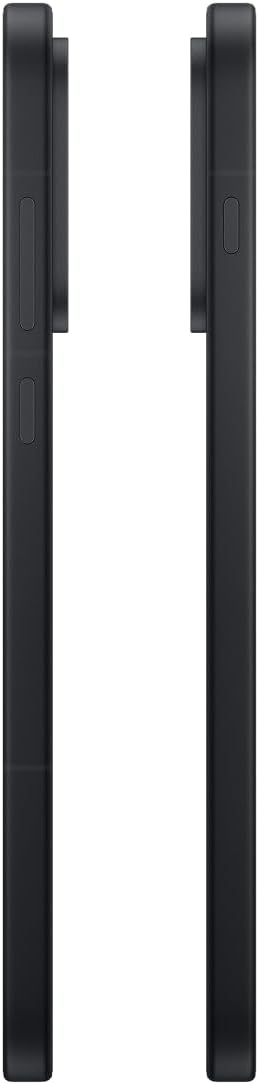
الصورة: الجانب view of the OnePlus 15, showing the placement of the power and volume buttons.
4.3 استخدام الكاميرا
The OnePlus 15 features a versatile triple 50 MP camera system. To open the camera app, tap the camera icon on your home screen or lock screen.
- أوضاع التبديل: Swipe left or right on the screen to switch between Photo, Video, Portrait, and other modes.
- تكبير: Pinch in or out on the viewfinder, or tap the zoom icons (e.g., 0.6x, 1x, 2x) to adjust magnification.
- يأسر: اضغط على زر الغالق لالتقاط صورة أو بدء/إيقاف تسجيل الفيديو.
- إعدادات: Access camera settings for features like flash, timer, aspect ratio, and more.

الصورة: الخلف view of the OnePlus 15, highlighting the triple 50 MP camera system.
4.4 إدارة البطارية
Your OnePlus 15 is equipped with a 7,300 mAh battery. To optimize battery life:
- اضبط سطوع الشاشة وقم بتعيين مهلة زمنية أقصر للشاشة.
- قم بتعطيل Wi-Fi وBluetooth وGPS عند عدم استخدامها.
- أغلق التطبيقات التي تعمل في الخلفية والتي تستهلك الطاقة.
- Utilize Battery Saver mode when your battery is low.
- Use the provided charger and USB cable for optimal fast charging.
5. الصيانة
5.1 تنظيف جهازك
To clean your OnePlus 15:
- استخدم قطعة قماش ناعمة وخالية من الوبر لمسح الشاشة واللوحة الخلفية.
- بالنسبة للبقع العنيدة، استخدمي القليل منampامسح القماش بالماء أو بمنظف الشاشة.
- تجنب استخدام المواد الكيميائية القاسية أو المواد الكاشطة أو الهواء المضغوط.
5.2 تحديثات البرامج
تُوفّر تحديثات البرامج الدورية ميزات جديدة، وتحسينات أمنية، وإصلاحات للأخطاء. للتحقق من وجود تحديثات:
- اذهب الى إعدادات > حول الجهاز > OxygenOS version.
- مقبض التحقق من التحديثات.
- If an update is available, follow the on-screen instructions to download and install it. Ensure your device has sufficient battery and is connected to Wi-Fi before updating.
6. استكشاف الأخطاء وإصلاحها
If you encounter issues with your OnePlus 15, try the following common troubleshooting steps:
- الجهاز لا يستجيب: اضغط مع الاستمرار على زر الطاقة لمدة 10 ثوانٍ تقريبًا لإعادة التشغيل القسري.
- تعطل التطبيقات: قم بمسح ذاكرة التخزين المؤقت وبيانات التطبيق الذي به المشكلة في إعدادات > التطبيقات > [اسم التطبيق] > التخزين والذاكرة المؤقتة.
- استنزاف البطارية بسرعة: Review استخدام البطارية في إعدادات > بطارية to identify power-hungry apps. Adjust settings as described in Section 4.4.
- مشاكل الاتصال بالشبكة: Toggle Airplane Mode on and off, restart your device, or reset network settings in إعدادات > إعدادات النظام > النسخ الاحتياطي وإعادة الضبط > إعادة ضبط الهاتف > إعادة ضبط Wi-Fi والجوال والبلوتوث.
- Screen protector installation: For assistance with screen protector installation, refer to the following video guide:
Video: Installation guide for a screen protector on the OnePlus 15 5G. This video demonstrates the steps to correctly apply a screen protector to your device.
7. المواصفات
| اسم الموديل | ون بلس 15 |
| رقم موديل العنصر | سي بي اتش 2749 |
| أبعاد المنتج | 6.36 × 3.02 × 0.33 بوصة |
| وزن العنصر | 1.29 رطل |
| نظام التشغيل | أندرويد 16 |
| نموذج وحدة المعالجة المركزية | Snapdragon 8 Elite Gen 5 |
| سرعة وحدة المعالجة المركزية | 4.61 جيجاهرتز |
| حجم ذاكرة الوصول العشوائي المثبتة | 12 جيجا بايت |
| سعة تخزين الذاكرة | 256 جيجا بايت |
| حجم الشاشة | 6.78 بوصة |
| دقة | 2772*1272 |
| معدل التحديث | 165 هرتز |
| سعة البطارية | 7300 مليamp ساعات |
| وقت التحدث عبر الهاتف | 68.7 ساعة |
| تقنيات الاتصال | بلوتوث، الأشعة تحت الحمراء، تقنية الاتصال قريب المدى (NFC)، منفذ USB، واي فاي |
| المميزات الخاصة | Dual SIM, Wireless Charging |
| الشركة المصنعة | ون بلس |
8. معلومات هامة حول السلامة
Please read all safety information before using your device to ensure safe and proper use. Improper use may cause damage to the device or personal injury.
- لا تعرض الجهاز لدرجات حرارة عالية أو لأشعة الشمس المباشرة لفترات طويلة.
- استخدم فقط الشواحن والبطاريات والملحقات المعتمدة.
- تجنب إسقاط الجهاز أو تعريضه لصدمة شديدة.
- Keep the device away from water and liquids, despite its water resistance ratings, to prevent potential damage.
- لا تحاول فك أو تعديل الجهاز.
9. الضمان والدعم
Your OnePlus 15 is covered by a manufacturer's warranty. For detailed warranty information, technical support, or service inquiries, please visit the official OnePlus webالموقع أو الاتصال بخدمة العملاء.
يمكنك العثور على دعم إضافي ومعلومات عن المنتج على الموقع الإلكتروني التالي: OnePlus Store.


