1. المقدمة
The BLUETTI Elite 10 Mini Portable Power Station is a compact and versatile power solution designed for various applications, including camping, travel, and emergency backup. Featuring a 128Wh LiFePO4 battery and a 200W AC outlet, it provides reliable power for small electronic devices. Its lightweight and airline-friendly design makes it an ideal companion for on-the-go power needs.

Figure 1: BLUETTI Elite 10 Mini Portable Power Station, showcasinبفضل تصميمه الصغير ولوحته الأمامية.
2. تعليمات السلامة
Please read and understand all safety instructions before operating the BLUETTI Elite 10. Failure to follow these instructions may result in electric shock, fire, or serious injury.
- لا تقم بفك أو إصلاح أو تعديل الوحدة.
- قم بإبقاء الوحدة بعيدًا عن النار والماء ودرجات الحرارة العالية.
- تجنب إسقاط الوحدة أو تعريضها لصدمات قوية.
- استخدم فقط الملحقات وكابلات الشحن المعتمدة.
- تأكد من التهوية المناسبة أثناء الاستخدام والشحن.
- يحفظ بعيدًا عن متناول الأطفال.
3. مواصفات المنتج
- Versatile Power Output: Equipped with a 200W AC outlet, 100W USB-C fast charging, and multiple DC ports to power various devices.
- صغير الحجم وقابل للحمل: Weighs approximately 4.0 lbs (1.8 kg) with an ergonomic handle, making it easy to carry.
- Airline-Friendly Capacity: 128Wh battery capacity falls within the 100–160Wh range, allowing it to be carried on most major airlines with prior approval (limit 2 per passenger).
- مزود الطاقة غير المنقطع (UPS): Features a built-in 10ms UPS and 350W bypass output for seamless power during outagإِسْ
- خيارات شحن متعددة: Supports 150W AC charging (full in 70 mins), 100W solar charging, and 100W car charging.
- التحكم في التطبيق الذكي: Connect via Bluetooth to customize charging modes, adjust lighting, and monitor power status in real time.
- إضاءة LED متكاملة: Offers 3 lighting modes (warm/cool light, SOS) for up to 50 hours of illumination.
4. البدء والإعداد
4.1. فتح العلبة ومحتويات العبوة
عند فتح العبوة، تأكد من وجود جميع المكونات:
- BLUETTI Elite 10 Mini Power Station
- كابل شحن التيار المتردد
- كابل شحن السيارة
- دليل المستخدم

Figure 2: Contents of the BLUETTI Elite 10 package.
4.2. الشحن الأولي
Before first use, fully charge the BLUETTI Elite 10. Connect the AC charging cable to the AC input port on the unit and then to a wall outlet. The display will indicate charging status. A full charge via AC takes approximately 70 minutes.
5. انتهى المنتجview
5.1. اللوحة الأمامية
The front panel features the main display, control buttons, and various output ports:
- DC Output (12V/5A): للأجهزة المتوافقة مع التيار المستمر.
- شاشة العرض: Shows input/output wattagه، نسبة البطاريةtagهـ، ووقت التشغيل المتبقي.
- زر DC: Activates DC output ports.
- زر الطاقة: يقوم بتشغيل / إيقاف الوحدة.
- زر التيار المتردد: Activates the AC output outlet.
- USB-C 100W Output: لشحن الأجهزة المتوافقة مع منفذ USB-C بسرعة.
- USB-A 15W Outputs (x2): Standard USB-A ports for charging.
- USB-C 15W Output: Additional USB-C port.
Figure 3: Front panel layout of the BLUETTI Elite 10.
5.2. Side and Rear Panels
The side and rear panels house additional input/output ports and the LED light:
- DC/PV Input (12-28V/8A, 100W Max): For solar or car charging.
- AC Output (120V/200W): Standard wall outlet for AC-powered devices.
- مدخل التيار المتردد: For charging the unit via wall outlet.
- ضوء LED: Multi-mode light for illumination.

Figure 4: Rear panel showing AC output and LED light.
5.3. الأبعاد والوزن
The Elite 10 is designed for portability:
- أبعاد: Approximately 7.8"L x 5.7"W x 4.3"H (19.8cm x 14.5cm x 11cm)
- وزن: حوالي 4.0 رطل (1.8 كجم)

Figure 5: Visual representation of the Elite 10's compact size.
6. تعليمات التشغيل
6.1. تشغيل / إيقاف التشغيل
اضغط مع الاستمرار على زر الطاقة الرئيسي الموجود على اللوحة الأمامية لتشغيل الجهاز أو إيقاف تشغيله. ستضيء الشاشة عند التشغيل.
6.2. استخدام منافذ التيار المتردد
To use the AC outlet, press the 'AC' button on the front panel. The AC icon on the display will light up. Plug your AC-powered device into the AC output port on the rear panel. Ensure your device's power consumption does not exceed 200W.
6.3. Using DC Outputs
To use the DC output ports (USB-C, USB-A, 12V/5A), press the 'DC' button on the front panel. The DC icon on the display will light up. Connect your devices to the appropriate USB or 12V DC output ports.
6.4. Charging the Elite 10
The Elite 10 supports three charging methods:
- الشحن بالتيار المتردد: Connect the AC charging cable to the AC input port and a wall outlet. Max 150W, full charge in approximately 70 minutes.
- الشحن بالطاقة الشمسية: Connect a compatible solar panel (e.g., BLUETTI PV60L/PV60F/PV100) to the DC/PV input port. Max 100W.
- شحن السيارة: Connect the car charging cable to the DC/PV input port and your vehicle's cigarette lighter socket. Max 100W.

Figure 6: Various charging methods for the Elite 10.
6.5. وظيفة مزود الطاقة غير المنقطع (UPS)
When the Elite 10 is connected to an AC wall outlet and has devices plugged into its AC output, it can function as a UPS. In case of a power outage, the unit will automatically switch to battery power within 10 milliseconds, providing continuous power to connected devices up to 350W bypass output.
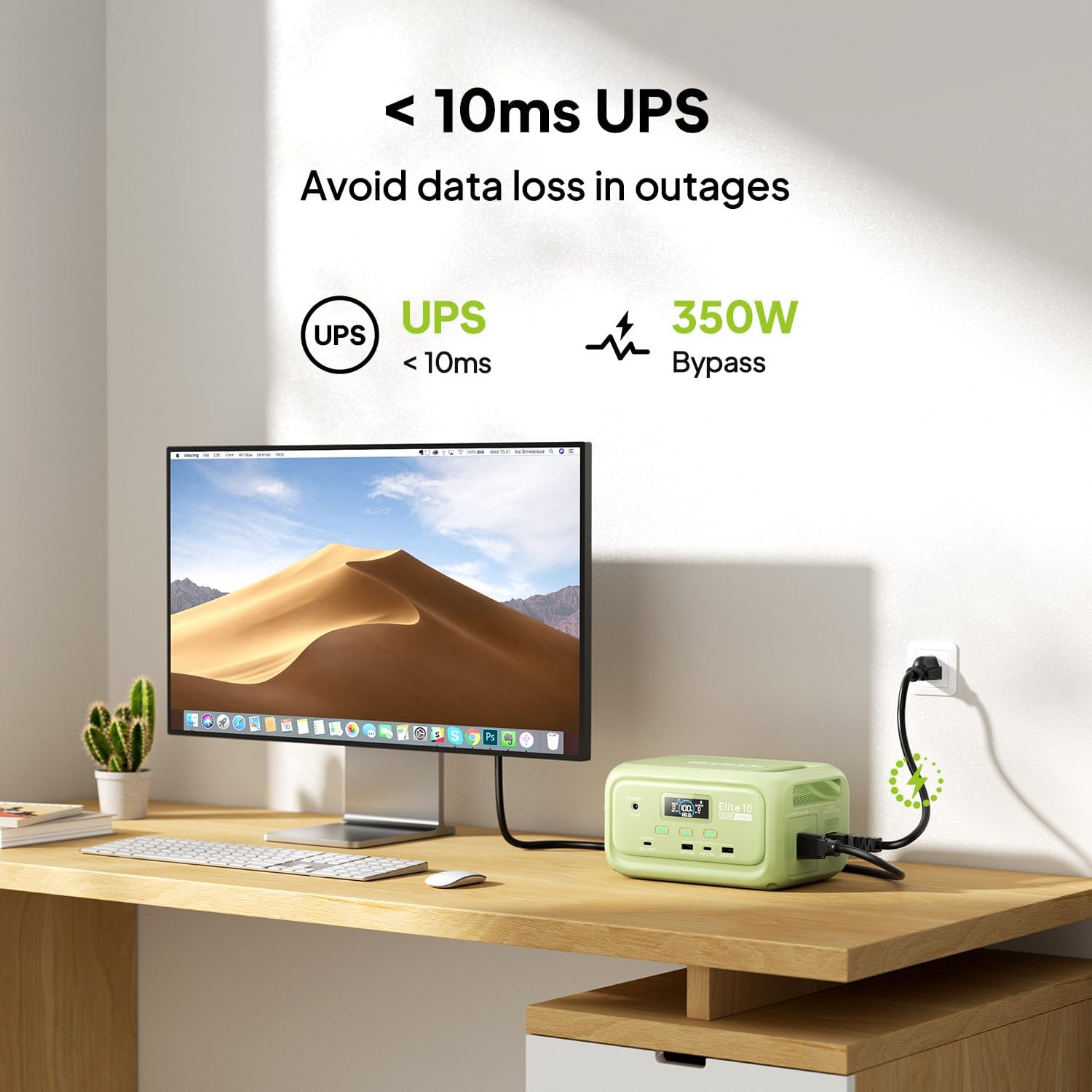
Figure 7: Illustration of the Elite 10's UPS capability.
6.6. إضاءة LED
The LED light on the rear panel offers three modes: warm light, cool light, and SOS. Press the dedicated light button to cycle through modes or turn it off. The light can provide up to 50 hours of illumination.
6.7. التحكم الذكي بالتطبيق
Download the BLUETTI app and connect to your Elite 10 via Bluetooth. The app allows you to monitor power status, customize charging modes, and adjust lighting settings remotely.

Figure 8: Managing the Elite 10 via the BLUETTI mobile application.
7. الصيانة والتخزين
- تنظيف: استخدم قطعة قماش جافة وناعمة لتنظيف الجهاز. لا تستخدم المنظفات الكاشطة أو المذيبات.
- درجة حرارة: Store and operate the unit within the recommended temperature range (typically 0°C to 40°C or 32°F to 104°F).
- تخزين طويل المدى: If storing for extended periods, charge the unit to 50-80% every 3-6 months to prolong battery life. Store in a cool, dry place.
8. استكشاف الأخطاء وإصلاحها
If you encounter issues with your BLUETTI Elite 10, refer to the following common solutions:
- الوحدة لا تعمل: تأكد من شحن البطارية. إذا لم تكن مشحونة، فقم بتوصيلها بمأخذ كهربائي لشحنها.
- لا يوجد إخراج من المنافذ: Verify that the respective DC or AC output buttons are pressed and their indicators are lit. Check if the device connected requires more power than the unit can provide.
- الشحن البطيء: Ensure you are using the original BLUETTI charging cables. Check the power source for adequate output.
- حماية من التحميل الزائد: If the unit shuts down, it may be due to an overload. Disconnect some devices and restart the unit.
For persistent issues, contact BLUETTI customer support.
9. المواصفات
| ميزة | التفاصيل |
|---|---|
| نموذج | النخبة 10 |
| سعة البطارية | 128 واط ساعة من فوسفات الحديد الليثيوم |
| مخرج التيار المتردد | 120 فولت / 200 واط (موجة جيبية نقية) |
| مخرج USB-C | 1 × 100 واط، 1 × 15 واط |
| إخراج USB-A | 2 × 15 واط |
| العاصمة المخرجات | 12 فولت/5 أمبير |
| مدخلات التيار المستمر/الكهروضوئية | 12-28 فولت / 8 أمبير ، 100 واط كحد أقصى |
| وقت شحن التيار المتردد | Approx. 70 minutes (150W Max) |
| وظيفة UPS | 10ms switchover, 350W bypass |
| الأبعاد (الطول × العرض × الارتفاع) | 7.8 بوصة × 5.7 بوصة × 4.3 بوصة (19.8 سم × 14.5 سم × 11 سم) |
| وزن | 4.0 رطل (1.8 كجم) |
10. الضمان والدعم
The BLUETTI Elite 10 Mini Portable Power Station comes with a standard manufacturer's warranty. Please refer to the warranty card included in your package or visit the official BLUETTI webالموقع للحصول على شروط وأحكام الضمان التفصيلية.
For technical support, troubleshooting assistance, or any product-related inquiries, please contact BLUETTI customer service through their official channels.


