1. المقدمة
شكرا لك على الشراءasing the CAMRY Digital Pocket Gram Scale. This precision instrument is designed for accurate weighing of small items, offering a maximum capacity of 500g with 0.01g readability. Its compact size and multiple weighing units make it suitable for various applications, including food, jewelry, herbs, and more. Please read this manual carefully to ensure proper use and maintenance of your scale.
2. معلومات السلامة
- لا تقم بتحميل الميزان بما يتجاوز سعته القصوى البالغة 500 غرام، لأن ذلك قد يتسبب في تلف دائم.
- تجنب تعريض الميزان لدرجات حرارة شديدة أو رطوبة عالية أو لأشعة الشمس المباشرة.
- احتفظ بالميزان بعيدًا عن المجالات الكهرومغناطيسية القوية.
- تنظيف الميزان مع لينة ، دamp لا تستخدم المنظفات الكاشطة أو تغمر الميزان في الماء.
- Handle the scale with care. Avoid dropping or subjecting it to sudden shocks.
- قم بإزالة البطاريات إذا لم يتم استخدام الميزان لفترة طويلة لمنع التسرب.
3. محتويات العبوة
تأكد من وجود جميع العناصر في الحزمة الخاصة بك:
- 1 x CAMRY Digital Pocket Gram Scale (Model WEHA0451H)
- 2 بطاريات AAA
- 1 × دليل المستخدم
4. انتهى المنتجview
The CAMRY Digital Pocket Gram Scale features a compact design with a protective flip cover that doubles as a weighing tray. Key components include:
- Stainless Steel Weighing Platform: Durable and easy to clean surface for placing items.
- شاشة LCD بإضاءة خلفية: Provides clear weight readings and unit indications.
- أزرار:
- [T] TARE Button: Used to zero the scale or subtract the weight of a container.
- [U] UNIT Button: Used to switch between weighing units (g, oz, gn, ct, dwt, ozt).
- [Power] ON/OFF Button: لتشغيل المقياس أو إيقاف تشغيله.
- غطاء الوجه الواقي: Shields the weighing platform and display when not in use.

الصورة: أكثر منview of the CAMRY Digital Pocket Gram Scale, highlighting its components and the instructions printed on the protective lid.
5. الإعداد
5.1. تركيب البطارية
- افتح غطاء حجرة البطارية الموجود في الجانب السفلي من الميزان.
- قم بإدخال بطاريتين AAA، مع التأكد من القطبية الصحيحة (+/-).
- أغلق غطاء حجرة البطارية جيدًا.
5.2. التعيين الأولي
Place the scale on a hard, flat, and stable surface to ensure accurate readings. Avoid placing it on soft or uneven surfaces, or near sources of vibration.
6. تعليمات التشغيل
6.1. تشغيل/إيقاف
- لتشغيل الجهاز: اضغط على [قوة] button. The LCD will display "88888" then "0.00g" (or the last used unit).
- لإيقاف التشغيل: اضغط مع الاستمرار على [قوة] button for a few seconds, or the scale will automatically turn off after approximately 60 seconds of inactivity (Auto-Off function).
6.2. وحدة التحويل
بعد تشغيل الميزان، اضغط على [U] UNIT button repeatedly to cycle through the available weighing units:
- جرام (جم)
- أونصات (أونصة)
- الحبوب (جرام)
- قيراط (ط م)
- أوزان بيني (بالوزن الساكن)
- Troy Ounces (ozt)
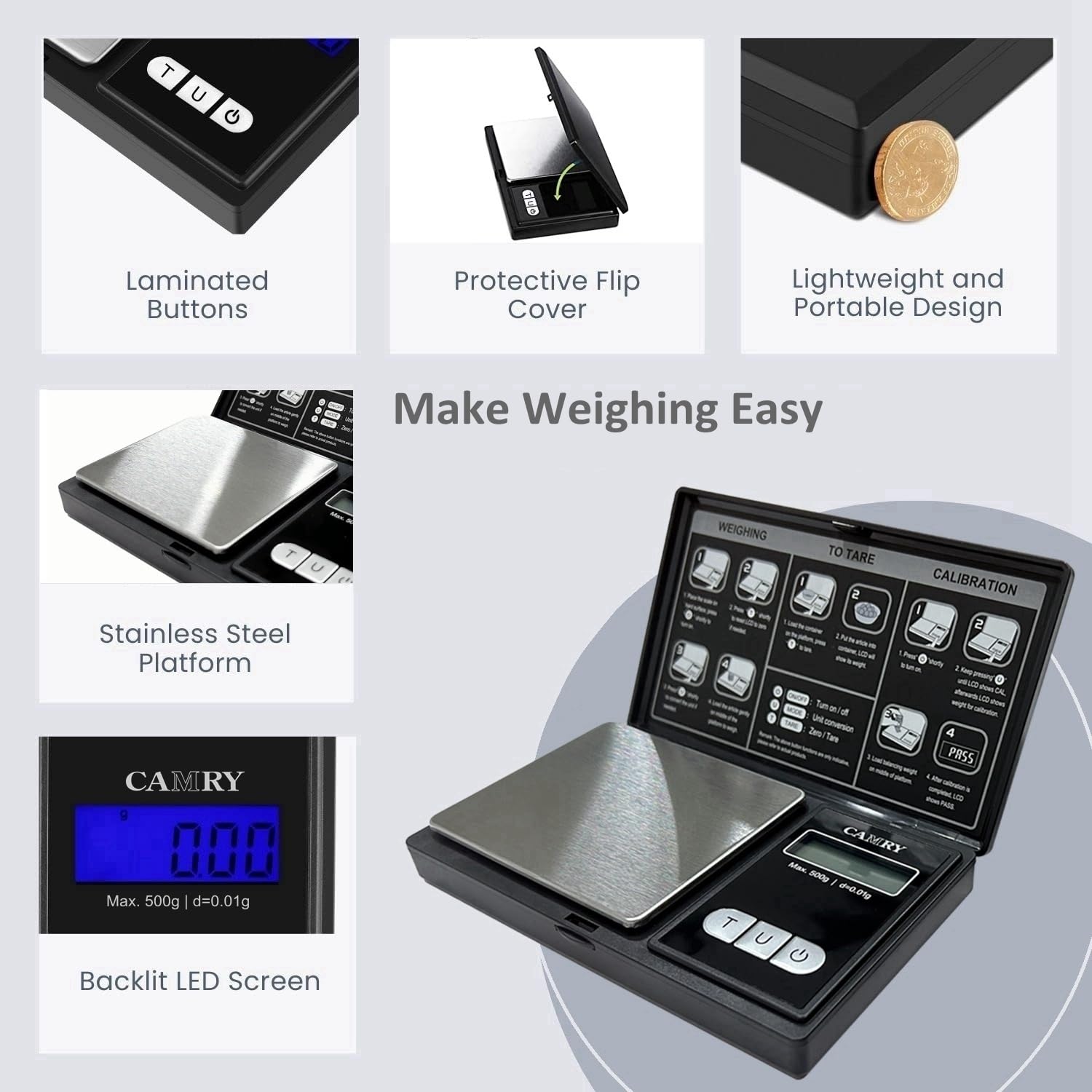
Image: The scale's display and unit button, illustrating the six different weighing units.
6.3. دالة الوزن الصافي
تتيح لك وظيفة "الوزن الفارغ" طرح وزن الحاوية، بحيث تقيس فقط الوزن الصافي للمحتويات.
- Turn on the scale and wait for it to display "0.00g".
- Place an empty container (e.g., a bowl or tray) on the weighing platform. The display will show the container's weight.
- اضغط على [T] TARE سيتم إعادة ضبط الشاشة إلى "0.00g".
- Add the items you wish to weigh into the container. The display will now show only the weight of the items.

Image: Step-by-step illustration of using the Tare function to measure net weight.
6.4. وزن العناصر
- Ensure the scale is on and displays "0.00g".
- Carefully place the item(s) to be weighed onto the center of the stainless steel platform.
- Wait for the display to stabilize and read the weight.
- If using a container, utilize the Tare function as described above.

Image: The scale in use, weighing small items on its platform, highlighting its accuracy.
7. المعايرة
Calibration ensures the accuracy of your scale. It is recommended to calibrate the scale periodically or if you suspect inaccurate readings. A 500g calibration weight (not included) is required for this process.
- قم بتشغيل المقياس.
- اضغط مع الاستمرار على [U] UNIT اضغط على الزر حتى تظهر كلمة "CAL" على الشاشة.
- اضغط على [U] UNIT اضغط على الزر مرة أخرى. ستومض الشاشة بعبارة "500.00 غرام".
- Place a 500g calibration weight gently onto the center of the weighing platform.
- Wait for the display to show "PASS". This indicates successful calibration.
- Remove the calibration weight. The scale is now ready for use.
Image: Calibration instructions as displayed on the scale's protective lid.
8. الصيانة
8.1. التنظيف
لتنظيف القشور، امسح السطح برفقamp cloth. Do not use harsh chemicals, abrasive cleaners, or immerse the scale in water. The stainless steel platform can be wiped clean easily.
8.2. التخزين
When not in use, store the scale in a dry, cool place. Keep the protective flip cover closed to prevent dust and damage to the weighing platform and display. Remove batteries if storing for extended periods.

Image: The scale with its protective imitation leather cover closed, suitable for storage.
9. استكشاف الأخطاء وإصلاحها
| مشكلة | السبب المحتمل | حل |
|---|---|---|
| "Lo" or Low Battery Indicator | البطاريات منخفضة. | استبدل كلا بطاريتي AAA ببطاريات جديدة. |
| "O-Ld" or "EEEE" (Overload) | Weight on the platform exceeds maximum capacity (500g). | أزل المنتج فوراً. لا تتجاوز الكمية 500 غراماً. |
| قراءات غير دقيقة |
|
|
| المقياس لا يعمل |
|
|
10. المواصفات
- نموذج: WEHA0451H
- سعة: 500 جرام
- دقة: 0.01 جرام
- وحدات الوزن: g, oz, gn, ct, dwt, ozt
- عرض: شاشة LCD ذات إضاءة خلفية
- مادة المنصة: الفولاذ المقاوم للصدأ
- قوة: 2 × بطاريات AAA (مضمنة)
- إيقاف التشغيل التلقائي: حوالي 60 ثوانٍ من الخمول
- أبعاد: Approximately 12.8 cm (5.0 in) x 7.4 cm (3.0 in) x 1.8 cm (0.7 in) (closed)
- المميزات الخاصة: Tare Function, Overload Indicator, Low Battery Indicator, Protective Flip Cover

Image: Dimensions and portable size of the CAMRY Digital Pocket Gram Scale.
11. فيديو المنتج
Watch this video for a visual guide on the features and operation of the CAMRY Digital Pocket Gram Scale.
Video: A demonstration of the CAMRY Digital Gram Scale (Model WEHA0451H), showcasing its backlight LCD display, unit conversion, and calibration process.
12. الضمان والدعم
CAMRY products are designed for reliability and performance. For specific warranty details or technical support, please refer to the contact information provided with your purchase or visit the official CAMRY webالموقع. احتفظ بإيصال الشراء الخاص بك كإثبات للشراء في حالة مطالبات الضمان.
For further assistance, you may contact the seller, USA NUTRI FIT, through the Amazon platform.


