مقدمة
This manual provides detailed instructions for the setup, operation, maintenance, and troubleshooting of your GMKtec Mini PC M2Pro S. This compact desktop computer is equipped with an 11th generation Intel Core i7-1185G7 processor, 32GB DDR4 RAM, and a 512GB NVMe SSD, designed for efficient performance in various applications. Please read this manual thoroughly before using the device to ensure proper functionality and longevity.
محتويات الحزمة
تأكد من وجود جميع العناصر المدرجة أدناه في الحزمة الخاصة بك:
- 1 x GMKtec Nucbox Mini PC Computer
- 1 × محول الطاقة
- 1 × حامل VESA مع البراغي
- 1 × كابل HDMI
- 1 × دليل المستخدم (هذه الوثيقة)

Image: Contents of the GMKtec Mini PC M2Pro S retail box.
المنتج انتهىview
The GMKtec Mini PC M2Pro S is a high-performance, compact desktop solution. Key features include:
- المعالج: 11th Gen Intel Core i7-1185G7 (up to 4.8 GHz, 4 Cores, 8 Threads, 12MB Cache)
- ذاكرة: 32GB DDR4 SODIMM (dual-channel, expandable up to 64GB)
- تخزين: 512GB M.2 2280 NVMe SSD (PCIe3.0, expandable up to 2TB), additional M.2 2242 SATA slot (expandable up to 2TB)
- الرسومات: Intel Iris Xe Graphics G7 96EU
- عرض الإخراج: Supports triple 4K displays via 2 x HDMI (4K@60Hz) and 1 x USB Type-C (4K@60Hz)
- شبكة: 2.5Gbps LAN (RJ45), WiFi 6 (802.11ax), Bluetooth 5.2
- الموانئ: USB 3.2, USB Type-C (40Gbps), Audio (3.5mm CTIA)
- تبريد: Upgraded quiet cooling fan with copper vapor chamber and multiple exhaust vents
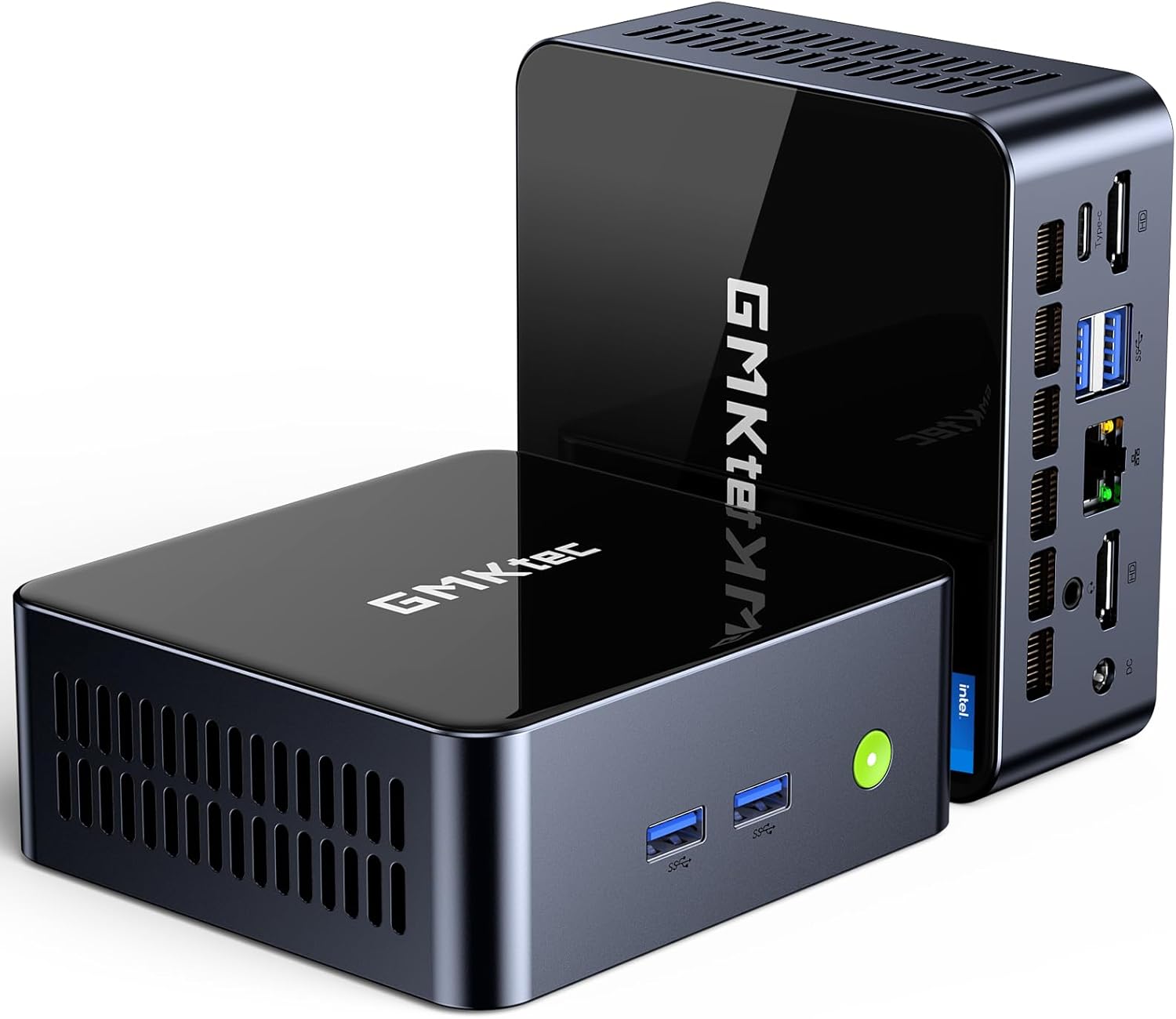
الصورة: الجبهة view of the GMKtec Mini PC M2Pro S.
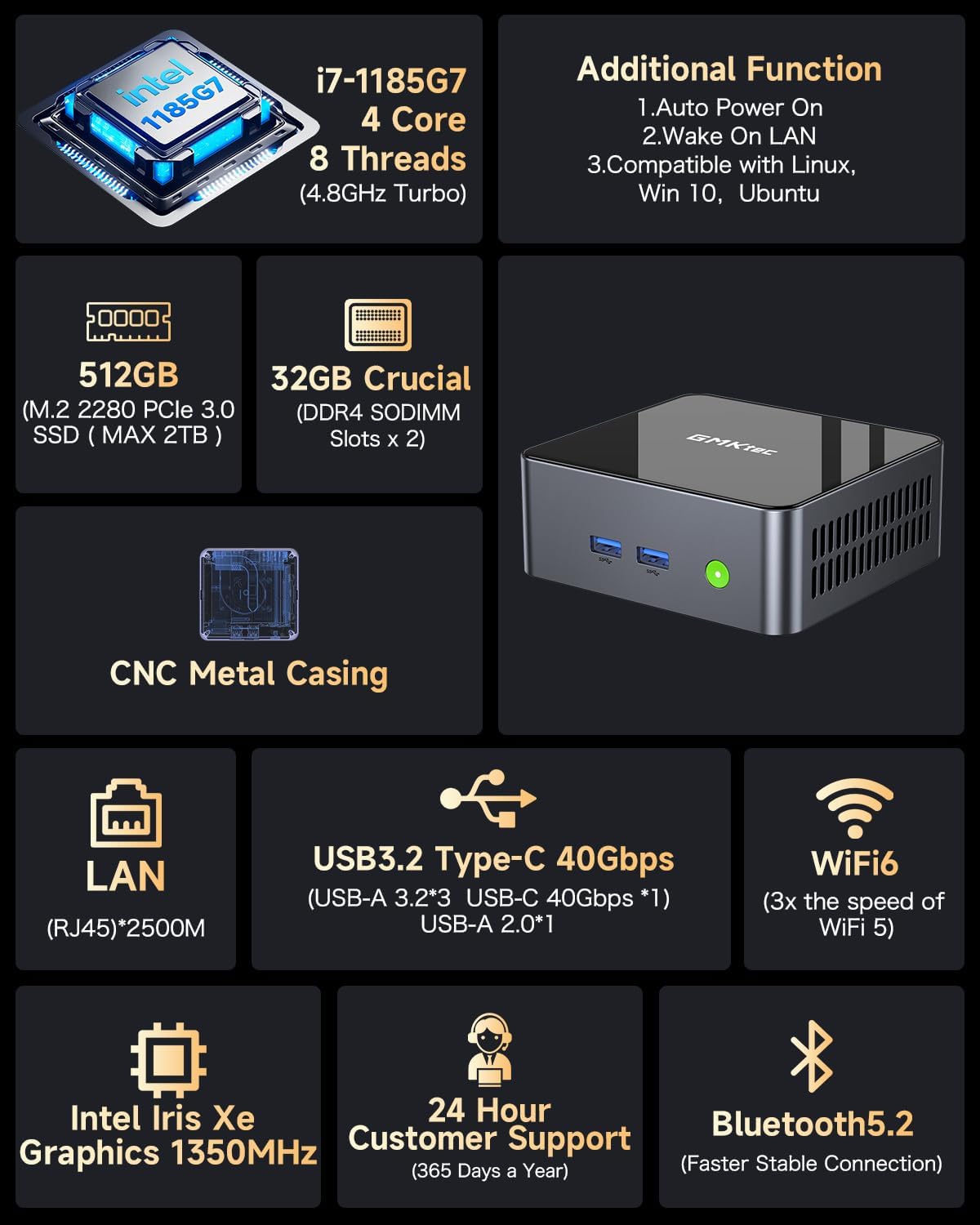
الصورة: أكثر منview of the GMKtec Mini PC M2Pro S features and specifications.
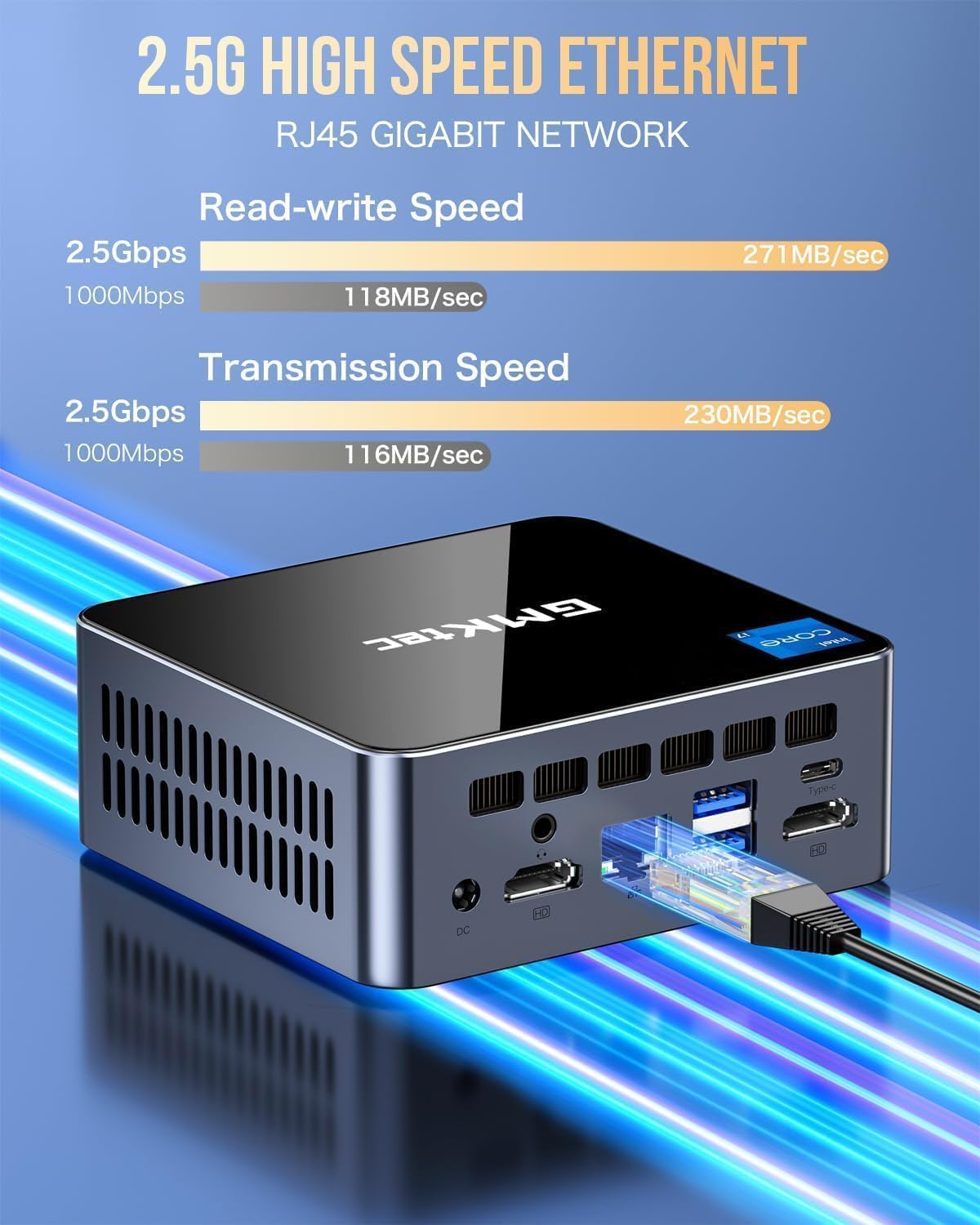
الصورة: مفصلة view of the multi-purpose ports on the GMKtec Mini PC M2Pro S.
دليل الإعداد
- توصيل الأجهزة الطرفية: Connect your monitor(s) using the HDMI or USB Type-C ports. Connect your keyboard and mouse to the available USB ports.
- إتصال شبكة: For a wired connection, plug an Ethernet cable into the 2.5Gbps LAN port. For wireless, the device supports WiFi 6 and Bluetooth 5.2, which can be configured after initial boot.
- توصيل الطاقة: Connect the provided power adapter to the DC IN port on the mini PC and then to a power outlet.
- تشغيل الطاقة: Press the power button located on the front of the mini PC. The system will boot up.
- الإعداد الأولي لنظام التشغيل Windows: اتبع التعليمات التي تظهر على الشاشة لإكمال إعداد Windows 11 Pro، بما في ذلك اللغة والمنطقة والشبكة وإنشاء حساب المستخدم.
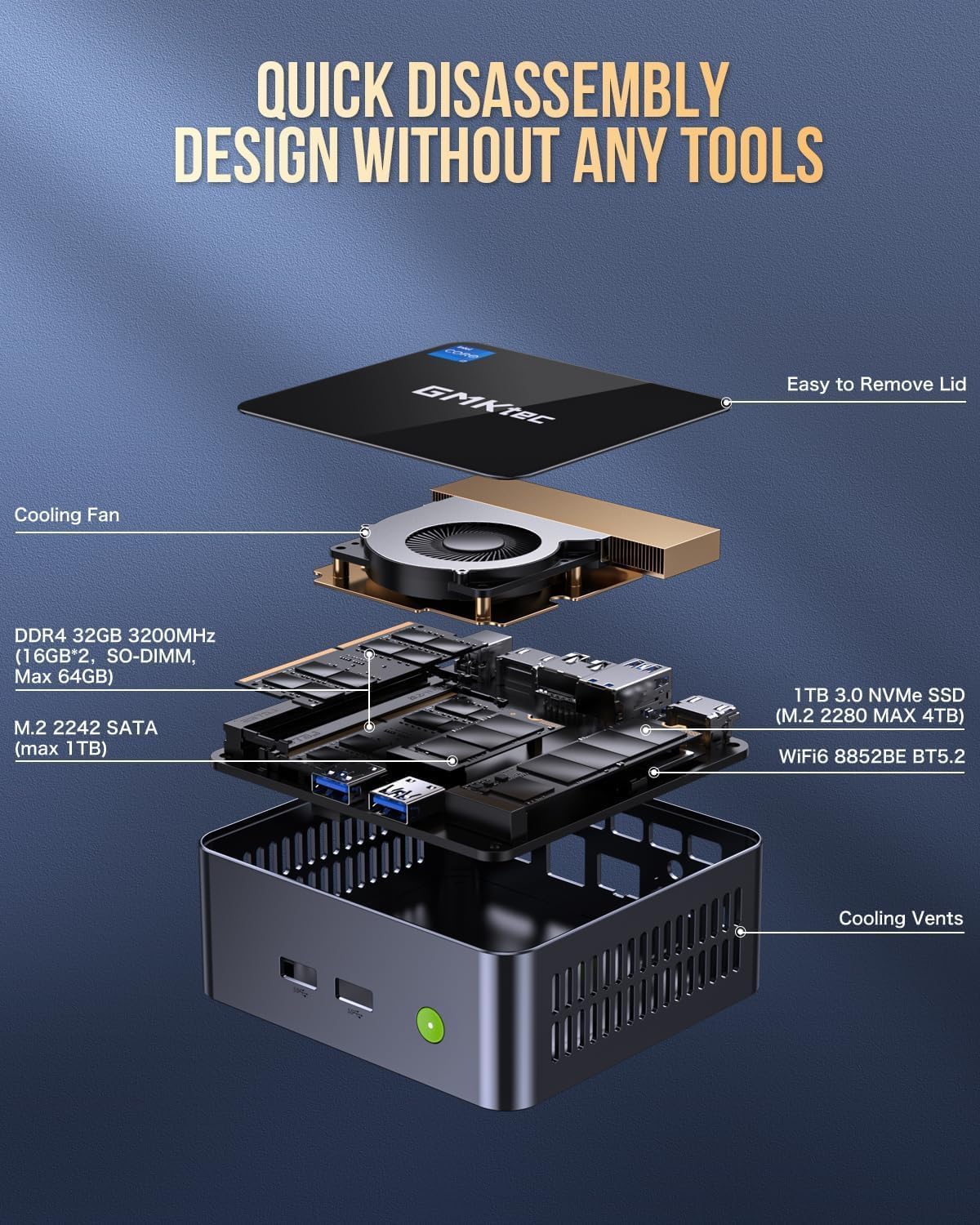
Image: Desktop placement and VESA mount installation options for the Mini PC.
تعليمات التشغيل
تشغيل/إيقاف الطاقة
- لتشغيل: اضغط على زر الطاقة الموجود في الجزء الأمامي من الجهاز.
- للإغلاق: انقر فوق زر البدء في نظام التشغيل Windows، ثم حدد الطاقة > إيقاف التشغيل.
- لإعادة التشغيل: انقر فوق زر البدء في نظام التشغيل Windows، ثم حدد الطاقة > إعادة التشغيل.
إعداد العرض الثلاثي
The GMKtec Mini PC M2Pro S supports up to three 4K displays simultaneously. Connect your monitors to the available HDMI ports and the USB Type-C port. Once connected, Windows will automatically detect the displays. You can configure display settings (e.g., extend, duplicate) via الإعدادات > النظام > الشاشة.

الصورة: السابقample of a triple 4K display setup with the Mini PC.
الاتصال بالشبكة
- سلكي (LAN): Connect an Ethernet cable to the RJ45 port for a stable 2.5Gbps connection.
- لاسلكي (واي فاي): Access network settings in Windows to connect to a WiFi 6 network.
- بلوتوث: Pair Bluetooth devices (e.g., headphones, keyboard, mouse) via Windows Bluetooth settings.
الصيانة والترقيات
توسيع التخزين
The GMKtec Mini PC M2Pro S supports storage expansion:
- The existing M.2 2280 NVMe (PCIe3.0) SSD can be upgraded to a maximum of 2TB.
- An additional M.2 2242 SATA slot is available for expansion up to 2TB.
توسيع ذاكرة الوصول العشوائي
The device comes with 32GB DDR4 SODIMM RAM in a dual-channel configuration. It can be expanded up to a maximum of 64GB by replacing the existing modules with higher capacity ones.
الوصول إلى المكونات الداخلية
The mini PC features a quick disassembly design for easy access to internal components for upgrades or maintenance. Carefully remove the lid to access the RAM and SSD slots. Refer to the diagram below for guidance.

Image: Quick disassembly design for internal component access.

Image: Illustration of the upgraded quiet cooling fan system.
استكشاف الأخطاء وإصلاحها
If you encounter issues with your GMKtec Mini PC M2Pro S, refer to the following common solutions:
- لا يوجد طاقة: Ensure the power adapter is securely connected to both the mini PC and a working power outlet. Check the power button for any damage.
- لا يوجد عرض: Verify that the monitor is powered on and correctly connected to the mini PC via HDMI or USB Type-C. Try a different cable or monitor if possible. Ensure the correct input source is selected on your monitor.
- No Network Connection (Wired): Check if the Ethernet cable is properly connected to both the mini PC and your router/modem. Verify router status.
- No Network Connection (Wireless): Ensure WiFi is enabled in Windows settings. Check if the correct WiFi network is selected and the password is entered correctly.
- الأداء البطيء: Close unnecessary applications. Check for background processes. Ensure sufficient free storage space. Consider upgrading RAM or SSD if performance issues persist after basic troubleshooting.
- Windows Activation Issues: If you experience problems activating Windows 11 Pro, ensure your internet connection is active. If the issue persists, contact GMKtec customer support for assistance.
For further assistance, please contact GMKtec customer support.
المواصفات الفنية
| ميزة | مواصفة |
|---|---|
| ماركة | GMKtec |
| رقم الموديل | M2 Pro S |
| المعالج | Intel Core i7-1185G7 (4.8 GHz Turbo, 4 Cores, 8 Threads) |
| كبش | 32GB DDR4 SDRAM (3200 MHz, Dual-channel, expandable to 64GB) |
| تخزين | 512GB M.2 2280 NVMe SSD (PCIe 3.0, expandable to 2TB), M.2 2242 SATA slot (expandable to 2TB) |
| معالج الرسوميات المساعد | Intel Iris Xe Graphics G7 96EU |
| أقصى دقة للشاشة | 5120 × 2880 بكسل |
| نظام التشغيل | ويندوز 11 برو |
| نوع لاسلكي | واي فاي 6 (802.11ax)، بلوتوث 5.2 |
| شبكة محلية | 2.5Gbps RJ45 Ethernet |
| منافذ USB | 3 x USB 3.2, 1 x USB Type-C (40Gbps) |
| مخرج الفيديو | 2 x HDMI (4K@60Hz), 1 x USB Type-C (4K@60Hz) |
| منفذ الصوت | 3.5 ملم CTIA |
| وزن العنصر | 3.3 رطل |
| أبعاد الحزمة | 6.38 × 6.26 × 4.69 بوصة |
الضمان والدعم
Your GMKtec Mini PC M2Pro S comes with a standard manufacturer's warranty. Please refer to the warranty card included in your package for specific terms and conditions. For technical support, troubleshooting assistance, or warranty claims, please contact GMKtec customer service directly. Contact information can typically be found on the GMKtec official webالموقع أو من خلال البائع الذي اشتريت منه المنتج.
بائع هذا المنتج هو GMKtec一Store. Please reach out to them for product-specific inquiries.


