
1. المقدمة
This manual provides essential instructions for setting up, operating, and maintaining your OUKITEL BT20 Military Smart Watch. Designed for durability and comprehensive health and fitness tracking, the BT20 offers Bluetooth calling, extensive sports modes, and robust construction for various environments.

Image 1.1: OUKITEL BT20 Military Smart Watch with various display screens.
2. ماذا يوجد في الصندوق
يرجى التأكد من وجود جميع العناصر في الحزمة الخاصة بك:
- 1 × OUKITEL BT20 Smart Watch
- 1 × دليل المستخدم
- 1 × كابل شحن مغناطيسي
- 1 × Retail Box
3. انتهى المنتجview
The OUKITEL BT20 features a 1.96-inch AMOLED HD large screen with 410*502 resolution, offering clear visuals and eye protection. Its robust design includes aerospace-grade metal casing and Corning Gorilla Glass for enhanced durability.
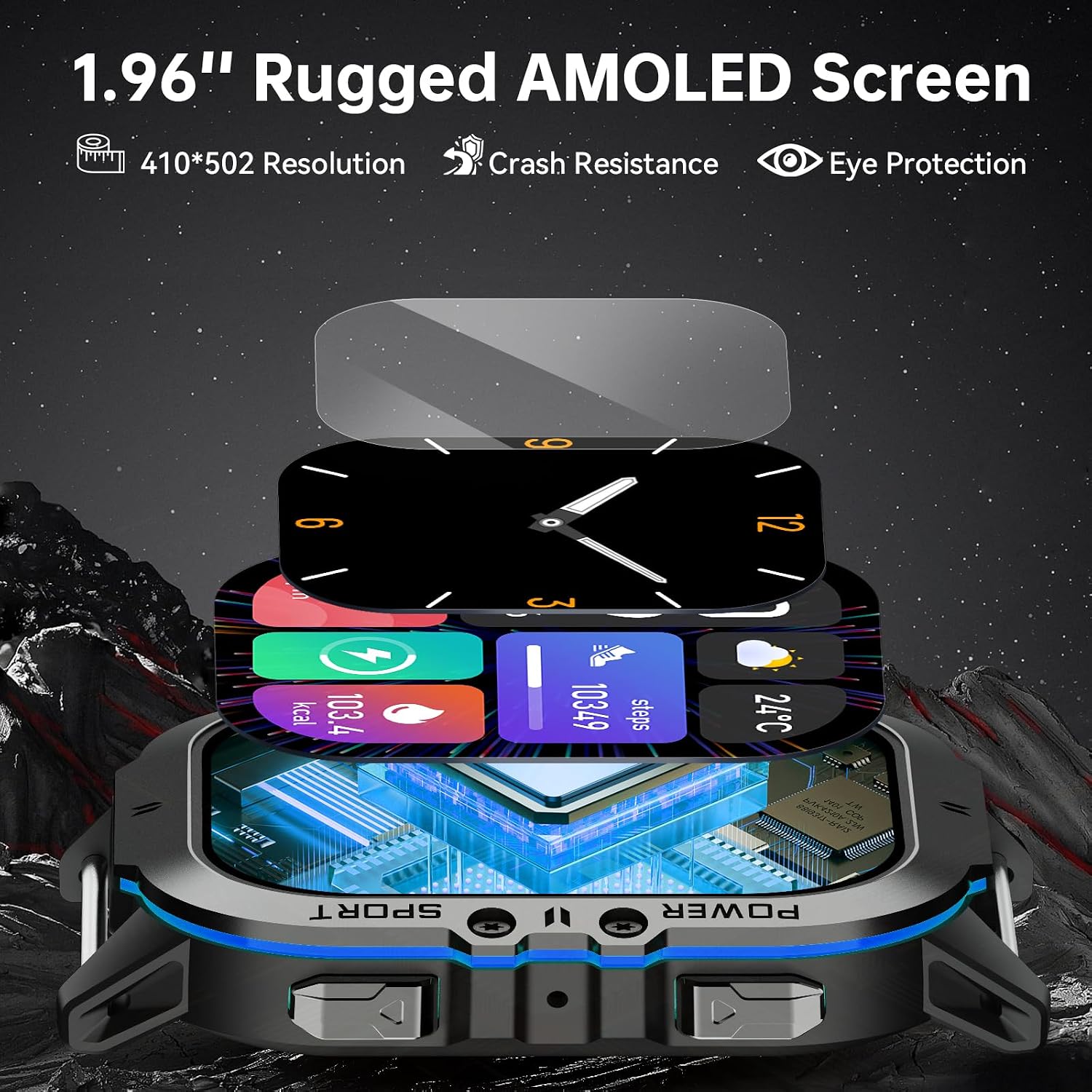
الصورة 3.1: تفصيلية view of the 1.96-inch rugged AMOLED screen and watch construction.
4. الإعداد
4.1. شحن الجهاز
Before first use, fully charge your OUKITEL BT20 Smart Watch. Connect the magnetic charging cable to the charging points on the back of the watch and to a USB power source. The watch features a 350 mAh battery, providing up to 15 days of standby time, 10 days of daily use, or 7 days of heavy use on a single charge.

Image 4.1: Illustration of the watch's long battery life and magnetic charging.
4.2. تنزيل التطبيق وإقرانه
To unlock the full functionality of your smart watch, download and install the "Mobile APP" (FitCloudPro) on your smartphone. The app is compatible with both Android and iPhone devices.
- Scan the QR code provided in the manual or on the watch screen, or visit http://fitcloud.hetangsmart.com/qrcode/ to download the FitCloudPro app.
- افتح تطبيق FitCloudPro واتبع الإرشادات التي تظهر على الشاشة لإنشاء حساب أو تسجيل الدخول.
- Navigate to the 'Device' section within the app and select 'Add Peripheral Now' or 'Discover new device'.
- Ensure Bluetooth is enabled on your smartphone. The app will search for available devices. Select 'BT20' to connect.
- قم بتأكيد طلب الاقتران على كل من هاتفك الذكي والساعة.
- Once paired, enable 'Call audio' on the watch to use the Bluetooth calling feature.

Image 4.2: Visual guide for pairing the OUKITEL BT20 Smart Watch with a smartphone.
5. تعليمات التشغيل
5.1. التنقل الأساسي
The OUKITEL BT20 features a responsive touchscreen and physical buttons for navigation. Swipe left, right, up, or down to access different functions and menus. Press the side buttons for specific actions like returning to the home screen or accessing sports modes.
5.2. Bluetooth Calls and AI Voice Assistant
With Bluetooth 5.2 technology, the BT20 allows you to make and receive calls directly from your wrist. It also supports synchronizing phone contacts and call logs. Activate the AI Voice Assistant to control your watch using voice commands.

Image 5.1: Demonstrates Bluetooth calling and AI Voice Assistant functionality.
5.3. مراقبة الصحة
The watch includes an optical tracking sensor for 24-hour health monitoring:
- معدل ضربات القلب: يراقب معدل ضربات قلبك باستمرار.
- ضغط الدم: يوفر قراءات ضغط الدم.
- أكسجين الدم (SpO2): قياس مستويات الأكسجين في الدم.
- تتبع النوم: Monitors sleep status at night, recording total sleep time and quality.
Synchronize watch data with the "Mobile APP" to view detailed health reports and analyze your health status over time.

Image 5.2: Displays the 24-hour heart rate, blood pressure, and blood oxygen monitoring features.

Image 5.3: Illustrates the sleep monitoring function, showing sleep duration and quality analysis.
5.4. أوضاع الرياضة
The fitness watch supports over 100 sports modes, including treadmill, jogging, cycling, walking, outdoor training, skiing, swimming, and more. Access these modes through the watch interface and view complete training data in the "Mobile APP". Connect to your mobile phone's GPS to track routes, distances, and fitness metrics during outdoor activities.

Image 5.4: Shows various sports modes supported by the watch, including cycling, running, climbing, walking, fitness, and lift weights.
5.5. Notifications and Other Functions
The BT20 provides various practical functions for a smarter experience:
- إخطارات الرسائل: Receive alerts from SMS, WhatsApp, Instagram, Facebook, and other apps.
- Incoming Call Notifications: Be alerted to incoming calls.
- التحكم بالموسيقى: التحكم في تشغيل الموسيقى على هاتفك الذكي.
- التحكم بالكاميرا: قم بتشغيل كاميرا هاتفك الذكي عن بُعد.
- توقعات الطقس: احصل على تحديثات الطقس في الوقت الحقيقي.
- Alarms and Reminders: Set alarms and receive sedentary reminders.
5.6. واجهات ساعة مخصصة
Personalize your watch with over 200 rich user interfaces and custom watch face designs available through the app.

Image 5.5: Illustrates the variety of custom watch face designs and user interfaces available.
6. الصيانة والمتانة
The OUKITEL BT20 is engineered for extreme conditions, making it a reliable companion for various activities.
6.1. مقاومة الماء
The watch is 5ATM depth waterproof, allowing it to withstand water pressure equivalent to a depth of 50 meters. It is suitable for swimming, surfing, and other water activities.

Image 6.1: Depicts the watch being used underwater, highlighting its 50-meter waterproof capability.
6.2. Extreme Condition Resistance
The BT20 is built to military standards, ensuring resilience against various environmental challenges:
- مقاومة درجة الحرارة: Operates in extreme temperatures, from -40°C (Super Antifreeze) to 70°C (Heat Resistance).
- تأثير المقاومة: Designed to withstand drops and shocks (Ultra Drop Proof, Anti-Smash, Impact Resistance).
- مقاومة للخدش: Features a rugged screen (Ultra Scratch Resistant).
- الغبار: Protected against dust ingress (Ultra Dustproof).
- مقاومة الرطوبة: 240H moisture resistance.
Video 6.1: Demonstrates the OUKITEL BT20 Smart Watch undergoing various durability tests, including freezing, heat, impact, and water submersion, showcasing its military-grade resilience.
7. استكشاف الأخطاء وإصلاحها
If you encounter issues with your OUKITEL BT20 Smart Watch, please refer to the following common solutions:
- الساعة لا تعمل: تأكد من شحن الساعة بالكامل. قم بتوصيلها بالشاحن المغناطيسي وانتظر بضع دقائق.
- غير قادر على الاقتران بالهاتف:
- تأكد من تمكين البلوتوث على هاتفك والساعة.
- تأكد من أن الساعة موجودة ضمن نطاق هاتفك.
- أعد تشغيل هاتفك والساعة.
- قم بمسح ذاكرة التخزين المؤقت للبلوتوث على هاتفك وحاول الاقتران مرة أخرى.
- بيانات صحية غير دقيقة:
- تأكد من ارتداء الساعة بشكل مريح على معصمك، وليس ضيقًا جدًا أو فضفاضًا جدًا.
- قم بتنظيف المستشعر الموجود على الجزء الخلفي من الساعة.
- تجنب الحركة المفرطة أثناء القياسات.
- عدم ظهور الإشعارات:
- Check app permissions on your phone to ensure the FitCloudPro app has access to notifications.
- Verify that notification settings are enabled within the FitCloudPro app for desired applications.
- تأكد من أن الساعة متصلة عبر البلوتوث.
- عمر بطارية قصير:
- تقليل سطوع الشاشة.
- قم بتعطيل مراقبة معدل ضربات القلب المستمرة إذا لم تكن هناك حاجة لذلك على مدار الساعة طوال أيام الأسبوع.
- قلل عدد الإشعارات النشطة.
- تأكد من شحن الساعة بالكامل في كل مرة.
إذا استمرت المشاكل، يرجى الاتصال بدعم العملاء.
8. المواصفات
| ميزة | التفاصيل |
|---|---|
| رقم الموديل | بي تي 20 |
| حجم الشاشة | شاشة AMOLED مقاس 1.96 بوصة |
| دقة | 410*502 |
| سعة البطارية | 350 مللي أمبير ليثيوم بوليمر |
| الاتصال | بلوتوث 5.2 |
| مقاومة الماء | 5ATM (50 مترًا) |
| نظام التشغيل | Android Wear 2.0 (compatible with Android/iOS) |
| المميزات الخاصة | Activity Tracker, Custom Activity Tracking, Multisport Tracker, Touchscreen, Voice Control, Health Monitoring (HR, BP, SpO2, Sleep) |
| وزن العنصر | 5 أونصات |
| أبعاد الحزمة | 9.57 × 6.42 × 1.18 بوصة |

Image 8.1: Diagram showing the dimensions of the OUKITEL BT20 Smart Watch.
9. الضمان والدعم
OUKITEL is committed to providing quality products and customer satisfaction. Your BT20 Smart Watch comes with:
- 2 Years Warranty Service: Covers manufacturing defects and malfunctions under normal use.
- 30-Days No Reason to Return Policy: For hassle-free returns within 30 days of purchase.
- 7 x 24 Hours Customer Service: يتوفر دعم متخصص على مدار الساعة.
- Lifetime Support and Satisfied Solutions: Ongoing assistance for the lifespan of your product.
For any inquiries or support needs, please refer to the contact information provided in your retail box or visit the official OUKITEL webموقع.

Image 9.1: Details OUKITEL's service commitment, including warranty and customer support.


