1. المقدمة
The Waveshare ESP32-S3 Dual Eye Round LCD AIoT Development Board is a versatile microcontroller development platform designed for makers and electronics enthusiasts. Based on the ESP32-S3 chip, it offers robust connectivity with 2.4GHz Wi-Fi and Bluetooth BLE 5. This board features dual 1.28-inch round IPS LCD displays, each with 240x240 resolution and 65K colors, capable of running graphical user interfaces (GUIs) like LVGL smoothly. It also integrates a microphone, speaker header, Lithium battery recharge circuit, TF card slot, and various expansion connectors, making it suitable for a wide range of applications including HMI, robotic agents, and AI voice-interactive projects.

الصورة 1.1: The Waveshare ESP32-S3 Dual Eye Round LCD AIoT Development Board. This image shows the compact design of the board with its two circular displays, one of which is being touched by a finger, illustrating its interactive capabilities.
2. الميزات الرئيسية
- المعالج: High-performance Xtensa 32-bit LX7 dual-core processor, up to 240MHz main frequency.
- الربط اللاسلكي: Supports 2.4GHz Wi-Fi (802.11 b/g/n) and Bluetooth 5 (LE) with an onboard antenna.
- ذاكرة: Built-in 512KB SRAM and 384KB ROM, with onboard 8MB PSRAM and 16MB Flash.
- يعرض: Dual 1.28-inch LCD displays, 240 × 240 resolution, 65K color, with optional capacitive touch function.
- صوتي: Onboard ES8311 audio codec and ES7210 audio ADC chip, equipped with a standard microphone and speaker header, supporting AI speech interaction.
- تخزين: Onboard TF card slot for convenient local storage expansion of data, images, and audio files.
- إدارة الطاقة: Onboard Lithium battery recharge management module, with a reserved 3.7V Lithium battery power supply header.
- توسع: Onboard SH1.0 14PIN connector, adapting UART, I2C, and various IO interfaces for DIY customization.
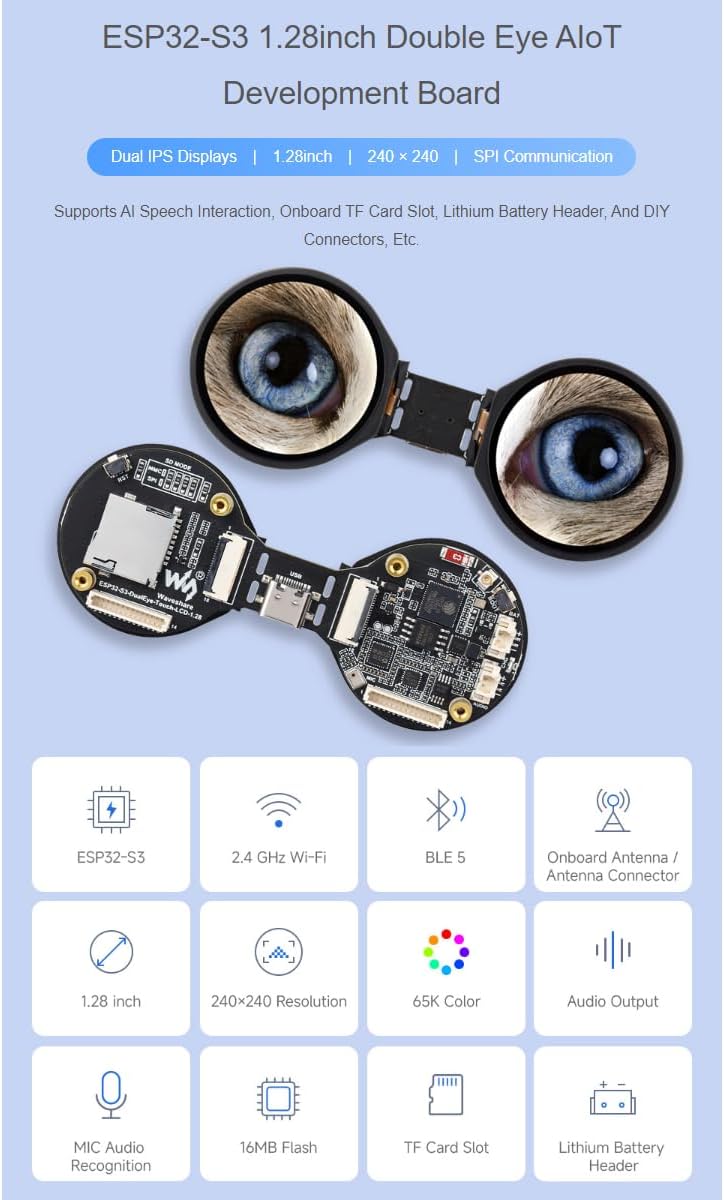
الصورة 2.1: ميزة أكثرview of the ESP32-S3 Dual Eye AIoT Development Board. This image displays the board along with various icons representing its core functionalities such as ESP32-S3 chip, Wi-Fi, Bluetooth, onboard antenna, 1.28-inch displays, 240x240 resolution, 65K colors, audio output, MIC audio recognition, 16MB Flash, TF card slot, and Lithium battery header.
3. حزمة المحتوى
يتم تضمين العناصر التالية في الحزمة الخاصة بك:
- ESP32-S3-DualEye-Touch-LCD-1.28 Board x1
- SH1.0 14PIN cable (~100mm) x1
- FFC 18PIN cable (~200mm) x1
- 8Ω 2W MX1.25 2PIN speaker x1

الصورة 3.1: Package contents. This image shows the ESP32-S3 Dual Eye Touch LCD board, an FFC cable, a SH1.0 14PIN cable, and an 8Ω 2W MX1.25 2PIN speaker, which are all included in the product package.
4. Setup and Hardware Overview
Before operating the board, familiarize yourself with its components and connection points.
الصورة 4.1: What's On Board. This diagram provides a numbered overview of the ESP32-S3 Dual Eye Touch LCD board's components and connectors, essential for setup and development.
4.1 تحديد المكون
- ESP32-S3R8: Dual-core processor, up to 240MHz operating frequency.
- 16MB Flash.
- Battery recharge management chip.
- Ampشريحة مكبر الصوت.
- ES8311: Audio codec.
- ES7210: Audio ADC.
- ميكروفون.
- MP1605GTF-Z: Power module, supports up to 3.3V 2A output.
- Onboard ceramic antenna.
- IPEX1 connector: For connecting an external antenna, enabled via resoldering an onboard resistor.
- زر التمهيد.
- GPIO1 function selection resistor: Soldered on the side near the crystal by default; the GPIO1 pin is used for battery voltage measurement. Resoldered to the other side: the GPIO1 connects to the 17. FPC connector, enabling three-screen display function through software modification.
- Battery header.
- MX1.25 2PIN connector for 3.7V Lithium battery, supports charging and discharging.
- Charge indicator: Lithium battery charge indicator, lights up when charging, off when fully charged (the light status is uncertain when the battery is not connected).
- Speaker header.
- SH1.0 14PIN header.
- 18PIN FPC connector: For three-screen display function by resoldering the 12. resistor and modifying the display configuration parameters in the program. When the board is split into two halves, this FPC connector can be linked with 18. FPC connector so that both displays function properly (Note: when the board is split and connected via FPC cable, the RESET button will be unavailable).
- 18PIN FPC header: For connection to the host.
- TF card communication mode selection: When the board is split into two halves, switching to SPI mode allows the TF card to be controlled by an external master controller.
- فتحة بطاقة TF.
- زر إعادة الضبط.
- SH1.0 14PIN cable header: For controlling TF card and the LCD display via SPI interface when the board is split into two halves and resoldering 19. resistor to SPI mode.
- منفذ من النوع C.
4.2 الاتصال الأولي
- مزود الطاقة: Connect the board to a power source using the Type-C port (24). Alternatively, connect a 3.7V Lithium battery to the Battery header (13) or MX1.25 2PIN connector (14).
- اتصال مكبر الصوت: If using the included speaker, connect it to the Speaker header (16).
- بطاقة TF: Insert a TF card into the TF card slot (21) for local storage if needed.
- توسع: Utilize the SH1.0 14PIN header (17) or other FPC connectors (18, 19) for custom expansions as required by your project.
5. تعليمات التشغيل
5.1 بيئة التطوير
The ESP32-S3-DualEye-Touch-LCD-1.28 supports two primary development tools and frameworks:
- بيئة التطوير المتكاملة Arduino: A popular choice for ease of use and a large community.
- ESP-IDF: Espressif IoT Development Framework, offering more control and advanced features for complex projects.
Choose the development tool that best suits your project requirements and personal preferences. Development resources and examples can be obtained by contacting Waveshare support.
5.2 Display and Touch Functionality
The board features dual 1.28-inch IPS displays with 240x240 resolution. The displays support 65K colors and can render GUIs efficiently. The optional capacitive touch function is controlled via an I2C interface, providing flexible operation and smooth UI interaction with interrupt support.

الصورة 5.1: Capacitive Touch. This image demonstrates the touch functionality of the displays, showing a finger interacting with one of the screens displaying a scenic image.
5.3 التفاعل الصوتي بالذكاء الاصطناعي
The integrated microphone and audio codec chips enable AI speech interaction. This allows the board to process audio input and interact with online large model platforms such as DeepSeek and Doubao for advanced speech recognition and response capabilities.

الصورة 5.2: Supports AI Speech Interaction. This diagram illustrates the workflow of AI speech interaction: a conversation is made with the built-in microphone, sent to a large model platform for analysis, an answer is received, and a reply is generated via an external speaker.
5.4 Audio Input and Output
The onboard audio codec chip supports high-quality audio processing, providing clear audio input and output. This is crucial for applications involving sound, music, or voice commands.

الصورة 5.3: Onboard Audio Codec Chip. This image visually represents the audio output and input capabilities of the board, with musical notes displayed on the screens, indicating sound processing.
6. الصيانة
To ensure the longevity and optimal performance of your ESP32-S3 Dual Eye Round LCD AIoT Development Board, follow these maintenance guidelines:
- التعامل: Always handle the board by its edges to avoid touching sensitive components or applying undue pressure to the displays.
- تنظيف: Use a soft, dry, anti-static cloth to clean the board and displays. Avoid using liquids or abrasive materials.
- تخزين: Store the board in a cool, dry, and dust-free environment. If not in use for extended periods, consider storing it in an anti-static bag.
- قوة: تأكد من حجم مصدر الطاقة المناسبtage (3.7V for battery, 5V via Type-C) and avoid reverse polarity connections.
- بيئة: Protect the board from extreme temperatures, humidity, and direct sunlight.
7. استكشاف الأخطاء وإصلاحها
If you encounter issues with your development board, consider the following troubleshooting steps:
- لا يوجد طاقة:
- Check Type-C cable connection and power source.
- If using a battery, ensure it is charged and correctly connected to the battery header.
- Verify the charge indicator LED (15) behavior.
- العرض لا يعمل:
- Ensure FFC cables are securely connected.
- Check display initialization code in your program.
- If the board is split, ensure the 18PIN FPC connector (18) and resistor (12) are correctly configured.
- مشاكل الاتصال بشبكة Wi-Fi/Bluetooth:
- Verify your code for correct Wi-Fi/Bluetooth initialization and credentials.
- Ensure the onboard ceramic antenna (9) is not obstructed.
- If using an external antenna, ensure it's properly connected to the IPEX1 connector (10) and the onboard resistor is configured correctly.
- مشاكل الصوت:
- Check speaker connection to the Speaker header (16).
- Verify audio codec initialization and playback/recording code.
- Ensure the microphone (7) is not covered.
- TF Card Not Detected:
- Ensure the TF card is fully inserted into the TF card slot (21).
- Check TF card communication mode selection (20) if the board is split.
- Verify your code for correct TF card initialization and file الوصول إلى النظام.
For further assistance, refer to the official Waveshare documentation or contact their technical support.
8. المواصفات
| ميزة | التفاصيل |
|---|---|
| المعالج | Xtensa 32-bit LX7 dual-core, up to 240MHz |
| الاتصال اللاسلكي | واي فاي بتردد 2.4 جيجاهرتز (802.11 b/g/n)، بلوتوث 5 (LE) |
| على متن الذاكرة | 512KB SRAM, 384KB ROM, 8MB PSRAM, 16MB Flash |
| شاشات العرض | Dual 1.28-inch IPS LCD, 240 × 240 resolution, 65K colors |
| وظيفة اللمس | Optional Capacitive Touch (I2C interface) |
| صوتي | ES8311 Codec, ES7210 ADC, Microphone, Speaker Header |
| توسيع التخزين | فتحة بطاقة TF |
| مدخلات الطاقة | Type-C, 3.7V Lithium Battery Header |
| أبعاد | 4.25 × 3.15 × 1.02 بوصة (الحزمة) |
| وزن العنصر | 0.704 أونصات |
| رقم الموديل | ESP32-S3 Double Eye Touch LCD (ESP32-S3-DualEye-Touch-LCD-1.28) |
9. الضمان والدعم
9.1 معلومات الضمان
Specific warranty details for the Waveshare ESP32-S3 Dual Eye Round LCD AIoT Development Board are typically provided at the point of purchase or on the official Waveshare webالموقع. يرجى الرجوع إلى وثائق الشراء أو موقع الشركة المصنعة. webللحصول على سياسة الضمان الأكثر دقة وحداثة، تفضل بزيارة الموقع.
9.2 الدعم الفني
For technical assistance, development resources, or inquiries regarding the ESP32-S3 Dual Eye Round LCD AIoT Development Board, please visit the official Waveshare support page or contact their customer service directly. You can often find detailed documentation, exampالكود، ومنتديات المجتمع الخاصة بهم webموقع.
ويفشير الرسمي Webموقع: www.waveshare.com


