1. انتهى المنتجview
The Baseus BS1 NC Semi-in-Ear Noise Cancelling Earbuds offer a blend of comfort and advanced audio technology. Featuring Adaptive Hybrid Active Noise Cancellation (ANC), Hi-Res Audio with LDAC support, and a lightweight design, these earbuds are engineered for extended listening and clear communication. They are also equipped with a 6-microphone AI system for clear calls and IP55 water and dust resistance.

Image: Baseus BS1 NC Semi-in-Ear Noise Cancelling Earbuds and their charging case in black.
2. محتويات العبوة
تأكد من وجود جميع العناصر في العبوة:
- Baseus Bass BS1 NC Semi-in-Ear Earbuds (Left and Right)
- حافظة الشحن
- كابل شحن USB-C
- دليل البدء السريع

Image: The complete retail package for the Baseus BS1 NC Earbuds, showing the earbuds, charging case, USB-C cable, and quick start guide.
3. شحن سماعات الأذن والعلبة
للحصول على أفضل أداء، اشحن سماعات الأذن وعلبة الشحن بالكامل قبل الاستخدام الأول.
3.1 شحن سماعات الأذن
- ضع سماعات الأذن في علبة الشحن. تأكد من تثبيتها بشكل صحيح في فتحاتها المخصصة (L لليسار، R لليمين).
- Close the charging case. The earbuds will begin charging automatically.
3.2 شحن العلبة
- قم بتوصيل كابل الشحن USB-C المقدم بمنفذ الشحن الموجود على العلبة.
- قم بتوصيل الطرف الآخر من الكابل بمحول طاقة USB (غير متضمن) أو بمنفذ USB الخاص بالكمبيوتر.
- The LED indicator on the case will show the charging status:
- أخضر: 75% - 100% مشحونة
- الأصفر: 25% - 75% مشحونة
- أحمر: Below 25% charged
- A full charge for the case provides up to 40 hours of total playtime for the earbuds (with ANC off). A 10-minute charge can provide up to 2 hours of playback.

Image: The Baseus BS1 NC Earbuds resting in their open charging case, highlighting the 40-hour total playtime and rapid charging capabilities.
4. الاقتران والاتصال
4.1 الاقتران الأولي
- افتح علبة الشحن. ستدخل سماعات الأذن تلقائيًا في وضع الاقتران.
- على جهازك (الهاتف الذكي، الجهاز اللوحي، الكمبيوتر)، قم بتمكين البلوتوث.
- بحث عن "Baseus Bass BS1 NC" in the list of available Bluetooth devices.
- Select "Baseus Bass BS1 NC" to connect. A voice prompt will confirm successful pairing.
4.2 إعادة الاتصال التلقائي
Once paired, the earbuds will automatically reconnect to the last connected device when removed from the charging case and within Bluetooth range.
4.3 اتصال متعدد النقاط
The Baseus BS1 NC supports Baseus Smart-Connect (BSC) technology, allowing simultaneous connection to two devices. This enables seamless switching between audio sources without manual re-pairing.
To use multipoint connection:
- قم بإقران سماعات الأذن بجهازك الأول.
- افصل سماعات الأذن عن إعدادات البلوتوث الخاصة بالجهاز الأول (لا تقم بإلغاء الاقتران).
- قم بإقران سماعات الأذن بجهازك الثاني.
- أعد توصيل سماعات الأذن بالجهاز الأول من خلال إعدادات البلوتوث. يجب أن تكون سماعات الأذن الآن متصلة بكلا الجهازين.
سيتم تحويل الصوت تلقائيًا إلى الجهاز الذي يقوم بتشغيل المحتوى أو استقبال المكالمات.
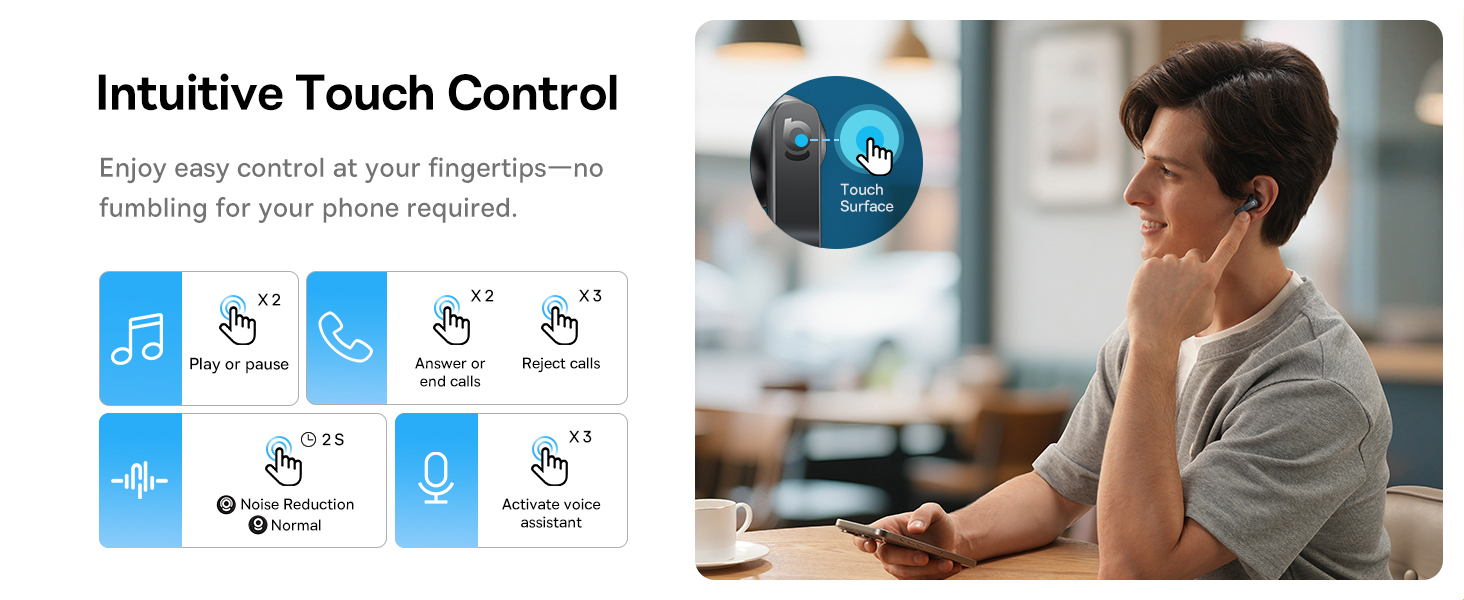
Image: A visual representation of the Baseus BS1 NC Earbuds connected to both a laptop and a smartphone, showcasing the instant multipoint connection feature.
5. ارتداء سماعات الأذن
The Baseus BS1 NC earbuds feature a semi-in-ear design for comfortable, pressure-free wear. For optimal sound quality and noise cancellation, ensure a proper fit.
- حدد سماعات الأذن اليسرى (L) واليمنى (R).
- قم بإدخال كل سماعة أذن برفق في قناة أذنك.
- Adjust the earbud until it feels secure and comfortable. The stem should point slightly forward or downward.

Image: A person wearing the Baseus BS1 NC Earbuds, illustrating their ergonomic and lightweight design for all-day comfort.
6. تعليمات التشغيل
6.1 الضوابط التي تعمل باللمس
The earbuds feature intuitive touch controls on their stems. The following are default functions, which may be customizable via the Baseus app:
| فعل | وظيفة |
|---|---|
| Double-tap (Left or Right Earbud) | تشغيل / إيقاف الموسيقى ، الرد / إنهاء المكالمة |
| Triple-tap (Left or Right Earbud) | Reject call, Activate voice assistant |
| اضغط مع الاستمرار (2 ثوان) | Switch Noise Control Mode (ANC/Normal/Transparency) |

Image: An illustration detailing the intuitive touch controls on the Baseus BS1 NC Earbuds for various functions like play/pause, call management, noise reduction, and voice assistant activation.
6.2 أوضاع التحكم في الضوضاء
The Baseus BS1 NC earbuds offer three noise control modes:
- Adaptive Hybrid ANC (Active Noise Cancellation): Reduces ambient noise for an immersive listening experience. Ideal for noisy environments.
- وضع الشفافية: يُمكّنك هذا التطبيق من سماع محيطك مع الاستمتاع بالصوت في الوقت نفسه. وهو مفيد لزيادة الوعي في البيئات الحضرية أو أثناء المحادثات.
- الوضع العادي: Standard audio playback without active noise cancellation or transparency features.
Switch between modes by pressing and holding the touch area on either earbud for 2 seconds.

Image: A cutaway diagram of a Baseus BS1 NC earbud in an ear, illustrating the semi-in-ear fit and the availability of Adaptive Noise Cancelling and Transparency Mode.
6.3 Hi-Res Audio with LDAC
These earbuds support LDAC technology, enabling high-resolution audio transmission for a detailed and rich sound experience. Ensure your device supports LDAC and activate it in your device's Bluetooth settings for the best audio quality.

Image: The Baseus BS1 NC Earbuds surrounded by sound waves, emphasizing features like Hi-Res Audio, SuperBass 2.0, and 13mm dynamic drivers for powerful sound.
6.4 6-Mic AI Clear Calls
The earbuds are equipped with 6 microphones and AI noise isolation technology to ensure your voice is clear during calls, even in noisy environments. Wind noise reduction further enhances call clarity outdoors.
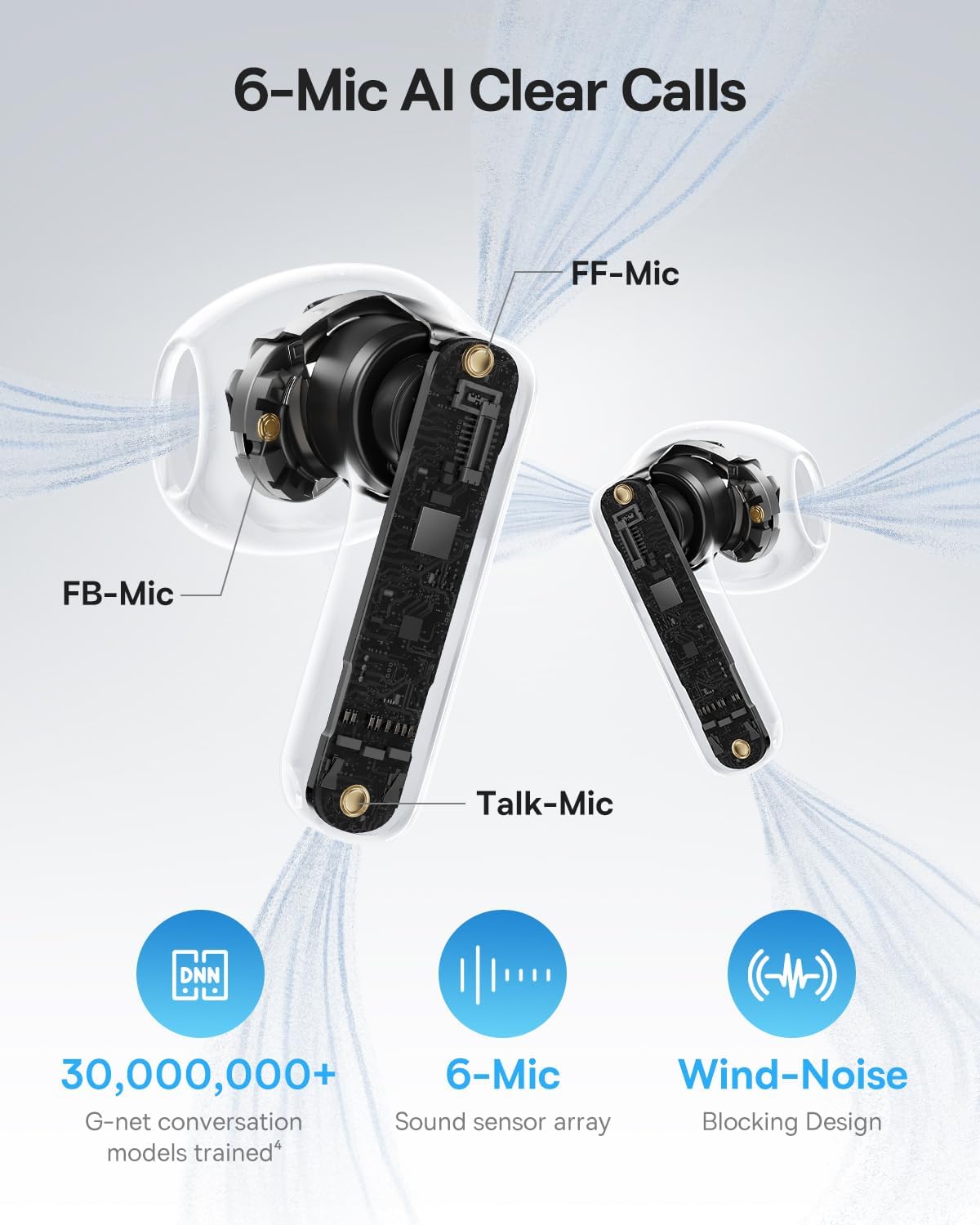
Image: A detailed diagram of the Baseus BS1 NC earbud, highlighting the placement of the FF-Mic, FB-Mic, and Talk-Mic, which contribute to the 6-Mic AI Clear Call technology and wind-noise blocking design.
6.5 التحكم الذكي في التطبيق
Download the dedicated Baseus app for enhanced control and customization options. The app allows you to:
- اضبط مستويات تعزيز الصوت الجهير.
- Select from various EQ Modes.
- التحكم في إعدادات الصوتيات المكانية.
- استخدم ميزة "العثور على سماعات الأذن الخاصة بك".
ملاحظة: في وضع الضيف، لا يلزم إنشاء حساب أو الحصول على أذونات لتخصيص الميزات، ولكن يلزم الوصول إلى نظام تحديد المواقع العالمي (GPS) لتحديد موقع سماعات الأذن المفقودة.

Image: A smartphone displaying the Baseus app interface, which offers various sound control options including Bass Boost, EQ Modes, Spatial Acoustics, and a "Find Your Earbuds" function.
7. الصيانة والعناية
7.1 التنظيف
- قم بتنظيف سماعات الأذن وعلبة الشحن بانتظام باستخدام قطعة قماش ناعمة وجافة وخالية من الوبر.
- لا تستخدم كيماويات مركزة أو محاليل التنظيف أو المنظفات القوية.
- Gently remove any earwax or debris from the earbud mesh and charging contacts using a small, soft brush or cotton swab.
7.2 مقاومة الماء والغبار (IP55)
The earbuds are rated IP55, meaning they are protected against limited dust ingress and low-pressure water jets from any direction. This makes them suitable for workouts and light rain exposure.
- لا تغمر سماعات الأذن في الماء.
- تأكد من جفاف سماعات الأذن قبل إعادتها إلى علبة الشحن لمنع تلف نقاط التلامس الخاصة بالشحن.
- علبة الشحن ليست مقاومة للماء.

Image: The Baseus BS1 NC Earbuds shown with water droplets, signifying their IP55 rating for dust and water resistance.
7.3 التخزين
قم بتخزين سماعات الأذن في علبة الشحن الخاصة بها عند عدم استخدامها لحمايتها وإبقائها مشحونة.
8. استكشاف الأخطاء وإصلاحها
If you encounter issues with your Baseus BS1 NC earbuds, refer to the following common solutions:
- لا توجد مشاكل في الصوت/الاتصال:
- تأكد من شحن سماعات الأذن.
- Verify Bluetooth is enabled on your device and "Baseus Bass BS1 NC" is selected.
- Try placing earbuds back in the case, closing it, and then reopening to reset the connection.
- انسى الجهاز في إعدادات البلوتوث لديك وأعد إقرانه.
- سماعة أذن واحدة لا تعمل:
- تأكد من شحن كلا سماعات الأذن.
- أعد وضع سماعات الأذن في العلبة، ثم أغلقها، ثم أعد فتحها.
- قم بتنظيف نقاط اتصال الشحن الموجودة على سماعتي الأذن وداخل العلبة.
- ضعف جودة الصوت:
- تأكد من تثبيت سماعات الأذن بشكل صحيح في أذنيك.
- نظف شبكة سماعة الأذن لإزالة أي عوائق.
- Check your device's audio settings and ensure LDAC is enabled if supported.
- المؤتمر الوطني الأفريقي غير فعال:
- Ensure ANC mode is activated via touch control or the Baseus app.
- Adjust the earbuds for a better seal in your ears.
9. المواصفات
| ميزة | التفاصيل |
|---|---|
| اسم الموديل | Baseus Bass BS1 NC |
| التحكم في الضوضاء | إلغاء الضوضاء التكيفي، إلغاء الضوضاء البيئية، إلغاء الضوضاء الهجين |
| تكنولوجيا الاتصال | بلوتوث 6.0، لاسلكي |
| تكنولوجيا الاتصالات اللاسلكية | بلوتوث 6.0 |
| مدى البلوتوث | 10 مترا |
| نوع برنامج تشغيل الصوت | سائق ديناميكي |
| حجم برنامج تشغيل الصوت | 13 مليمتر |
| استجابة التردد | 40 كيلو هرتز |
| الكمون الصوتي | 60 ميلي ثانية |
| عمر البطارية (سماعات الأذن) | 7 Hours (ANC off) |
| إجمالي وقت اللعب (مع الحقيبة) | 40 Hours (ANC off) |
| Charging Time (Rapid Charge) | 10 دقيقة لمدة ساعتين من التشغيل |
| مستوى مقاومة الماء | IP55 (سماعات الأذن فقط) |
| نوع التحكم | التحكم باللمس |
| مادة | أكريلونيتريل بوتادين ستايرين (ABS)، بولي كربونات (PC) |
| وزن السلعة (سماعات الأذن) | 4 جرام لكل سماعة أذن |
| Product Dimensions (Earbuds) | 1.2 × 0.7 × 0.7 بوصة |
| الأجهزة المتوافقة | الأجهزة التي تدعم تقنية الصوت عبر البلوتوث، بما في ذلك أنظمة iOS وAndroid وWindows وMac OS وSwitch. |
10. فيديو المنتج الرسمي
Watch the official product video for a visual guide on the Baseus BS1 NC Earbuds:
فيديو: فيديو ترويجي رسمي لمنتج من شركة Baseusasing the features and usage of the Baseus BS1 NC Semi-in-Ear True Wireless Earbuds.
11. الضمان والدعم
For warranty information, technical support, FAQs, and further assistance, please visit the official Baseus support center.
Refer to the Quick Start Guide included in your package for a direct link or visit the Baseus webموقع.
Note: Protection plans may be available for purchase separately.


