مقدمة
This manual provides essential information for the safe and efficient use of your Blaupunkt 40FGC5500S 40-inch Full HD Google TV. Please read it thoroughly before operating the device and retain it for future reference. This television combines Full HD LED display technology with the Google TV operating system, offering a wide range of entertainment options and smart features.
يثبت
1. فك العبوة والمحتويات
أخرج التلفزيون وجميع ملحقاته من العبوة بحرص. تأكد من وجود جميع المكونات.
- Blaupunkt 40FGC5500S TV Unit
- جهاز التحكم عن بعد
- كابل الطاقة
- TV Stands (2 pieces) and Screws
- دليل المستخدم (هذا المستند)
Inspect the TV for any damage. If any damage is found, do not proceed with installation and contact customer support.

أمام view of the Blaupunkt 40FGC5500S 40-inch Full HD Google TV, showcasinتتميز شاشتها وحوافها النحيفة.

واجهة بزاوية view of the Blaupunkt 40FGC5500S 40-inch Full HD Google TV, providing a perspective of its design.
2. تركيب الحامل
If placing the TV on a table, attach the two included stands to the bottom of the TV using the provided screws. Ensure the stands are securely fastened to prevent the TV from tipping.
3. التثبيت على الحائط
The Blaupunkt 40FGC5500S is compatible with VESA 200x200 mm wall mounts. For wall mounting, remove the stands and follow the instructions provided with your wall mount bracket. Professional installation is recommended for safety.

مؤخرة view of the Blaupunkt 40FGC5500S 40-inch Full HD Google TV, showing the VESA mounting pattern and connection panel.
4. توصيل الأجهزة الطرفية
Connect external devices such as set-top boxes, gaming consoles, or sound systems to the TV's ports. The TV features 3 HDMI ports, 2 USB ports, an Ethernet (LAN) input, and a 3.5mm audio output.

جانب view of the Blaupunkt 40FGC5500S 40-inch Full HD Google TV, illustrating the accessible input ports for various devices.
5. تشغيل الجهاز والإعداد الأولي
Connect the power cable to the TV and a power outlet. Press the power button on the remote control or the TV. Follow the on-screen instructions to complete the initial setup, which includes:
- اختيار اللغة
- اتصال الشبكة (Wi-Fi أو Ethernet)
- تسجيل الدخول إلى حساب جوجل
- إعداد مساعد جوجل
- Channel scanning (if applicable)
التشغيل
1. واجهة Google TV
Your Blaupunkt TV runs on Google TV, providing a personalized home screen with content recommendations from your subscriptions. Navigate using the remote control's directional pad and select button.

The Google TV interface on the Blaupunkt 40FGC5500S, displaying various streaming applications and content suggestions.
2. التحكم الصوتي باستخدام مساعد جوجل
Press the Google Assistant button on your remote control and speak into the microphone to search for content, control smart home devices, get answers, and more.

Icon indicating the voice control feature, powered by Google Assistant.
3. Accessing Applications
The Google TV home screen provides quick access to popular streaming services like Netflix, YouTube, and Google Play. You can download additional apps from the Google Play Store.

Icon representing the smart features and application access on the TV.
4. الاتصال
- Wi-Fi 2T2R: قم بالاتصال بشبكة الواي فاي المنزلية للوصول إلى الإنترنت.
- بلوتوث شنومكس: Pair wireless headphones, speakers, or other Bluetooth-enabled devices.
- مدمج في Chromecast: قم بعرض المحتوى من هاتفك الذكي أو جهازك اللوحي أو جهاز الكمبيوتر المتوافق مباشرة على التلفزيون.
5. إعدادات الصورة والصوت
Navigate to the settings menu to adjust picture modes (e.g., Standard, Vivid, Movie), brightness, contrast, and color. The TV supports HDR for enhanced visual detail. Audio settings allow you to customize sound profiles and volume levels from the integrated 16W speakers.

Icon representing the high-quality display and picture settings.
6. ميزات إضافية
- دليل البرامج الإلكتروني (EPG): View upcoming TV programs and schedule recordings (if external recording device is connected).
- مؤقت النوم: اضبط التلفزيون على الإيقاف التلقائي بعد فترة زمنية محددة.
- قفل الطفل: Restrict access to certain channels or content.
صيانة
1. تنظيف التلفزيون
Before cleaning, unplug the TV from the power outlet. Use a soft, dry, lint-free cloth to gently wipe the screen and cabinet. Do not use liquid cleaners, aerosols, or abrasive materials, as they may damage the TV's surface.
2. تحديثات البرامج
The TV may receive automatic software updates via the internet to improve performance and add new features. Ensure your TV is connected to the internet to receive these updates. You can also manually check for updates in the settings menu.
استكشاف الأخطاء وإصلاحها
إذا واجهت مشكلات مع التلفزيون الخاص بك، فراجع المشكلات والحلول الشائعة التالية:
| مشكلة | الحل المحتمل |
|---|---|
| لا يوجد طاقة | تأكد من توصيل كابل الطاقة بإحكام بالتلفزيون ومقبس الطاقة. جرّب مقبسًا آخر. |
| لا توجد صورة، ولكن الصوت موجود | تأكد من اختيار مصدر الإدخال الصحيح. تحقق من توصيلات الكابلات بالأجهزة الخارجية. |
| لا يوجد صوت ولكن الصورة موجودة | Check volume levels and mute settings. Ensure external audio systems are properly connected and selected. |
| جهاز التحكم عن بعد لا يعمل | استبدل البطاريات. تأكد من عدم وجود عوائق بين جهاز التحكم عن بُعد ومستشعر الأشعة تحت الحمراء الخاص بالتلفزيون. |
| لا يمكن الاتصال بشبكة Wi-Fi | Verify your Wi-Fi password. Restart your router and the TV. Ensure the TV is within range of your Wi-Fi network. |
إذا استمرت المشكلة بعد تجربة هذه الحلول، فيرجى الاتصال بدعم العملاء.
تحديد
The following table details the technical specifications of the Blaupunkt 40FGC5500S 40-inch Full HD Google TV:
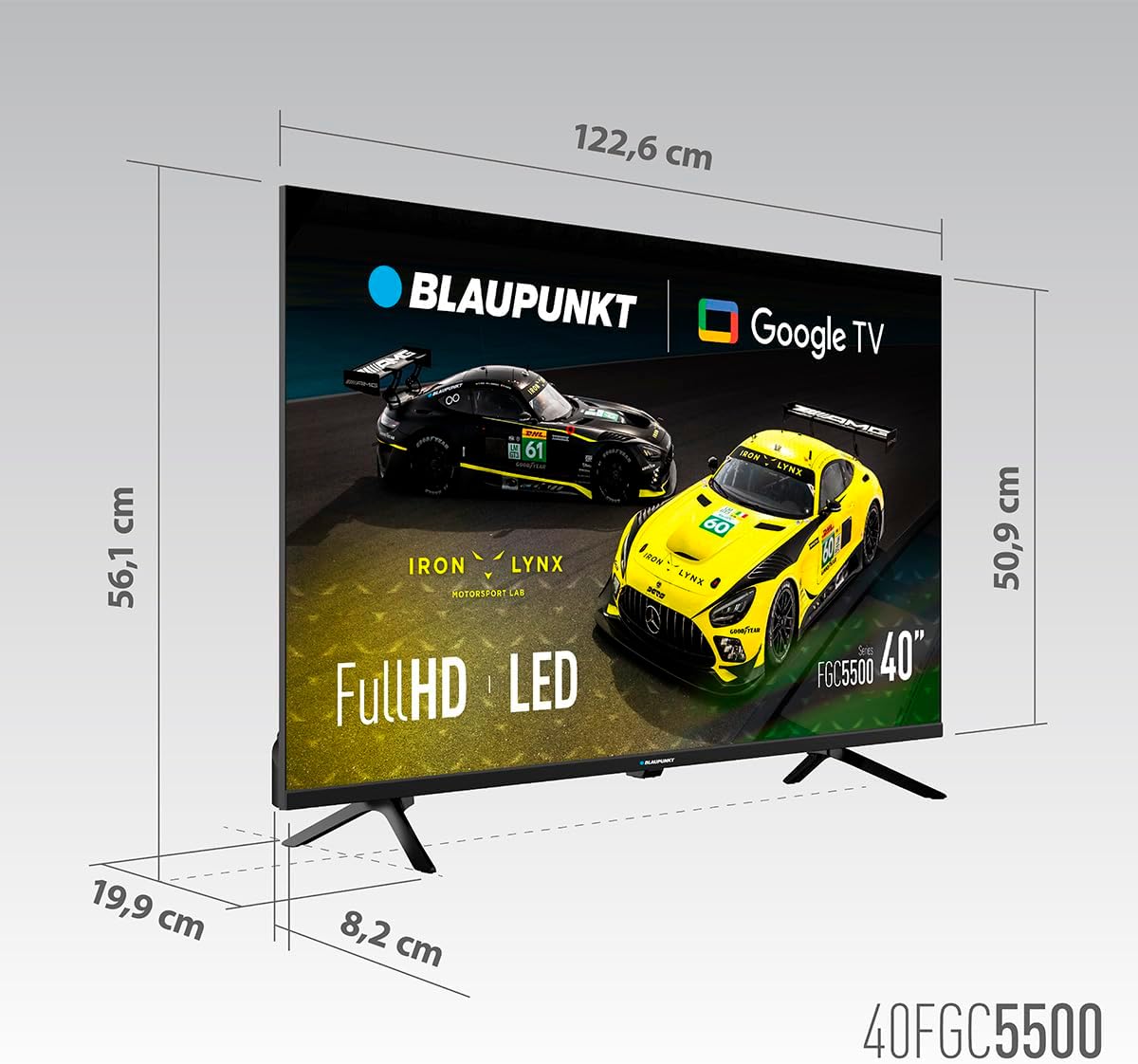
Dimensional diagram of the Blaupunkt 40FGC5500S 40-inch Full HD Google TV, showing its width, height, and depth.
| ميزة | التفاصيل |
|---|---|
| ماركة | بلاوبونكت |
| اسم الموديل | 40FGC5500S |
| حجم الشاشة | 40 inches (102 Centimeters) |
| تكنولوجيا العرض | قاد |
| نوع العرض | VA |
| دقة | 1920 × 1080 بكسل (Full HD) |
| معدل التحديث | 60 هرتز |
| نظام التشغيل | جوجل تي في |
| الاتصال | Bluetooth 5.0, Ethernet, HDMI (3 ports), USB (2 ports), Wi-Fi 2T2R, 3.5mm Audio |
| قوة إخراج الصوت | 16 واط (إجمالي) |
| المميزات الخاصة | Built-in Speaker, Chromecast, Sleep Timer, Wide Viewing Angle, HDR |
| توافق التركيب | VESA 200x200 mm (Wall Mount, Table Stand) |
| أبعاد المنتج (الطول × العرض × الارتفاع) | 89.3 × 19.9 × 56.1 سم |
| وزن المنتج | 5.6 كجم |
| تقييم كفاءة الطاقة | F |
الضمان والدعم
معلومات الضمان
للحصول على معلومات مفصلة حول الضمان، يرجى الرجوع إلى بطاقة الضمان المرفقة مع المنتج أو زيارة موقع Blaupunkt الرسمي. webيغطي الضمان عادةً عيوب التصنيع لفترة محددة من تاريخ الشراء.
دعم العملاء
If you require technical assistance, have questions about your product, or need to report a fault, please contact Blaupunkt customer support. Contact details can usually be found on the official Blaupunkt webيمكنك العثور على معلومات حول هذا الموضوع في الموقع أو في الوثائق المرفقة مع التلفزيون الخاص بك.


