مقدمة
This manual provides essential information for the safe and efficient use of your Samsung QN65Q6FAAFXZA 65-inch Q6F Series QLED 4K UHD AI Smart Tizen TV. Please read these instructions thoroughly before operating the television and retain them for future reference.
The Samsung Q6F Series QLED TV features a Q4 Lite Processor with AI Upscaling for enhanced visuals, 100% Color Volume with Quantum Dot technology for vibrant colors, and Quantum HDR with HDR10+ for improved contrast. It operates on the Tizen OS, offering access to a wide range of content and smart features.
معلومات هامة حول السلامة
- لا تعرض هذا الجهاز للمطر أو الرطوبة.
- لا تسد أي فتحات تهوية. ثبّت المنتج وفقًا لتعليمات الشركة المصنعة.
- لا تقم بالتثبيت بالقرب من أي مصادر للحرارة مثل المشعات أو فتحات التدفئة أو المواقد أو أي أجهزة أخرى (بما في ذلك ampالمُضخِّمات) التي تنتج الحرارة.
- حماية سلك الطاقة من أن يمشي عليه أحد أو يضغط عليه.
- استخدم فقط المرفقات/الملحقات المحددة من قبل الشركة المصنعة.
- قم بإحالة جميع أعمال الصيانة إلى موظفي الخدمة المؤهلين.
ماذا يوجد في الصندوق
عند تفريغ الأمتعة، تأكد من وجود جميع العناصر المدرجة أدناه وعدم تعرضها للتلف:
- تلفزيون سامسونج Q6F Series QLED 4K UHD AI الذكي بنظام تايزن (2025)
- دليل المستخدم
- كابل الطاقة
- جهاز التحكم عن بعد
- مكونات حامل التلفاز

Image: The Samsung Q6F Series QLED 4K UHD AI Smart Tizen TV, accompanied by its remote control, power cable, and stand components.
يثبت
1. Physical Assembly (Stands)
Carefully place the TV screen-down on a soft, flat surface to prevent damage. Attach the stand components to the designated slots on the bottom of the TV using the provided screws. Ensure the stands are securely fastened.
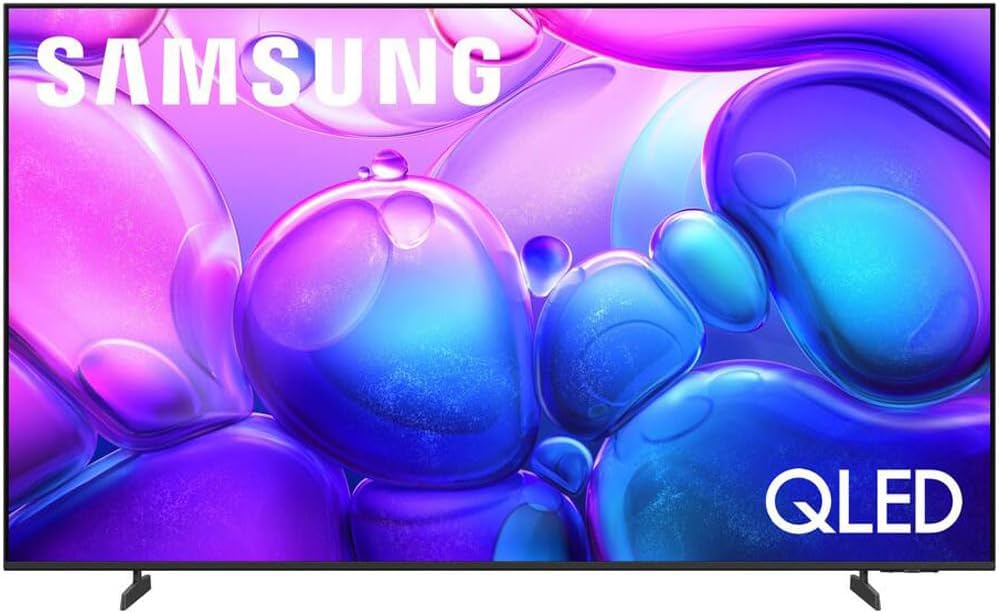
الصورة: الجبهة view of the Samsung Q6F Series QLED TV, showcasing the attached stand legs providing stable support.

الصورة: الجانب المحترفfile of the Samsung Q6F Series QLED TV, illustrating its slim design and the securely attached stand.
2. الاتصالات
Connect the power cable to the TV's power input and then to a wall outlet. For external devices like Blu-ray players or gaming consoles, use HDMI cables. For internet access, connect an Ethernet cable to the LAN port or connect wirelessly during initial setup.

الصورة: تفصيلية view of the rear connection panel of the Samsung Q6F Series QLED TV, showing HDMI, USB, and Ethernet ports.
3. Initial Power On & Smart Setup
Once powered on, follow the on-screen instructions to complete the initial setup. This includes selecting your language, connecting to a Wi-Fi network, and configuring the Tizen Smart Hub. You will be guided through setting up your Samsung account and accessing various streaming services.
تشغيل التلفزيون الخاص بك
Smart Hub & Tizen OS
The Tizen Smart Hub provides intuitive access to live TV, streaming apps, and connected devices. Navigate using the remote control to browse content, customize your home screen, and manage settings.
إعدادات الصورة
Your Q6F Series QLED TV offers advanced picture technologies:
- Q4 Lite Processor with AI Upscaling: Automatically enhances content to near 4K resolution, optimizing visuals and color.
- حجم اللون 100% مع Quantum Dot: Delivers over a billion shades of accurate, vibrant colors that remain true at any brightness level.
- تقنية Quantum HDR مع HDR10+: Reveals fine details in both the darkest and brightest scenes, providing a more dynamic and lifelike image.
- Motion Xcelerator Technology: Ensures smooth motion and reduces blur in fast-paced scenes, ideal for sports and gaming.

Image: A Samsung QLED TV screen showing a vibrant scene, highlighting the 100% Color Volume with Quantum Dot technology.

Image: A close-up of the Samsung Q4 Lite Processor chip, illustrating its advanced technology for optimizing and upscaling content to 4K resolution.
إعدادات الصوت
استمتع بتجربة صوتية غامرة مع:
- صوت تتبع الكائنات الخفيف: Audio moves dynamically with the action on screen, creating a more engaging experience.
- كيو سيمفوني: When paired with a compatible Samsung soundbar, the TV and soundbar speakers work in harmony to deliver a richer, more enveloping surround sound.
المساعدون الصوتيون
Your TV supports various voice assistants for convenient control. Use your remote's voice command button to search for content, adjust settings, or control smart home devices.
صيانة
تنظيف التلفاز
لتنظيف الشاشة، امسحها برفق بقطعة قماش ناعمة وخالية من الوبر. أما بالنسبة للبقع الصعبة، فامسحها برفق بقطعة قماش ناعمة وخالية من الوبر.ampen the cloth with water or a specialized screen cleaner. Avoid using harsh chemicals or abrasive materials. For the TV frame, use a soft, dry cloth.
العناية والتعامل
Avoid placing heavy objects on the TV. Do not expose the TV to direct sunlight or extreme temperatures. Ensure proper ventilation around the TV to prevent overheating.
استكشاف الأخطاء وإصلاحها
لا يوجد طاقة
- تأكد من توصيل كابل الطاقة بشكل آمن بالتلفزيون والمقبس الكهربائي في الحائط.
- تأكد من أن منفذ الحائط يعمل عن طريق توصيل جهاز آخر.
لا يوجد صورة/صوت
- تأكد من تحديد مصدر الإدخال الصحيح على التلفزيون.
- Check all HDMI or other audio/video cables for secure connections.
- في حالة استخدام أجهزة صوتية خارجية، تأكد من تشغيلها وتكوينها بشكل صحيح.
جهاز التحكم عن بعد لا يعمل
- استبدال البطاريات في جهاز التحكم عن بعد.
- تأكد من عدم وجود أي عوائق بين جهاز التحكم عن بعد ومستشعر التلفزيون.
تحديد
| ميزة | التفاصيل |
|---|---|
| ماركة | سامسونج |
| رقم الموديل | E1SAMQN65Q6F |
| حجم الشاشة | 64.5 بوصة |
| تكنولوجيا العرض | تلفزيون كيو إل إي دي |
| دقة | 4K |
| معدل التحديث | 60 هرتز |
| نسبة العرض إلى الارتفاع | 16:9 |
| أبعاد المنتج | 8.7 بوصة عمق × 56.9 بوصة عرض × 34.7 بوصة ارتفاع |
| وزن العنصر | 32 رطل |
| تكنولوجيا الاتصال | بلوتوث |
| المميزات الخاصة | 100% Color Volume with Quantum Dot, Motion Xcelerator, Object Tracking Sound Lite, Q4 Lite Processor |
الضمان والدعم
Your Samsung Q6F Series QLED TV includes a standard manufacturer's protection. Additionally, this product comes with an exclusive 26-month extended protection plan.
For technical support, troubleshooting assistance, or warranty claims, please refer to the contact information provided in your product's warranty card or visit the official Samsung support webموقع.
Online resources, FAQs, and software updates are also available through the Samsung support portal.


