1. المقدمة
Thank you for choosing the pTron Bassbuds Trendz Open Ear Wireless Earbuds. These earbuds are designed to provide a comfortable and pressure-free listening experience while keeping you aware of your surroundings. Featuring 14.2mm dynamic drivers, Bluetooth v6.0 connectivity, and AI-ENC for clear calls, these earbuds offer up to 45 hours of total playtime with the charging case. This manual provides detailed instructions for setup, operation, and maintenance to ensure optimal performance.
2. محتويات العبوة
- pTron Bassbuds Trendz Open Ear Wireless Earbuds
- حافظة الشحن
- كابل شحن USB من النوع C
- دليل المستخدم
3. انتهى المنتجview
The pTron Bassbuds Trendz feature an open-ear design for comfort and situational awareness. They are equipped with advanced audio and connectivity technologies.

Image: pTron Bassbuds Trendz Open Ear Wireless Earbuds and their charging case.
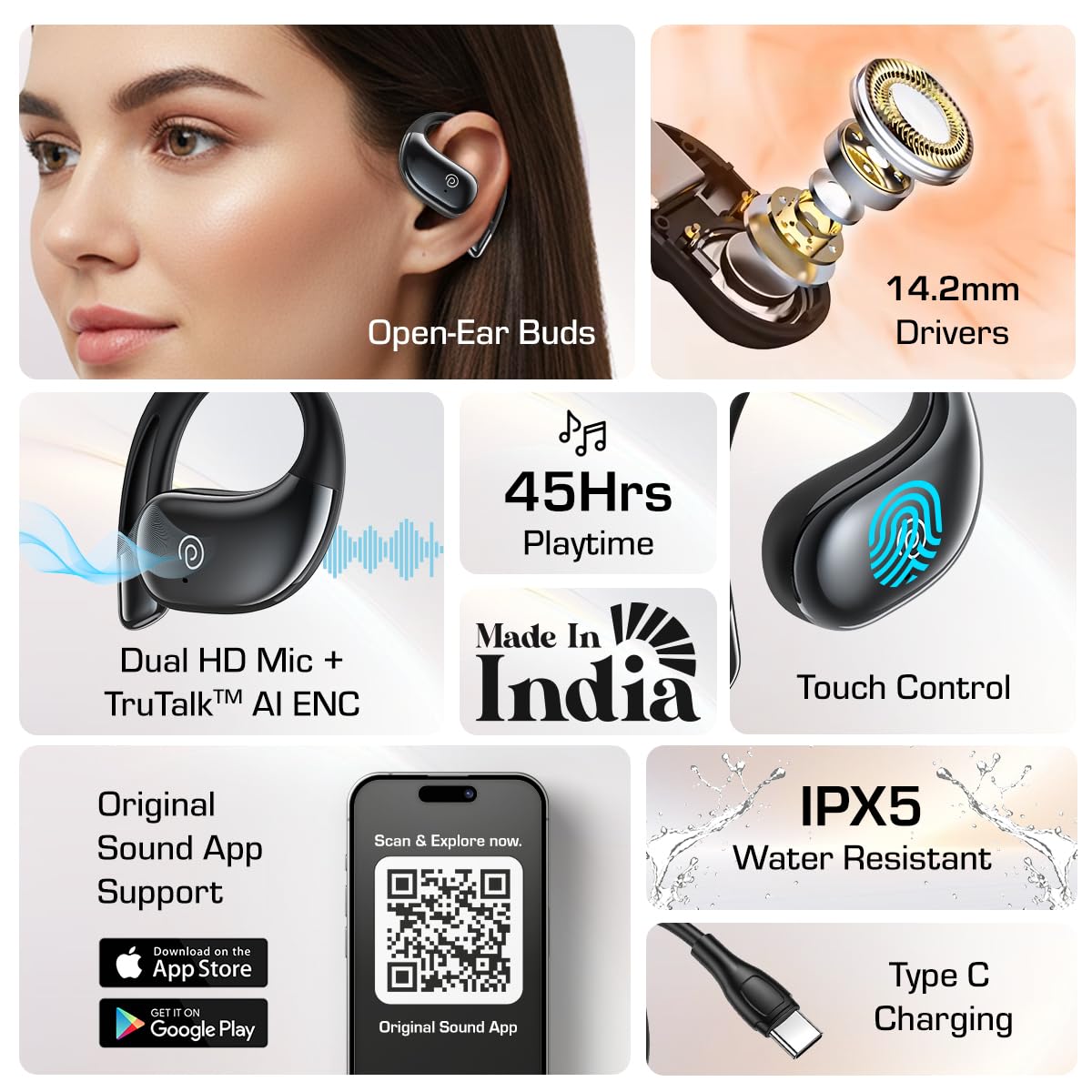
الصورة: أكثر منview of key features including open-ear design, 14.2mm drivers, 45 hours playtime, Dual HD Mic, Touch Control, App Support, IPX5 water resistance, and Type-C charging.
3.1. SafeBeats Open-Ear Design
The SafeBeats design ensures a comfortable and pressure-free fit, allowing you to remain aware of your surroundings during use, which is ideal for outdoor activities.

Image: A person wearing the pTron Bassbuds Trendz, highlighting the open-ear design for safe listening.
3.2. Audio Drivers
Each earbud is equipped with a 14.2mm dynamic driver, engineered to deliver clear stereo sound quality. For the best audio experience and minimal sound leakage, it is recommended to keep the volume between 60%-70%.

الصورة: انفجار view illustrating the internal components of the 14.2mm dynamic driver.
4. الإعداد
4.1. شحن سماعات الأذن والعلبة
Before first use, fully charge the earbuds and the charging case. Use the provided Type-C USB cable to connect the charging case to a power source. The earbuds will charge automatically when placed inside the case.
- عمر البطارية: The earbuds offer up to 45 hours of total playtime with the charging case.
- مؤشر الشحن: Refer to the LED indicators on the case for charging status.

Image: A visual representation of the 45-hour total playtime provided by the earbuds and their charging case.
4.2. الاقتران بجهاز
The pTron Bassbuds Trendz utilize Bluetooth v6.0 for quick and stable wireless connectivity.
- تأكد من شحن وسادات الأذن.
- افتح علبة الشحن. ستدخل سماعات الأذن تلقائيًا في وضع الاقتران.
- على جهازك (الهاتف الذكي، الجهاز اللوحي، الكمبيوتر المحمول)، قم بتمكين البلوتوث.
- بحث عن available Bluetooth devices and select "pTron Bassbuds Trendz" from the list.
- بمجرد الاتصال، سوف تسمع صوتًا تنبيهيًا، وستتغير أضواء مؤشر سماعات الأذن.

Image: A close-up graphic highlighting the advanced Bluetooth V6.0 chip for quick and stable wireless connection.
5. تعليمات التشغيل
5.1. أدوات التحكم التي تعمل باللمس
The earbuds feature intuitive touch controls for managing audio playback, calls, and voice assistant functions.
- تشغيل/إيقاف مؤقت: ضغطة واحدة على أي سماعة أذن.
- المسار التالي: اضغط مرتين على سماعة الأذن اليمنى.
- المسار السابق: اضغط مرتين على سماعة الأذن اليسرى.
- الرد/إنهاء المكالمة: ضغطة واحدة على أي سماعة أذن.
- رفض المكالمة: اضغط مع الاستمرار على أي من سماعات الأذن لمدة ثانيتين.
- تنشيط مساعد الصوت: اضغط ثلاث مرات على أي سماعة أذن.
5.2. Call Management with AI-ENC
The Bassbuds Trendz are equipped with Dual HD Microphones and AI-ENC (Environmental Noise Cancellation) technology to ensure crystal-clear calls by reducing background noise.

Image: A person making a call with the earbuds, illustrating the TruTalk AI-ENC feature for clear communication.
5.3. Original Sound App Support
Enhance your listening experience by downloading the 'Original Sound' app. The app allows you to customize touch controls, choose or create sound EQs, and switch between game and music modes.

Image: A smartphone screen displaying the 'Original Sound' app interface with a QR code for easy download. Scan the QR code or visit ptron.in/pages/original-sound-app للتحميل.
6. الرعاية والصيانة
- تنظيف: نظّف سماعات الأذن وعلبة الشحن بانتظام بقطعة قماش ناعمة وجافة. تجنّب استخدام المواد الكيميائية القاسية أو المواد الكاشطة.
- مقاومة الماء: The earbuds are IPX5 water resistant, meaning they can withstand splashes and sweat. Do not submerge them in water or expose them to heavy rain.
- تخزين: قم بتخزين سماعات الأذن في علبة الشحن الخاصة بها عند عدم استخدامها لحمايتها وإبقائها مشحونة.
- درجة حرارة: تجنب تعريض سماعات الأذن لدرجات حرارة شديدة (ساخنة أو باردة) لأن ذلك قد يؤثر على عمر البطارية والأداء.
7. استكشاف الأخطاء وإصلاحها
- سماعات الأذن غير مقترنة: Ensure both earbuds are charged and out of the case. Turn off and on your device's Bluetooth, then try pairing again. If issues persist, reset the earbuds (refer to the app or pTron support for specific reset instructions).
- لا يوجد صوت من سماعة أذن واحدة: Place both earbuds back in the charging case, close it, then open it again. Ensure they are properly connected to your device.
- قضايا الشحن: افحص كابل Type-C ومحول الطاقة. تأكد من أن نقاط التلامس الخاصة بالشحن على سماعات الأذن وداخل العلبة نظيفة وخالية من أي شوائب.
- ضعف جودة المكالمة: Ensure the earbuds are positioned correctly. Check for strong Bluetooth signal. Use the 'Original Sound' app to verify settings.
- عناصر التحكم باللمس لا تستجيب: تأكد من أن أصابعك نظيفة وجافة. حاول إعادة تشغيل سماعات الأذن بوضعها في العلبة ثم إخراجها.
8. المواصفات
| ميزة | مواصفة |
|---|---|
| اسم الموديل | Bassbuds Trendz |
| تكنولوجيا الاتصال | لاسلكي (بلوتوث) |
| نسخة البلوتوث | 6.0 |
| مدى البلوتوث | 10 أمتار |
| نوع برنامج تشغيل الصوت | سائق ديناميكي |
| حجم برنامج تشغيل الصوت | 14.2 مليمتر |
| عمر البطارية | 45 ساعة (مع علبة الشحن) |
| طريقة التحكم | يلمس |
| ميكروفون | Dual HD Mic with AI-ENC |
| مستوى مقاومة الماء | IPX5 |
| مادة | أكريلونيتريل بوتادين ستايرين (ABS) |
| وزن العنصر | 57 جرام |
| أبعاد المنتج | 8.5 × 6 × 2.8 سم |
9. الضمان والدعم
The pTron Bassbuds Trendz come with a ضمان الشركة المصنعة لمدة 6 أشهر on manufacturing defects from the date of purchase.
For customer support, inquiries, or warranty claims, please contact:
- الشركة المصنعة: PALRED ELECTRONICS PVT. LTD.
- الاتصال بخدمة العملاء: 040-67138888
- دعم البريد الإلكتروني: Support@ptron.in


