مقدمة
This manual provides essential information for setting up and operating your DOOGEE Fire 5 Ultra Rugged Phone. Please read it carefully to ensure proper use and to maximize the device's capabilities. The DOOGEE Fire 5 Ultra is designed for durability and performance in challenging environments, featuring robust construction, a large battery, and advanced functionalities.
محتويات الحزمة
تأكد من وجود جميع العناصر في العبوة:
- DOOGEE Fire 5 Ultra Cellphone
- كابل يو اس بي
- شاحن
- غشاء واقٍ (مطبق مسبقًا)
- دليل المستخدم
- بطاقة الضمان
- أداة فتح فتحات البطاقات

Image: Contents of the DOOGEE Fire 5 Ultra box, including the phone, charger, USB cable, protective film, user manual, warranty card, and card slot opener.
Video: An unboxing video of the DOOGEE Fire 5 Ultra, showcasing the phone and its accessories as they are removed from the packaging.
الميزات الرئيسية انتهتview
Explore the main features and design aspects of the DOOGEE Fire 5 Ultra.
Video: A 3D animated overview of the DOOGEE Fire 5 Ultra, highlighting its rugged design, dual camping lights, and camera system.
دليل الإعداد
1. تركيب بطاقة SIM وبطاقة التخزين
The DOOGEE Fire 5 Ultra supports dual Nano SIM cards and a TF card for expandable storage up to 2TB. Use the provided card slot opener to access the SIM/TF card tray.
- حدد مكان درج بطاقة SIM على جانب الهاتف.
- Insert the card slot opener into the small hole next to the tray and press gently until the tray ejects.
- Place your Nano SIM card(s) and/or TF card into the designated slots on the tray. Ensure proper orientation as indicated on the tray.
- قم بإعادة إدخال الدرج داخل الهاتف بعناية حتى يستقر في مكانه.
2. الشحن الأولي
Before first use, fully charge your device. The phone comes with a 13000mAh battery and supports 18W fast charging.
- قم بتوصيل كابل USB بمحول الشاحن.
- قم بتوصيل محول الشاحن بمأخذ الطاقة.
- قم بتوصيل طرف USB-C من الكابل بمنفذ الشحن الموجود على هاتفك.
- اترك الهاتف يشحن حتى يظهر مؤشر البطارية 100%.
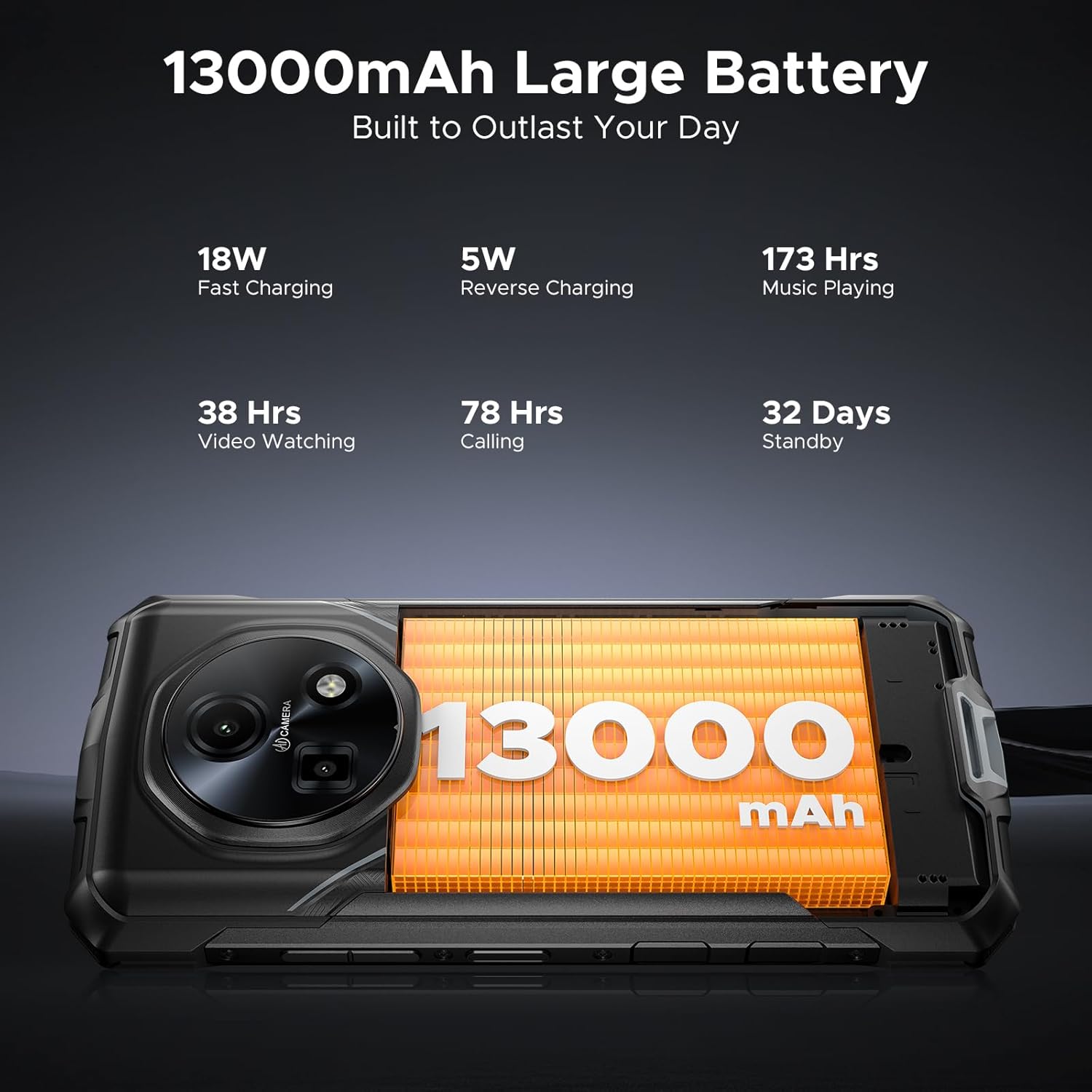
Image: Close-up of the DOOGEE Fire 5 Ultra's charging port with a USB-C cable connected.
تشغيل جهازك
تشغيل/إيقاف التشغيل وقفل الشاشة
- To power on, press and hold the Power button until the DOOGEE logo appears.
- لإيقاف التشغيل، اضغط مع الاستمرار على زر الطاقة، ثم حدد "إيقاف التشغيل" من الخيارات.
- To lock the screen, briefly press the Power button. To unlock, press the Power button and swipe up, or use fingerprint/face unlock.
ثنائي سيampأضواء جي
The DOOGEE Fire 5 Ultra features dual camping lights on the back, providing illumination for various situations. These lights offer three modes: illumination, strobe, and SOS.
- التفعيل: Access the quick settings panel or a dedicated app to control the campأضواء جي.
- الأوضاع: Switch between steady illumination, strobe (flashing), and SOS (Morse code for distress).
- Brightness & Timer: Adjust the brightness level and set a timer for automatic shut-off through the phone's settings or the dedicated app.

Image: The back of the DOOGEE Fire 5 Ultra showing the dual camping lights illuminated.
Video: A demonstration of the DOOGEE Fire 5 Ultra's powerful dual camping lights, showcasing their brightness and different modes.
وظائف الكاميرا
The phone is equipped with a 48MP AI main camera and an 8MP front camera. The camera app offers various modes for photography and video recording.
- الكاميرا الرئيسية: Supports AI shooting, night mode, panorama, and 2K video recording.
- الكاميرا الأمامية: Features beauty mode for enhanced selfies and supports face unlock.
- وصول: Open the Camera app from the home screen or lock screen.

Image: Close-up of the DOOGEE Fire 5 Ultra's rear camera module.
العرض والملاحة
The 6.6-inch HD IPS display features a 90Hz refresh rate for smooth visuals.
- ملاحة: Use standard Android gestures or on-screen navigation buttons.
- الوضع المظلم: Enable Dark Mode in display settings for comfortable viewجي في الإضاءة الخافتة.
Video: A demonstration of the DOOGEE Fire 5 Ultra's 6.6-inch HD+ IPS display with a 90Hz refresh rate, showing smooth visuals.
ميزات الأمان
- Side Fingerprint ID: Register your fingerprints in the Security settings for quick and secure unlocking. The sensor is located on the side of the device.
- معرف الوجه: قم بإعداد خاصية التعرف على الوجه لفتح القفل بسهولة.
Connectivity and Other Functions
- 4G LTE: Ensures stable cellular connectivity.
- NFC: For contactless payments and quick data transfer. Activate in Settings > Connected devices > NFC.
- او تي جي: On-The-Go functionality allows connecting USB devices like flash drives or external keyboards.
- راديو FM: Listen to FM radio stations (may require headphones as an antenna).
المتانة والحماية
The DOOGEE Fire 5 Ultra is built to withstand harsh conditions, certified with industry-leading durability standards.
- تصنيف IP68/IP69K: This certification indicates the device is highly resistant to dust and water. It can withstand immersion in 1.5 meters of water for up to 30 minutes and is protected against high-pressure, high-temperature water jets.
- MIL-STD-810H Compliance: Tested against military standards for durability, the phone is resistant to drops, shocks, vibrations, and extreme temperatures, making it suitable for industrial job sites and outdoor adventures.

Image: The DOOGEE Fire 5 Ultra shown in various rugged scenarios, including being dropped, submerged in water, and covered in mud, illustrating its IP68/IP69K and MIL-STD-810H ratings.
الأداء والتخزين
- المعالج: Powered by the MediaTek Helio G81 octa-core processor, providing smooth performance for daily tasks and light gaming.
- نظام التشغيل: Runs on Android 15, offering the latest features and security updates.
- جيميني للذكاء الاصطناعي: Integrated Gemini AI optimizes performance and power efficiency based on usage patterns.
- كبش: Features 32GB RAM (8GB physical + 24GB extended virtual RAM) for efficient multitasking.
- التخزين الداخلي: Comes with 256GB of internal storage.
- مساحة تخزين قابلة للتوسعة: Supports storage expansion up to 2TB via a TF (microSD) card (sold separately).

Image: Visual representation of the MediaTek Helio G81 Octa-Core chipset and the 32GB RAM + 256GB ROM configuration.
Video: An animation highlighting the MediaTek Helio G81 Octa-Core processor and its role in the DOOGEE Fire 5 Ultra's performance.
إدارة البطارية
The DOOGEE Fire 5 Ultra is equipped with a large 13000mAh battery, designed for extended use.
- سعة: 13000mAh for prolonged operation, ideal for outdoor activities or remote work.
- الشحن السريع: Supports 18W fast charging to reduce recharge times.
- الشحن العكسي OTG: The phone can act as a power bank to charge other small devices (e.g., headphones, flashlights) using an OTG cable (not included).
Image: The DOOGEE Fire 5 Ultra displaying its 13000mAh battery capacity and charging status.
Video: A visual representation of the DOOGEE Fire 5 Ultra's 13000mAh large battery and its fast charging capabilities.
المواصفات الفنية
| ميزة | مواصفة |
|---|---|
| اسم الموديل | Fire5 Ultra |
| ماركة | دوجي |
| نظام التشغيل | أندرويد 15 |
| نموذج وحدة المعالجة المركزية | معالج MediaTek Helio G81 ثماني النواة |
| كبش | 32 جيجابايت (8 جيجابايت فعلي + 24 جيجابايت افتراضي) |
| سعة تخزين الذاكرة | 256 جيجابايت (قابلة للتوسيع حتى 2 تيرابايت عبر بطاقة TF) |
| حجم الشاشة | 6.6 Inches HD+ IPS Display |
| دقة | 2560 × 1440 |
| معدل التحديث | 90 هرتز |
| الكاميرا الرئيسية | كاميرا رئيسية بتقنية الذكاء الاصطناعي بدقة 48 ميجابكسل |
| الكاميرا الأمامية | كاميرا أمامية بدقة 8 ميجا بكسل |
| سعة البطارية | 13000 مليamp ساعات |
| الشحن | شحن سريع بقوة 18 واط، وشحن عكسي بتقنية OTG |
| المميزات الخاصة | Dual SIM, Octa Core Processor, Water Resistant (IP68/IP69K), MIL-STD-810H, Dual Camping Lights (1200LM), NFC, GPS, Side Fingerprint ID, Face ID, FM Radio |
| أبعاد المنتج | 6.95 × 3.25 × 0.74 بوصة |
| وزن العنصر | 13.9 أونصات |
استكشاف الأخطاء وإصلاحها
If you encounter issues with your DOOGEE Fire 5 Ultra, refer to the following common solutions:
- الجهاز لا يعمل: تأكد من شحن البطارية. وصّل الشاحن وانتظر بضع دقائق قبل إعادة تشغيل الجهاز.
- الشاشة لا تستجيب: حاول إعادة تشغيل الجهاز عن طريق الضغط على زر الطاقة لمدة 10-15 ثانية تقريبًا حتى يتم إعادة تشغيله.
- مشاكل الاتصال بالشبكة: تأكد من إدخال شريحة SIM بشكل صحيح. تحقق من تفعيل بيانات الجوال في الإعدادات. إذا استمرت المشكلة، فاتصل بمزود خدمة الشبكة.
- تعطل التطبيقات أو تجميدها: Clear the cache of the problematic app in Settings > Apps. If the issue continues, try reinstalling the app.
- الأداء البطيء: Close unnecessary background applications. Clear cached data regularly. Consider performing a factory reset if performance significantly degrades (back up your data first).
- مشاكل الشحن: Ensure the USB cable and charger are securely connected and undamaged. Try a different power outlet or charger if available.
الضمان والدعم
Your DOOGEE Fire 5 Ultra comes with a manufacturer's warranty. Please refer to the included warranty card for specific terms and conditions.
- فترة الضمان: Typically includes a 1-year warranty service from the manufacturer.
- سياسة العائدات: Products purchased may be eligible for return within 30 days of receipt, subject to the retailer's return policy.
- خدمة العملاء: For technical assistance or warranty claims, please contact DOOGEE customer support. Refer to the contact information provided on the warranty card or the official DOOGEE webموقع.

Image: DOOGEE's service commitment, including 1-year warranty and customer service details.


