1. المقدمة
The VEVOR Emergency Weather Radio MD-091 is a multi-functional device designed for emergency preparedness, outdoor activities, and daily use. It integrates FM/AM/WB/NOAA radio reception, multiple power sources, a powerful flashlight, a reading light, and an SOS alarm. This manual provides detailed instructions for the safe and effective operation of your radio.

انتهىview of the VEVOR Emergency Weather Radio, showcasing its compact design, integrated flashlight, reading light, and connectivity options for charging a smartphone and using headphones.
2. تعليمات السلامة
- لا تعرض الجهاز لدرجات حرارة عالية، أو أشعة الشمس المباشرة، أو الرطوبة العالية.
- تجنب إسقاط الراديو أو تعريضه لصدمات قوية.
- Keep the device away from water. While it has an IPX3 rating for damp conditions, it is not waterproof for submersion.
- Do not attempt to disassemble or modify the radio. This will void the warranty and may cause damage or injury.
- استخدم فقط كابل USB المرفق أو كابلًا معتمدًا مماثلًا للشحن.
- تخلص من البطارية والجهاز وفقًا للوائح المحلية.
3. انتهى المنتجview
Familiarize yourself with the various components and controls of your VEVOR Emergency Weather Radio.

A comprehensive diagram labeling the key features of the radio, such as the emergency power bank, Type-C input, reading light, survival bracelet with compass, headphone jack, dual USB output, flashlight, battery indicator, FM/AM/WB radio, weather alert radio, and SOS alarm.
الضوابط والوظائف:
- مقبض الطاقة/الصوت: Turn clockwise to power on and adjust volume.
- محدد النطاق: Switch between FM, AM, and WB (Weather Band).
- موجة الضبط: Adjust frequency to find radio stations.
- زر الاستغاثة: Press and hold to activate the emergency alarm and flashing light.
- زر المصباح: Activate the front flashlight.
- Reading Light Switch: Turn on/off the top reading light.
- منافذ إخراج USB: لشحن الأجهزة الخارجية.
- منفذ الإدخال من النوع C: لشحن البطارية الداخلية للراديو.
- مقبس سماعة الرأس: للاستماع الخاص.
- هوائي تلسكوبي: Extend for better radio reception.
- لوحة الطاقة الشمسية: For supplementary charging.
- كرنك اليد: لتوليد الطاقة يدوياً.
4. الإعداد
4.1 الشحن الأولي
Before first use, fully charge the radio's internal 8000mAh battery using the provided USB-C cable. Connect the cable to the Type-C input port on the radio and a standard USB power adapter (not included) or a computer USB port. The battery indicator lights will show charging progress.
4.2 تمديد الهوائي
For optimal radio reception, fully extend the telescopic antenna when listening to FM or Weather Band (WB) broadcasts.
5. تعليمات التشغيل
5.1 تشغيل/إيقاف التشغيل والتحكم في مستوى الصوت
تدوير مقبض الطاقة/الحجم clockwise to turn on the radio and increase the volume. Rotate counter-clockwise to decrease volume and turn off the radio.
5.2 Radio Operation (FM/AM/WB)
- Select the desired band (FM, AM, or WB) using the مختار الفرق يُحوّل.
- Extend the telescopic antenna for better reception, especially for FM and WB.
- تدوير موجة الضبط to scan for stations. The frequency will be displayed on the screen.
- For Weather Band (WB), tune to one of the 7 NOAA channels (162.400 MHz to 162.550 MHz).
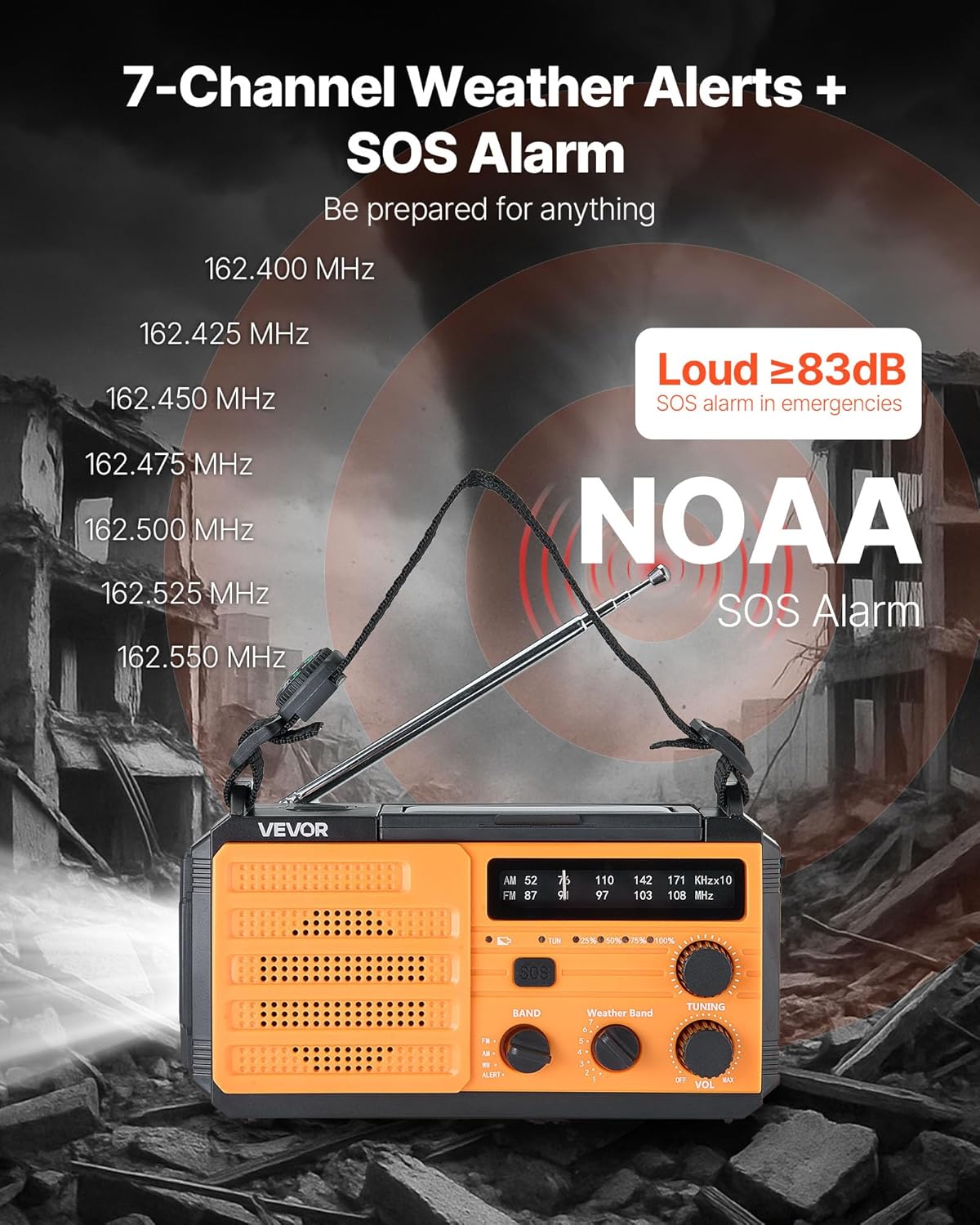
This image illustrates the radio's capability to receive 7 NOAA weather channels and activate a loud SOS alarm (over 83dB) during emergencies, with frequencies listed for reference.
5.3 NOAA Weather Alert Function
When the radio is set to the WB band, it can automatically detect and alert you to severe weather warnings from NOAA. A green light indicates normal operation, while a yellow light flashing with an alert sound warns of an impending weather event.
5.4 إنذار SOS
في حالة الطوارئ، اضغط مع الاستمرار على زر الاستغاثة to activate a loud alarm (≥83dB) and a flashing light. This feature is designed to attract attention and signal for help. Press the button again briefly to deactivate.
5.5 وظائف الإضاءة

This image displays the radio's versatile lighting features, including a soft 6500K reading light for tasks and a powerful flashlight for long-range illumination, suitable for various emergency and outdoor scenarios.
- مصباح يدوي: اضغط على زر المصباح اليدوي on the side to turn on the 1W high-beam LED flashlight. Press again to cycle through modes (high, low, off).
- ضوء القراءة: Flip up the solar panel to reveal the reading light. Use the قراءة مفتاح الضوء to turn on/off the 6 COB LEDs for soft area lighting.
5.6 شحن الأجهزة الخارجية (بنك الطاقة)
The radio can act as a power bank to charge your mobile devices. Connect your device's USB charging cable to one of the منافذ إخراج USB on the radio. Ensure the radio has sufficient battery charge for this function.
5.7 Multiple Power Sources

A visual guide to the various power sources available for the radio, including USB charging, solar panel, hand crank, built-in lithium battery, and Type-C input, ensuring continuous operation in diverse situations.
- شحن USB-C: Connect the provided USB-C cable to the منفذ إدخال من النوع C and a power source. This is the primary method for a full charge.
- الشحن بالطاقة الشمسية: Place the radio with the solar panel facing direct sunlight. This method is primarily for maintaining the battery charge or for emergency trickle charging, not for a full charge from empty.
- كرنك اليد: Rotate the hand crank clockwise or counter-clockwise at a steady pace (approximately 130-150 RPM) to generate power. Cranking for 1 minute can provide several minutes of radio use or flashlight operation.
- البطارية الداخلية: The built-in 8000mAh battery powers all functions. Monitor the battery indicator for charge level.
6. الصيانة
- تنظيف: امسح الراديو بقطعة ناعمة ، دamp القماش. لا تستخدم المنظفات أو المذيبات الكاشطة.
- تخزين: Store the radio in a cool, dry place away from direct sunlight and extreme temperatures. If storing for extended periods, charge the battery to at least 50% every 3-6 months to prolong battery life.
- العناية بالبطارية: Avoid fully discharging the battery frequently. Regular partial charges are better for lithium-ion battery longevity.
7. استكشاف الأخطاء وإصلاحها
| مشكلة | السبب المحتمل | حل |
|---|---|---|
| الراديو لا يعمل. | نفدت طاقة البطارية. | اشحن الراديو باستخدام منفذ USB-C أو الطاقة الشمسية أو ذراع التدوير اليدوي. |
| استقبال راديو ضعيف. | الهوائي غير ممتد؛ إشارة ضعيفة. | قم بتمديد الهوائي التلسكوبي بالكامل. حاول تغيير موضع الراديو. |
| الجهاز الخارجي لا يتم شحنه. | Radio battery too low; incorrect cable. | Ensure radio battery is sufficiently charged. Use a compatible USB cable. |
| Hand crank is stiff or not generating power. | Improper cranking speed; internal issue. | Crank at a steady, moderate pace. If issue persists, contact support. |
8. المواصفات

This image provides the physical dimensions of the radio (6.89 x 3.15 x 3.86 inches) and a summary of its technical specifications, including model number, power, battery capacity, waterproof rating, and materials.
| ميزة | التفاصيل |
|---|---|
| رقم الموديل | ام دي-091 |
| سعة البطارية | 8000 مللي أمبير |
| نطاقات الراديو المدعومة | FM, AM, WB (7-Band NOAA) |
| مصدر الطاقة | Battery Powered (Internal), USB, Solar, Hand Crank |
| تكنولوجيا الاتصال | USB (Type-C input, Dual USB output) |
| المميزات الخاصة | Portable, SOS Alarm, Flashlight (1W), Reading Light (6 COB LEDs), Compass |
| تصنيف مقاومة الماء | IPX3 |
| أبعاد المنتج | 6.89 بوصة طول × 3.15 بوصة عرض × 3.86 بوصة ارتفاع (175 × 80 × 98 مم) |
| وزن العنصر | 1.2 رطل (0.545 كجم) |
| Shell Main Material | نظام ABS |
| المكونات المضمنة | 1 x Emergency Weather Radio, 1 x USB Cable, Owner's Manual |
9. الضمان والدعم
For warranty information, technical support, or any questions regarding your VEVOR Emergency Weather Radio MD-091, please refer to the official VEVOR webالموقع أو تواصل مع خدمة العملاء مباشرةً. احتفظ بإيصال الشراء لطلبات الضمان.
مسؤول فيفور Webموقع: www.vevor.com


