1. المقدمة
يُعدّ جهاز OREI BK-4927 محوّلاً متطوراً لاستخراج الصوت عبر HDMI بدقة 8K وأربعة منافذ، مصمماً لتبسيط إعدادات الصوت والفيديو. يتيح لك هذا الجهاز توصيل ما يصل إلى أربعة مصادر HDMI بشاشة عرض واحدة بدقة 8K أو 4K، مع استخراج الصوت في الوقت نفسه لأنظمة الصوت الخارجية. يدعم الجهاز أحدث معايير HDMI 2.1 وHDCP 2.3، مما يضمن التوافق مع أجهزة الوسائط الحديثة والمحتوى عالي الدقة.
محتويات الحزمة:
- مفتاح استخراج الصوت HDMI من OREI BK-4927 عدد 1
- محول طاقة واحد 100-240 فولت (جهد عالمي)tagالدعم الإلكتروني)
- 1 × جهاز التحكم عن بعد
- 1 × دليل المستخدم

صورة: محول HDMI من طراز OREI BK-4927 وملحقاته المرفقة.
2. الإعداد والاتصالات
اتبع هذه الخطوات لإعداد مفتاح استخراج الصوت HDMI الخاص بك OREI BK-4927 بشكل صحيح.
2.1 توصيل مصادر الإدخال:
- قم بتوصيل ما يصل إلى أربعة أجهزة مصدر HDMI (مثل أجهزة ألعاب الفيديو، ومشغلات Blu-ray، وأجهزة البث) بـ في 1، في 2، في 3، و في 4 منافذ إدخال HDMI في الجزء الخلفي من جهاز BK-4927 باستخدام كابلات HDMI 2.1 عالية الجودة.
2.2 توصيل شاشة العرض:
- قم بتوصيل شاشة العرض بدقة 8K أو 4K (تلفزيون، شاشة، جهاز عرض) بـ مخرج 1 (eARC) يوجد منفذ إخراج HDMI في الجزء الخلفي من جهاز BK-4927. يدعم هذا المنفذ تقنية eARC لإرجاع الصوت.
2.3 توصيل مخرج الصوت:
يوفر جهاز BK-4927 خيارات متعددة لإخراج الصوت:
- صوت HDMI فقط (مخرج 2): قم بتوصيل هذا المنفذ بجهاز استقبال AV للحصول على تنسيقات صوتية كاملة النطاق (Dolby Atmos، Dolby TrueHD، DTS-HD Master Audio، LPCM 7.1/5.1/2.0).
- بصري: قم بالتوصيل بأجهزة استقبال الصوت والفيديو القديمة أو مكبرات الصوت باستخدام كابل بصري للحصول على صوت يصل إلى 5.1 قناة.
- يمين/يسار (3.5 مم): قم بالتوصيل بمكبرات صوت 2.0 أو أنظمة ستيريو باستخدام كابل صوت 3.5 ملم للصوت التناظري ثنائي القنوات.
2.4 اتصال الطاقة:
- قم بتوصيل محول الطاقة المرفق بجهد 5 فولت تيار مستمر بـ تيار مستمر 5 فولت قم بتوصيل منفذ الطاقة الموجود في الجزء الخلفي من جهاز BK-4927، ثم قم بتوصيل المحول بمأخذ كهربائي قياسي. سيضيء مؤشر الطاقة LED الموجود على اللوحة الأمامية.

صورة: مخطط توصيل يوضح كيفية توصيل مصادر الوسائط وشاشات العرض وأنظمة الصوت بجهاز BK-4927.

صورة: جهاز التبديل BK-4927 متصل بمصادر وسائط متعددة وشاشة عرض، مما يسلط الضوء على وظيفة التوصيل والتشغيل الخاصة به.
فيديو: فيديو رسمي من OREI يوضح كيفية استخدام جهاز استخراج الصوت HDMI 4x1، بما في ذلك الإعداد والوظائف.
3. تعليمات التشغيل
يوفر جهاز OREI BK-4927 خيارات تحكم مرنة لتبديل المدخلات وإدارة الصوت.
3.1 تبديل المدخلات:
- زر اللوحة الأمامية: اضغط على يُحوّل اضغط على الزر الموجود على اللوحة الأمامية للتنقل بين مصادر إدخال HDMI (IN 1، IN 2، IN 3، IN 4). سيضيء مؤشر LED الخاص بالإدخال المقابل.
- جهاز التحكم عن بعد: استخدم الأزرار المرقمة (1، 2، 3، 4) على جهاز التحكم عن بعد لتحديد مدخل HDMI مباشرة.
- تحويل تلقائي: لتمكين التبديل التلقائي للإدخال، اضغط مع الاستمرار على يُحوّل اضغط على الزر الموجود على اللوحة الأمامية لأكثر من 3 ثوانٍ. آلي سيضيء مؤشر LED. في هذا الوضع، سيكتشف المفتاح تلقائيًا مصدر الإدخال النشط الأخير وينتقل إليه.
3.2 اختيار وضع الصوت:
يتيح لك جهاز BK-4927 اختيار معالجات صوتية مختلفةfiles لمخرجات الصوت المستخرجة:
- اضغط على صوتي استخدم الزر الموجود على اللوحة الأمامية أو جهاز التحكم عن بعد للتنقل بين أوضاع الصوت المتاحة: 2.0، 5.1، 7.1، و يمرسيشير مؤشر LED المقابل إلى معالج الصوت النشطfile.
- 2.0: خرج صوت ستيريو.
- 5.1: مخرج صوت 5.1 قناة.
- 7.1: مخرج صوت 7.1 قناة.
- يمر: يمر عبر تنسيق الصوت الأصلي دون تعديل.
3.3 وظائف eARC:
- اضغط على إي آر سي زر على اللوحة الأمامية أو جهاز التحكم عن بعد لتفعيل أو تعطيل وظيفة eARC. إي آر سي سيضيء مؤشر LED عند التفعيل. يسمح هذا بإعادة الصوت من التلفزيون/الشاشة إلى مخرج الصوت HDMI فقط لأجهزة استقبال الصوت والفيديو المتوافقة.
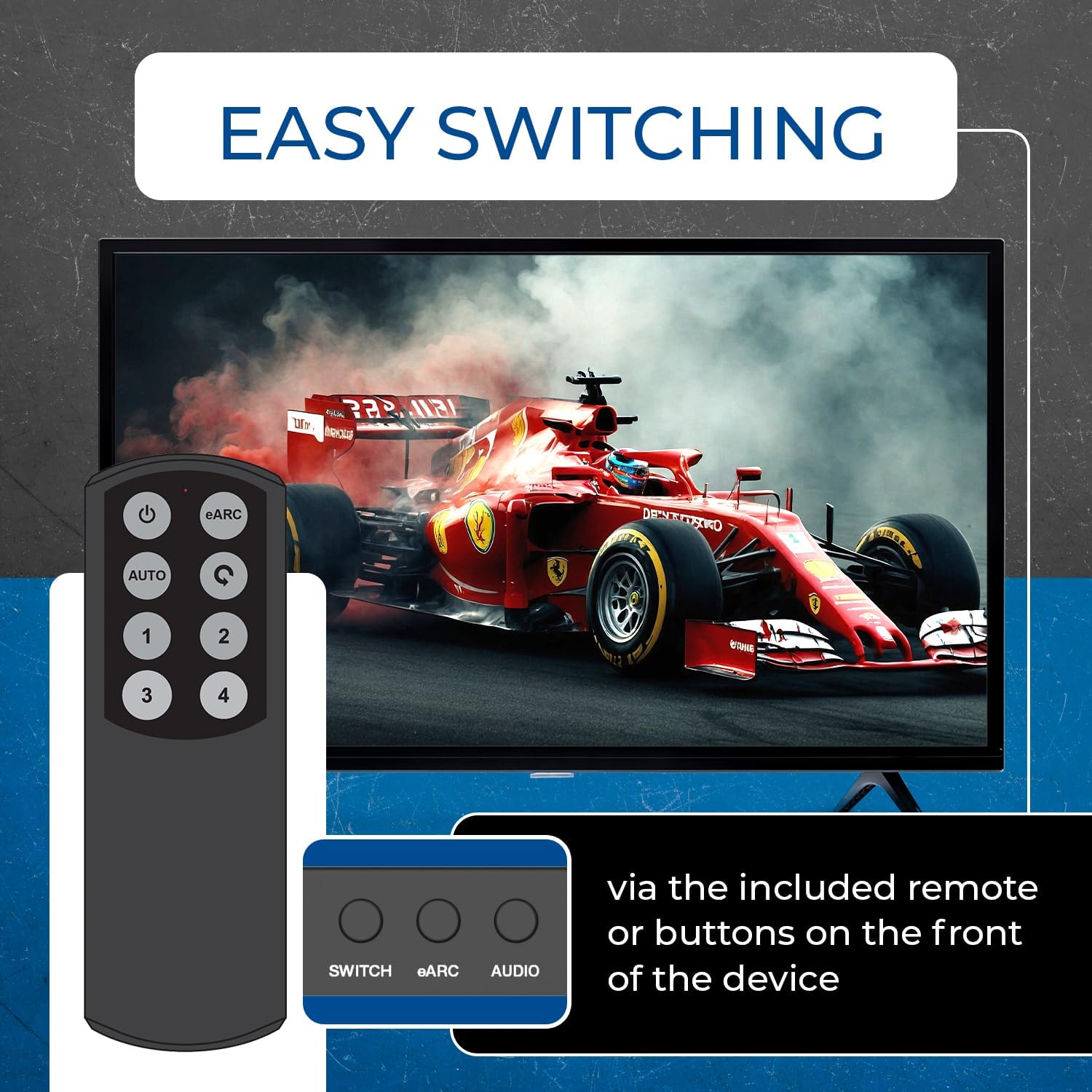
صورة: مفتاح BK-4927 يوضح سهولة تبديل المدخلات عبر جهاز التحكم عن بعد أو أزرار اللوحة الأمامية.
4. الميزات والمواصفات
4.1 الميزات الرئيسية:
- متوافق مع HDMI 2.1 وHDCP 2.3
- يدعم دقة تصل إلى 8K@60Hz و 4K@120Hz
- عرض نطاق ترددي 48 جيجابت في الثانية (رابط ثابت المعدل) و18 جيجابت في الثانية (رابط TMDS)
- تبديل الإدخال التلقائي واليدوي
- تمرير HDR (HDR10+، Dolby Vision، HLG)
- إزالة تضمين الصوت لتقنيات Dolby Atmos وDTS:X وDTS-HD Master Audio وDolby TrueHD وDTS Digital Surround وDolby Digital وLPCM 7.1/5.1/2.0
- مخرج صوت فقط بتقنية eARC للتلفزيون وHDMI
- دعم لجنة الانتخابات المركزية
- تصميم صغير الحجم مع غلاف معدني متين
4.2 المواصفات الفنية:
- أبعاد المنتج: 9.75 × 3 × 6 بوصة (200 مم طول × 84 مم عرض × 20 مم ارتفاع)
- وزن السلعة: 12 أونصة (430 غرام / 15.16 أونصة)
- مادة: معدن
- لون: أسود
- نوع الموصل: منفذ HDMI
- الأجهزة المتوافقة: جهاز استقبال الصوت والفيديو، مشغل بلو راي، وحدة تحكم الألعاب (بلاي ستيشن 5، إكس بوكس)، أجهزة البث (أبل تي في، فاير تي في)، جهاز كمبيوتر، أجهزة عرض.

صورة: قائمة مفصلة بالميزات التي يدعمها محول HDMI BK-4927.

صورة: المواصفات الفنية لمحول HDMI OREI BK-4927.

صورة: مفتاح BK-4927 يوضح التوافق الواسع مع مختلف أجهزة الوسائط.
5. الصيانة
- احتفظ بالجهاز في مكان بارد وجاف وجيد التهوية.
- تجنب تعريض الجهاز لأشعة الشمس المباشرة أو درجات الحرارة العالية أو الرطوبة.
- نظّف الجهاز بقطعة قماش ناعمة وجافة. لا تستخدم المنظفات السائلة أو البخاخات.
- تأكد من توصيل جميع الكابلات بإحكام لمنع فقدان الإشارة.
6. استكشاف الأخطاء وإصلاحها
- لا يوجد فيديو/صوت: تأكد من توصيل جميع كابلات HDMI والصوت. تأكد من توصيل محول الطاقة بإحكام وتشغيل الجهاز. تحقق من تحديد مصدر الإدخال الصحيح على جهاز التبديل، ومن تحديد الإدخال الصحيح على شاشة العرض/جهاز الاستقبال.
- جودة الصورة رديئة: تأكد من استخدام كابلات HDMI 2.1 عالية الجودة، خاصةً لمحتوى 8K/4K@120Hz. تحقق من إعدادات دقة العرض لجهاز المصدر والشاشة.
- مشاكل الصوت: تأكد من أن وضع الصوت المُختار (2.0، 5.1، 7.1، PASS) على المفتاح يتوافق مع إمكانيات نظام الصوت لديك. تأكد من تفعيل eARC إذا كنت تستخدم جهاز استقبال متوافقًا مع eARC. لاحظ أن الإخراج البصري محدود بـ 5.1 قناة، والإخراج التناظري بـ 2 قناة.
- جهاز التحكم عن بعد لا يعمل: تأكد من عدم وجود أي عوائق بين جهاز التحكم عن بُعد ونافذة مستقبل الأشعة تحت الحمراء في المفتاح. افحص بطاريات جهاز التحكم عن بُعد واستبدلها إذا لزم الأمر.
7. الضمان والدعم
مفتاح استخراج الصوت HDMI طراز OREI BK-4927 مدعوم بضمان OREI الكامل ضمان لمدة سنتين لراحة البال. كما تقدم شركة OREI الدعم الفني مدى الحياة لمنتجاتها. لأي مساعدة فنية أو مطالبات ضمان، يرجى الاتصال بدعم عملاء OREI.
فيديو: منتج رسمي من OREIview فيديو خاص بمحول استخراج الصوت HDMI رباعي المنافذ بدقة 8K.


