1. المقدمة
Thank you for choosing the Parsonver PSSW8 Smart Watch. This manual provides essential information for setting up, operating, and maintaining your device. The PSSW8 Smart Watch is designed to enhance your daily life with features such as built-in GPS, Bluetooth calling, comprehensive health monitoring, and a wide array of sports modes.

Figure 1: Parsonver PSSW8 Smart Watch (Black 43mm)
2. معلومات السلامة
- ليس جهازًا طبيًا: This device is not intended for medical use and should not be used to diagnose or treat any medical condition. Consult a medical professional for any health concerns.
- مقاومة الماء: The device is IP68 water- and dust-resistant, suitable for splashes, hand washing, and rain. It is not recommended for showering, swimming, or sauna use. Prolonged exposure to water may cause damage.
- سلامة البطارية: Do not attempt to replace the battery yourself. Use only the provided charging cable. Avoid extreme temperatures.
- خطر الاختناق: احتفظ بالجهاز وملحقاته بعيدًا عن متناول الأطفال الصغار.
- سلامة القيادة: Avoid interacting with the device while driving to prevent distractions.
3. الإعداد
3.1. فتح العلبة ومحتويات العبوة
Carefully unbox your Parsonver PSSW8 Smart Watch. The package should contain the following items:
- 1x Parsonver PSSW8 Smart Watch
- 1 × كابل شحن
- 1 × دليل المستخدم
- Additional interchangeable bands (color may vary)
الفيديو 1: فتح الصندوق والبدء في الكتابةview of the Parsonver Smart Watch and its accessories.
3.2. Attaching/Changing Bands
The watch bands are designed for easy attachment and removal, allowing you to customize your watch's appearance. To remove a band, locate the small release button on the underside of the watch where the band connects. Push this button and slide the band out. To attach a new band, align it with the watch body and slide it in until it clicks securely into place.

Figure 2: Close-up of the watch band attachment mechanism.
3.3. شحن الساعة الذكية
Connect the magnetic charging cable to the charging points on the back of the watch. The magnets will ensure proper alignment. Connect the USB end of the cable to a power source. A full charge typically takes about 2 hours and provides up to 7 days of typical use or 30 days of standby time.

الشكل 3: كابل شحن مغناطيسي متصل بالساعة.
3.4. تثبيت التطبيق وإقران الجهاز
Download the companion app (InfoWear) from your smartphone's app store (compatible with Android 5.0+ and iOS 12.0+). Open the app and follow the on-screen instructions to pair your watch. This usually involves scanning a QR code displayed on the watch screen. Ensure Bluetooth is enabled on your phone.
Video 2: Demonstrates the pairing process between the smartwatch and the companion app.
3.5. Unit Settings and Watch Face Customization
Within the app, navigate to the settings to customize units (metric/imperial) for weight, length, and temperature. You can also browse over 100 watch faces in the "Watch Face Center" or create your own custom DIY watch face using your photos.

Figure 4: Watch Face Center in the companion app showing various customization options.
4. تشغيل الساعة الذكية
4.1. التنقل والواجهة
The watch features a 1.27-inch 360x360 Ultra HD display with responsive touch controls. Swipe left/right to access quick widgets like activity data, heart rate, sleep, music control, and weather. Swipe down for quick settings (brightness, water lock, etc.). Press the side button to access the main app menu.
4.2. مراقبة الصحة
The PSSW8 Smart Watch offers 24/7 wellness monitoring:
- معدل ضربات القلب: Tracks heart rate continuously with customizable alerts.
- أكسجين الدم (SpO2): يراقب مستويات الأكسجين في الدم.
- مستويات التوتر: Provides insights into emotional fluctuations.
- مراقبة النوم: يحلل النوم العميق والخفيف ونوم حركة العين السريعة (REM)tagإِسْ
- تتبع صحة المرأة: Supports data-driven cycle management.

الشكل 5: انتهىview of 24-hour health monitoring features.
4.3. أوضاع الرياضة وتتبع النشاط
Choose from over 100 sports modes, including running, cycling, yoga, and strength training. The watch automatically detects workouts and records stats like heart rate, calories, distance, and pace. Built-in GPS accurately tracks routes without needing your phone.

Figure 6: Built-in GPS tracking for outdoor activities.
4.4. Bluetooth Calling and Smart Alerts
With dual Bluetooth support (BT 3.0 + BLE 5.3) and a premium microphone, you can make and answer calls directly from your wrist. Receive instant notifications for calls, texts, and popular apps like WhatsApp and Facebook. Quick call replies are available for Android users.

Figure 7: Bluetooth calling and smart notifications on the watch.
4.5. Smart Life Assistant Features
The watch includes various assistant features:
- تذكيرات: Drink water, move, take medication, wash hands.
- أدوات: Weather updates, music control, remote camera trigger, alarms, timers, stopwatch, calculator, calendar, find my phone.
- صحة: Guided breathing sessions.
- ميزات الذكاء الاصطناعي: AI Voice Assistant and AI Smart Watch Face generation.

الشكل 8: انتهىview من بين الميزات الذكية الإضافية المتوفرة في الساعة.
4.6. مقاومة الماء والغبار بمعيار IP68
The watch is IP68 rated, meaning it is resistant to dust and can withstand immersion in water up to 1.5 meters for 30 minutes. It is suitable for daily use like hand washing, rain, and splashes. However, it is not recommended for showering, swimming, or sauna use.

Figure 9: The watch is IP68 waterproof, suitable for splashes but not prolonged water immersion.
5. الصيانة
- تنظيف: Regularly wipe the watch screen and bands with a soft, dry cloth. If necessary, use a slightly damp قطعة قماش وصابون خفيف، ثم اشطفها وجففها جيدًا.
- الشحن: Always use the provided magnetic charging cable. Ensure the charging points are clean and dry before charging.
- تخزين: احفظ الساعة في مكان بارد وجاف بعيداً عن أشعة الشمس المباشرة ودرجات الحرارة القصوى عندما لا تكون قيد الاستخدام.
- تحديثات البرامج: Periodically check the companion app for available software updates to ensure optimal performance and access to new features.
6. استكشاف الأخطاء وإصلاحها
- الساعة لا تعمل: تأكد من شحن الساعة بالكامل. وصّلها بالشاحن وانتظر بضع دقائق قبل إعادة تشغيلها.
- مشاكل الاتصال:
- تأكد من تمكين Bluetooth على هاتفك الذكي.
- تأكد من أن الساعة ضمن نطاق هاتفك الذكي.
- أعد تشغيل كل من هاتفك الذكي والساعة.
- Unpair and re-pair the device through the companion app.
- Inaccurate Readings (Heart Rate, SpO2, etc.):
- تأكد من ارتداء الساعة بشكل مريح على معصمك، ولكن ليس بشكل ضيق للغاية.
- حافظ على نظافة منطقة المستشعر الموجودة في الجزء الخلفي من الساعة.
- Remain still during measurements.
- الشاشة لا تستجيب/متجمدة: Try restarting the watch by pressing and holding the side button. If unresponsive, allow the battery to fully drain and then recharge. A factory reset option is available in the app settings.
7. المواصفات
| ميزة | التفاصيل |
|---|---|
| رقم الموديل | PSSW8 |
| حجم العرض | 1.27 بوصة |
| دقة العرض | 360 × 360 بكسل |
| مقاومة الماء | IP68 |
| سعة البطارية | 270 مليamp ساعات |
| عمر البطارية (نموذجي) | حتى 7 يوما |
| وقت الاستعداد | حتى 30 يوما |
| وقت الشحن | حوالي 2 ساعات |
| الاتصال | Bluetooth 5.3 (BT 3.0 + BLE 5.3) |
| نظام التشغيل | Compatible with iOS 12.0+/Android 5.0+ |
| نظام تحديد المواقع العالمي (GPS) المدمج | نعم |
| وزن العنصر | 40 جرام |
| أبعاد المنتج | 11.02 × 3.35 × 0.71 بوصة |
8. الضمان والدعم
Your Parsonver PSSW8 Smart Watch comes with dedicated customer service. For any questions, technical support, or warranty claims, please contact our 24/7 customer service team. Refer to the product packaging or the official Parsonver webموقع للحصول على تفاصيل الاتصال.
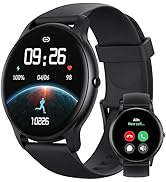
Figure 10: 24/7 Online Support available.


