1. المقدمة
Welcome to the COLMI R10 Smart Ring user manual. This guide provides essential information for the proper setup, operation, and maintenance of your new smart ring. The COLMI R10 is designed to help you monitor various health metrics, including heart rate, blood oxygen, sleep patterns, and daily activity, to support your overall well-being.

Image: The COLMI R10 Smart Ring in silver, alongside its compact charging case.
2. ماذا يوجد في الصندوق
Upon opening your COLMI R10 Smart Ring package, you should find the following items:
- خاتم COLMI R10 الذكي
- حافظة الشحن
- كابل الشحن
- دليل المستخدم (هذا المستند)
3. المقاس والملاءمة
For optimal comfort and accurate data collection, selecting the correct ring size is crucial. It is recommended to purchase a COLMI sizing kit prior to your smart ring purchase to ensure the best fit. The ring should feel snug but comfortable, allowing for slight finger swelling throughout the day or during sleep.
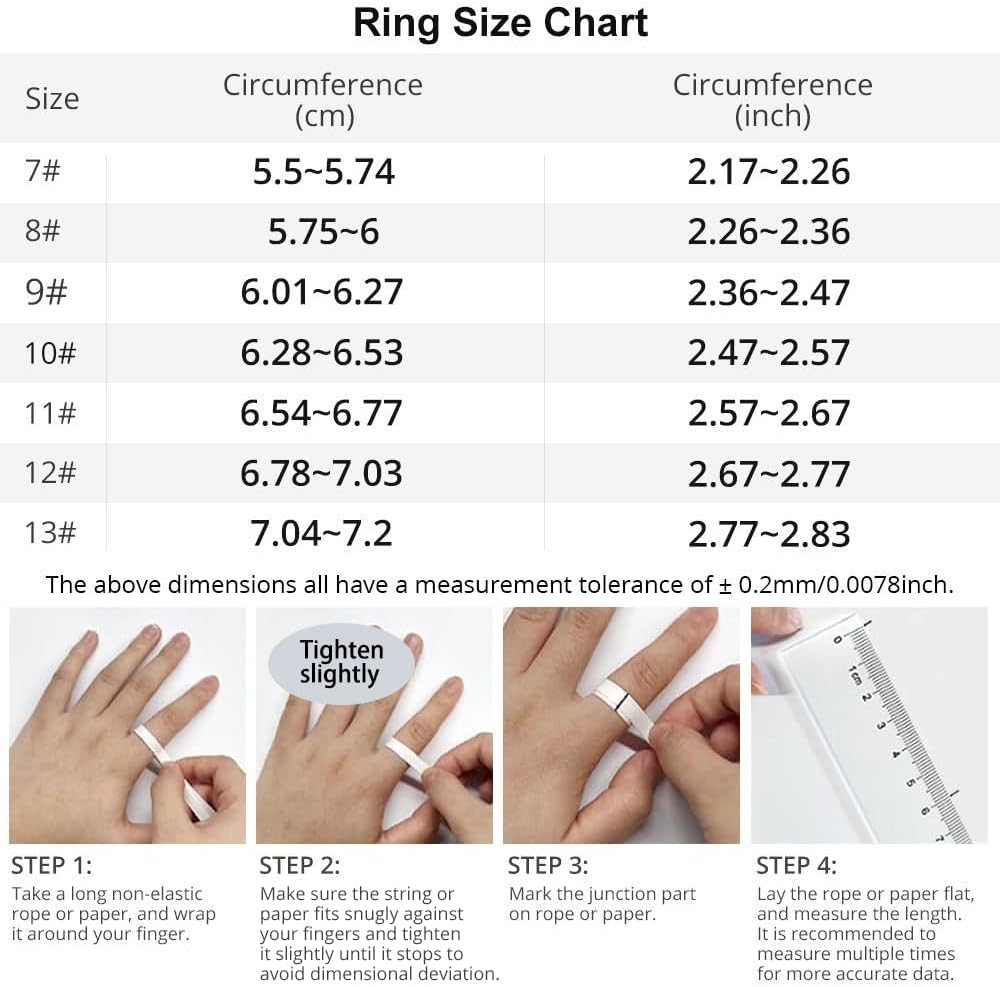
Image: A detailed ring size chart showing circumference in centimeters and inches, along with a four-step guide on how to measure your finger using a non-elastic rope or paper.
4. الإعداد
Follow these steps for the initial setup of your COLMI R10 Smart Ring:
- Purchase Sizing Kit: قبل الشراءasing the COLMI Smart Ring R10, acquire the COLMI sizing kit to determine your accurate ring size.
- Select Ring Size: After determining your finger size, purchase the COLMI R10 Smart Ring in the appropriate size.
- تنزيل التطبيق: Download the official "Q Ring" application from your device's app store (compatible with Android and iPhone).
- قم بإقران الخاتم: Open the "Q Ring" app and follow the on-screen instructions to pair your COLMI R10 Smart Ring with your smartphone via Bluetooth.
- Begin Monitoring: Once paired, the ring will start collecting data, and you can view your health insights within the app.

Image: A visual guide illustrating the four steps to set up the COLMI R10 Smart Ring, from sizing to app integration.
5. Operating the COLMI R10 Smart Ring
The COLMI R10 Smart Ring continuously monitors various health parameters. All collected data is synchronized with the companion "Q Ring" app on your smartphone.
5.1 مراقبة معدل ضربات القلب
The ring provides 24/7 real-time heart rate monitoring, allowing you to track your heart rate trends throughout the day and night. Access detailed heart rate data, including average, minimum, and maximum values, within the app.

Image: A woman wearing the COLMI R10 Smart Ring, with a smartphone displaying a heart rate monitoring interface showing a graph of heart rate over time and current beats per minute (BPM).
5.2 مراقبة نسبة الأكسجين في الدم (SpO2)
Measure your blood oxygen saturation (SpO2) quickly with a single tap in the app. This feature helps assess your body's oxygen supply efficiency, contributing to comprehensive daily health management. The app provides historical data and trends for your SpO2 levels.

Image: A woman wearing the COLMI R10 Smart Ring, with a smartphone displaying a blood oxygen detection interface showing a bar graph of SpO2 levels and current percentage.
5.3 مراقبة النوم
The COLMI R10 provides in-depth analysis of your sleep stages, including deep sleep, light sleep, and awake time. This data helps you understand your sleep quality and duration, aiding in improving your sleep habits for a more refreshed wake-up.

Image: A smartphone displaying a sleep monitoring interface with a timeline showing different sleep stages (wake up, light sleep, deep sleep) and a sleep score.
5.4 Activity Tracking (Pedometer & Fitness Tracker)
The smart ring acts as your all-day fitness coach, recording calorie consumption, exercise duration, steps taken, and distance covered. It generates exercise reports to help you track your progress and achieve your fitness goals.
5.5 التحكم في الكاميرا عن بعد
Utilize the COLMI R10 Smart Ring to remotely control your smartphone's camera. This feature simplifies taking photos, especially group shots, by allowing you to trigger the shutter with a simple gesture.

Image: The COLMI R10 Smart Ring shown next to a smartphone displaying a camera interface, indicating its remote camera control capability.
5.6 الشحن
The COLMI R10 Smart Ring comes with a stylish and portable charging case. A single charge of the ring provides 3-5 days of use, and the charging case offers an additional 7-10 charges, extending the standby time to 30 days. This eliminates the need for frequent charging.

Image: The COLMI R10 Smart Ring placed inside its compact charging case, with text highlighting its 3-5 days single endurance time and 8-10 approximate charging times from the case.
6. الصيانة
To ensure the longevity and optimal performance of your COLMI R10 Smart Ring, follow these maintenance guidelines:
- تنظيف: Regularly wipe the ring with a soft, dry cloth to remove dirt and oils. Avoid using harsh chemicals or abrasive materials.
- مقاومة الماء: The ring is designed to be water-resistant for daily use. However, avoid prolonged submersion in water or exposure to high-pressure water jets.
- الشحن: Always use the provided charging cable and case. Ensure the charging contacts on both the ring and case are clean and dry before charging.
- تخزين: When not in use for extended periods, store the ring and charging case in a cool, dry place.
7. استكشاف الأخطاء وإصلاحها
If you encounter any issues with your COLMI R10 Smart Ring, please try the following common troubleshooting steps:
- Ring Not Connecting to App: Ensure Bluetooth is enabled on your smartphone and the ring is sufficiently charged. Try restarting both the ring (by placing it in the charging case and closing/opening) and your phone.
- بيانات غير دقيقة: Verify that the ring is worn correctly and snugly on your finger. Ensure the sensors on the inside of the ring are clean.
- مشاكل الشحن: Check if the charging cable and case are properly connected. Clean the charging contacts on the ring and case.
- التطبيق لا يتم تحديثه: Ensure your smartphone has an active internet connection. Try force-closing and reopening the "Q Ring" app.
If the problem persists after attempting these steps, please refer to the support section for further assistance.
8. المواصفات
| ميزة | التفاصيل |
|---|---|
| رقم الموديل | COLMI R10 |
| وزن العنصر | 3.53 أونصات |
| أبعاد الحزمة | 4.53 × 3.15 × 0.98 بوصة |
| البطاريات | يلزم وجود بطارية واحدة غير قياسية (مرفقة) |
| سعة البطارية | 15 مليamp ساعات |
| نظام التشغيل | أندرويد، آيفون |
| تكنولوجيا الاتصال | بلوتوث |
| معيار الاتصال اللاسلكي | بلوتوث |
| المميزات الخاصة | Blood oxygen monitoring, Heart rate, Sleep monitoring |
| سعة تخزين الذاكرة | 1 ميجا بايت |
| نظام تحديد المواقع العالمي (جي بي اس) | لا يوجد نظام تحديد المواقع العالمي (GPS) |
| شكل | دائري |
| الشركة المصنعة | Shenzhen COLMl Technology Co., Ltd |
| تاريخ أول توفر | 1 سبتمبر 2025 |
9. الضمان والدعم
For warranty information and customer support, please refer to the documentation included with your product packaging or visit the official COLMI webيمكنك أيضًا التواصل مع البائع مباشرةً للحصول على المساعدة.


