1. المقدمة
This manual provides detailed instructions for the setup, operation, maintenance, and troubleshooting of your Lenovo ThinkVision T24-40 23.8-inch Monitor. Please read this manual thoroughly before using your monitor to ensure proper functionality and to prevent damage.
المميزات الرئيسية:
- 23.8" viewable screen size for enhanced clarity.
- WLED backlight technology for uniform illumination.
- 4 ms response time for smooth transitions.
- Designed to meet Eye Comfort standards with a 5-Star Eye Comfort Rating.
- 16:9 widescreen aspect ratio.
- 250 Nit brightness levels for clear visuals.
- Anti-glare matte screen finish.
- 1920 x 1080 maximum resolution.
2. ماذا يوجد في الصندوق
تأكد من وجود جميع العناصر في العبوة:
- ThinkVision T24-40 Widescreen LED Monitor
- كابل دي بي
- كابل USB-A إلى USB-B
3. الإعداد
3.1. مجموعة الشاشة
To assemble the monitor stand:
- قم بإزالة مكونات الشاشة والحامل من العبوة بعناية.
- Attach the stand neck to the back of the monitor. Align the tabs and push firmly until it clicks into place. Secure it with the captive thumb screw.
- Attach the base to the stand neck. Align the base with the bottom of the neck and secure it with the captive thumb screw.
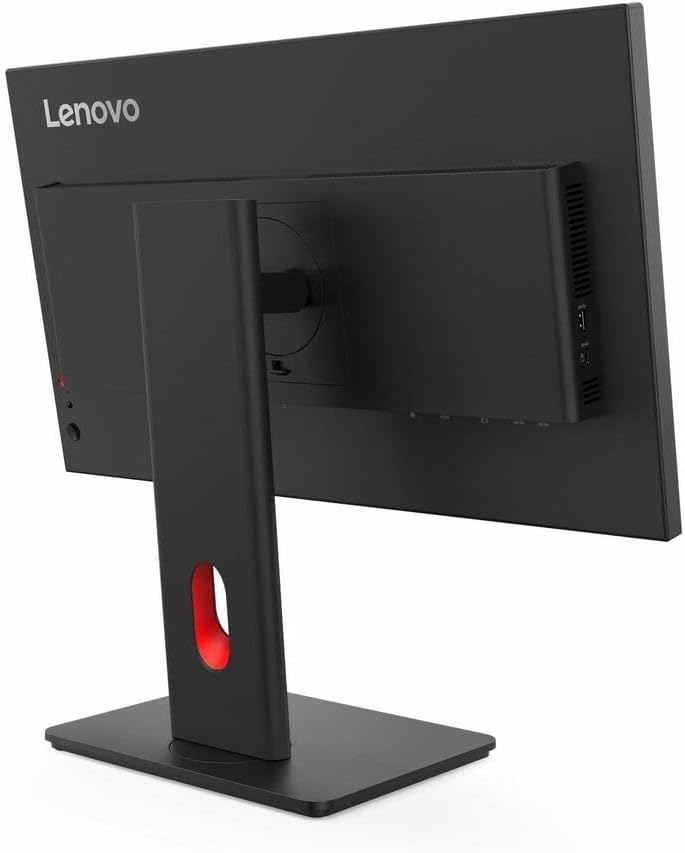
الشكل 1: خلفي view of the monitor with the stand attachment area.

الشكل 2: الجانب view illustrating the monitor with its stand assembled.
3.2. توصيل الشاشة
Connect the monitor to your computer using the provided cables:
- توصيل الطاقة: Connect the power cable to the monitor's power input port and then to a power outlet.
- اتصال الفيديو: Connect the DisplayPort (DP) cable from your computer's DP output to the monitor's DP input. Alternatively, use an HDMI cable if your computer supports it.
- اتصال USB: Connect the USB-A to USB-B cable from your computer to the monitor to enable the monitor's USB hub functionality.

الشكل 3: خلفي view of the monitor showing various input ports and connected cables.
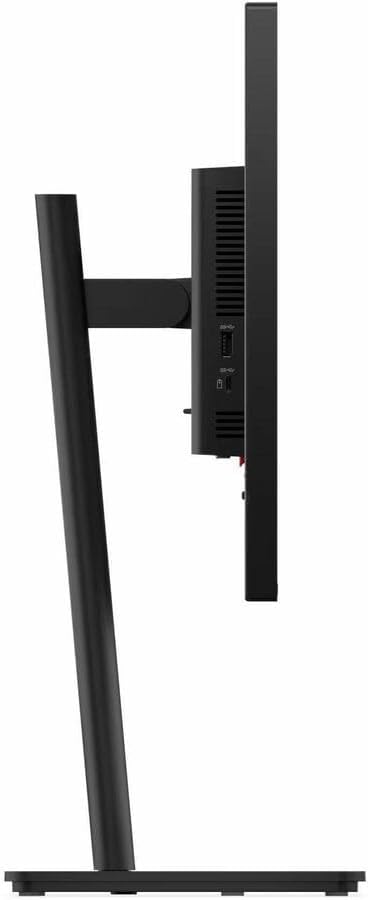
Figure 4: Close-up of the monitor's side ports, including HDMI and VGA.
4. تعليمات التشغيل
4.1. تشغيل/إيقاف التشغيل
اضغط على زر التشغيل الموجود في أسفل يمين الشاشة لتشغيلها أو إيقافها. سيضيء مؤشر الطاقة عند تشغيل الشاشة.
4.2. عناصر التحكم في العرض على الشاشة (OSD)
The monitor features several buttons on the bottom bezel to access and navigate the On-Screen Display (OSD) menu. These controls allow you to adjust various display settings.

Figure 5: Control buttons located on the lower right side of the monitor bezel.
4.3. ضبط إعدادات العرض
Use the OSD buttons to navigate through the menu options. Common adjustments include:
- السطوع / التباين: Adjust the overall luminance and contrast levels of the display.
- مصدر الإدخال: Select between available input sources (e.g., HDMI, DisplayPort, VGA).
- إعدادات الألوان: Customize color temperature, gamma, and other color-related parameters.
- وضع العرض: Choose from preset display modes optimized for different content types (e.g., Standard, Movie, Game).
4.4. التعديلات الجسدية
يسمح حامل الشاشة بإجراء تعديلات مريحة:
- ضبط الارتفاع: ادفع أو اسحب الشاشة برفق لأعلى أو لأسفل لتحقيق النتيجة المطلوبة viewارتفاع جي.
- تعديل الميل: قم بإمالة الشاشة للأمام أو للخلف لتحسين تجربتك viewزاوية جي.
- تعديل الدوران: قم بتدوير الشاشة إلى اليسار أو اليمين على قاعدتها.
5. الصيانة
To ensure the longevity and optimal performance of your ThinkVision T24-40 monitor, follow these maintenance guidelines:
- تنظيف الشاشة: استخدم قطعة قماش ناعمة وخالية من الوبر برفق دampened with water or a non-ammonia, non-alcohol-based screen cleaner. Do not spray liquid directly onto the screen.
- تنظيف Casing: استخدم قطعة قماش ناعمة وجافة لمسح الشاشة.asinز. تجنب استخدام المنظفات الكاشطة.
- تهوية: تأكد من عدم سد فتحات التهوية الموجودة على الشاشة لمنع ارتفاع درجة الحرارة.
- تخزين: عند عدم الاستخدام لفترات طويلة، قم بتخزين الشاشة في مكان بارد وجاف، ويفضل أن يكون ذلك في عبوتها الأصلية.
6. استكشاف الأخطاء وإصلاحها
إذا واجهت مشكلات مع شاشتك، فراجع المشكلات والحلول الشائعة التالية:
| مشكلة | الحل المحتمل |
|---|---|
| لا توجد صورة على الشاشة | Ensure power cable is securely connected. Verify video cable is connected to both monitor and computer. Select correct input source via OSD. |
| Image is dim or too bright | Adjust brightness and contrast settings using the OSD menu. |
| الألوان تظهر غير صحيحة | Adjust color settings in the OSD menu. Ensure graphics drivers are up to date. |
| وميض الشاشة | Check video cable connections. Ensure refresh rate is set correctly in your computer's display settings. |
| لا يوجد صوت | If using monitor speakers, ensure volume is not muted and is turned up. Check audio output settings on your computer. |
7. المواصفات
| ميزة | التفاصيل |
|---|---|
| حجم عرض الشاشة الدائمة | 23.8 بوصة |
| دقة الشاشة | 1920×1080 |
| أقصى دقة للشاشة | 1920 × 1080 بكسل |
| ماركة | لينوفو |
| مسلسل | فكر في الرؤية |
| رقم موديل السلعة | ت24-40 |
| وزن العنصر | 6.61 رطل |
| أبعاد المنتج | 1.8 × 21.3 × 12.4 بوصة |
| لون | Eclipse Black, Black |
| نسبة العرض إلى الارتفاع | 16:9 |
| وصف سطح الشاشة | مطفي |
8. الضمان والدعم
For warranty information, technical support, or to download the latest drivers and user manuals, please visit the official Lenovo support webموقع. احتفظ بإيصال الشراء الخاص بك لمطالبات الضمان.
دعم Lenovo Webموقع: pcsupport.lenovo.com


