مقدمة
This manual provides detailed instructions for the Redragon S156 Wireless Gaming Keyboard and Mouse combo. This product offers versatile connectivity, customizable features, and ergonomic design for an enhanced computing experience. Please read this manual thoroughly before use to ensure proper operation and to maximize the product's capabilities.
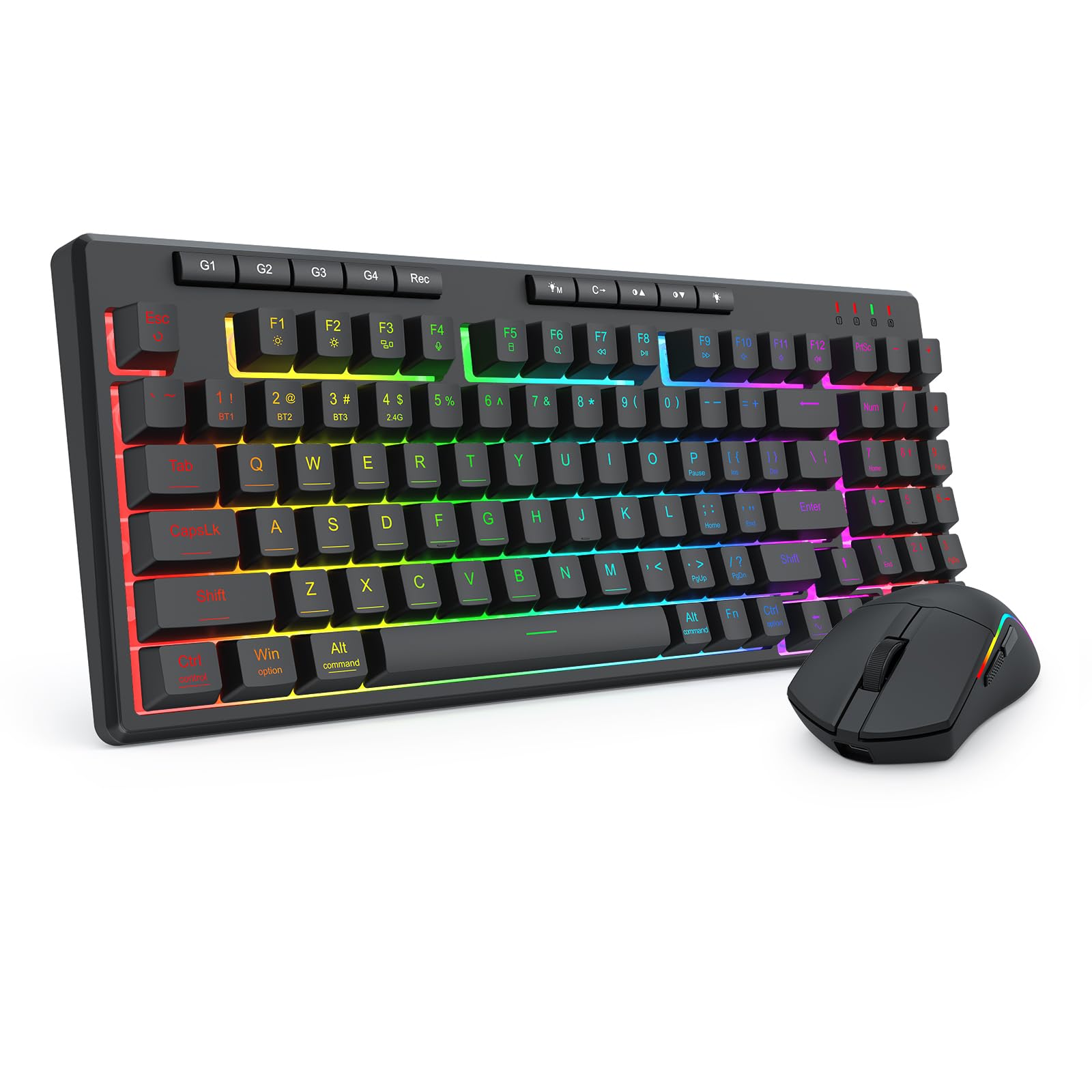
Figure 1: Redragon S156 Keyboard and Mouse in a typical gaming setup.
محتويات الحزمة
قبل البدء في عملية الإعداد، يرجى التأكد من وجود جميع العناصر في العبوة:
- Redragon S156 Wireless Gaming Keyboard
- Redragon S156 Wireless Gaming Mouse
- 2.4GHz استقبال USB
- كابل شحن USB-C
- دليل المستخدم (هذا المستند)

Figure 2: Contents included with the Redragon S156 product.
يثبت
شحن الأجهزة
Ensure both the keyboard and mouse are fully charged before initial use. Connect the provided USB-C cable to the charging port on each device and to a powered USB port on your computer or a USB wall adapter. The charging indicator will show status (refer to device for specific light behavior).
Connectivity Options (Tri-Mode)
The Redragon S156 supports three connection modes: 2.4GHz Wireless, Bluetooth (BT1/BT2/BT3), and Wired (USB-C).

Figure 3: Tri-mode connectivity options for multiple devices.
اتصال شومكسغز اللاسلكية
- حدد موقع جهاز الاستقبال USB 2.4 جيجا هرتز.
- قم بتوصيل جهاز الاستقبال بمنفذ USB متاح على جهاز الكمبيوتر الخاص بك.
- قم بتشغيل لوحة المفاتيح والماوس. يجب أن يتصلا تلقائيًا بجهاز الاستقبال.
اتصال بلوتوث
The keyboard and mouse can connect to up to three different Bluetooth devices (BT1, BT2, BT3).
- Turn on the keyboard/mouse and switch to a desired Bluetooth channel (e.g., BT1).
- Activate Bluetooth on your device (PC, Mac, smartphone, tablet).
- بحث عن new Bluetooth devices and select "Redragon S156 Keyboard" or "Redragon S156 Mouse" from the list.
- اتبع أي مطالبات تظهر على الشاشة لإكمال الاقتران.
اتصال USB-C سلكي
Connect the USB-C cable directly from the keyboard/mouse to your computer's USB port. The devices will function in wired mode and charge simultaneously.

Figure 4: Mouse connectivity options.

Figure 5: Mouse connected via USB-C for wired operation and charging.
تعليمات التشغيل
وظائف لوحة المفاتيح
إضاءة خلفية RGB
The keyboard features multiple built-in RGB lighting modes and effects. Use the dedicated keys (often Fn + specific keys) to cycle through modes, adjust brightness, and change colors. Refer to the keyboard's function key legends for specific controls.

Figure 6: Keyboard lighting customization options.

Figure 7: Keyboard software interface for backlight customization (Windows only).
مفاتيح الماكرو (G1-G4)
The keyboard includes dedicated macro keys (G1-G4) for instant command execution. These can be programmed directly on the keyboard without software.
- اضغط على [تسجيل] button to start macro recording.
- اضغط على أحد ملفات [G1-G4] مفاتيح لاختيار محترفfile للتسجيل.
- اكتب تسلسل المفاتيح التي ترغب في تسجيلها.
- بعد الانتهاء من تسجيل مفتاح الماكرو، اضغط [تسجيل] قم بحفظ الماكرو مرة أخرى.

Figure 8: On-the-fly macro recording instructions.
وظائف الماوس
ضبط DPI
The mouse features adjustable DPI settings up to 10000 DPI for precision control. Use the dedicated DPI button on the mouse to cycle through preset DPI levels.
أزرار قابلة للبرمجة وتخصيص إضاءة RGB
The mouse buttons and RGB lighting can be customized using the Redragon software. This software allows for adjusting DPI, polling rate, assigning macros, and customizing RGB effects.

Figure 9: Customizable gaming mouse buttons.

Figure 10: Mouse software for customization (Windows only; not supported in Bluetooth mode).
صيانة
تنظيف
To maintain optimal performance, regularly clean your keyboard and mouse. Use a soft, dry cloth to wipe surfaces. For stubborn dirt, a slightly damp يمكن استخدام قطعة قماش مع صابون لطيف، مع التأكد من عدم دخول أي سوائل إلى الجهاز. تجنب المواد الكيميائية القاسية أو المواد الكاشطة.
عمر البطارية والشحن
The keyboard features a 4000mAh battery, offering extended use. The mouse provides up to 200 hours of battery life on a full charge. For best battery longevity, avoid fully discharging the devices frequently. Recharge when the low battery indicator appears.

Figure 11: Keyboard battery capacity and estimated usage time.

Figure 12: Mouse ultra-long battery life indication.
استكشاف الأخطاء وإصلاحها
مشاكل الاتصال
- الجهاز غير متصل: Ensure the device is powered on and in the correct connection mode (2.4GHz, BT1/2/3). For 2.4GHz, ensure the USB receiver is securely plugged in. For Bluetooth, ensure your host device's Bluetooth is enabled and the pairing process is completed.
- اتصال متقطع: Move the devices closer to the receiver/host device. Avoid sources of interference such as other wireless devices or large metal objects. Ensure devices are charged.
لوحة المفاتيح/الماوس لا تستجيب
- تحقق من مستويات البطارية وأعد شحنها إذا لزم الأمر.
- Try switching to wired mode using the USB-C cable to rule out wireless issues.
- أعد تشغيل الكمبيوتر الخاص بك.
- For the keyboard, ensure it is not in a locked mode (e.g., Num Lock, Caps Lock, Scroll Lock indicators).
إضاءة RGB لا تعمل
- Ensure the backlight is turned on and brightness is adjusted.
- Cycle through different lighting modes to see if any work.
- If using software, ensure it is running and settings are applied correctly.
تحديد
| ميزة | التفاصيل |
|---|---|
| ماركة | ريد دراجون |
| نموذج | س156 |
| تكنولوجيا الاتصال | 2.4G Wireless, Bluetooth (BT1/BT2/BT3), USB-C Wired |
| نوع لوحة المفاتيح | Mechanical Feel Membrane Keyboard |
| مفاتيح لوحة المفاتيح | 94-key layout, 4 Macro Keys (G1-G4) |
| الخلفية لوحة المفاتيح | RGB Backlit (multiple modes) |
| بطارية لوحة المفاتيح | 4000 مللي أمبير |
| مؤشر الماوس DPI | حتى 10000 نقطة في البوصة (قابلة للتعديل) |
| وزن الفأر | 61 جرامًا (خفيف الوزن للغاية) |
| عمر بطارية الماوس | تصل إلى 200 ساعة |
| الأجهزة المتوافقة | كمبيوتر محمول، كمبيوتر شخصي، هاتف ذكي، جهاز لوحي |
| توافق نظام التشغيل | ويندوز، ماك |
| مادة | بلاستيك |
| وزن العنصر | 2.16 رطل (مجتمعة) |
| أبعاد الحزمة | 15.12 × 8.86 × 2.01 بوصة |

الشكل 13: أبعاد لوحة المفاتيح.

Figure 14: Keyboard height.
الضمان والدعم
معلومات الضمان
Redragon products are covered by a limited warranty against defects in materials and workmanship. The specific warranty period may vary by region and product. Please retain your proof of purchase for warranty claims.
دعم العملاء
للحصول على المساعدة التقنية، أو استكشاف الأخطاء وإصلاحها، أو الاستفسارات المتعلقة بالضمان، يرجى زيارة موقع Redragon الرسمي website or contact their customer support team. Contact information can typically be found on the Redragon webالموقع أو على عبوة المنتج.


