1. المقدمة
This manual provides detailed instructions for the Bikevee GPS Bike Computer. This device is designed to track various cycling data, including speed, distance, time, and altitude, with features like auto start/stop, auto backlight, and IPX7 waterproofing. Please read this manual thoroughly before using the product to ensure proper operation and maintenance.
2. ما هو المشمول
تأكد من وجود جميع المكونات في الحزمة الخاصة بك:
- Bike Computer (Main Unit)
- كابل الشحن (USB-C)
- Out Front Extended Mount
- برغي مقبس سداسي
- مفتاح سداسي
- اسفنجة
- دليل المستخدم

Image: All components included in the Bikevee GPS Bike Computer package.
3. الإعداد والتثبيت
3.1 تركيب كمبيوتر الدراجة
The Bikevee GPS Bike Computer uses a wireless design for easy installation. Follow these steps to mount the device:
- Attach the Out Front Extended Mount to your bicycle's handlebar. Use the provided Hexagon Socket Screw and Hexagon Wrench to secure it firmly.
- Slide the Bike Computer onto the mount until it clicks securely into place.

Image: Simple installation of the wireless GPS bike computer on the handlebar mount.
3.2 التشغيل الأولي وتحديد موقع نظام تحديد المواقع العالمي (GPS)
After mounting, press the power button to turn on the device. The computer will automatically search for GPS signals. It utilizes a 5-satellite system (GPS, BDS, Glonass, Galileo, QZSS) for accurate and stable positioning. The initial connection time may be longer, but subsequent connections will be faster.

Image: The bike computer's 5-satellite positioning system for enhanced accuracy.
3.3 إعدادات اللغة
The device supports 9 languages. Refer to the user manual for specific instructions on how to navigate to the language settings and select your preferred language.

Image: The bike computer displaying data in multiple languages.
4. تعليمات التشغيل
4.1 Display Pages and Data Types
The Bikevee GPS Bike Computer features a 2.4" LCD screen that displays various cycling data across 6 functional pages. You can cycle through these pages using the device's buttons. The data types include:
- ارتفاع GPS
- ساعة
- Speed (MPH and KM/H)
- وقت الرحلة
- مسافة الرحلة
- الوقت الإجمالي
- المسافة الإجمالية
- متوسط السرعة
- السرعة القصوى
- حالة الإضاءة الخلفية

الصورة: السابقamples of the 6 functional data display pages.
4.2 Auto Start/Stop Function
The device automatically starts recording data when you begin cycling and pauses when you stop, conserving battery life and ensuring accurate trip data.
4.3 الإضاءة الخلفية التلقائية
To turn the backlight on or off, press both the left and right buttons simultaneously. Once activated, the backlight remains on throughout your ride. You can turn off the backlight during the day to save battery power, or keep it on for clear visibility at night.
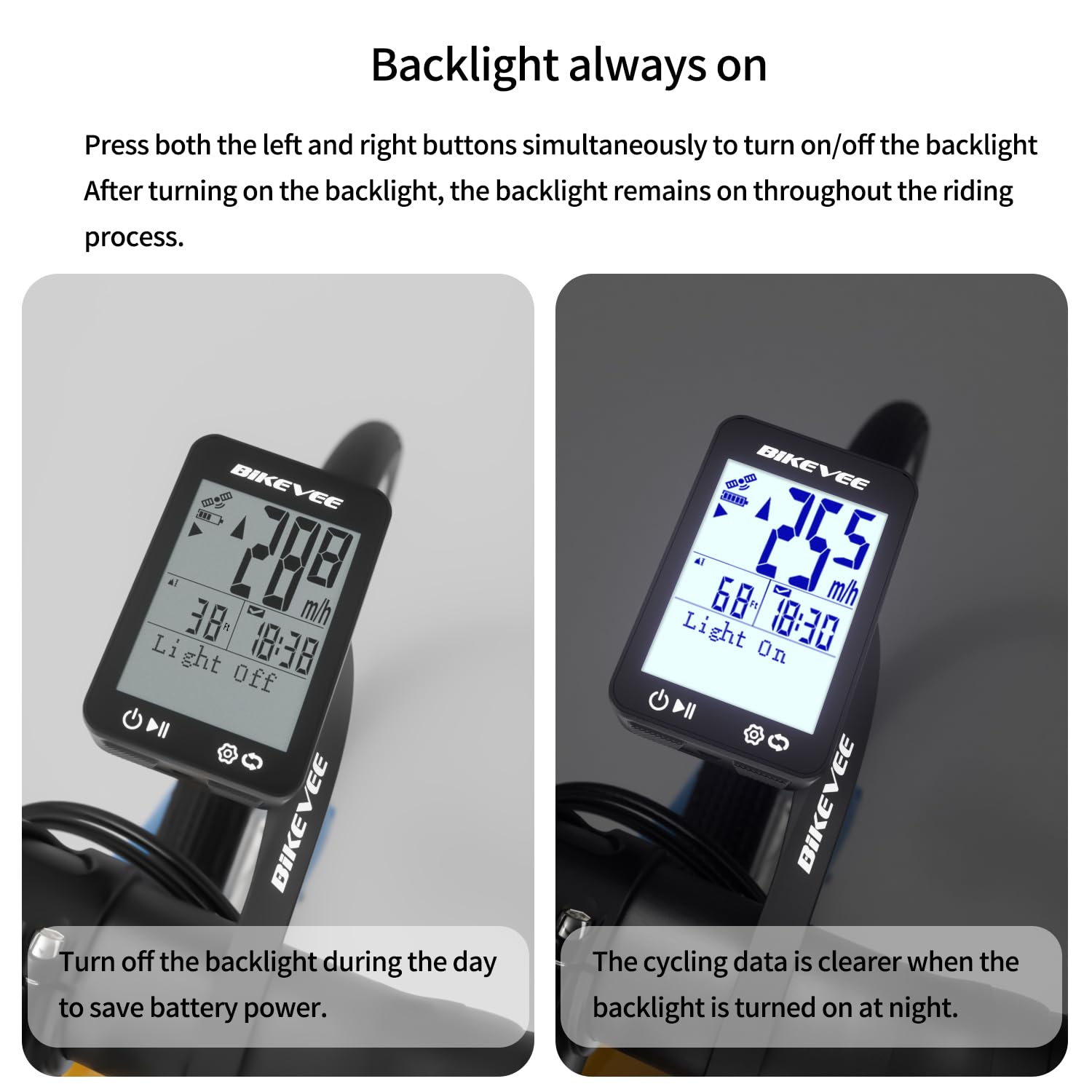
Image: Backlight functionality, showing display with backlight off and on.
5. الصيانة والعناية
5.1 التنظيف
امسح الجهاز بقطعة ناعمة ، دamp قطعة قماش. لا تستخدم المنظفات الكاشطة أو المذيبات، لأنها قد تتلف الشاشة أوasing.
5.2 العزل المائي
The Bikevee GPS Bike Computer has an IPX7 waterproof rating, meaning it can withstand immersion in water up to 1 meter for 30 minutes. This protects it from rain and splashes during your rides. However, avoid prolonged submersion or high-pressure water jets.
5.3 شحن البطارية
The device is equipped with a 650mAh Lithium Ion battery, providing up to 28 hours of continuous use. Charge the device using the provided USB-C charging cable when the battery indicator is low.
6. استكشاف الأخطاء وإصلاحها
If you encounter issues with your Bikevee GPS Bike Computer, consider the following:
- الجهاز لا يعمل: Ensure the battery is charged. Connect the device to the charging cable and allow it to charge for at least 30 minutes before attempting to power it on again.
- لم يتم الحصول على إشارة GPS: تأكد من أنك في منطقة مفتوحة ذات رؤية واضحة view of the sky. Initial GPS acquisition can take longer. If indoors or under heavy tree cover, signal acquisition may be difficult.
- بيانات غير دقيقة: Ensure the device is securely mounted and has a clear GPS signal. Verify that the correct units (MPH/KM/H) are selected in the settings.
- Screen not visible: Check the backlight setting. If the backlight is off, press both left and right buttons simultaneously to activate it.
للحصول على مزيد من المساعدة، يرجى الرجوع إلى معلومات الاتصال في قسم الضمان والدعم.
7. المواصفات
| ميزة | مواصفة |
|---|---|
| ماركة | بايكفي |
| رقم الموديل | SF20250929B0FN818NDK |
| لون | أسود |
| أبعاد المنتج | 45L x 16W x 70H Millimeters |
| وزن العنصر | 50 جرام |
| حجم الشاشة | 2.4 بوصة |
| نوع العرض | شاشة الكريستال السائل |
| عمر البطارية | 28 ساعة |
| تكوين خلية البطارية | أيون الليثيوم |
| تصنيف الحماية الدولية | IPX7 |
| نوع التركيب | حامل المقود |
| مدخلات واجهة الإنسان | أزرار |
| بلد المنشأ | الصين |

Image: Summary of key product features and specifications.
8. الضمان والدعم
8.1 ضمان الجودة
Bikevee is committed to providing dependable products. This GPS Bike Computer is designed for lasting satisfaction.
8.2 دعم العملاء
For any questions, technical support, or warranty claims, please contact Bikevee customer service through the retailer where you purchased the product or visit the official Bikevee webموقع لمعلومات الاتصال.


