1. المقدمة
This manual provides essential information for the proper setup, operation, and maintenance of your NIMO 15.6 inch Laptop Computer. Please read this manual thoroughly before using your device to ensure optimal performance and longevity. Keep this manual for future reference.
2. انتهى المنتجview
2.1. مكونات الكمبيوتر المحمول
The NIMO 15.6 inch Laptop features a Full HD display, a backlit keyboard, and an integrated fingerprint reader for secure access. It is powered by an AMD Ryzen 5 3500U processor and runs on Windows 11.

الشكل 2.1: الجبهة view of the NIMO 15.6 inch Laptop, showcasing شاشته وتخطيط لوحة المفاتيح.
2.2. المنافذ والموصلات
Your NIMO laptop is equipped with various ports for comprehensive connectivity, allowing you to connect peripherals and external devices.

Figure 2.2: Expanded Connectivity Options. This image illustrates the location and type of ports available on the laptop, including Type-C (Charge Only), USB 3.0, HDMI, Type-C (Full Function), Charge LED, Micro SD Reader, USB 2.0, USB 3.0, Headphone Combo, and Kensington Lock.
- Type-C (Charge Only): لإدخال الطاقة.
- يو اس بي 3.0: لنقل البيانات بسرعة عالية.
- HDMI: للاتصال بالشاشات الخارجية.
- Type-C (Full Function): Supports Power Delivery (PD), DisplayPort (DP), and data transfer.
- مؤشر LED للشحن: يشير إلى حالة الشحن.
- قارئ بطاقة الذاكرة الصغيرة (Micro SD): For reading Micro SD cards.
- يو اس بي 2.0: للأجهزة USB القياسية.
- يو اس بي 3.0: لنقل البيانات بسرعة عالية.
- Headphone Combo: لإخراج الصوت وإدخال الميكروفون.
- قفل Kensington: لأسباب أمنية جسدية.
3. الإعداد
3.1. الشحن الأولي
Before first use, connect the laptop to a power outlet using the provided 65W PD Type-C charger. The Charge LED indicator will illuminate. Allow the battery to charge fully.

Figure 3.1: Type-C 65W PD Charger. This image highlights the versatility of the 65W Power Delivery charger, capable of charging the laptop, tablets, and smartphones, reducing cable clutter.
3.2. تشغيل
Open the laptop lid. Press the power button located on the keyboard deck. The laptop will boot up, and you will be guided through the Windows 11 initial setup process.
3.3. إعداد Windows 11
Follow the on-screen instructions to configure your Windows 11 operating system. This includes selecting your region, language, connecting to a Wi-Fi network, and setting up your user account.
4. تعليمات التشغيل
4.1. لوحة المفاتيح والإدخال
The laptop features a backlit keyboard for comfortable typing in various lighting conditions, a responsive touchpad, and a numeric keypad for data entry.

Figure 4.1: Effortless Typing in Any Environment. This image demonstrates the backlit keyboard, touchpad, fingerprint reader, and numeric keypad, enhancing user experience and productivity.
- لوحة مفاتيح ذات إضاءة خلفية: اضغط على Fn key and the appropriate function key (usually F3 or F4, indicated by a keyboard icon) to adjust the backlight brightness or turn it on/off.
- لوحة اللمس: Use the touchpad for navigation. Supports multi-touch gestures for scrolling, zooming, and other functions.
- المفاتيح العددية: Provides dedicated number keys for efficient data entry.
4.2. التعرف على بصمات الأصابع
The integrated fingerprint reader allows for secure and quick login. Set up your fingerprint in Windows Settings under 'Sign-in options'.
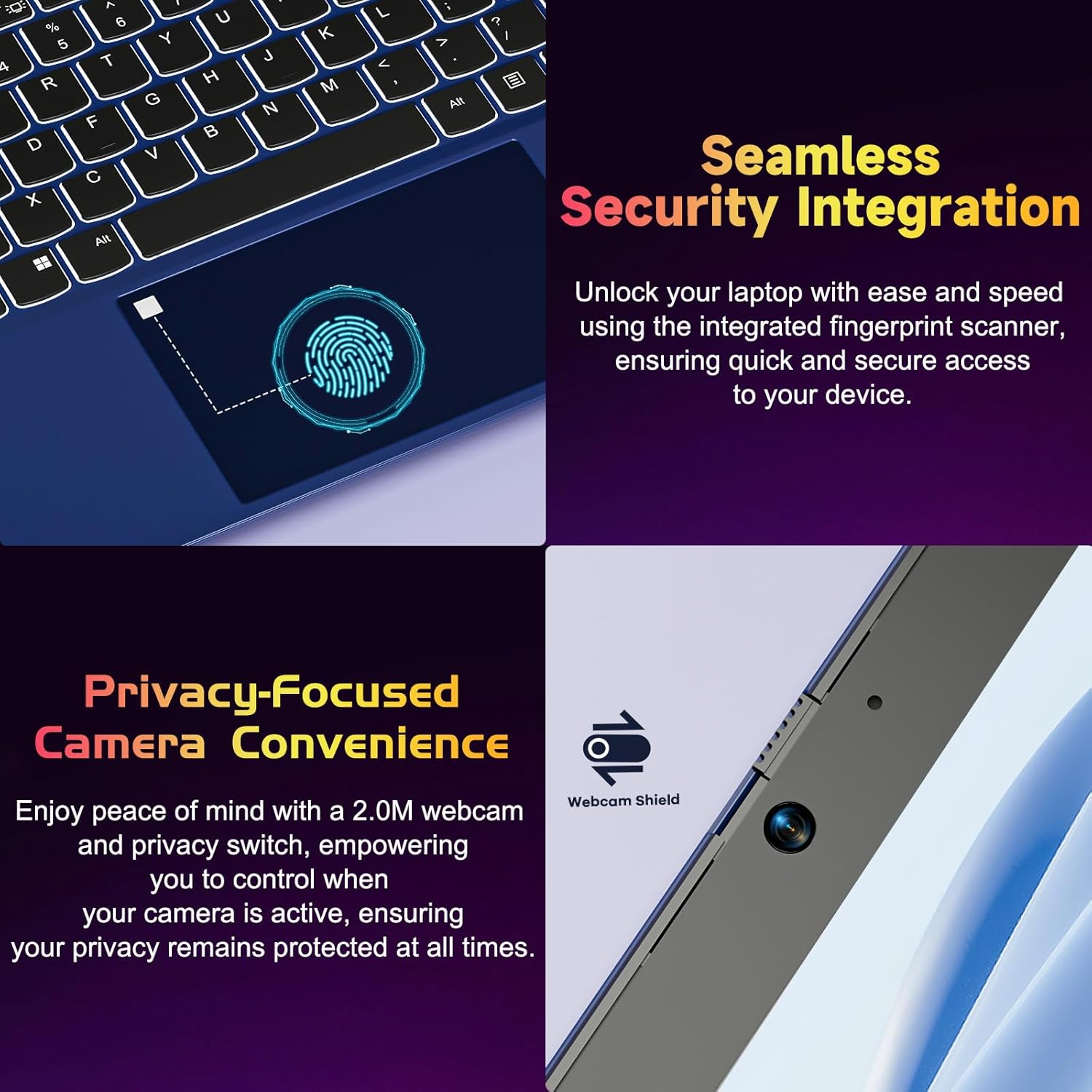
Figure 4.2: Seamless Security Integration and Privacy-Focused Camera. This image highlights the fingerprint scanner for quick and secure access, and the 2.0MP webcam with a physical privacy switch for enhanced user privacy.
4.3. ميزات العرض
The 15.6 inch Full HD (1920 x 1080 Pixel) IPS display offers vivid visuals and a wide viewing angle. The 180° lay-flat hinge allows for flexible screen positioning, ideal for sharing content.

Figure 4.3: Vivid Full HD Display. This image emphasizes the laptop's 15.6-inch Full HD (1920x1080) IPS display, offering bright visuals and eye protection.

Figure 4.4: 180° Lay-Flat Hinge. This image illustrates the laptop's ability to lay flat, expanding usage scenarios and facilitating content sharing.
4.4. Webخصوصية الكاميرا
The laptop includes a 2.0MP webcam with a physical privacy switch (Webcam Shield). Slide the switch to cover the camera lens when not in use to ensure your privacy.
5. الصيانة
- تنظيف: استخدم قطعة قماش ناعمة وخالية من الوبر لتنظيف الشاشة والجزء الخارجي. للبقع الصعبة، افركها برفق.ampامسح القماش بالماء أو بمنظف الشاشة. تجنب المواد الكيميائية القاسية.
- العناية بالبطارية: To prolong battery life, avoid fully discharging the battery frequently. Store the laptop in a cool, dry place if not used for extended periods.
- تحديثات البرامج: قم بتحديث نظام التشغيل Windows وبرامج التشغيل الخاصة بك بانتظام لضمان الأداء والأمان الأمثل.
- توسيع التخزين: The laptop supports dual DDR4 SO-DIMM slots and M.2 NVMe SSD for memory and storage expansion. Consult a qualified technician for upgrades.
6. استكشاف الأخطاء وإصلاحها
6.1. مشاكل الطاقة
- الكمبيوتر المحمول لا يعمل: Ensure the laptop is charged. Connect the charger and wait a few minutes before attempting to power on again.
- البطارية لا تشحن: Verify the charger is properly connected to both the laptop and the power outlet. Try a different outlet.
6.2. مشاكل العرض
- الشاشة فارغة: Check if the laptop is powered on. Try adjusting screen brightness using the function keys. If an external monitor is connected, ensure it is properly configured.
6.3. مشاكل الأداء
- الكمبيوتر المحمول بطيء: Close unnecessary applications. Check for background processes consuming high resources. Ensure sufficient free storage space. Consider performing a system scan for malware.
6.4. مشاكل الاتصال
- عدم الاتصال بشبكة Wi-Fi: Ensure Wi-Fi is enabled. Restart your router and the laptop. Check network settings in Windows.
7. المواصفات
| ميزة | التفاصيل |
|---|---|
| ماركة | نيمو |
| اسم الموديل | NIMO N152R |
| حجم الشاشة | 15.6 بوصة |
| دقة الشاشة | 1920 × 1080 بكسل (Full HD) |
| المعالج | معالج AMD Ryzen 5 3500U (3.7 جيجاهرتز، 4 أنوية، 8 خيطًا) |
| كبش | ذاكرة وصول عشوائي 8 جيجابايت من نوع DDR4 (قابلة للترقية) |
| سرعة الذاكرة | 3200 ميجا هرتز |
| القرص الصلب | 256 GB SSD (Upgradable M.2 NVMe) |
| معالج الرسوميات المساعد | AMD Integrated graphics (Vega) |
| نظام التشغيل | ويندوز 11 |
| نوع لاسلكي | 802.11abg |
| منافذ USB | 1x USB 2.0, 2x USB 3.0, 2x USB-C (1x Charge Only, 1x Full Function) |
| منفذ HDMI | نعم |
| قارئ Micro SD | نعم |
| متوسط عمر البطارية | 5 ساعة |
| وزن العنصر | 3.8 رطل (1.72 كجم) |
| أبعاد المنتج | 14.07 × 8.98 × 0.76 بوصة |
| لون | وَردَة |
| مؤخرة Webقرار الكاميرا | 2 ميجا بكسل |
8. الضمان والدعم
Your NIMO laptop comes with a 2-year warranty, covering manufacturing defects and hardware malfunctions under normal use. Additionally, a 90-day free return policy is provided.

Figure 8.1: After-Sales Support. This image outlines the 2-year warranty, 90-day return policy, and professional customer service available for NIMO products.
8.1. الاتصال بالدعم
For technical assistance, warranty claims, or product-related questions, please contact the NIMO U.S.-based support team. Contact information can typically be found on the official NIMO webتغليف الموقع أو المنتج.
9. معلومات السلامة
لتجنب الإصابة أو تلف جهازك، يرجى مراعاة احتياطات السلامة التالية:
- لا تعرض الكمبيوتر المحمول لدرجات حرارة عالية، أو أشعة الشمس المباشرة، أو الرطوبة العالية.
- تجنب وضع أشياء ثقيلة على الكمبيوتر المحمول.
- Use only the provided charger or a compatible 65W PD Type-C charger.
- لا تحاول تفكيك أو إصلاح الكمبيوتر المحمول بنفسك. استشر فني صيانة مؤهلًا.
- احتفظ بالسوائل بعيدًا عن الكمبيوتر المحمول لتجنب التعرض لصدمة كهربائية أو تلف.
- Ensure proper ventilation when using the laptop to prevent overheating.


