1. المقدمة
This manual provides essential instructions for the assembly, operation, and maintenance of your Arcade1Up Ms. Pac-Man Classic SE Arcade Machine. Please read this manual thoroughly before use to ensure proper function and safety.

Image 1: The Arcade1Up Ms. Pac-Man Classic SE Arcade Machine, featuring vibrant blue and pink artwork with Ms. Pac-Man characters.
2. معلومات السلامة
يرجى مراعاة احتياطات السلامة التالية:
- Keep the arcade machine away from water or excessive moisture.
- تأكد من أن سلك الطاقة غير تالف أو متآكل.
- Do not attempt to open or modify the machine. Refer all servicing to qualified personnel.
- Place the machine on a stable, level surface to prevent tipping.
- الإشراف على الأطفال أثناء الاستخدام.
3. محتويات العبوة
Your Arcade1Up Ms. Pac-Man Classic SE Arcade Machine package includes:
- Arcade Machine Cabinet
- محول الطاقة
- دليل التعليمات (هذا المستند)
Note: An optional riser may be sold separately.
4. الإعداد
4.1 التجميع
The Arcade1Up Ms. Pac-Man Classic SE Arcade Machine requires some assembly. Follow the detailed instructions provided in the separate assembly guide included with your product. Ensure all screws and fasteners are securely tightened before use.

Image 2: Dimensions of the Arcade1Up Ms. Pac-Man Classic SE Arcade Machine, showing its height of 45.4 inches without a riser and indicating an optional riser is sold separately.
4.2 توصيل الطاقة
- Locate the power input port on the back of the arcade machine.
- Connect the provided power adapter to the machine.
- قم بتوصيل محول الطاقة بمأخذ كهربائي قياسي.
- Ensure the power switch (if present) is in the 'OFF' position before plugging in.
فيديو 1: أكثر منview of the Arcade1Up Ms. Pac-Man Classic SE Arcade Machine, demonstrating its features and setup in a home environment. This video is provided by the seller.
5. تعليمات التشغيل
5.1 تشغيل/إيقاف التشغيل
Locate the power switch on the control panel. Flip the switch to 'ON' to power on the machine. Flip to 'OFF' to power off.
5.2 Game Selection
Upon powering on, you will see a game selection menu. Use the joystick to navigate through the available games. Press the 'Start Game' button to select and launch your desired game.
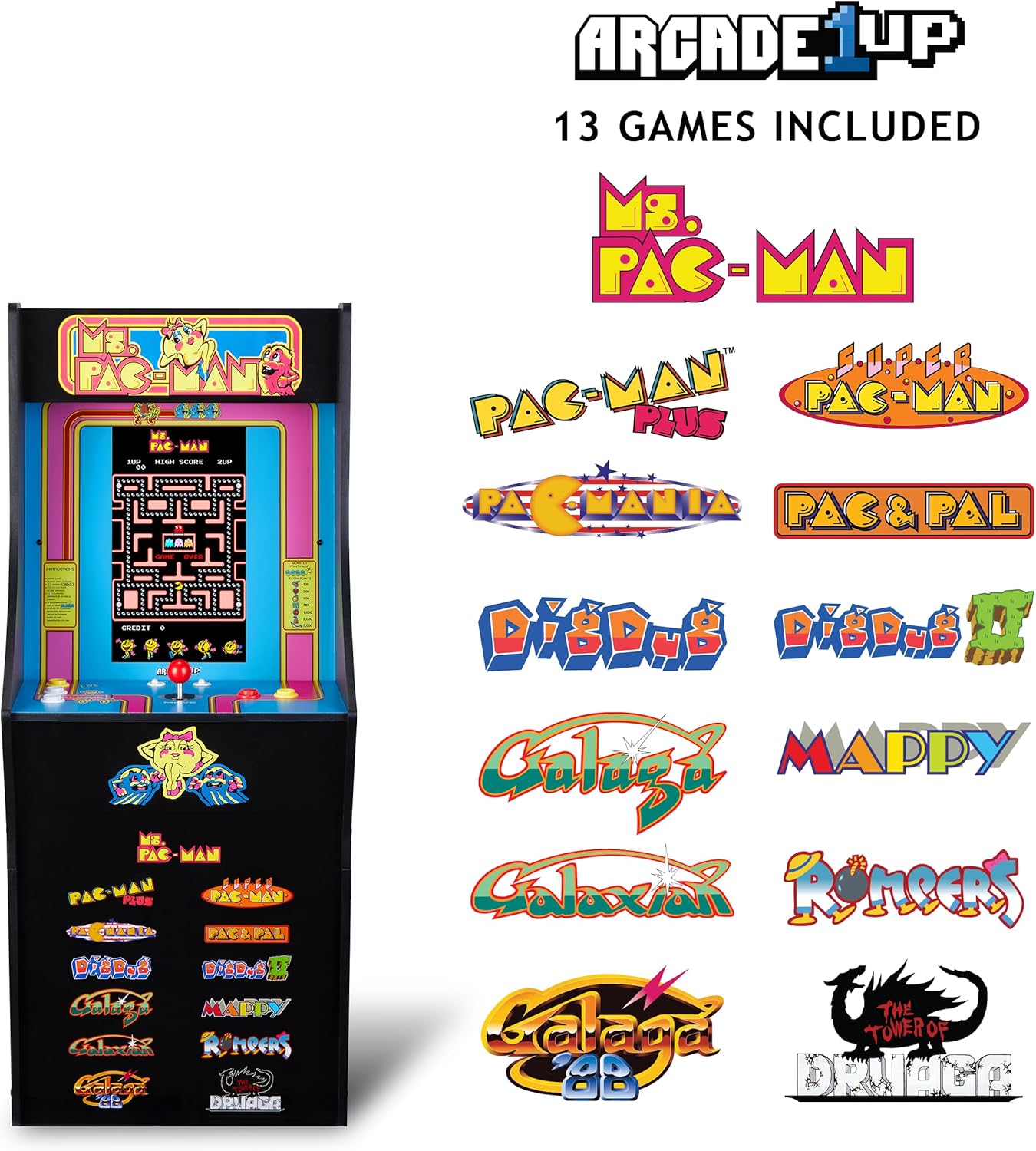
Image 3: The Arcade1Up Ms. Pac-Man Classic SE Arcade Machine displaying the list of 13 included games, such as Ms. Pac-Man, Dig Dug, and Galaga.
5.3 عناصر التحكم
- عصا التحكم: Used for character movement in games.
- Start Game Button: Initiates a game or confirms selection.
- أزرار العمل: Used for specific in-game actions (e.g., firing, jumping).
- التحكم في مستوى الصوت: Adjust the game sound level using the dedicated volume buttons.
- To return to the game selection menu or save a high score, hold the 'Start Game' button for 5 seconds.
- To reset a game, hold the 'Start Game' button for 5 seconds.

الصورة 4: تفصيلية view of the control panel, highlighting the joystick, start game button, and other action buttons for gameplay.
5.4 Included Games
Your Arcade1Up Ms. Pac-Man Classic SE Arcade Machine includes 13 classic games:
- Ms. PAC-MAN
- PAC-MAN PLUS
- SUPER PAC-MAN
- PAC & PAL
- PACMANIA
- DIG DUG
- DIG DUG 2
- GALAGA
- GALAXIAN
- GALAGA 88
- MAPPY
- ROMPERS
- THE TOWER OF DRUAGA
5.5 WiFi Leaderboards
Connect your arcade machine to WiFi to access online leaderboards and compete for high scores globally. Refer to the on-screen prompts for WiFi setup and leaderboard access.
Video 2: Gameplay footage of the Arcade1Up Ms. Pac-Man Classic SE Arcade Machine, showcasing the classic arcade experience and the online leaderboard feature. This video is provided by the seller.
6. الصيانة
- تنظيف: Use a soft, dry cloth to wipe down the cabinet and screen. Avoid abrasive cleaners or excessive moisture.
- تخزين: قم بتخزين الجهاز في مكان بارد وجاف بعيدًا عن أشعة الشمس المباشرة ودرجات الحرارة القصوى.
- سلك الطاقة: افحص سلك الطاقة بانتظام بحثًا عن أي علامات تلف.
7. استكشاف الأخطاء وإصلاحها
| مشكلة | السبب المحتمل | حل |
|---|---|---|
| الجهاز لا يعمل. | سلك الطاقة غير موصول؛ المقبس لا يعمل. | تأكد من توصيل سلك الطاقة بشكل آمن. اختبر المنفذ باستخدام جهاز آخر. |
| لا يوجد صوت. | Volume turned down; speaker issue. | Check volume settings on the control panel. If problem persists, contact support. |
| Game freezes or crashes. | خلل برمجي؛ خطأ مؤقت. | Power off the machine, wait 10 seconds, then power back on. |
8. المواصفات
| ميزة | التفاصيل |
|---|---|
| رقم الموديل | MSP-A-405629 |
| الأبعاد (الارتفاع × العرض × العمق) | 45.4" x 17.35" x 45.4" (without riser) |
| حجم الشاشة | 15.6 Inches IPS Color Monitor |
| عدد الألعاب | 13 |
| نوع وحدة التحكم | عصا التحكم |
| مصدر الطاقة | كهرباء سلكية |
| مادة | البلاستيك، أكريلونتريل بوتادين ستايرين (ABS) |
| وزن العنصر | 47 رطل |
| العمر الموصى به من قبل الشركة المصنعة | 10 سنوات وما فوق |
| الاتصال | WiFi Leaderboards |
9. الضمان والدعم
For warranty information, technical support, or service inquiries, please refer to the official Arcade1Up webالموقع الإلكتروني أو تواصل مع قسم خدمة العملاء. احتفظ بإثبات الشراء لطلبات الضمان.
الدعم عبر الإنترنت: www.arcade1up.com


