1. المقدمة
This manual provides detailed instructions for the operation and maintenance of your HIFI WALKER H2 Touch 64GB Hi Res MP3 Player. Please read this manual thoroughly before using the device to ensure proper functionality and to maximize your audio experience.
2. مواصفات المنتج
- Hi-Res Lossless Audio Performance: Equipped with an ESS9219Q DAC chip, supporting FLAC, APE, WAV, ALAC, AIFF, and native DSD64/128 up to 32-bit/384 kHz.
- بلوتوث شنومكس: Bi-directional (TX/RX) with aptX-HD and LDAC support for high-fidelity wireless audio.
- واجهة تحكم مزدوجة: 2.4-inch full-touch 480x360 display combined with six physical buttons for intuitive navigation.
- Premium Build & Outputs: CNC-machined aluminum alloy body with 3.5 mm headphone out and line-out ports.
- اتصال متعدد الاستخدامات: Functions as a USB DAC, offers SPDIF output via Type-C port.
- مساحة تخزين قابلة للتوسعة: Includes a pre-inserted 64 GB micro SD card, expandable up to 512 GB via micro SD or USB OTG.
- تسجيل عالي الدقة: Digital stereo MIC for 48 kHz high-fidelity recording.
- عمر بطارية طويل: 1500 mAh lithium battery provides up to 10 hours of playback.
- وظائف إضافية: E-book reading, background music playback, multiple EQ presets.
3. ماذا يوجد في الصندوق
- HIFI WALKER H2 Touch MP3 Player
- كابل الشحن
- بطاقة ذاكرة مايكرو إس دي سعة 64 جيجابايت (مثبتة مسبقًا)
- دليل المستخدم
4. انتهى المنتجview
4.1 تخطيط الجهاز
The HIFI WALKER H2 Touch features a compact design with a 2.4-inch display and strategically placed physical controls.
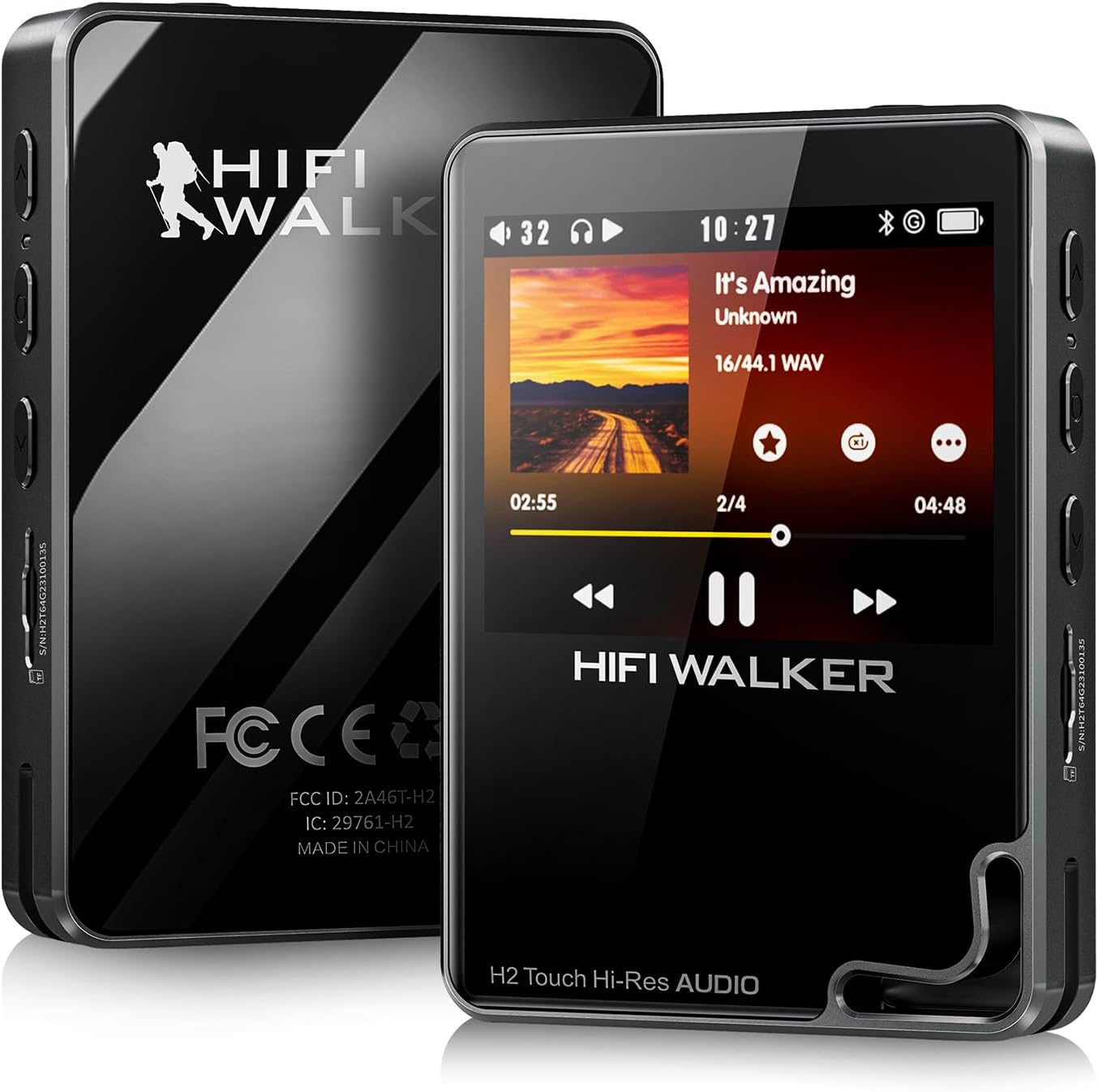
الشكل 1: الأمامي والخلفي view of the HIFI WALKER H2 Touch MP3 Player.
4.2 الأزرار والمنافذ المادية
The device combines a touch screen with tactile buttons for ease of use.

Figure 2: Close-up of the H2 Touch screen and physical control buttons.
- زر الطاقة: Located on the top edge. Press and hold to power on/off.
- أزرار التحكم في الصوت: Located on the side, marked '+' and '-'.
- منفذ كارت الذاكرة الصغيرة: Located on the side, for memory expansion.
- مخرج سماعة رأس 3.5 ملم: Standard audio output port.
- Line-Out Port: للاتصال بالأجهزة الخارجية amplifiers or car audio systems.
- منفذ USB من النوع C: For charging, data transfer, and USB DAC/SPDIF output.
- أزرار التنقل: Play/Pause, Previous/Rewind, Next/Fast-forward, Back, and Menu buttons are located on the front panel.

الشكل 3: مفصل view of the device's ports.
5. الإعداد
5.1 الرسوم الأولية
Before first use, fully charge the device using the provided USB Type-C cable connected to a computer or a compatible USB power adapter. A full charge typically takes about 3 hours.
5.2 Inserting/Expanding Storage
Your device comes with a 64GB micro SD card pre-inserted. To expand storage, power off the device, gently insert a micro SD card (up to 512GB) into the designated slot until it clicks. The device also supports USB OTG for additional storage.
5.3 نقل الموسيقى
Connect the H2 Touch to your computer using the USB Type-C cable. The device will appear as a removable drive. Simply drag and drop your music files into the device's storage or the inserted micro SD card. The player supports various formats including FLAC, APE, WAV, ALAC, AIFF, DSD64/128, and MP3.
Video 1: Demonstrates connecting the H2 Touch to a computer and transferring music files.
6. تعليمات التشغيل
6.1 تشغيل/إيقاف التشغيل
Press and hold the Power button on the top edge for a few seconds to turn the device on or off.
6.2 الملاحة الأساسية
Navigate the menu using the 2.4-inch touch screen or the physical buttons on the front panel. The scroll wheel allows for quick browsing through lists, while the Play/Pause, Next/Fast-forward, Previous/Rewind, Back, and Menu buttons provide direct control.
6.3 تشغيل الموسيقى
From the main menu, select 'Music' to browse your library by song, artist, album, or genre. Select a track to begin playback. Use the physical buttons or on-screen controls to play, pause, skip tracks, or adjust volume.
6.4 اتصال البلوتوث
للاتصال بسماعات الرأس أو مكبرات الصوت البلوتوث:
- Go to 'System Settings' from the main menu.
- حدد "إعدادات البلوتوث".
- Ensure Bluetooth is 'On'.
- Select 'Bluetooth Scan' to find available devices.
- اختر الجهاز الذي ترغب في إقرانه من القائمة.
The H2 Touch supports bi-directional Bluetooth 5.2, allowing it to transmit audio to headphones/speakers or receive audio from another device (e.g., a smartphone) to act as a Bluetooth DAC.
Video 2: Demonstrates Bluetooth pairing and UI navigation on the H2 Touch.
6.5 وضع USB DAC
Connect the H2 Touch to a computer or compatible smartphone via the USB Type-C cable. In the device's settings, select 'USB Mode' and choose 'DAC'. This allows the player to function as an external sound card, enhancing the audio quality of your connected device.
6.6 إعدادات المعادل
Customize your sound experience by accessing the 'Equalizer' settings. Choose from various presets (Rock, Jazz, Classical, Pop, etc.) or create a custom EQ profile لتناسب تفضيلاتك.

Figure 4: Custom Equalizer modes for personalized audio.
6.7 وظيفة التسجيل
The H2 Touch features a digital stereo MIC for high-fidelity recording. Access the 'Record' function from the main menu to start, pause, and save recordings.
7. المواصفات
| اسم الموديل | اتش 2 تاتش |
| ماركة | جهاز المشي عالي الجودة |
| سعة تخزين الذاكرة | 64 جيجابايت (قابلة للتوسعة حتى 512 جيجابايت) |
| حجم الشاشة | 2.4 بوصة |
| تكنولوجيا الاتصال | Bluetooth 5.2 (bi-directional) |
| ميزة خاصة | Hi-Res Audio, USB DAC, SPDIF Output, Recording |
| شريحة DAC | ESS9219Q |
| تنسيقات الصوت المدعومة | FLAC, APE, WAV, ALAC, AIFF, native DSD64/128, MP3 |
| بطارية | 1500 mAh Lithium Polymer (up to 10 hours playback) |
| وزن العنصر | 10.5 أونصات |
| أبعاد | 5.91 × 3.78 × 2.24 بوصة |
8. استكشاف الأخطاء وإصلاحها
- الجهاز لا يعمل: تأكد من شحن الجهاز بالكامل. إذا كانت البطارية فارغة تمامًا، فقد يستغرق الأمر بضع دقائق من الشحن قبل أن يتمكن الجهاز من التشغيل.
- لا يوجد صوت: Check headphone connection, volume level, and ensure the correct output mode (headphone out/line-out) is selected. Verify Bluetooth connection if using wireless audio.
- موسيقى files not recognized: يضمن files are in a supported format and correctly transferred to the device's internal storage or micro SD card. Try updating the music library from the settings.
- مشاكل اتصال البلوتوث: Ensure the H2 Touch and the target Bluetooth device are in pairing mode and within range. Try restarting both devices.
- الجهاز لا يستجيب: Press and hold the power button for 10-15 seconds to force a restart. If issues persist, consider performing a factory reset (note: this will erase all user data).
9. الصيانة
- حافظ على الجهاز جافًا وبعيدًا عن درجات الحرارة القصوى.
- Clean the screen and body with a soft, dry cloth. Avoid using harsh chemicals.
- تجنب إسقاط الجهاز أو تعريضه لصدمات قوية.
- قم بعمل نسخة احتياطية من الموسيقى الخاصة بك بانتظام files لمنع فقدان البيانات.
10. الضمان والدعم
For warranty information and technical support, please refer to the official HIFI WALKER webالموقع الإلكتروني أو تواصل مع خدمة العملاء مباشرةً. احتفظ بإثبات الشراء لطلبات الضمان.


