1. انتهى المنتجview
The MOKiN Thunderbolt 4 Dock (Model MODK1903) is a versatile docking station designed to expand the connectivity of your laptop. It features multiple high-speed ports, advanced display capabilities, and power delivery for efficient workflow management.
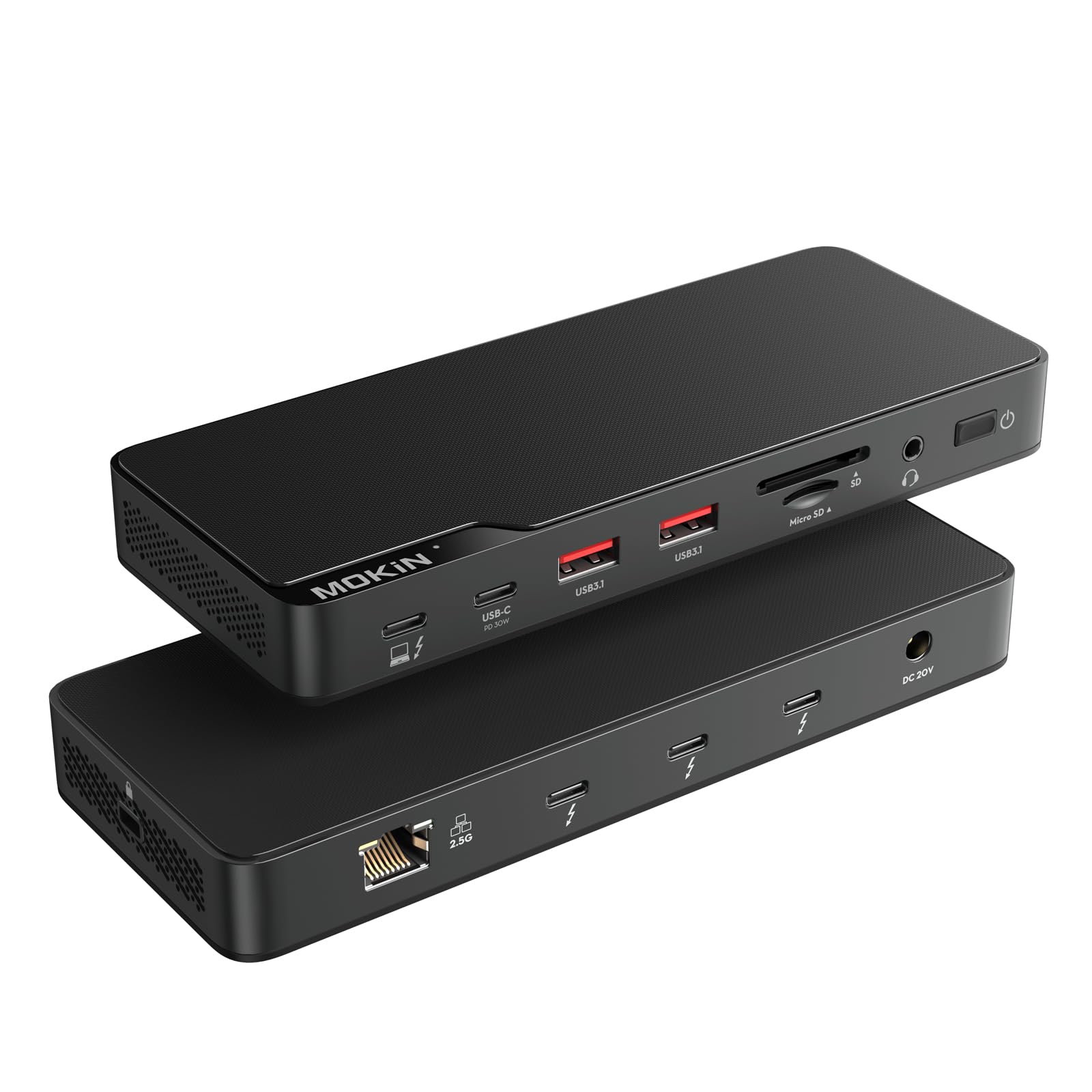
الصورة 1: الأمامي والخلفي view of the MOKiN Thunderbolt 4 Dock, highlighting all available ports and their labels.
2. Key Features and Ports
The MOKiN Thunderbolt 4 Dock offers a comprehensive set of ports to enhance your computing experience:
- Thunderbolt 4 Host Port: Up to 40 Gbp/s data transfer, provides up to 85W power delivery to the host computer.
- Thunderbolt 4 Device Ports (x3): Up to 40 Gbp/s data transfer, provides 15W power delivery for external drives and other devices.
- منافذ USB-A 3.1 (x2): سرعة نقل البيانات 10 جيجابت في الثانية.
- منفذ USB-C 2.0 (x1): Supports 30W Power Delivery and 480Mbps data transfer.
- 2.5GbE Ethernet Port (x1): Provides high-speed wired network connectivity, 2.5 times faster than 1Gbps, compatible with 1Gbps routers and switches.
- 3.5mm Audio Ports (x1): لإدخال الصوت (الميكروفون) وإخراجه (سماعات الرأس).
- SD/Micro SD UHS-II Card Reader (x1): Supports SD4.0 with up to 250MB/s transfer speed, allows simultaneous use of both card slots.
- مدخلات طاقة التيار المستمر: 150W DC power adapter for dock operation and laptop charging.
- فتحة قفل الأمان: من أجل الأمن المادي للرصيف.
- مفتاح التشغيل: To turn the dock on/off.

الصورة 2: تفصيلية view of the MOKiN Thunderbolt 4 Dock's front and rear ports with their respective labels and functions.
3. الإعداد والتثبيت
- توصيل الطاقة: Connect the 150W DC Power adapter to the DC Power Input port on the dock and then to a power outlet.
- الاتصال بجهاز الكمبيوتر المحمول المضيف: Use the provided 2.62ft Thunderbolt 4 cable to connect the Thunderbolt 4 Host port (85W charging) on the dock to a Thunderbolt 4 port on your laptop.
- توصيل الشاشات:
- For a single 8K@30Hz display, connect it to one of the Thunderbolt 4 device ports using a compatible cable.
- For dual 4K@60Hz displays, connect them to two separate Thunderbolt 4 device ports using compatible cables.
- For triple 4K displays (Thunderbolt Port Triple Display), connect each display to a separate Thunderbolt 4 device port.
ملحوظة: Dual-screen mode is only available on computers with Intel processors and MacBook models with M1 Pro/Max, M2 Pro/Max, or M3 Pro/Max chips. M1/M2/M3 MacBook Air series only connect one external display.
- توصيل الأجهزة الطرفية: Connect your USB-A, USB-C, Ethernet, audio devices, and SD/Micro SD cards to their respective ports on the dock.
- تشغيل الطاقة: Press the power switch on the dock to turn it on.
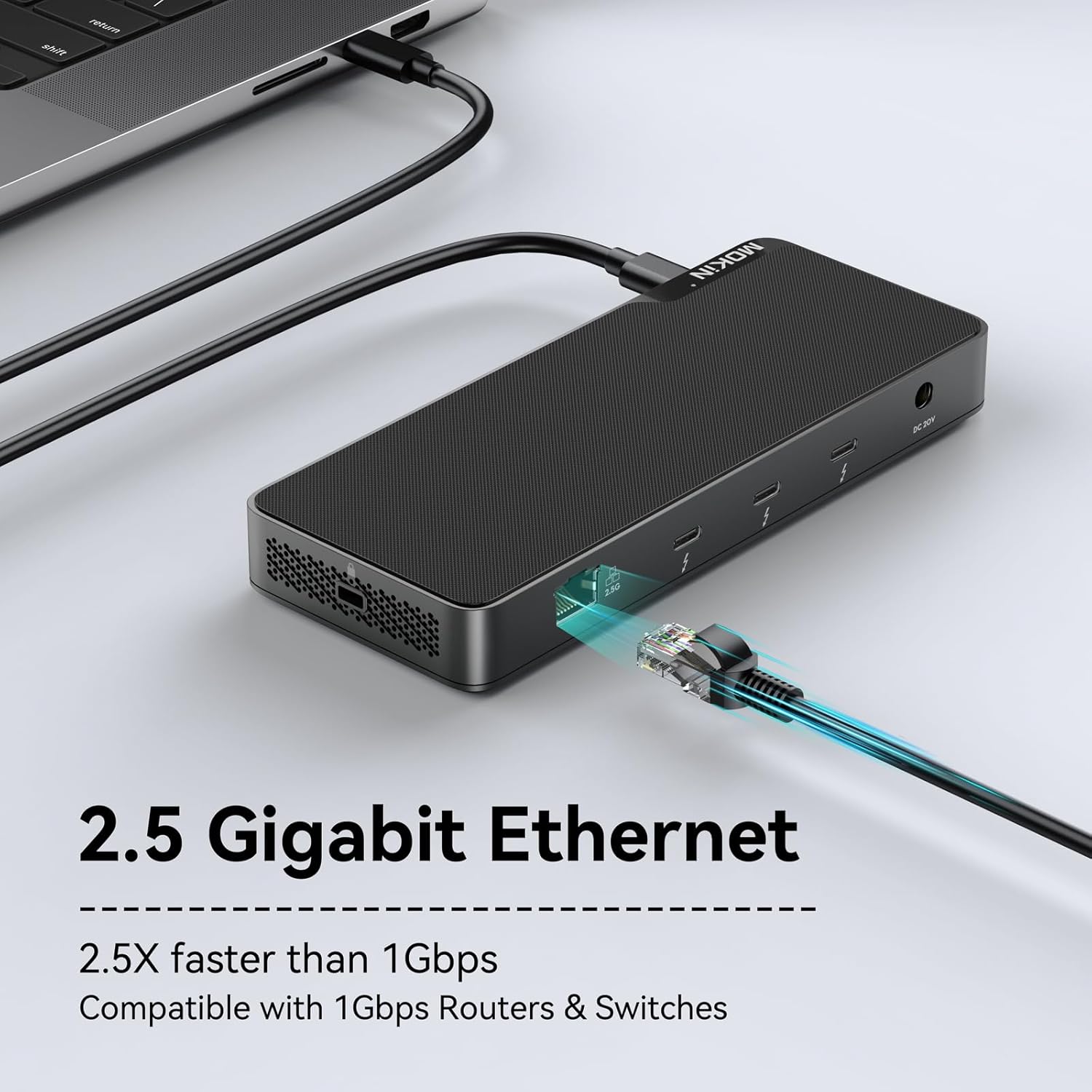
Image 3: The MOKiN Thunderbolt 4 Dock connected to a laptop, external hard drive, and other peripherals, demonstrating its multi-port functionality.
فيديو 1: أكثر منview of the MOKiN Thunderbolt 4 Dock, demonstrating its features and connectivity options. This video is provided by the seller.
4. تعليمات التشغيل
4.1 تكوين العرض
The dock supports various display configurations depending on your host system:
- عرض واحد: Up to 8K@30Hz resolution.
- شاشات مزدوجة: Up to dual 4K@60Hz resolution.
- شاشات ثلاثية: Supports triple different 4K displays simultaneously.
The dock supports extended mode (ABC), allowing you to use different screens to expand your workspace.

Image 4: A MacBook connected to the MOKiN Thunderbolt 4 Dock, displaying content across two external monitors in extended mode on macOS.
4.2 توصيل الطاقة
The dock provides efficient power management:
- شحن الجهاز المضيف: The Thunderbolt 4 host port delivers up to 85W of power to your connected laptop.
- شحن الجهاز: The Thunderbolt 4 device ports provide 15W of power, suitable for charging peripherals like external SSDs.
- الشحن عبر USB-C PD: The USB-C 2.0 port supports 30W Power Delivery for charging compatible devices.
A single cable connection to your laptop will charge your device and provide all necessary connectivity.

Image 5: The MOKiN Thunderbolt 4 Dock simultaneously charging a laptop (85W), a smartphone (30W PD), and earbuds/smartwatch (15W), illustrating its universal charging capabilities.
5. المواصفات
| ميزة | مواصفة |
|---|---|
| رقم الموديل | مودك1903 |
| اتصال المضيف | Thunderbolt 4 (up to 40 Gbp/s, 85W PD) |
| منافذ Thunderbolt 4 في اتجاه المصب | 3x (40 Gbp/s, 15W PD each) |
| منافذ USB-A | 2 منفذ USB-A 3.1 (10 جيجابت في الثانية) |
| منافذ USB-C | 1x USB-C 2.0 (30W PD, 480Mbps) |
| إيثرنت | 2.5GbE (2.5 Gigabit Ethernet) |
| صوتي | 1x 3.5mm Audio/Mic port |
| قارئ البطاقات | SD/Micro SD UHS-II (250MB/s) |
| Max Display Resolution (Single) | 8 كيلو @30 هرتز |
| Max Display Resolution (Dual/Triple) | 4 كيلو @60 هرتز |
| محول الطاقة | محول طاقة تيار مستمر بقدرة 150 واط |
| أبعاد | 9.92 × 6.18 × 2.05 بوصة |
| وزن العنصر | 1.81 رطل |
6. استكشاف الأخطاء وإصلاحها
6.1 مشاكل العرض
- لا يوجد عرض/دقة غير صحيحة:
- Ensure all display cables are securely connected to both the dock and the monitors.
- Verify that your laptop and monitors support the desired resolutions and refresh rates.
- Check your laptop's display settings to ensure external monitors are detected and configured correctly (e.g., extended mode).
- For MacBooks, note that M1/M2/M3 MacBook Air series only support one external display. Dual-screen mode is available for Intel processors and M1 Pro/Max, M2 Pro/Max, or M3 Pro/Max chips.
6.2 Power Delivery Issues
- الكمبيوتر المحمول لا يشحن:
- Ensure the 150W DC Power adapter is correctly connected to the dock and a working power outlet.
- Verify the Thunderbolt 4 cable is connected to the Thunderbolt 4 Host port on the dock and a compatible Thunderbolt 4 port on your laptop.
- Check if your laptop supports charging via Thunderbolt 4 and the required wattag(حتى 85 واط).
6.3 مشاكل الاتصال
- الأجهزة الطرفية غير المكتشفة:
- Ensure the dock is powered on.
- حاول توصيل الجهاز الطرفي بمنفذ مختلف على قاعدة التوصيل.
- Ensure the peripheral's drivers are up to date on your host laptop.
- نقل البيانات البطيء:
- Verify that your devices and cables support the advertised speeds (e.g., 10Gbps for USB-A 3.1, 40Gbps for Thunderbolt 4).
- Ensure you are using high-quality, certified cables.
7. الضمان والدعم
The MOKiN Thunderbolt 4 USB C Docking Station (Model MODK1903) is covered by a ضمان لمدة عام واحد على العمل.
For technical support or warranty claims, please refer to the contact information provided in your User Guide or visit the official MOKiN webموقع.


