مقدمة
Thank you for choosing the GMBACK Wireless Pro Controller. This manual provides detailed instructions for setting up, operating, and maintaining your controller to ensure optimal performance and an enhanced gaming experience. Please read this manual thoroughly before use.
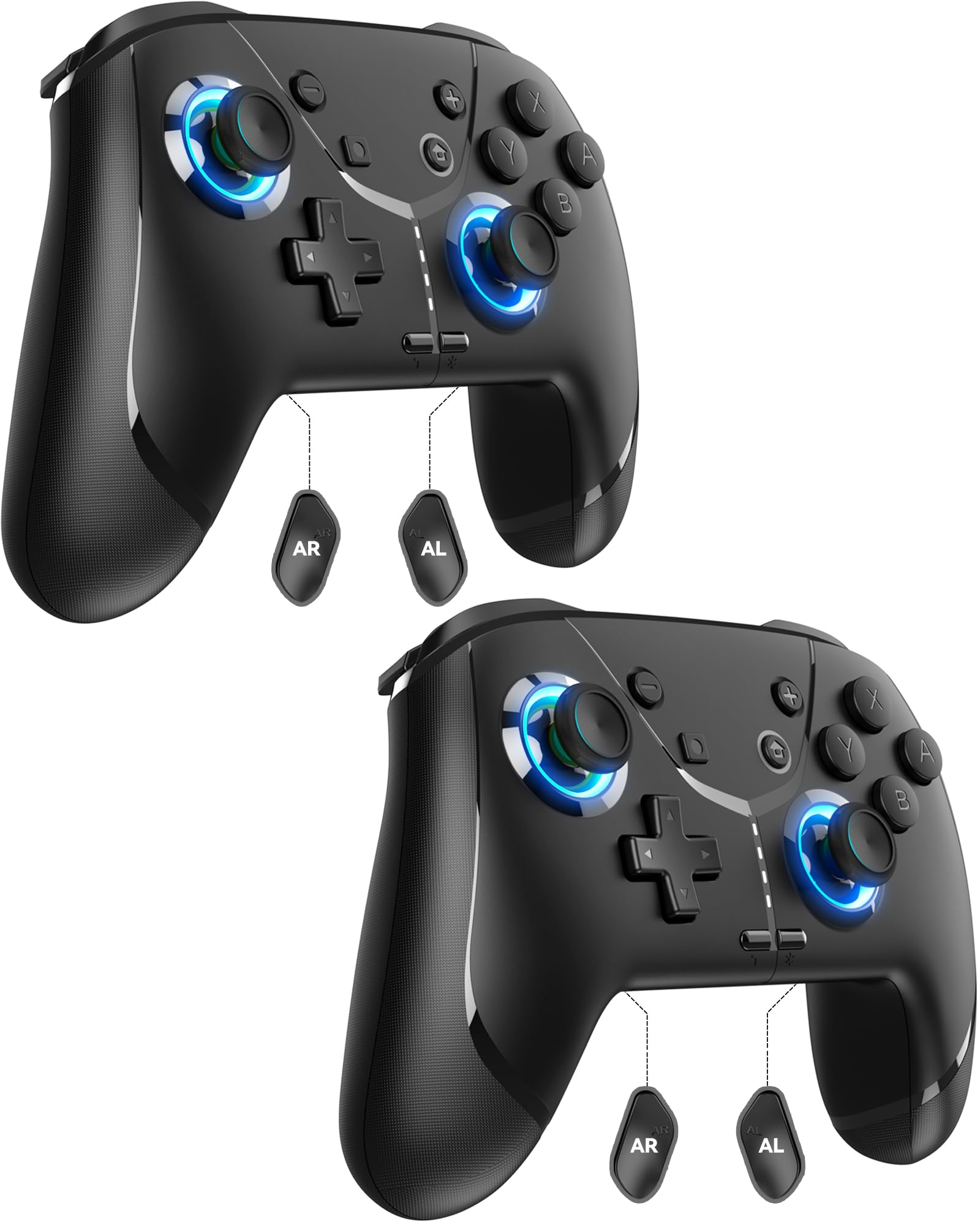
Image: GMBACK Wireless Pro Controller, front view.
محتويات الحزمة
- 2 x GMBACK Wireless Pro Controllers
- 2 × كابلات شحن USB-C
- 1 × دليل المستخدم
ابدء
1. الاقتران بجهاز نينتندو سويتش
- تأكد من تشغيل جهاز Nintendo Switch الخاص بك وتحديثه إلى أحدث إصدار من برامج النظام.
- من قائمة HOME ، حدد "المتحكمون"، ثم "تغيير المقبض/الترتيب".
- On the GMBACK controller, press and hold the زر المزامنة (located on the top edge near the USB-C port) for 3-5 seconds until the LED indicators begin to flash rapidly.
- The controller will automatically pair with the Switch. Once paired, the player LED(s) on the bottom of the controller will light up solid.

Image: GMBACK Wireless Pro Controller connected to a Nintendo Switch console.
2. الاتصال بالكمبيوتر (سلكيًا)
- Connect the GMBACK controller to your PC using the provided USB-C cable.
- The controller will be recognized as a standard gamepad. Drivers may install automatically.
- For optimal compatibility, ensure your PC's operating system is up to date.
3. شحن وحدة التحكم
- Connect the controller to a USB power source (e.g., Switch dock, PC, USB wall adapter) using the provided USB-C cable.
- The LED indicators will show charging status. A full charge typically takes 2-3 hours.
- The controller features an 800mAh battery, providing approximately 15-20 hours of playtime on a full charge.

Image: Visual representation of the 800mAh battery, 15-20 hours playtime, and 2-3 hours charging time.
الميزات والوظائف الرئيسية
1. Loop Macro Function
The controller supports a loop macro function, allowing you to record and replay a sequence of up to 30 seconds of button presses and joystick movements. This includes joysticks, triggers, D-pad, ABXY, and +/- buttons.
- لتسجيل: Refer to the detailed instructions in the included user manual for specific recording steps.
- To Start/Stop Loop: امسك زر توربو و ال زر ماكرو simultaneously. The controller will automatically replay your recorded actions in a continuous loop.

الصورة: الخلفية view of the controller highlighting the AR and AL programmable buttons and the text 'Loop Macro Function'.
2. مستشعر جيروسكوب سداسي المحاور
The integrated 6-axis gyro sensor provides precise motion detection, allowing for intuitive control in compatible games that utilize motion sensing. This enhances immersion and gameplay accuracy.

Image: Controller being used for a racing game, illustrating the 6-Axis Gyro Sensor feature.
3. Customizable Turbo Function
The controller offers three adjustable turbo speeds for rapid-fire actions. This feature can be set to either auto-fire or manual-fire mode.
- لضبط سرعة التوربو: Refer to the included user manual for specific button combinations to cycle through the three turbo speeds.
- لتفعيل/إلغاء تفعيل وضع التيربو: اضغط على زر توربو along with the desired action button.

Image: Controller displaying the 'Auto & Manual Turbo' feature with a gaming background.
4. Dual Vibration Adjustment
Experience immersive feedback with four levels of dual vibration intensity: None, Weak, Medium, and Strong. Adjust the vibration to your preference for different games.
- To Adjust Vibration: Consult the user manual for the specific button combination to cycle through vibration levels.

Image: Controller illustrating the four levels of dual vibration: None, Weak, Medium, Strong.
5. إضاءة RGB
The controller features dynamic RGB lighting around the joysticks, enhancing the visual appeal during gameplay. The lighting can be adjusted or turned off.
- To Adjust RGB Lighting: Refer to the user manual for instructions on changing lighting modes or turning off the lights.

صورة: عرض وحدة التحكمasing its RGB lighting feature around the joysticks.
6. Remappable ABXY Buttons
The ABXY buttons can be remapped to switch between Nintendo Switch and Xbox layouts, providing flexibility for different gaming preferences without needing to physically remove any buttons.
- To Remap ABXY: Follow the instructions in the user manual for the specific button sequence to switch layouts.

Image: Controller illustrating the ABXY button function switching between Nintendo Switch and Xbox layouts.
7. Screenshot and Home Wake-up
- The controller includes a dedicated زر لقطة الشاشة for capturing in-game moments.
- ال زر الصفحة الرئيسية can be used to wake up your Nintendo Switch console from sleep mode.
صيانة
- تنظيف: استخدم قطعة قماش ناعمة وجافة لتنظيف وحدة التحكم. تجنب استخدام المواد الكيميائية القاسية أو المواد الكاشطة.
- تخزين: قم بتخزين وحدة التحكم في مكان بارد وجاف بعيدًا عن أشعة الشمس المباشرة ودرجات الحرارة القصوى.
- العناية بالبطارية: لإطالة عمر البطارية، تجنب تفريغ وحدة التحكم بالكامل بشكل متكرر. اشحنها بانتظام، حتى لو لم تكن قيد الاستخدام المستمر.
استكشاف الأخطاء وإصلاحها
- وحدة التحكم غير متصلة:
- تأكد من شحن وحدة التحكم.
- Verify the Switch is in 'Change Grip/Order' mode.
- Try restarting both the Switch and the controller.
- تأكد من عدم وجود أجهزة لاسلكية أخرى تسبب تداخلاً.
- الأزرار لا تستجيب:
- Check if the controller is properly paired.
- Test button functionality in Switch system settings.
- Ensure the controller's firmware is up to date (if applicable, check GMBACK support webموقع).
- مشاكل الشحن:
- Use the provided USB-C cable.
- حاول استخدام مصدر طاقة USB مختلف.
- تأكد من أن منفذ الشحن الموجود على وحدة التحكم نظيف وخالٍ من الشوائب.
تحديد
| ميزة | التفاصيل |
|---|---|
| نموذج | HD6900 |
| التوافق | Nintendo Switch 2, Switch, Switch Lite, Switch OLED, Windows PC (wired) |
| سعة البطارية | 800 مللي أمبير |
| وقت اللعب | 15-20 ساعات |
| وقت الشحن | 2-3 ساعات |
| الاتصال | لاسلكي (بلوتوث)، سلكي (USB-C) |
| المميزات الخاصة | Loop Macro, 6-Axis Gyro Sensor, Dual Vibration (4 levels), Adjustable Turbo (3 speeds), RGB Lighting, Remappable ABXY, Screenshot, Home Wake-up |
| وزن العنصر | 8.5 أونصات |
| أبعاد الحزمة | 6.54 × 5.31 × 5.28 بوصة |
فيديو المنتج الرسمي
فيديو: انتهىview of the GMBACK Wireless Switch Controller, demonstrating its features and compatibility with Nintendo Switch, Switch Lite, and Switch OLED consoles.
الضمان والدعم
GMBACK products come with a standard manufacturer's warranty. For detailed warranty information, technical support, or any inquiries regarding your controller, please refer to the contact information provided on the product packaging or visit the official GMBACK webموقع.

Image: Icon representing customer support.
