1. المقدمة
This manual provides essential information for the safe and efficient operation of your Anern FGI-DU4200 Dual Voltage Hybrid Solar Inverter. Please read this manual thoroughly before installation and use, and retain it for future reference. This inverter is designed to provide reliable power for various applications, integrating solar charging, AC utility charging, and inverter output functions.
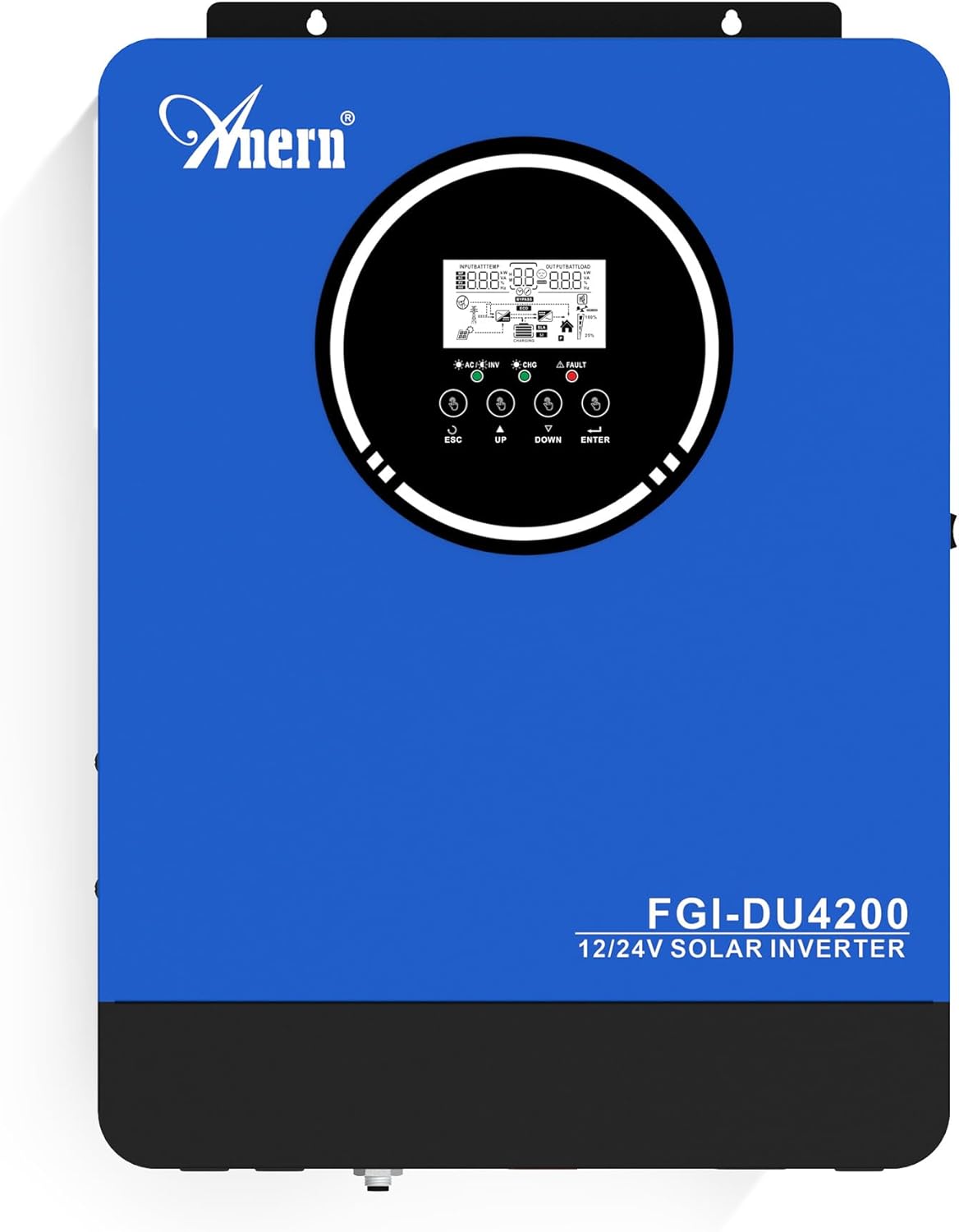
الشكل 1: Anern FGI-DU4200 Dual Voltage Hybrid Solar Inverter. This image shows the front panel of the inverter, featuring the display screen and control buttons.
2. تعليمات السلامة
Please observe the following safety precautions to prevent injury and damage to the inverter or connected equipment:
- يجب أن يتم التركيب بواسطة فنيين مؤهلين وفقًا لقوانين الكهرباء المحلية.
- تأكد من أن جميع الأسلاك ذات حجم مناسب وموصولة بشكل صحيح.
- لا تقم بفكّ العاكس. لا يحتوي على أي أجزاء قابلة للصيانة.
- قم بإبقاء العاكس بعيدًا عن المواد القابلة للاشتعال والرطوبة وأشعة الشمس المباشرة.
- تأكد من وجود تهوية كافية حول العاكس لمنع ارتفاع درجة الحرارة.
- Always disconnect all power sources (solar, battery, utility) before performing any maintenance or wiring.
- ارتدِ معدات الحماية الشخصية المناسبة أثناء التركيب والصيانة.
3. انتهى المنتجview والميزات
The Anern FGI-DU4200 is a versatile hybrid solar inverter designed for both on-grid and off-grid applications. It features automatic dual-voltage operation and a 120A MPPT solar charge controller.
المميزات الرئيسية:
- Automatic Dual-Voltagالعملية الإلكترونية: Automatically recognizes 12VDC (2300W output) or 24VDC (4200W output) battery systems.
- High-Efficiency Pure Sine Wave Output: Provides stable 220-230VAC ±5% output (50Hz) with 90% efficiency.
- Integrated 120A MPPT Solar Charge Controller: Maximizes solar power harvesting.
- أوضاع شحن متعددة: Solar, Solar and Utility, Solar Priority.
- أوضاع إخراج متعددة: Solar Priority, Utility Priority, SBU (Solar-Battery-Utility) Mode.
- Seamless Transfer: Grid/generator transfer time less than 20ms for critical loads.
- الحماية الشاملة: حماية من الحمل الزائد، وارتفاع درجة الحرارة، وقصر الدائرة.
- توافق البطارية: Supports 12V/24V Lithium, Lead-Acid, and Gel batteries.
- إمكانية التشغيل البارد: Ensures operation in extreme conditions.
- مراقبة شبكة الواي فاي: Allows system operation control via mobile phone (requires optional Wi-Fi module).

الشكل 2: زيادةview of key features including frequency range, waveform, charging currents, battery voltage, and protection mechanisms.

الشكل 3: Illustration of the inverter's dual voltage capability, supporting 4.2KW at 24V and 2.3KW at 12V battery systems.
4. الإعداد والتثبيت
4.1 فك العبوة والتفتيش
Upon receiving the inverter, carefully unpack it and inspect for any shipping damage. Ensure all components listed in the packing list are present. If any damage or missing parts are found, contact your dealer immediately.
4.2 تركيب العاكس
Mount the inverter vertically on a sturdy wall or surface. Ensure there is sufficient clearance around the unit for proper ventilation (at least 20 cm on all sides). Avoid mounting in direct sunlight, near heat sources, or in areas with excessive dust or moisture.
4.3 توصيلات الأسلاك
All wiring must comply with local electrical codes. Use appropriate wire gauges for all connections to prevent overheating and ensure efficient power transfer.
4.3.1 توصيل البطارية
The inverter supports both 12VDC and 24VDC battery systems. The inverter automatically detects the battery voltage. Ensure correct polarity when connecting batteries. For 12V systems, batteries are typically connected in parallel. For 24V systems, batteries are typically connected in series.

الشكل 4: Wiring diagram illustrating parallel connection for 12V battery systems (2300W output) and series connection for 24V battery systems (4200W output).

الشكل 5: The inverter is compatible with various battery types, including Gel, AGM, Flooded (FLD), Lithium (LI), and Sealed Lead-Acid (SLD) batteries.
4.3.2 توصيل الألواح الشمسية
Connect your solar panels to the designated PV input terminals. Ensure the open circuit voltage (Voc) of your solar array does not exceed the inverter's maximum PV input voltage (500Vdc). Observe correct polarity.
4.3.3 AC Input Connection (Utility/Generator)
Connect the AC utility grid or a compatible generator to the AC input terminals. The inverter supports 220-230VAC input. Ensure proper grounding.
4.3.4 AC Output Connection (Loads)
Connect your household or office loads to the AC output terminals. The inverter provides a pure sine wave output suitable for sensitive electronics. Do not exceed the rated output power of the inverter (2300W for 12VDC systems, 4200W for 24VDC systems).
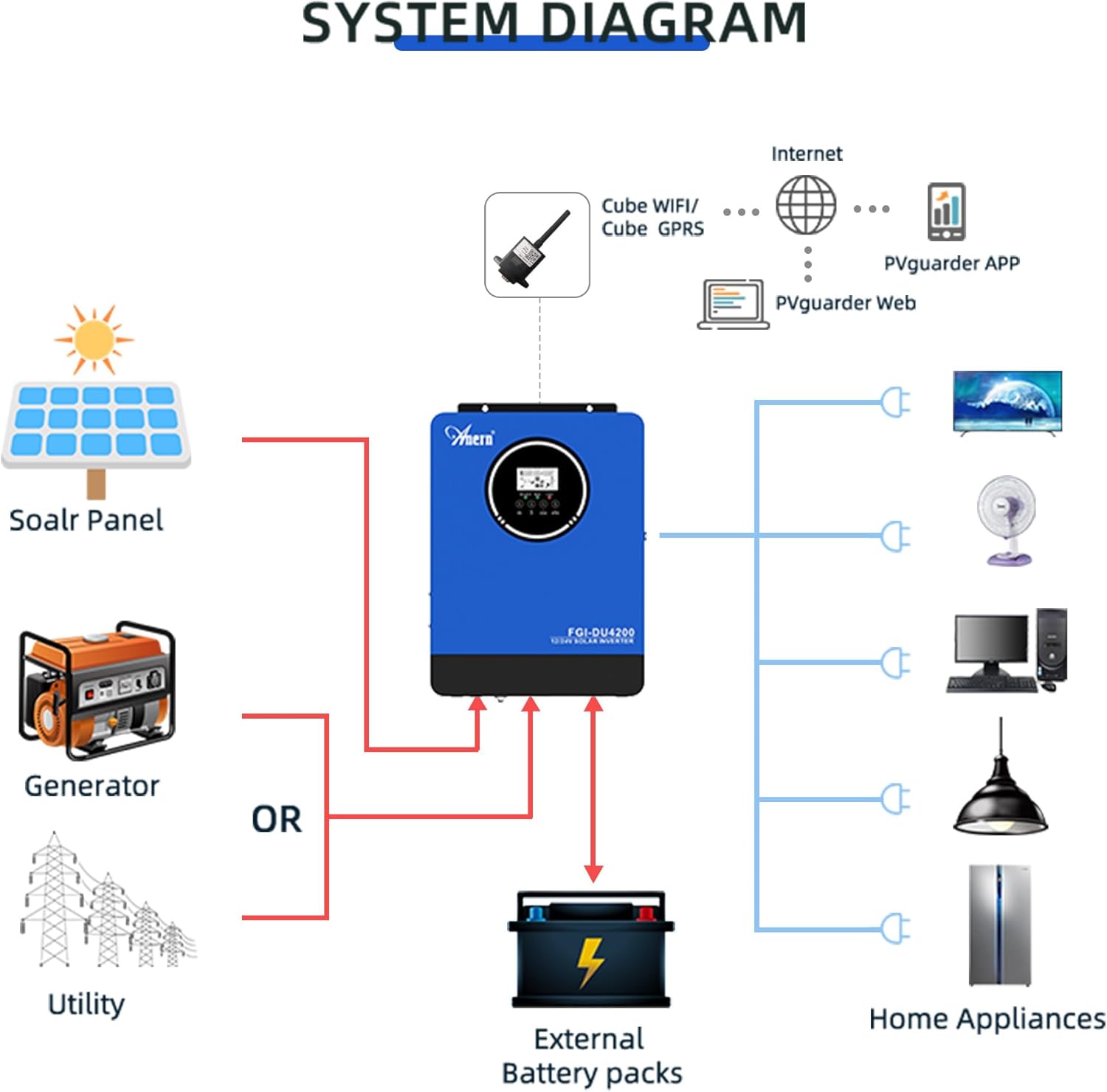
الشكل 6: Comprehensive system diagram showing connections for solar panels, generator/utility, external battery packs, and various home appliances.

الشكل 7: Example of an outdoor installation of the Anern FGI-DU4200 inverter, demonstrating its integration into a home solar power system.
5. تعليمات التشغيل
5.1 تشغيل/إيقاف التشغيل
After all connections are securely made, switch on the battery breaker first, then the solar array breaker, and finally the AC input breaker (if connected). Press the power button on the inverter to turn it on. To power off, reverse the sequence: turn off AC input, then solar, then battery, and finally the inverter power button.
5.2 شاشة LCD وأزرار التحكم
The inverter features an LCD display that shows real-time operating status, input/output voltages, battery status, and error codes. Use the control buttons (ESC, UP, DOWN, ENTER) to navigate through menus and adjust settings.
5.3 أوضاع شحن
يوفر العاكس أربعة أوضاع شحن قابلة للاختيار:
- الأولوية للطاقة الشمسية: Solar power charges the battery first. If solar is insufficient, utility power supplements.
- أولوية المرافق: Utility power charges the battery first. Solar power supplements if utility is unavailable.
- الطاقة الشمسية فقط: الطاقة الشمسية هي الطريقة الوحيدة لشحن البطارية.
- الطاقة الشمسية والمرافق العامة: تقوم كل من الطاقة الشمسية وطاقة المرافق بشحن البطارية في نفس الوقت.
5.4 أوضاع إخراج
The inverter offers three selectable output modes:
- أولوية المرافق: Loads are primarily powered by utility. If utility fails, the inverter switches to battery power.
- الأولوية للطاقة الشمسية: Loads are primarily powered by solar. If solar is insufficient, battery power is used. If both are insufficient, utility power is used (if connected).
- SBU (Solar-Battery-Utility) Mode: Loads are powered by solar first, then battery, and finally utility if both solar and battery are depleted or unavailable.
5.5 مراقبة شبكة الواي فاي (اختياري)
If equipped with the optional Wi-Fi module, the inverter can be monitored and controlled via a mobile application. Connect the Wi-Fi module to the designated port on the inverter and follow the instructions provided with the module for setup.

الشكل 8: Diagram illustrating the connection of an optional Wi-Fi module for remote monitoring and control of the inverter system via a mobile application or web واجهة.
6. الصيانة
تضمن الصيانة المنتظمة طول عمر وأداء العاكس الخاص بك على النحو الأمثل.
- تنظيف: نظّف الجزء الخارجي من العاكس بشكل دوري بقطعة قماش جافة. تأكد من خلو فتحات التهوية من الغبار والحطام.
- الاتصالات: افحص جميع التوصيلات الكهربائية سنوياً للتأكد من إحكامها وخلوها من التآكل. أعد ربطها بإحكام إذا لزم الأمر.
- فحص البطارية: بالنسبة لبطاريات الرصاص الحمضية، تحقق من مستويات الإلكتروليت وحالة الأطراف وفقًا لإرشادات الشركة المصنعة للبطارية.
- بيئة: تأكد من أن بيئة التشغيل تظل ضمن نطاقات درجة الحرارة والرطوبة المحددة.
7. استكشاف الأخطاء وإصلاحها
يُقدّم هذا القسم حلولاً للمشاكل الشائعة. أما بالنسبة للمشاكل غير المذكورة هنا، فيُرجى التواصل مع الدعم الفني.
| مشكلة | السبب المحتمل | حل |
|---|---|---|
| العاكس لا يعمل | لا يوجد اتصال بالبطارية؛ مستوى شحن البطاريةtagمستوى الطاقة منخفض جدًا؛ لم يتم الضغط على زر التشغيل. | تحقق من توصيلات البطارية ومستوى الصوتtage; Charge battery; Press and hold power button. |
| لا يوجد مخرج تيار متردد | زيادة الحمل؛ قصر الدائرة؛ انخفاض مستوى البطارية؛ عطل في العاكس. | Reduce load; Check for short circuits; Charge battery; Restart inverter. |
| الشحن بالطاقة الشمسية لا يعمل | Solar panels disconnected; Insufficient sunlight; PV voltage too low/high; MPPT fault. | Check PV connections; Ensure adequate sunlight; Verify PV voltagهـ ضمن النطاق. |
| تم عرض رمز الخطأ | Specific fault detected by the inverter. | Refer to the inverter's LCD display for the specific error code and consult the full manual (if available) or contact support for detailed interpretation and resolution. |
8. المواصفات
| المعلمة | قيمة |
|---|---|
| نموذج | FGI-DU4200 |
| Rated Power (12VDC) | 2300 واط |
| Rated Power (24VDC) | 4200 واط |
| حجم البطاريةtage | 12 فولت تيار مستمر / 24 فولت تيار مستمر (استشعار تلقائي) |
| حجم الإخراجtage | 220-230VAC ±5% (50Hz) |
| شكل الموجة | موجة جيبية نقية |
| تيار وحدة التحكم في شحن الطاقة الشمسية بتقنية MPPT | 120 أمبير |
| ماكس PV صفيف الدائرة المفتوحة المجلدtage | 500 فولت تيار مستمر |
| تيار الشحن AC | 60 أمبير |
| كفاءة | 90% |
| وقت النقل | <20 مللي ثانية |
| أبعاد المنتج | 16.9 × 8.27 × 21.6 بوصة |
| وزن العنصر | 19.14 رطل |
| الشركة المصنعة | Anern |
9. الضمان والدعم
Anern products are designed for reliability and performance. For warranty information, please refer to the warranty card included with your product or visit the official Anern website. For technical support, troubleshooting assistance, or spare parts, please contact Anern customer service through their official channels. Please have your model number (FGI-DU4200) and purchase date ready when contacting support.
معلومات الاتصال: Refer to your product packaging or the official Anern webالموقع للحصول على تفاصيل الاتصال الأكثر تحديثًا.


