مقدمة
This manual provides comprehensive instructions for the CAMECHO Android Carplay Autoradio, model 4G+128G, specifically designed for FIAT Bravo vehicles manufactured between 2008 and 2013. It covers essential information regarding product overview, installation, operation, maintenance, troubleshooting, and technical specifications to ensure optimal performance and user experience.
المنتج انتهىview
The CAMECHO Autoradio is an advanced in-car entertainment system featuring a 9-inch touchscreen, Android 15 operating system, 4GB RAM, and 128GB ROM. It integrates seamlessly with your FIAT Bravo (2008-2013 models) to enhance your driving experience with modern connectivity and multimedia capabilities.
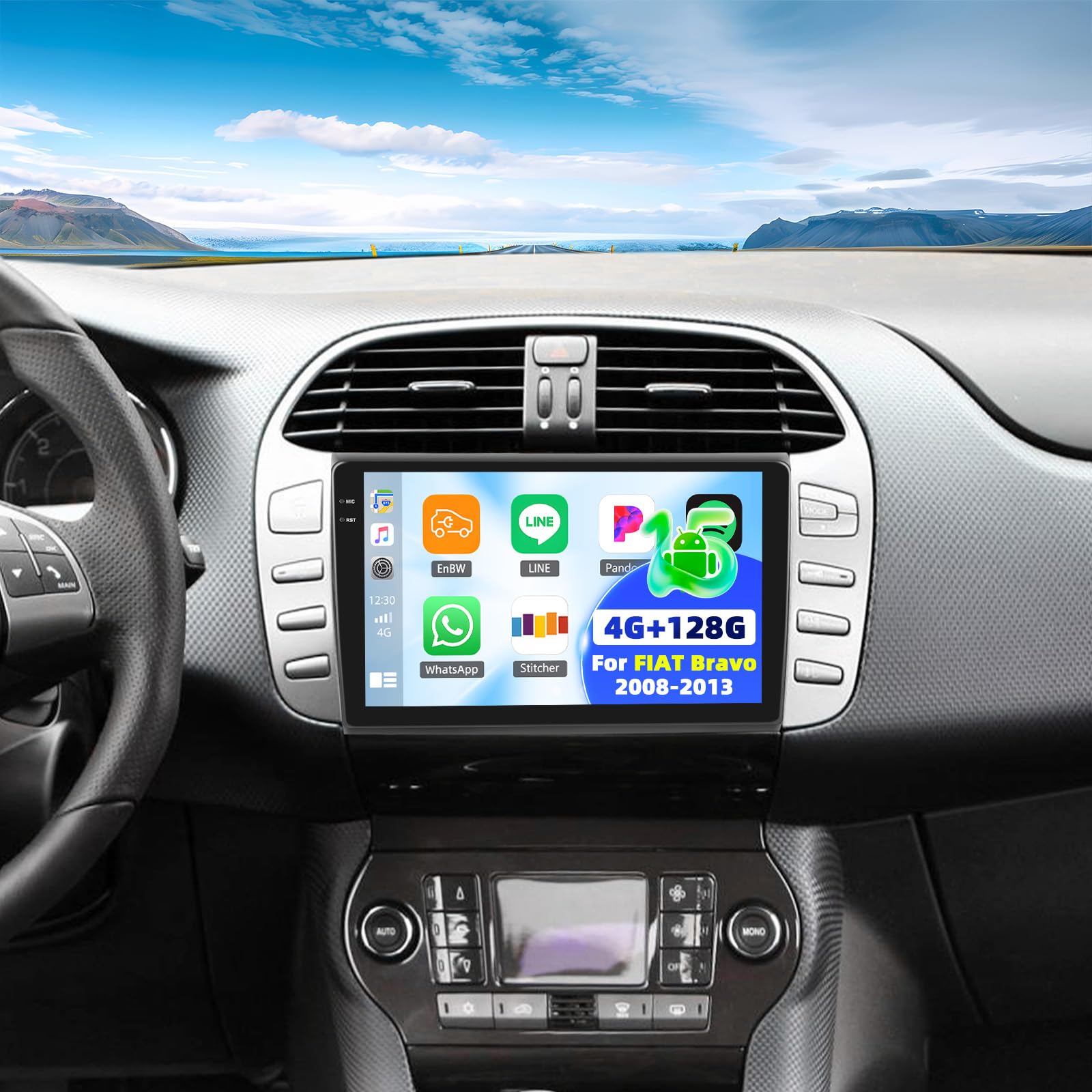
Image: Comparison of the FIAT Bravo dashboard before and after installing the CAMECHO 9-inch touchscreen autoradio.
Video: A brief product demonstration showcasing the CAMECHO Autoradio's display and various angles.
Packing List and Dimensions
Please verify that all components listed below are present in the package before proceeding with installation.

الصورة: مفصلة view of the packing list and the physical dimensions of the autoradio unit and its mounting frame.
محتويات الحزمة:
- CAMECHO Autoradio Unit
- أقواس التثبيت والبراغي
- كابل الطاقة
- CANBUS Decoder Box
- Wired Microphone with Clip
- RCA كابل
- كابلات USB (6 دبابيس و 4 دبابيس)
- كابل الكاميرا الخلفية
- هوائي نظام تحديد المواقع العالمي (GPS)
- ايه اتش دي خلفيview آلة تصوير
- كابل تمديد للكاميرا الخلفية
- Removal Tool for old autoradio
- مفك صغير فيليبس
- دليل المستخدم (الإنجليزية)
أبعاد المنتج:
The autoradio unit measures approximately 23 cm (length) x 14 cm (width) x 4 cm (thickness). The display is 9 inches. The overall package dimensions are 26 x 17 x 10 cm, with a total weight of 1.4 kg. Refer to the diagram above for detailed measurements of the unit and frame.
الإعداد والتثبيت
Professional installation is highly recommended to ensure correct wiring and functionality. Always disconnect the vehicle's battery before beginning any electrical work.
التوصيلات السلكية:
- سلك الطاقة: Connect the main power harness to the vehicle's power supply. Ensure all connections are secure.
- CANBUS Decoder: If your vehicle requires a CANBUS decoder for steering wheel controls or other vehicle data, connect the CANBUS box before powering on the unit. Then, navigate to Apps > Car Settings > Factory Settings (1234) > Protocol settings > Choose Canbus Brand Name > Choose Car's style to configure the SWC properly. Select the matching model and year according to your vehicle's specifications.
- هوائي GPS: Connect the GPS antenna and mount it in a location with a clear, unobstructed view من السماء لاستقبال الإشارة بشكل مثالي.
- كبلات USB: Connect the provided USB cables for data transfer, media playback, or charging external devices.
- كابلات RCA: Use RCA cables for connecting external audio/video input or output devices, such as amplifiers or additional displays.
- ميكروفون: Connect the external microphone to the designated input for improved hands-free calling clarity.
مؤخرةview أسلاك الكاميرا:
Proper wiring of the rearview camera is crucial for its automatic activation and display.
Image: Wiring diagram for connecting the AHD rearview camera to the autoradio system.
- Red Cable 1 and 3: Connect these cables to the positive terminal of your car's reverse light power supply.
- Black Cable 2: Connect this cable to the negative terminal (ground) of your car's reverse light power supply.
- Black Cable 4: Connect this cable to the reverse trigger wire on the autoradio's power harness. This signal tells the unit to switch to the camera view عندما يتم تعشيق ترس الرجوع للخلف.
تعليمات التشغيل
Wireless Carplay and Android Auto:
The unit supports wireless Carplay and Android Auto for seamless smartphone integration.

Image: The Carplay interface displayed on the 9-inch autoradio screen.
- تأكد من تمكين Bluetooth وWi-Fi على هاتفك الذكي.
- On the autoradio, navigate to the Carplay or Android Auto application.
- اتبع التعليمات التي تظهر على الشاشة لإقران هاتفك الذكي عبر البلوتوث.
- Once connected, you can use voice commands or the touchscreen to access navigation, music, calls, and other compatible apps.
Mirror Link (Wired/Wireless):
Mirror Link allows you to display your smartphone's screen directly onto the autoradio display.

Image: The Mirror Link feature in action, mirroring a smartphone's display to the autoradio.
- For wireless Mirror Link, ensure both the autoradio and your smartphone are connected to the same Wi-Fi network.
- For wired Mirror Link, connect your smartphone to the autoradio using a USB cable.
- Open the Mirror Link application on the autoradio and follow the pairing instructions specific to your smartphone's operating system.
بلوتوث شنومكس:
The integrated Bluetooth 5.0 module enables hands-free calling and wireless audio streaming.

Image: The Bluetooth interface, showing options for phone calls and music streaming.
- Enable Bluetooth on both the autoradio and your smartphone.
- بحث عن available devices on your smartphone and select the autoradio (e.g., "CAMECHO Carplay").
- قم بتأكيد رمز الاقتران إذا طُلب منك ذلك.
- بمجرد الاتصال، يمكنك إجراء واستقبال المكالمات، والوصول إلى دفتر الهاتف الخاص بك، وتشغيل الموسيقى لاسلكيًا.
راديو FM/RDS:
Enjoy high-quality FM radio with RDS (Radio Data System) functionality.

Image: The FM/RDS radio interface, displaying current frequency and options for station management.
- Access the Radio application from the main menu.
- Use the scan function to automatically find and save available stations, or manually tune to a specific frequency.
- The RDS feature will display station information (e.g., station name, song title) where available.
32-Band Equalizer (32EQ):
قم بتخصيص تجربتك الصوتية باستخدام معادل الصوت المدمج ذي العشر نطاقات.

Image: The 32-band equalizer interface, allowing detailed audio customization.
- Navigate to the Sound Settings or EQ application.
- Adjust individual frequency bands to fine-tune the audio output to your preference.
- Pre-set equalizer modes (e.g., Pop, Rock, Jazz) may also be available for quick adjustments.
GPS Navigation and WiFi:
The autoradio features integrated GPS for navigation and Wi-Fi for online connectivity.

Image: The GPS navigation interface and Wi-Fi connection capabilities of the autoradio.
- نظام تحديد المواقع العالمي (GPS): The unit supports both online and offline navigation. Ensure the GPS antenna is properly installed. You can download offline maps for navigation without an internet connection.
- واي فاي: Connect to a Wi-Fi hotspot (e.g., from your smartphone) to access online applications, stream media, browse the internet, and download software updates.
التحكم في عجلة القيادة (SWC):
Program your vehicle's steering wheel buttons for convenient control of the autoradio functions.

Image: Instructions for configuring steering wheel controls on the autoradio.
- يمكنك الوصول إلى إعدادات التحكم في عجلة القيادة من قائمة النظام.
- Follow the on-screen instructions to map your vehicle's steering wheel buttons (e.g., volume up/down, track skip, mode) to the corresponding autoradio functions.
- If your vehicle uses a CANBUS decoder, ensure it is correctly connected and configured as described in the Setup section for automatic SWC recognition.
كاميرا احتياطية:
نظام AHD الخلفي المضمنview camera provides a wide-angle view for safer parking and reversing maneuvers.

الصورة: الجزء الخلفيview camera display with parking guidelines, activated when reversing.
- Ensure the camera is properly installed and wired according to the "Rearview Camera Wiring" instructions in the Setup section.
- The display will automatically switch to the camera view عند تحويل السيارة إلى وضع الرجوع للخلف.
- The camera features HD resolution, a wide viewing angle, and night vision capabilities for enhanced visibility.
صيانة
Regular maintenance helps ensure the longevity and optimal performance of your CAMECHO Autoradio.
- تنظيف الشاشة: استخدم قطعة قماش ناعمة وخالية من الوبر، وجففها قليلاً.ampened with water or a screen-safe cleaner, to clean the touchscreen. Avoid using abrasive materials, alcohol, or chemical solvents, as these can damage the screen surface.
- تحديثات البرامج: Periodically check for available software updates through the system settings (requires a Wi-Fi connection). Keeping the software updated ensures you have the latest features, performance improvements, and security patches.
- العناية العامة: Avoid exposing the unit to extreme temperatures, direct sunlight for prolonged periods, or excessive moisture. Ensure proper ventilation around the unit to prevent overheating.
استكشاف الأخطاء وإصلاحها
يتناول هذا القسم المشكلات الشائعة التي قد تواجهها. في حال وجود مشاكل أكثر تعقيدًا، يُرجى التواصل مع خدمة العملاء.
| مشكلة | السبب المحتمل | حل |
|---|---|---|
| الوحدة لا تعمل | Incorrect wiring; Blown fuse in vehicle or unit; Loose connection | Check all power connections. Inspect vehicle fuses and the unit's fuse (if accessible). Ensure the ignition wire is correctly connected. |
| لا يوجد مخرج صوت | Volume too low; Incorrect audio source selected; Speaker wiring issue; Mute activated | Increase volume. Verify the correct audio source (e.g., FM, Bluetooth, USB). Check speaker connections. Ensure the unit is not muted. |
| إشارة GPS مفقودة أو غير دقيقة | GPS antenna obstruction; Poor satellite reception; Antenna not connected | Ensure the GPS antenna has a clear, unobstructed view of the sky. Relocate the antenna if necessary. Verify the antenna is securely connected. |
| Bluetooth connection unstable or fails to pair | Interference; Device compatibility; Out of range; Bluetooth on phone/unit off | Ensure both devices have Bluetooth enabled and are within range. Restart both the autoradio and your smartphone. Clear previous pairings and try again. |
| أزرار التحكم في عجلة القيادة لا تعمل | Incorrect CANBUS setup; Wiring issue; Buttons unprogrammed | Verify CANBUS connection and configuration in settings. Ensure buttons are programmed correctly in the SWC settings. Check wiring to the steering wheel control interface. |
| مؤخرةview الكاميرا لا تعرض | Incorrect wiring; Faulty camera; Reverse trigger wire not connected | Check camera power and video signal connections. Ensure the reverse trigger wire is correctly connected to the vehicle's reverse light circuit. Test the camera if possible. |
المواصفات الفنية
Below are the key technical specifications for the CAMECHO 4G+128G Carplay Autoradio.
| ميزة | التفاصيل |
|---|---|
| ماركة | كاميكو |
| نموذج | 4G+128G Carplay |
| نظام التشغيل | أندرويد 15 |
| كبش | 4 جيجا بايت |
| ذاكرة للقراءة فقط | 128 جيجا بايت |
| حجم الشاشة | 9 بوصة |
| دقة الشاشة | شنومكس * شنومكس إيبس |
| الاتصال | بلوتوث 5.0، واي فاي، نظام تحديد المواقع العالمي (GPS) |
| الأجهزة الطرفية المتوافقة | الهاتف الذكي |
| وضع إخراج الصوت | Stereo, Surround (5.1) |
| المميزات الخاصة | Wireless Carplay, Android Auto, Mirror Link, FM/RDS Radio, 32-Band EQ, AHD Rearview Camera, Steering Wheel Control |
| أبعاد | 26 × 17 × 10 سم (الحزمة) |
| وزن | 1.4 كيلوغرام |
الضمان والدعم
CAMECHO is committed to providing excellent customer service and support for your product.

الصورة: أكثر منview of CAMECHO's customer support and warranty terms.
- ضمان: يتمتع هذا المنتج بضمان لمدة 24 شهرًا من تاريخ الشراء.
- سياسة الاستبدال: A 30-day replacement policy is available for eligible products.
- الرد عبر الإنترنت: We offer an 18-hour online response service for all your inquiries.
- الدعم الفني: Enjoy lifetime technical support for your CAMECHO Autoradio.
اتصل بالدعم:
For any questions, technical assistance, or warranty claims, please contact our customer support team:

Image: Customer service contact information.
بريد إلكتروني: CAMECHOVIP@126.com


