مقدمة
This manual provides detailed instructions for the setup, operation, and maintenance of your HTC N15 Wireless Clip On Earbuds. Please read this manual thoroughly before using the product to ensure proper function and longevity.
محتويات الحزمة
تأكد من وجود جميع العناصر في عبوة المنتج الخاص بك:
- 1 Pair HTC N15 Clip On Earbuds
- 1 حالة الشحن
- 1 كابل شحن USB-C
- 1 Quick Start Guide (Basic Operations)
المنتج انتهىview
The HTC N15 Wireless Clip On Earbuds feature an open-ear design for situational awareness and a lightweight, secure fit. They come with a compact charging case for extended use.
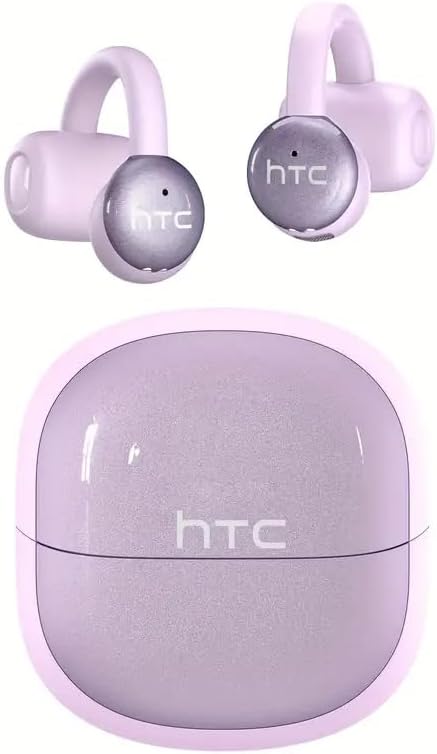
Image: HTC N15 Wireless Clip On Earbuds and Charging Case.

Image: The HTC N15 earbuds and charging case, highlighting battery life features such as 1.5 hours fast charging, 24 hours with the charge case, 8 hours on a single charge, and a Type-C charge port.
شحن سماعات الأذن والعلبة
قبل الاستخدام الأول، اشحن سماعات الأذن وعلبة الشحن بالكامل. توفر علبة الشحن طاقة إضافية للشحن أثناء التنقل.
- شحن العلبة: Connect the provided USB-C cable to the charging port on the case and a power source. The indicator lights on the case will show the charging status.
- شحن سماعات الأذن: Place the earbuds into the charging case. Ensure they are correctly seated. The earbuds will begin charging automatically.
A single charge provides approximately 8 hours of playback. The charging case extends total playtime to about 22 hours. Fast charging allows for quick power replenishment.

Image: Visual representation of the HTC N15 earbuds' battery life: 8 hours on a single charge, 24 hours with the charging case, and 1.5 hours for fast charging.
الإعداد والاقتران
The HTC N15 earbuds utilize Bluetooth 6.0 technology for a stable and low-latency connection. They are compatible with iOS and Android devices.
- تشغيل الطاقة: افتح علبة الشحن. سيتم تشغيل سماعات الأذن تلقائيًا ودخول وضع الاقتران.
- تفعيل البلوتوث: على جهازك (الهاتف الذكي، الجهاز اللوحي، الكمبيوتر المحمول)، قم بتمكين البلوتوث.
- اختر جهاز: In your device's Bluetooth settings, search for 'HTC NE15' and select it to pair.
- تأكيد: بمجرد الاقتران، سيؤكد تنبيه صوتي الاتصال.

Image: A diagram illustrating the 'Upgraded Bluetooth 6.0 Technology' with a comparison to Bluetooth 5.3 and 5.4, emphasizing low latency and fast connection.

Image: The HTC N15 earbuds and charging case shown with various compatible devices including notebooks, TVs, desktops, watches, phones, and iPads, demonstrating flexible connectivity. A phone screen displays 'HTC NE15 Connected'.
Operating Instructions (Touch Control)
The HTC N15 earbuds feature smart touch controls on both earbuds for easy management of calls and music playback.
- الرد/إنهاء المكالمة: انقر على أي من سماعتي الأذن مرة واحدة.
- رفض المكالمة: اضغط مع الاستمرار على أي من سماعات الأذن لمدة ثانيتين.
- تشغيل/إيقاف الموسيقى: انقر نقراً مزدوجاً على أي من سماعتي الأذن.
- الأغنية السابقة: انقر ثلاث مرات على سماعة الأذن اليسرى.
- الأغنية التالية: انقر ثلاث مرات على سماعة الأذن اليمنى.
- رفع الصوت: انقر على سماعة الأذن اليمنى مرة واحدة.
- اخفض الصوت: انقر على سماعة الأذن اليسرى مرة واحدة.
- مساعد صوت: استمر في الضغط على سماعة الأذن اليسرى لمدة ثانيتين.
- وضع اللعبة: استمر في الضغط على سماعة الأذن اليمنى لمدة ثانيتين.

Image: A diagram illustrating the touch control functions for the HTC N15 earbuds, showing actions for answering/ending calls, rejecting calls, playing/pausing music, skipping tracks, adjusting volume, activating voice assistant, and enabling game mode.
تعليمات الارتداء
The HTC N15 earbuds feature an ergonomic open-ear clip design for a secure and comfortable fit, allowing you to remain aware of your surroundings.
- Identify L/R: Confirm the left (L) and right (R) earbuds.
- التمركز: Confirm the direction of the earbud.
- مشبك على: Gently clip the earbud onto the thinnest part of your ear by sliding it down.
- يعدل: Adjust the earbud tip to align with your ear canal for optimal sound and comfort.
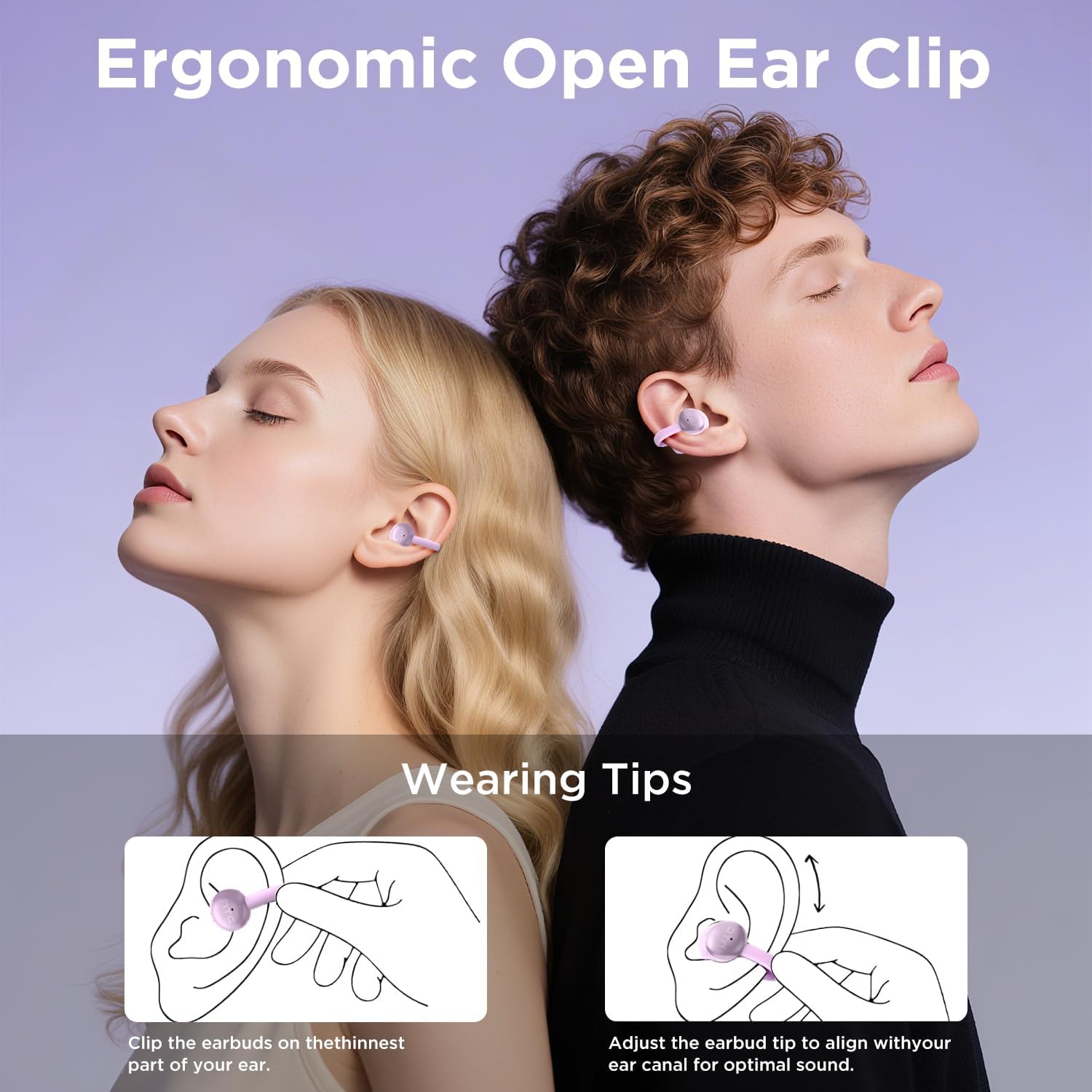
Image: A visual guide demonstrating the ergonomic open-ear clip design and wearing tips for the HTC N15 earbuds, showing how to clip them onto the ear and adjust for optimal sound.

Image: The HTC N15 earbuds emphasizing 'All-Day Comfort' with features like '4.7g Super Light' and a 'Flexible C-Bridge Design' for a secure fit.

Image: A four-step visual guide titled 'HOW TO WEAR?' showing how to correctly position and adjust the HTC N15 earbuds on the ear.
صيانة
To ensure the longevity and optimal performance of your HTC N15 earbuds, follow these maintenance guidelines:
- تنظيف: امسح سماعات الأذن وعلبة الشحن بانتظام بقطعة قماش ناعمة وجافة. تجنب استخدام المواد الكيميائية القاسية أو المواد الكاشطة.
- مقاومة الماء: The earbuds are IPX4 sweatproof, meaning they are resistant to splashes and sweat. Do not submerge them in water or expose them to heavy rain.
- تخزين: عندما لا تكون قيد الاستخدام، قم بتخزين سماعات الأذن في علبة الشحن الخاصة بها لحمايتها من الغبار والتلف.
- درجة حرارة: تجنب تعريض سماعات الأذن لدرجات حرارة قصوى (ساخنة أو باردة) أو لأشعة الشمس المباشرة لفترات طويلة.
استكشاف الأخطاء وإصلاحها
If you encounter issues with your HTC N15 earbuds, refer to the following common solutions:
- سماعات الأذن غير مقترنة: Ensure both earbuds are charged and in pairing mode. Turn off and on your device's Bluetooth, then try pairing again.
- لا يوجد صوت أو مستوى الصوت منخفض: Check the volume levels on both your device and the earbuds. Ensure the earbuds are correctly positioned in your ears. Due to the open-ear design, you may need to increase the volume slightly in noisy environments.
- سقوط سماعات الأذن: Ensure you are wearing the earbuds correctly as per the wearing instructions. Adjust the clip and earbud tip for a snug fit.
- عناصر التحكم باللمس لا تستجيب: Ensure your fingers are clean and dry. Try restarting the earbuds by placing them back in the case and taking them out again.
- قضايا الشحن: Verify the USB-C cable and power source are working. Ensure the earbuds are properly seated in the charging case.
تحديد
| ميزة | التفاصيل |
|---|---|
| اسم الموديل | HTC NE15 |
| تكنولوجيا الاتصال | لاسلكي (بلوتوث 6.0) |
| شكل سماعة الأذن | أذن مفتوحة |
| طريقة التحكم | يلمس |
| عمر البطارية (سماعات الأذن) | 8 ساعات (شحنة واحدة) |
| إجمالي وقت اللعب (مع الحقيبة) | 22 ساعة |
| مستوى مقاومة الماء | IPX4 (مقاوم للعرق) |
| مادة | البلاستيك والسيليكون |
| وزن العنصر | 4.6 أونصات |
| الأجهزة المتوافقة | الهواتف المحمولة والأجهزة اللوحية |
| رمز المنتج الموحد | 768649989703 |
فيديو المنتج
فيديو: فتح العلبة ومراجعة شاملةview of the HTC Wireless Clip On Earbuds N15 Bluetooth 6.0. This video demonstrates the product packaging, contents, and the physical appearance of the earbuds and charging case.
الضمان والدعم
HTC provides customer support for its products. For any questions or assistance, please refer to the contact information provided with your purchase or visit the official HTC support webموقع.
دعم العملاء: 7*24 Live Chat Support is available for assistance with your HTC N15 earbuds.
يرجى الاحتفاظ بإثبات الشراء الخاص بك لمطالبات الضمان.


