1. تعليمات السلامة الهامة
يرجى قراءة جميع التعليمات بعناية قبل استخدام هذا الجهاز. احتفظ بهذا الدليل للرجوع إليه مستقبلًا.
- تأكد من مستوى الصوتtage specified on the rating label matches your mains voltage.
- لا تغمر المروحة أو القابس أو السلك في الماء أو السوائل الأخرى.
- Unplug the fan from the outlet when not in use, before cleaning, or before moving.
- Do not operate the fan with a damaged cord or plug. Contact authorized service personnel for repair.
- أبقِ أصابعك وأشياء أخرى بعيدة عن شفرات المروحة وفتحاتها.
- Do not use the fan near windows, in bathrooms, or in wet environments.
- لا يُقصد استخدام هذا الجهاز من قبل الأشخاص (بما في ذلك الأطفال) ذوي القدرات البدنية أو الحسية أو العقلية المحدودة، أو الذين يفتقرون إلى الخبرة والمعرفة، ما لم يتم الإشراف عليهم أو توجيههم فيما يتعلق باستخدام الجهاز من قبل شخص مسؤول عن سلامتهم.
- يجب مراقبة الأطفال والتأكد من عدم لعبهم بالجهاز.
2. انتهى المنتجview
The Mistral MFD4389DRW is a 43-inch DC Turbo Tower Fan designed for efficient air circulation. It features a DC brushless motor, 12 speed settings, and multiple operating modes. Control options include a full touch screen, remote control, and Wi-Fi with online voice control capabilities. The fan also offers a unique height conversion feature and 60-degree left-right oscillation.

الشكل 2.1: الجبهة view of the Mistral MFD4389DRW DC Turbo Tower Fan, showcasing its sleek design and touch control panel.

الشكل 2.2: الجانب view of the Mistral MFD4389DRW DC Turbo Tower Fan, highlighting its slim profile.

الشكل 2.3: العودة view of the Mistral MFD4389DRW DC Turbo Tower Fan, showing the air intake grille.
3. محتويات العبوة
تأكد من وجود جميع المكونات في العبوة:
- Mistral MFD4389DRW DC Turbo Tower Fan Unit
- جهاز التحكم عن بعد
- دليل المستخدم (هذا المستند)
- Base components (if not pre-assembled)
- Height extension component (for convertible height models)
4. التجميع
The Mistral MFD4389DRW fan features simple assembly. Typically, this involves attaching the base to the main fan unit. For models with height conversion, an additional extension piece may need to be secured.
- قم بإزالة جميع المكونات بعناية من العبوة.
- ضع وحدة المروحة الرئيسية رأسًا على عقب على سطح ناعم ومستوٍ لتجنب الخدوش.
- Align the base with the bottom of the fan unit. Ensure the power cord passes through the designated opening in the base.
- Secure the base to the fan unit using the provided screws (if applicable).
- For height conversion, insert the extension component between the base and the main unit, ensuring it clicks securely into place or is fastened as per instructions.
- ضع المروحة بشكل عمودي على سطح مستوٍ وثابت.
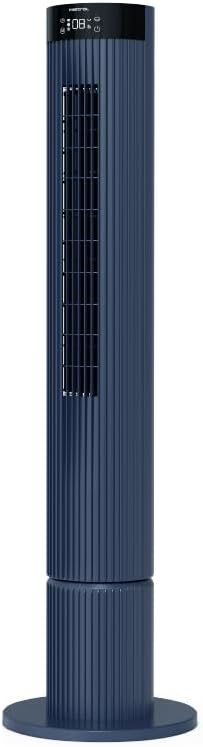
Figure 4.1: The fan demonstrating its convertible height feature, allowing adjustment between two different heights.
5. الإعداد والاستخدام الأولي
After assembly, position the fan in your desired location. Ensure it is on a stable, flat surface and away from curtains or objects that could obstruct airflow.
- Plug the power cord into a suitable electrical outlet (220-240V~, 50-60Hz).
- The fan will enter standby mode. The touch screen display may illuminate briefly.
- To power on, touch the power icon on the control panel or press the power button on the remote control.
6. تعليمات التشغيل
The fan can be operated via the full touch screen control panel on the unit or the included remote control.
6.1 وظائف لوحة التحكم
The touch screen control panel provides access to all fan functions:
- زر الطاقة: تشغيل المروحة أو إيقاف تشغيلها.
- تعديل السرعة: Cycles through 12 fan speeds.
- اختيار الوضع: Switches between Turbo, One-key Cycle, and Baby modes.
- التذبذب: Activates or deactivates 60-degree left-right oscillation.
- المؤقت: Sets the pre-set On/Off timer for up to 12 hours.
- مؤشر واي فاي: يظهر حالة اتصال Wi-Fi.
6.2 التحكم عن بعد
The remote control duplicates all functions available on the touch screen panel for convenient operation from a distance.
- تأكد من أن جهاز التحكم عن بعد يحتوي على بطاريات تعمل.
- Point the remote control towards the fan's control panel for optimal signal reception.
أوضاع التشغيل 6.3
- وضعية التوربو: Provides maximum airflow for rapid cooling.
- One-key Cycle Mode: Automatically cycles through different fan speeds to simulate natural breeze.
- وضع الطفل: Operates at a gentle, quiet speed suitable for nurseries or light sleeping.
7. Wi-Fi and Online Voice Control
The Mistral MFD4389DRW fan can be connected to your home Wi-Fi network for smart control via a mobile application and online voice commands.
7.1 اتصال واي فاي
- Download the official Mistral smart home application from your device's app store.
- قم بالتسجيل أو تسجيل الدخول إلى حسابك داخل التطبيق.
- تأكد من أن جهازك المحمول متصل بشبكة Wi-Fi بتردد 2.4 جيجاهرتز.
- Follow the in-app instructions to add a new device. This typically involves putting the fan into pairing mode (refer to the app or fan display for specific instructions, often by holding a Wi-Fi button).
- Once connected, the Wi-Fi indicator on the fan's control panel will illuminate steadily.
7.2 Online Voice Control
After successful Wi-Fi connection, you can link your fan to compatible smart home voice assistants (e.g., Google Assistant, Amazon Alexa) through the Mistral app settings.
- Open the Mistral app and navigate to the 'Integrations' or 'Voice Control' section.
- Select your preferred voice assistant and follow the prompts to link your Mistral account.
- بمجرد الارتباط، يمكنك استخدام الأوامر الصوتية مثل:
- "Turn on the fan."
- "Set fan speed to 5."
- "Turn off oscillation."
- "Change fan mode to Baby."
8. الصيانة
يساعد التنظيف المنتظم في الحفاظ على أداء المروحة وإطالة عمرها الافتراضي.
8.1 التنظيف
- افصل المروحة دائمًا عن مأخذ الطاقة قبل التنظيف.
- استخدمي قطعة قماش ناعمةamp استخدم قطعة قماش لمسح الأسطح الخارجية للمروحة. لا تستخدم منظفات أو مذيبات كاشطة.
- Use a vacuum cleaner with a brush attachment to remove dust from the air intake and outlet grilles.
- تأكد من أن المروحة جافة تمامًا قبل توصيلها مرة أخرى وتشغيلها.
8.2 التخزين
If storing the fan for an extended period, unplug it, clean it thoroughly, and store it in its original packaging or a dust-free environment.
9. استكشاف الأخطاء وإصلاحها
إذا واجهت مشاكل مع المروحة لديك، راجع المشاكل والحلول الشائعة التالية:
| مشكلة | السبب المحتمل | حل |
|---|---|---|
| المروحة لا تعمل. | لا يوجد مصدر للطاقة. | تأكد من توصيل سلك الطاقة بشكل آمن بمأخذ كهربائي يعمل. |
| تدفق الهواء ضعيف. | مدخل/مخرج الهواء مسدود؛ سرعة المروحة منخفضة للغاية. | Clean grilles to remove dust. Increase fan speed. |
| المروحة تصدر صوتا غير عادي. | Obstruction; Loose parts. | Unplug and check for any foreign objects. Ensure base is securely attached. |
| جهاز التحكم عن بعد لا يعمل. | Dead batteries; Obstruction. | استبدل بطاريات جهاز التحكم عن بعد. تأكد من عدم وجود أي عوائق تحجب مسار الإشارة. |
| فشل الاتصال بشبكة Wi-Fi. | كلمة مرور الواي فاي غير صحيحة؛ مشاكل في جهاز التوجيه؛ المروحة بعيدة جدًا عن جهاز التوجيه. | Verify Wi-Fi password. Ensure fan is within range of a 2.4GHz Wi-Fi network. Restart router and fan. |
إذا استمرت المشكلة بعد محاولة هذه الحلول، فيرجى الاتصال بدعم العملاء.
10. المواصفات
| ميزة | مواصفة |
|---|---|
| نموذج | MFD4389DRW |
| المجلدtage | 220-240V~, 50-60Hz 1.3A |
| واتtage | 40 واط |
| حجم الهواء | 29.54 متر مكعب / دقيقة |
| الحد الأقصى لتدفق الهواء | 4.26 متر/ثانية |
| Noise Level (Lowest Speed) | 33.2 ديسيبل |
| Noise Level (Highest Speed) | 68.3 ديسيبل |
| أبعاد المنتج (L * W * H) | 168 * 300 * 900 OR 1104 mm |
| الوزن الصافي | 4.46 كيلوجرام |
| علامة الأمان | 250467-11 |
| المميزات الخاصة | Remote Controlled, Timer, Wi-Fi Enabled |
| عدد السرعات | 12 |
11. الضمان والدعم
This Mistral MFD4389DRW DC Turbo Tower Fan comes with a comprehensive warranty:
- الضمان العام: 1 سنة من تاريخ الشراء.
- ضمان المحرك: An additional 3 Years for the motor only, totaling 4 years for the motor.
For warranty claims, technical support, or service inquiries, please contact your local Mistral authorized service center or refer to the contact information provided on the official Mistral webموقع.


