1. المقدمة
Thank you for choosing the HTC GT-288 Electric Shaver. This manual provides essential information for the safe and effective operation, maintenance, and care of your new shaver. Please read these instructions thoroughly before first use and retain them for future reference.
2. معلومات السلامة
لتقليل خطر التعرض لصدمة كهربائية أو إصابة أو ضرر، اتبع دائمًا احتياطات السلامة الأساسية التالية:
- Do not immerse the charging cable or power adapter in water or other liquids.
- احتفظ بالجهاز بعيدًا عن متناول الأطفال.
- Ensure the shaver is fully dry before connecting it to the charging cable.
- Do not use the shaver if the blade or foil is damaged, as this may cause injury.
- استخدم فقط كابل شحن USB المرفق.
- This appliance is designed for personal use only.
3. محتويات العبوة
يرجى التحقق من الحزمة للعناصر التالية:
- 1 x HTC GT-288 Electric Shaver
- 1 × كابل شحن USB
- 3 x Precision Combs (1mm, 3mm, 5mm)
- 1 × فرشاة تنظيف
- زيت تشحيم واحد
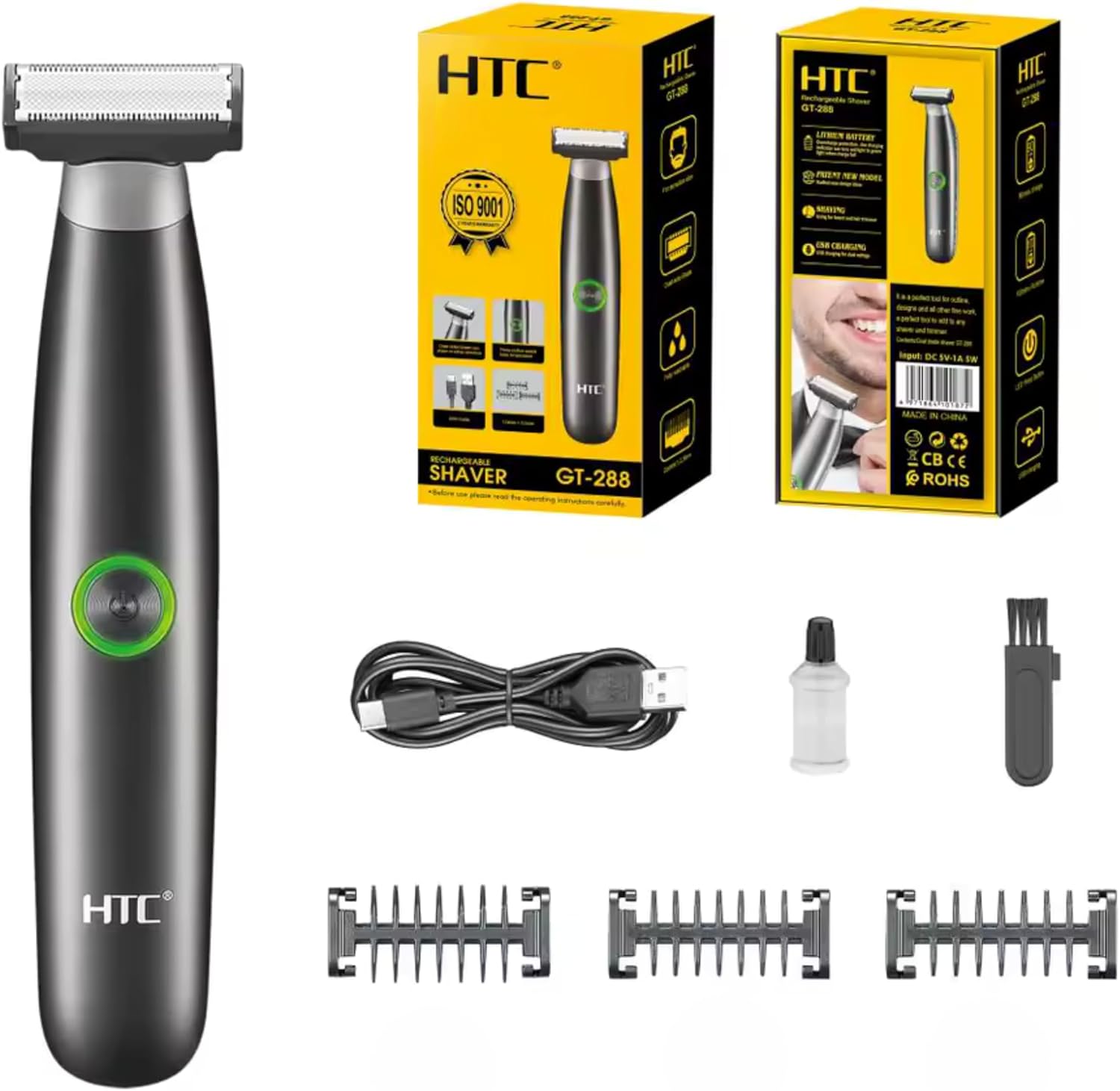
Image 3.1: Contents of the HTC GT-288 Electric Shaver package, including the shaver, USB cable, three precision combs, cleaning brush, and lubricating oil.
4. انتهى المنتجview
The HTC GT-288 Electric Shaver features a sleek design with a dual-sided blade for efficient trimming and shaving. It includes an easy-to-operate press-button switch and is fully washable for convenient cleaning.
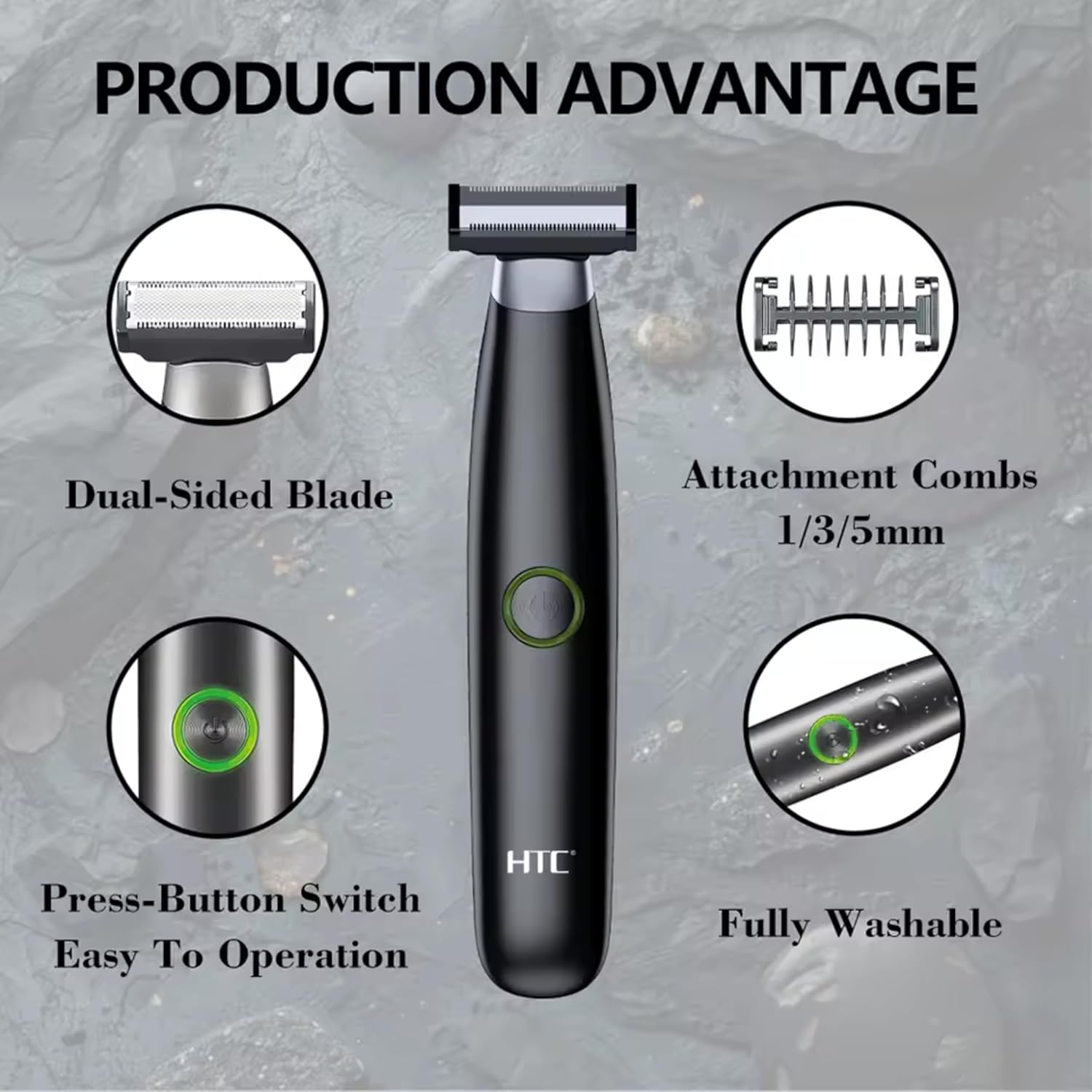
الصورة 4.1: انتهىview of the HTC GT-288 Electric Shaver's key features, highlighting the dual-sided blade, attachment combs (1/3/5mm), press-button switch, and fully washable design.

Image 4.2: Detail of the LED press button, which serves as the on/off switch for easy operation.
5. الإعداد
- أفرغ: قم بإزالة جميع المكونات بعناية من العبوة.
- التهمة الاولية: Before first use, fully charge the shaver. Refer to Section 6 for charging instructions.
- Attach Comb (Optional): If desired, select one of the three precision combs (1mm, 3mm, or 5mm) and slide it onto the shaver head until it clicks into place. Ensure it is securely attached.
6. الشحن
The HTC GT-288 Electric Shaver is equipped with a rechargeable battery for cordless operation.
- تأكد من إيقاف تشغيل ماكينة الحلاقة.
- Connect the small end of the USB charging cable to the charging port on the shaver.
- Connect the larger end of the USB cable to a compatible USB power source (e.g., computer, USB wall adapter).
- The LED indicator on the shaver will illuminate to show that it is charging.
- Allow the shaver to charge completely before its first use. A full charge typically takes several hours.
- بمجرد شحن الجهاز بالكامل، افصل كابل USB.
7. تعليمات التشغيل
The HTC GT-288 shaver can be used for both wet and dry shaving.
- تشغيل الطاقة: Press the LED button to turn on the shaver.
- الحلاقة الجافة: For dry shaving, ensure your skin is clean and dry. Gently press the shaver against your skin and move it in slow, even strokes against the direction of hair growth.
- الحلاقة الرطبة: For wet shaving, apply shaving foam or gel to your skin. The shaver is waterproof, allowing for use in the shower or with water. Move the shaver in gentle, even strokes.
- Using Precision Combs: Attach the desired 1mm, 3mm, or 5mm comb for trimming beards, sideburns, or other facial hair to a specific length. Move the shaver with the comb attached against the direction of hair growth for an even trim.
- إيقاف التشغيل: Press the LED button again to turn off the shaver after use.
8. الصيانة والتنظيف
يضمن التنظيف المنتظم الأداء الأمثل ويطيل عمر ماكينة الحلاقة الخاصة بك.
- إيقاف: قم دائمًا بإيقاف تشغيل ماكينة الحلاقة قبل التنظيف.
- رأس الشطف: The shaver is fully washable (IPX6 rated). You can rinse the shaver head directly under running water to remove hair clippings.
- استخدم فرشاة التنظيف: For more thorough cleaning, use the provided cleaning brush to remove stubborn hair particles from the blade and comb attachments.
- تشحيم الشفرات: After cleaning and drying, apply a small drop of the provided lubricating oil to the blades. Turn on the shaver for a few seconds to distribute the oil evenly. This helps maintain blade performance.
- جاف: اترك ماكينة الحلاقة تجف تمامًا في الهواء قبل تخزينها أو إعادة شحنها.

Image 8.1: The HTC GT-288 Electric Shaver being rinsed under a faucet, illustrating its IPX6 fully washable design for easy cleaning.
9. استكشاف الأخطاء وإصلاحها
| مشكلة | السبب المحتمل | حل |
|---|---|---|
| لا يتم تشغيل ماكينة الحلاقة. | نفدت طاقة البطارية. | اشحن ماكينة الحلاقة بالكامل. |
| Shaver does not cut effectively. | الشفرات مسدودة بالشعر أو غير حادة. | Clean the shaver head thoroughly. Apply lubricating oil. If problem persists, blades may need replacement. |
| ماكينة الحلاقة تسحب الشعر. | Battery is low or blades are clogged. | Charge the shaver. Clean the shaver head. |
| تتوقف ماكينة الحلاقة أثناء الاستخدام. | نفدت طاقة البطارية. | اشحن ماكينة الحلاقة. |
10. المواصفات
- ماركة: اتش تي سي
- اسم الموديل: جي تي-288
- مصدر الطاقة: قابلة لإعادة الشحن عبر USB
- المميزات الخاصة: USB Cable, Adjustable Combs, Rechargeable, Water Resistant, Wet & Dry Use
- الاستخدامات الموصى بها: Facial Shaving, Beard Trimming, Daily Use, Travel
- المكونات المتضمنة: Electric Shaver, USB Cable, 3 Precision Combs, Cleaning Brush, Lubricating Oil
- وزن المنتج: 250 جرام
- لون: أسود
- مادة الشفرة: الفولاذ المقاوم للصدأ
- نوع الرأس: الدقة المتقلب
11. الضمان والدعم
This product is manufactured by HTC. For any questions, technical support, or warranty claims, please contact the seller or manufacturer directly through your purchase platform. Please retain your proof of purchase for warranty purposes.


