1. المقدمة
Thank you for choosing Bluedee BD-SK900 Computer Speakers. This manual provides essential information for the proper setup, operation, and maintenance of your new speakers. Please read this guide thoroughly before use to ensure optimal performance and longevity of your device. These speakers are designed to deliver high-fidelity audio with versatile connectivity and dynamic RGB lighting for an enhanced audio-visual experience.
2. محتويات العبوة
يرجى التأكد من أن جميع العناصر المدرجة أدناه متضمنة في الحزمة الخاصة بك:
- 1x Bluedee Computer Speaker (Pair)
- 1x USB/USB-C Cable
- دليل البدء السريع شنومكس
3. مواصفات المنتج
The Bluedee BD-SK900 speakers are equipped with advanced features for a superior audio experience:
- صوت ستيريو عالي الدقة: Features 2 tweeters, 2 full-range drivers, and 2 passive radiators for clear highs, rich mids, and powerful bass with a 20W output.
- All-in-One Control Knob: A single, intuitive knob allows for play/pause, volume adjustment, lighting control, and switching between connection modes.
- اتصال بلوتوث 5.4: Ensures a stable, low-latency wireless connection for seamless audio streaming. (Note: Requires USB power supply for operation).
- تصميم التوصيل والتشغيل: Connects easily via the included USB/USB-C cable for both audio and power, requiring no additional drivers or software.
- إضاءة RGB الديناميكية: Offers 5 distinct RGB lighting modes, including dynamic color-shifting and static single-color glows, controllable via the knob.
- Unique Egg-shaped Acoustic Design: A minimalist and space-saving design (5.1"D x 5"W x 7.2"H) that enhances sound projection.
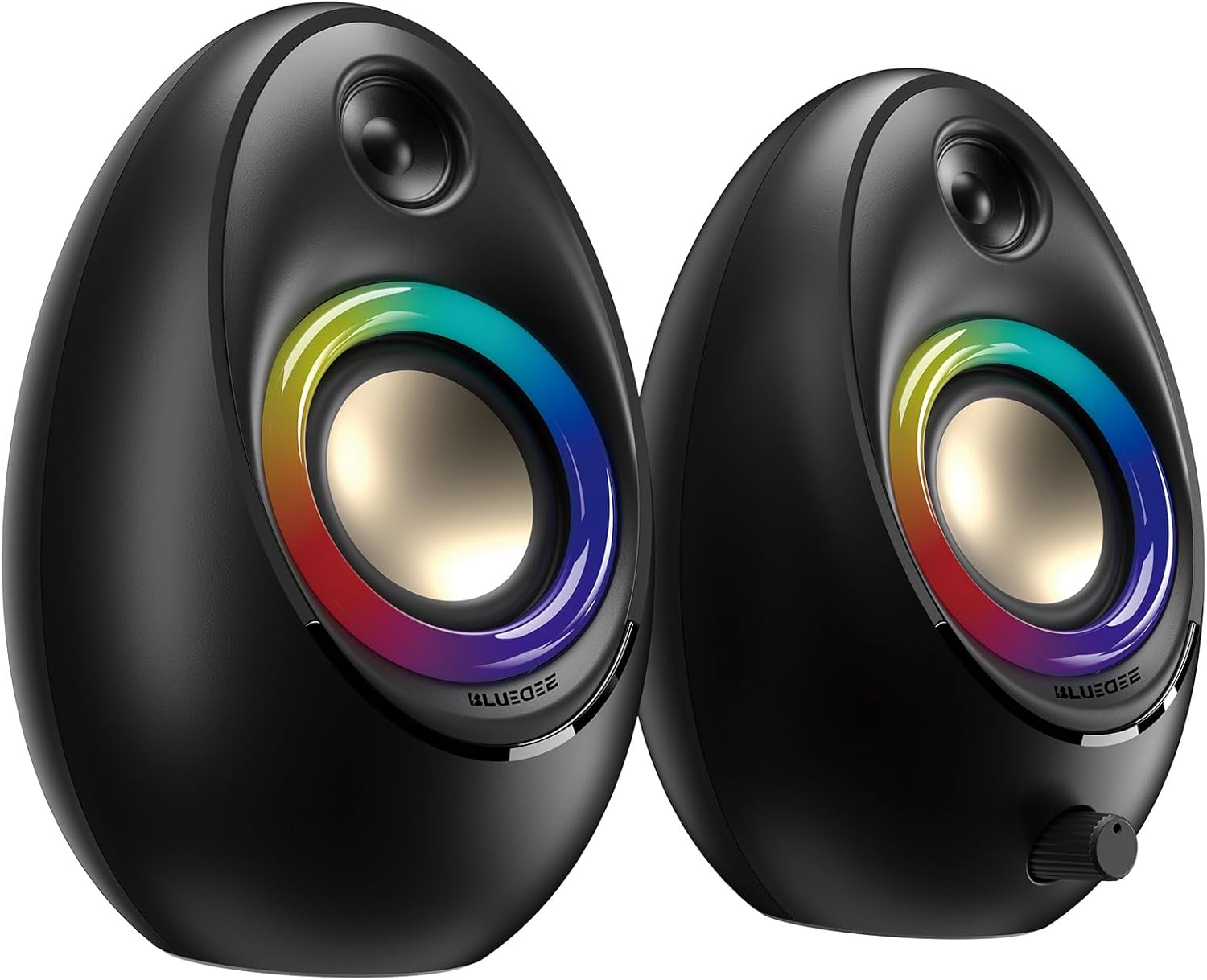
Figure 3.1: Bluedee BD-SK900 Computer Speakers, showcasing their design and RGB lighting.

Figure 3.2: Internal acoustic architecture of the Bluedee BD-SK900 speakers.

Figure 3.3: The multi-functional control knob for easy operation.
4. تعليمات الإعداد
Follow these steps to set up your Bluedee BD-SK900 speakers:
- الموقع: Position the two speakers on your desktop or desired surface, ensuring they are spaced appropriately for optimal stereo sound.
- Connect Power and Audio: Use the provided all-in-one USB/USB-C cable. Connect the USB-A or USB-C end to an available port on your computer (desktop, laptop) or a compatible USB power adapter (not included). The speakers will power on automatically.
- الاتصال الأولي: Upon connecting, the speakers will typically default to USB audio mode. If your computer recognizes the speakers, audio will play directly through them.
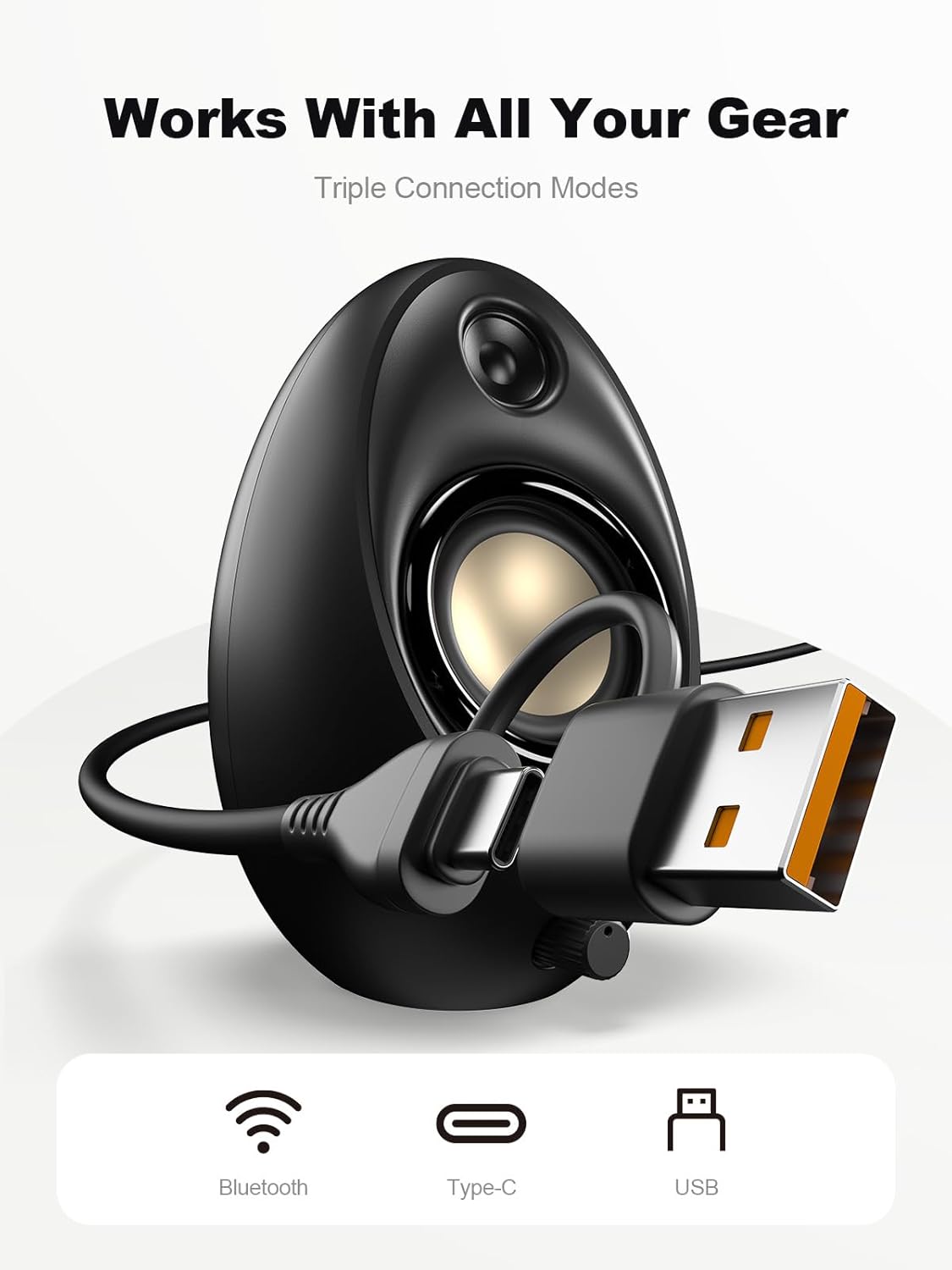
Figure 4.1: Connecting the speakers via USB/USB-C cable.
5. تعليمات التشغيل
5.1 تشغيل/إيقاف التشغيل
The speakers power on automatically when connected to a USB power source. To power off, disconnect the USB cable.
5.2 التحكم في مستوى الصوت
Rotate the multi-functional knob clockwise to increase volume and counter-clockwise to decrease volume.
5.3 اقتران بلوتوث
- التبديل إلى وضع البلوتوث: Press and hold the multi-functional knob for approximately 2-3 seconds until the speaker indicates Bluetooth mode (e.g., a specific light pattern or audio prompt).
- تفعيل البلوتوث على الجهاز: على هاتفك الذكي أو جهازك اللوحي أو حاسوبك المحمول، قم بتمكين البلوتوث وابحث عن الأجهزة المتاحة.
- زوج: Select "Bluedee BD-SK900" from the list of devices. Once paired, the speakers will confirm the connection.
5.4 USB/Type-C Connection
When connected via the USB/USB-C cable, the speakers will automatically function as an audio output device for your computer. To switch back to USB mode from Bluetooth, press and hold the multi-functional knob again.
5.5 التحكم في إضاءة RGB
The speakers feature 5 dynamic RGB lighting effects. Briefly press the multi-functional knob to cycle through the available lighting modes. This allows you to customize the ambiance to your preference.

Figure 5.1: Dynamic RGB lighting effects.
6. استكشاف الأخطاء وإصلاحها
If you encounter issues with your Bluedee BD-SK900 speakers, please refer to the following common solutions:
- لا يوجد صوت:
- Ensure the USB/USB-C cable is securely connected to both the speakers and your device/power source.
- Check the volume level on both the speakers (using the knob) and your connected device.
- تأكد من تحديد جهاز إخراج الصوت الصحيح في إعدادات الصوت بجهاز الكمبيوتر الخاص بك.
- If using Bluetooth, ensure the speakers are in Bluetooth mode and successfully paired.
- مشاكل انقطاع الاتصال/الاقتران بالبلوتوث:
- Ensure the speakers are within the 10-meter Bluetooth range of your device.
- قم بإيقاف تشغيل البلوتوث وتشغيله على جهازك، ثم حاول الاقتران مرة أخرى.
- قم بحذف الجهاز من قائمة البلوتوث الخاصة بك وأعد إقرانه.
- Ensure the speakers are not connected to another device.
- أضواء RGB لا تعمل:
- تأكد من تشغيل مكبرات الصوت.
- Briefly press the multi-functional knob to cycle through lighting modes; the lights might be off or in a static mode.
- صوت مشوه:
- قم بخفض مستوى الصوت على كل من مكبرات الصوت والجهاز المتصل.
- تأكد من أن مصدر الصوت ذو جودة جيدة.
- Check for any interference if using Bluetooth.
7. المواصفات
| اسم الموديل | بد-SK900 |
| نوع السماعة | الكمبيوتر سماعات |
| تكنولوجيا الاتصال | بلوتوث، يو اس بي |
| نسخة البلوتوث | 5.4 |
| مدى البلوتوث | 10 مترا |
| انتاج الطاقة | 20 واط |
| إشارة إلى نسبة الضوضاء | 70 ديسيبل |
| استجابة التردد | 20 KHz (Upper limit, typical for full-range) |
| أوضاع إضاءة RGB | 5 |
| الأجهزة المتوافقة | سطح المكتب، الكمبيوتر المحمول، الهاتف الذكي، الجهاز اللوحي |
| أبعاد المنتج (كل مكبر صوت) | 5.1 بوصة عمق × 5 بوصة عرض × 7.2 بوصة ارتفاع |
| وزن العنصر | 2.88 رطل |
| مصدر الطاقة | Corded Electric (USB/Type-C) |

Figure 7.1: Speaker dimensions and design.
8. الصيانة
لضمان طول عمر مكبرات الصوت لديك وأدائها الأمثل، اتبع إرشادات الصيانة التالية:
- تنظيف: Use a soft, dry cloth to clean the speaker surfaces. Avoid using abrasive cleaners, solvents, or strong chemicals, as they may damage the finish.
- تخزين: عند عدم الاستخدام لفترات طويلة، قم بتخزين مكبرات الصوت في مكان بارد وجاف بعيدًا عن أشعة الشمس المباشرة ودرجات الحرارة القصوى.
- التعامل: تعامل مع مكبرات الصوت بحذر. تجنب سقوطها أو تعريضها لصدمات قوية.
- تهوية: Ensure proper ventilation around the speakers to prevent overheating. Do not block any vents.
9. معلومات السلامة
يرجى مراعاة احتياطات السلامة التالية:
- Do not expose the speakers to water, moisture, or extreme temperatures.
- Do not attempt to disassemble or modify the speakers. This will void the warranty and may cause damage or injury.
- Keep the speakers away from heat sources, open flames, and direct sunlight.
- Use only the provided USB/USB-C cable for connection.
- تجنب الاستماع بمستويات صوت عالية للغاية لفترات طويلة لمنع تلف السمع.
10. الضمان والدعم
Bluedee provides comprehensive support for your BD-SK900 Computer Speakers:
- ضمان الجودة: Your speakers are covered by a 540-day quality warranty from the date of purchase.
- دعم مدى الحياة: Bluedee offers lifetime customer support for this product.
- اتصال: For any questions, technical assistance, or warranty claims, please contact us via Amazon Messages or refer to the contact details provided in your Quick Start Guide.


