1. المقدمة
The VIOFO A329S is a high-performance 3-channel dash camera system designed to record comprehensive video footage of your vehicle's surroundings and interior. It features 4K resolution for the front camera, 2K for the cabin camera with a 210° fisheye lens, and 2K for the rear camera. Equipped with STARVIS 2 sensors across all channels, it delivers enhanced clarity and reduced noise in various lighting conditions. Advanced features include Wi-Fi 6 connectivity for fast file transfers, power-saving parking mode, smart voice control, and integrated GPS functionality.

الصورة: أكثر منview of the VIOFO A329S 3-Channel Dash Cam system, including the main unit, cabin camera, rear camera, CPL filter, and a smartphone displaying the live view واجهة.
2. محتويات العبوة
Verify that all items listed below are present in your package. If any items are missing or damaged, please contact VIOFO customer support.
- الكاميرا الأمامية (الوحدة الرئيسية)
- الكاميرا الخلفية
- كاميرا كابينة عين السمكة
- Dual Type-C Car Charger (3.5m)
- كابل بيانات من النوع سي
- كابل كاميرا عين السمكة (1 متر)
- كابل الكاميرا الخلفية (6 أمتار)
- Front Camera Circular Polarizing Lens (CPL)
- Windshield Static Stickers (3x)
- Spare Adhesive Stickers (1 Set)
- أداة إزالة القطع
- ملصق تحذيري
- بطاقة خدمة ما بعد البيع
- دليل المستخدم ودليل البدء السريع
- GPS Module with sticker

Image: Detailed illustration of the VIOFO A329S package contents, including the main camera, rear camera, cabin camera, various cables, car charger, CPL filter, mounting accessories, and documentation.
3. الإعداد والتثبيت
Follow these steps for proper installation of your VIOFO A329S dash camera system.
3.1 التحضير للتثبيت
- Clean the windshield area where the cameras will be mounted to ensure optimal adhesion.
- Determine the optimal placement for the front, cabin, and rear cameras to ensure clear views and minimal obstruction to your driving.
- Ensure the vehicle's engine is off before beginning installation.
3.2 تركيب الكاميرا الأمامية
- Apply a static windshield sticker to the desired location on your front windshield, typically behind the rearview mirror. This helps protect your windshield and allows for easier removal.
- Attach the front camera's adhesive mount to the static sticker. Press firmly for 30 seconds.
- Slide the main camera unit onto the mounted bracket.
- Connect the power cable from the dual Type-C car charger to the front camera.

Image: An illustration demonstrating the ideal placement of the front camera near the rearview mirror, the cabin camera, and the rear camera on the back window, along with cable routing.
3.3 Installing the Cabin Camera
- Mount the fisheye cabin camera to the front windshield, ensuring it has a clear view من داخل السيارة.
- Connect the 1m cabin camera cable to the main front camera unit.
3.4 تركيب الكاميرا الخلفية
- Mount the rear camera on your vehicle's rear window, ensuring a clear view من خلف الطريق.
- Route the 6m rear camera cable from the rear camera to the main front camera unit. Use the trim removal tool to neatly tuck the cable along the headliner and pillar trim.

Image: A visual guide showing how the front, cabin, and rear cameras are connected to the main dash cam unit and how the main unit receives power from the car charger.
3.5 توصيل الطاقة
- Plug the dual Type-C car charger into your vehicle's 12V DC power outlet.
- Connect the Type-C power cable from the charger to the main front camera unit.
- مهم: Do not use mobile phone chargers or cables to power the dash cam, as they may not provide sufficient power.
3.6 Installing the CPL Filter
- The included Circular Polarizing Lens (CPL) attaches to the front camera lens.
- Rotate the CPL filter to reduce reflections and glare from the windshield and road surfaces, enhancing video clarity.

Image: A visual comparison demonstrating the effect of the Circular Polarizing Lens (CPL) on video quality, showing reduced reflections on the windshield when the CPL is used.
4. تعليمات التشغيل
4.1 تشغيل/إيقاف التشغيل
- The dash cam will automatically power on and begin recording when connected to power and the vehicle's ignition is turned on.
- سيتم إيقاف تشغيلها تلقائيًا بعد فترة وجيزة من إيقاف تشغيل المحرك.
4.2 أوضاع التسجيل
The A329S supports 3-channel recording:
- الكاميرا الأمامية: Records in 4K resolution at 30 frames per second (fps).
- كاميرا الكابينة: Records in 2K resolution with a 210° ultra-wide fisheye lens.
- الكاميرا الخلفية: التسجيل بدقة 2K.
All channels utilize STARVIS 2 sensors for enhanced low-light performance and reduced motion blur.

Image: A demonstration of the VIOFO A329S's 3-channel recording capability, displaying simultaneous views from the 4K front camera, 2K cabin camera, and 2K rear camera.

Image: A visual comparison highlighting the superior low-light performance and reduced noise of STARVIS 2 sensors used in the VIOFO A329S compared to other sensor technologies.
4.3 وضع الانتظار
The A329S features an Impact Detection Power Saving Parking Mode. When the vehicle is turned off, the camera enters a low-power standby state. Upon detecting a collision, it instantly begins recording to capture the event.
- This mode requires a VIOFO HK4 or HK6 Hardwire Kit (sold separately) for continuous power supply when the vehicle is off.
- The hardwire kit prevents battery drain by monitoring your vehicle's battery voltage.

Image: The VIOFO A329S dash cam mounted in a vehicle, depicting its power-saving parking mode feature which activates recording upon impact detection.
4.4 اتصال Wi-Fi 6
The dash cam integrates Wi-Fi 6 technology for fast wireless communication with the VIOFO smartphone application. This allows for:
- مباشر قبلview of camera feeds.
- Quick downloading of recorded videos (e.g., a 1-minute 4K video in under 10 seconds).
- Adjusting camera settings.
- Firmware updates via the app.
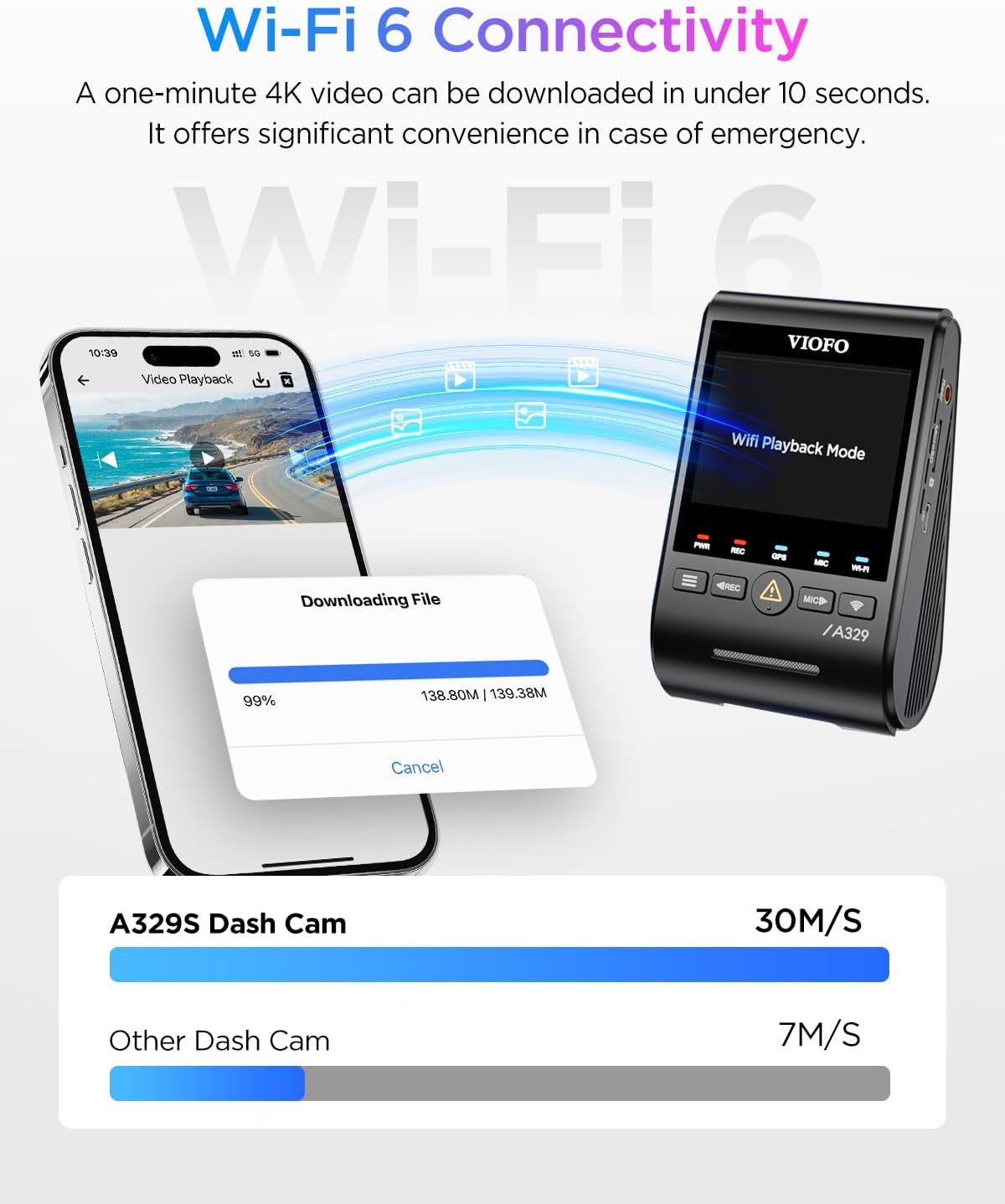
Image: A smartphone displaying the VIOFO app interface during a video download, illustrating the high-speed data transfer capabilities of Wi-Fi 6 with the A329S dash cam.
4.5 التحكم الصوتي الذكي
Operate key functions hands-free using voice commands. Supported commands include:
- "التقط صورة"
- "Start recording" / "Stop recording"
- "تشغيل الواي فاي" / "إيقاف تشغيل الواي فاي"
- "أغلق الفيديو"
The camera provides clear audio notifications for setting changes and memory card errors.
4.6 وظيفة نظام تحديد المواقع العالمي (GPS)
The built-in GPS module supports four global navigation satellite systems (GPS, BeiDou, Galileo, and GLONASS). This provides accurate data for:
- موقع المركبة
- سرعة
- بيانات الوقت
هذه المعلومات يمكن أن تكون viewed during video playback on the VIOFO App or VIOFO PC player.

Image: A split image illustrating the GPS tracking feature of the VIOFO A329S, showing vehicle location and speed on a map, alongside examples of smart voice control commands.
4.7 خيارات التخزين
The A329S supports high-capacity storage solutions:
- MicroSD cards up to 512GB.
- External SSDs up to 4TB (requires optional VIOFO Type-C SSD cable).
ملحوظة: MicroSD card and SSD storage are not included. VIOFO recommends using industrial-grade microSD cards for optimal performance and durability.

Image: The VIOFO A329S dash cam displaying its support for both microSD cards and external SSDs, with an illustration of an SSD connected to the device.
5. الصيانة
Proper maintenance ensures the longevity and optimal performance of your dash camera.
- تنظيف: Regularly clean the camera lenses with a soft, lint-free cloth. Avoid abrasive materials or harsh chemicals.
- تحديثات البرامج الثابتة: Periodically check the VIOFO website for firmware updates. Firmware updates typically need to be downloaded to a computer and manually transferred to the dash cam via the microSD card. Refer to the VIOFO website for detailed instructions on the update process.
- بطاقة الذاكرة: Format your microSD card regularly (e.g., once a month) within the camera's settings to prevent data corruption and ensure smooth recording. Replace the microSD card every 6-12 months, especially if using a non-industrial grade card, as continuous overwriting can degrade performance.
- تخزين: عند عدم استخدام كاميرا السيارة لفترات طويلة، قم بتخزينها في مكان بارد وجاف بعيدًا عن أشعة الشمس المباشرة.
6. استكشاف الأخطاء وإصلاحها
If you encounter issues with your VIOFO A329S, refer to the following common troubleshooting steps:
- الكاميرا لا تعمل:
- Ensure the car charger is securely plugged into the 12V outlet and the camera.
- Verify the vehicle's 12V outlet is functioning.
- Confirm you are using the original VIOFO car charger and cable.
- Recording Errors / Freezing:
- Format the microSD card within the camera's settings.
- Ensure you are using a high-endurance, industrial-grade microSD card from a reputable brand.
- Try a different microSD card to rule out card failure.
- Check for and install the latest firmware update.
- مشكلات الاتصال بشبكة Wi-Fi:
- تأكد من تمكين Wi-Fi على كاميرا لوحة القيادة.
- أعد تشغيل كل من كاميرا لوحة القيادة والهاتف الذكي الخاص بك.
- Confirm your phone is connected to the dash cam's Wi-Fi network.
- Temporarily disable mobile data on your phone if it interferes with the Wi-Fi connection.
- Poor Video Quality / Glare:
- تنظيف عدسات الكاميرا.
- Adjust the CPL filter by rotating it to minimize reflections.
- Ensure the windshield is clean.
- وضع ركن السيارة لا يعمل:
- Verify that a VIOFO HK4 or HK6 Hardwire Kit is correctly installed and connected.
- Check the hardwire kit's voltage cut-off settings.
If problems persist, consult the detailed user manual or contact VIOFO customer support.
7. المواصفات
| ميزة | التفاصيل |
|---|---|
| نموذج | A329S 3CH |
| دقة الكاميرا الأمامية | دقة 4K (3840x2160) بمعدل 30 إطارًا في الثانية |
| Cabin Camera Resolution | دقة 2K (2560x1440) بمعدل 30 إطارًا في الثانية |
| دقة الكاميرا الخلفية | دقة 2K (2560x1440) بمعدل 30 إطارًا في الثانية |
| مستشعرات الصورة | Front: STARVIS 2 IMX678; Cabin/Rear: STARVIS 2 IMX675 |
| Cabin Camera Angle | 210 درجة (عين السمكة) |
| الاتصال | Wi-Fi 6 (5GHz band), Type-C, USB 3.0 |
| نظام تحديد المواقع العالمي (جي بي اس) | Built-in, supports GPS, BeiDou, Galileo, GLONASS |
| دعم التخزين | MicroSD up to 512GB; External SSD up to 4TB |
| المميزات الخاصة | Impact Detection Power Saving Parking Mode, Smart Voice Control, CPL Filter (included) |
| حجم الشاشة | 2.4 بوصة |
| أبعاد المنتج | 2.4 بوصة طول × 1.7 بوصة عرض × 3.9 بوصة ارتفاع |
| وزن العنصر | 1.96 رطل |
8. الضمان والدعم
VIOFO is committed to providing reliable products and customer satisfaction.
- ضمان: The product typically comes with a 24-month warranty. Please refer to the After-Sales Service Card included in your package for specific terms and conditions.
- الإرجاعات: A 30-day return policy is generally available.
- دعم العملاء: For technical assistance, warranty claims, or any inquiries, please contact VIOFO customer support. Contact details are usually provided on the After-Sales Service Card or the official VIOFO webموقع.


