مقدمة
This manual provides detailed instructions for the setup, operation, and maintenance of your TOALLIN RGA6 Gimbal Selfie Stick with Light. This versatile device combines a gimbal stabilizer, selfie stick, and tripod, designed to enhance your smartphone photography and videography experience. Please read this manual thoroughly before use to ensure optimal performance and longevity of your product.
المنتج انتهىview
The TOALLIN RGA6 is a multi-functional accessory for smartphones, offering stability and flexibility for various content creation needs.
- Phone Selfie Stick & Gimbal Stabilizer: Functions as both a retractable, foldable selfie stick and a gimbal stabilizer. It can also be used as a tripod stand, suitable for video recording and live-streaming.
- Wireless Connectivity Stabilizer: Features a built-in wireless gimbal stabilizer for seamless phone connection. The gimbal can be locked by turning off its switch if only selfie stick functionality is desired.
- جهاز التحكم عن بعد: A detachable remote control allows for distant operation of the gimbal and phone, including one-button horizontal/vertical screen mode and POV mode.
- Removable Fill Light: Includes a three-color fill light with two adjustable levels per color, adapting to various lighting conditions. The light can be removed and re-installed horizontally or vertically.
- التوافق العالمي: Supports most smartphones, compatible with both iOS and Android operating systems.
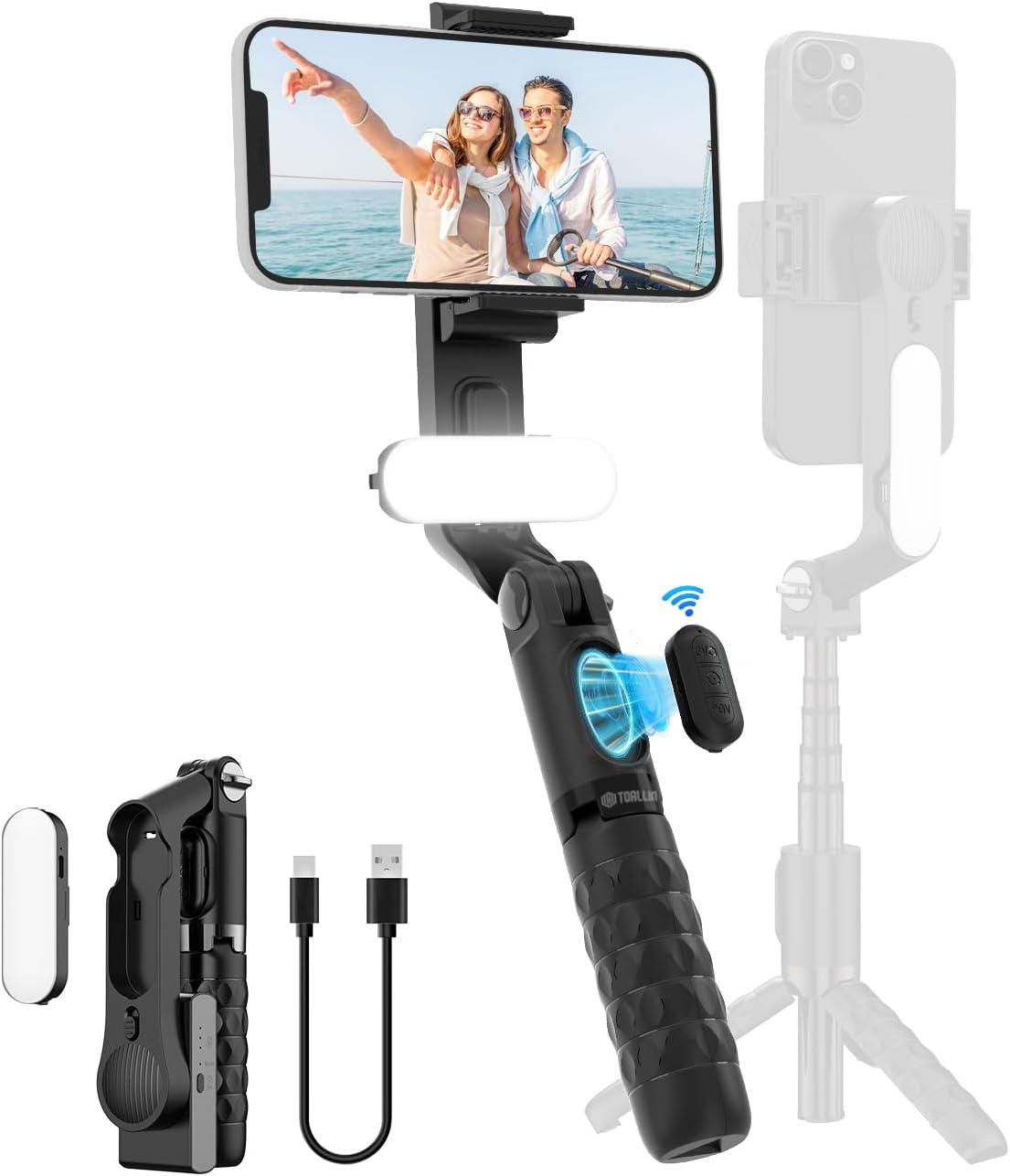
الشكل 1: انتهىview of the TOALLIN RGA6 Gimbal Selfie Stick with Light, highlighting its design and accessories.
محتويات الحزمة
تأكد من وجود جميع العناصر في العبوة:
- TOALLIN RGA6 Gimbal Stabilizer
- كابل شحن تيار متردد USB
- دليل المستخدم
تعليمات الإعداد
- اكشف الجيمبال: افتح جهاز التثبيت برفق من وضعه المضغوط. تأكد من تثبيت جميع المفاصل في مكانها بإحكام.
- قم بتثبيت هاتفك الذكي: قم بتمديد نطاق الهاتفamp and carefully insert your smartphone. Ensure the phone is centered and securely held to maintain balance.
- Power On the Gimbal: Locate the power button on the gimbal unit. Press and hold for a few seconds until the indicator light illuminates, signifying the gimbal is active and stabilizing.
- Pair Remote Control (Optional): The remote control is detachable. To pair, ensure your phone's Bluetooth is on. Press and hold the shooting button on the remote until its indicator light flashes, then select 'Gimbal' from your phone's Bluetooth devices list. The indicator light will turn solid upon successful pairing.
- Attach/Adjust Fill Light: The fill light can be attached to the gimbal. Press the power/adjust button on the light to cycle through three colors (cool, natural, warm) and two brightness levels for each. The light can be removed and re-positioned for front or rear illumination.

الشكل 2: مفصل view of the gimbal's components and controls.
تعليمات التشغيل
- استقرار جيمبال: Once powered on, the gimbal will automatically stabilize your phone, reducing shake and ensuring smooth footage, particularly for horizontal movement.
- Selfie Stick Function: Extend the aluminum alloy tube to use the device as a selfie stick. The remote control can be used to capture photos or start/stop video recording from a distance.
- وضع الحامل الثلاثي: Unfold the base of the handle to transform the device into a stable tripod. This is ideal for static shots, group photos, or hands-free video recording.
- وظائف التحكم عن بعد:
- Single Click (Top Button): Toggles between horizontal and vertical screen orientation.
- Double Click (Top Button): Activates POV mode, allowing for slight tilting movements while maintaining stability.
- Long Press (Top Button): Initiates clockwise 360-degree rotation. Release to stop.
- Long Press (Bottom Button): Initiates counter-clockwise 360-degree rotation. Release to stop.
- عملية ملء الضوء: Press the light button to turn on the fill light. Subsequent presses cycle through different color temperatures and brightness levels.
Video 1: Official TOALLIN RGA6 gimbal stabilizer and selfie stick demonstration, showing various operational modes and features.
صيانة
To ensure the longevity and optimal performance of your TOALLIN RGA6 Gimbal Selfie Stick, follow these maintenance guidelines:
- تنظيف: Use a soft, dry cloth to wipe down the device. Avoid using harsh chemicals or abrasive materials.
- تخزين: When not in use, fold the gimbal into its compact form and store it in a cool, dry place away from direct sunlight and extreme temperatures.
- الشحن: Charge the gimbal and fill light using the provided USB A-C charging cable. Do not overcharge.
- العناية بالبطارية: For optimal battery life, avoid fully discharging the device frequently. Charge it regularly, even if not in active use.
استكشاف الأخطاء وإصلاحها
- لا يستقر نظام التثبيت على الكاميرا:
- Ensure the gimbal is powered on.
- Check if the phone is properly centered and securely clamped. Improper phone placement can cause the motor to struggle.
- Verify the gimbal lock switch is disengaged (unlocked).
- جهاز التحكم عن بعد غير متصل:
- Ensure the remote control is powered on and in pairing mode (flashing indicator light).
- Check your phone's Bluetooth settings to ensure it's discoverable and 'Gimbal' is selected.
- The remote uses a watch battery; ensure it has sufficient charge.
- Fill Light Not Working:
- Ensure the fill light is charged.
- Press the light's power/adjust button to turn it on.
- عدم استقرار الحامل الثلاثي:
- تأكد من أن أرجل الحامل الثلاثي ممدودة بالكامل ومثبتة على سطح مستوٍ وثابت.
- Verify the phone is balanced correctly within the clamp لمنع الانقلاب.
تحديد
| ماركة | تولين |
| نموذج | رجا6 |
| أبعاد المنتج | 2.8 × 1.6 × 7.09 بوصة |
| وزن العنصر | 8.5 أونصة (240 جرامًا) |
| الحجم المطوي | 2.8 inches x 1.6 inches x 7.09 inches |
| الأجهزة المتوافقة | Cellphone (iOS & Android systems) |
| البطاريات | يلزم وجود بطاريتين غير قياسيتين (مرفقتان) |
| منفذ الشحن | USB-C (for gimbal and fill light) |
الضمان والدعم
For warranty information or technical support, please refer to the contact details provided on the product packaging or visit the official TOALLIN webالموقع. احتفظ بإيصال الشراء كإثبات للشراء.

