1. المقدمة
This manual provides detailed instructions for the installation, setup, and operation of your vine Smart Thermostat, Model B0FFBC4MV4. This device is designed to offer efficient temperature control for your home, featuring Wi-Fi connectivity, 7-day programmable scheduling, and compatibility with smart home assistants like Alexa and Google Assistant. Please read this manual thoroughly before installation and use to ensure proper function and safety.
2. معلومات السلامة
- انقطاع التيار الكهربائي: Always turn off power to your heating and cooling system at the circuit breaker before installing or servicing the thermostat.
- متطلبات الأسلاك من النوع C: A common wire (C-wire) is required for the operation of this thermostat. Ensure your system has a C-wire or install a C-wire power adapter if necessary.
- المجلدtagالتوافق ه: This thermostat is designed for 24V AC systems. It is not compatible with 110V-240V AC electric baseboard heat, millivolt systems, or systems that use S terminals for indoor/outdoor sensors. Attempting to install with incompatible systems can cause damage or injury.
- التثبيت الاحترافي: إذا كنت غير متأكد من أي جزء من عملية التركيب، فاستشر فني تكييف أو كهربائي مؤهل.
- فحص النظام: After installation, verify that your heating and cooling system operates correctly.
3. محتويات العبوة
تأكد من تضمين جميع العناصر المدرجة أدناه في الحزمة الخاصة بك:
- vine Smart Thermostat (Model B0FFBC4MV4) x1
- لوحة الحائط x1
- Large Trim Plate x1 (for covering marks from previous thermostat)
- Screws Sets x2
- Wiring Labels x1
- دليل المستخدم x1

الشكل 3.1: Package contents for the vine Smart Thermostat. Includes the thermostat unit, wall plate, trim plate, screws, wiring labels, and user manual.
4. التحقق من التوافق
Before installation, it is crucial to confirm your HVAC system's compatibility with the vine Smart Thermostat. This thermostat requires a C-wire (common wire) for operation and is designed for 24V AC systems.
4.1. System Types
The vine Smart Thermostat is compatible with approximately 90% of 24V AC systems, including:
- Conventional (2 Heat/2 Cool) - Gas, Oil, Electric, Boiler
- Heat Pump (2 stages Heat/Cool + 2 stages Auxiliary/Emergency)
- Heat-only or Cool-only Systems
4.2. Incompatible Systems
منظم الحرارة هو غير متوافق مع:
- Electric baseboard heat (110VAC-240VAC)
- أنظمة ملي فولت
- Systems that do not support S terminals for indoor and outdoor sensors
4.3. Online Compatibility Tool
For a detailed compatibility check, visit the official vine support page: vineconnected.com/support/thermostat. This tool will guide you through identifying your current wiring and system type.

الشكل 4.1: Visual guide to HVAC system compatibility, including wiring details and warnings for incompatible systems.
فيديو 4.1: This video demonstrates how to check the compatibility of your HVAC system with the vine Smart Thermostat, guiding you through identifying your current wiring and system type.
5. التثبيت
Follow these steps carefully to install your vine Smart Thermostat. Ensure you have performed the compatibility check before proceeding.
5.1. الأدوات المطلوبة
- فيليبس مفك البراغي
- مستوى (اختياري، من أجل التناسق الجمالي)
- قلم رصاص (للتمييز)
5.2. التثبيت خطوة بخطوة
- إيقاف تشغيل الطاقة: Locate your circuit breaker for your HVAC system and turn off the power. Verify the system is off by checking if your old thermostat screen is blank or unresponsive.
- إزالة منظم الحرارة القديم: Carefully remove the cover of your old thermostat. Take a picture of the wiring for reference before disconnecting any wires. This will help ensure correct re-connection.
- أسلاك الملصقات: Use the provided wiring labels to mark each wire according to its terminal on your old thermostat. If you see any jumper wires, remove them; your new thermostat has internal jumpers.
- إزالة لوحة الحائط القديمة: قم بفك وإزالة لوحة الحائط القديمة.
- Install New Wall Plate: Position the new vine wall plate on the wall. If needed, use the large trim plate to cover any marks or holes from the previous thermostat. Secure the new wall plate using the provided screws.
- توصيل الأسلاك: Insert each labeled wire into its corresponding terminal on the new vine wall plate. Ensure each wire is securely connected. If your system has two power wires (R/RC and RH), adjust the internal switch on the thermostat unit to the connection position.
- تثبيت منظم الحرارة: Align the four clips on the thermostat unit with the wall plate. Gently push the thermostat onto the wall plate until it clicks into place.
- اعادة الطاقة: Turn the power back on at your circuit breaker. The thermostat screen should light up.

الشكل 5.1: Visual steps for thermostat installation, including power off, wire labeling, and mounting.
فيديو 5.1: This video provides a detailed guide on how to assemble and install the vine Smart Thermostat (Model TJ550), covering wiring and mounting procedures.
6. إعداد التطبيق وشبكة الواي فاي
After physical installation, connect your vine Smart Thermostat to your home Wi-Fi network and the vine mobile application for remote control and smart features.
6.1. قم بتنزيل التطبيق
Download the "Vine Thermostat" or "Smart Life" app from the Apple App Store (iOS) or Google Play Store (Android). You can also scan the QR codes provided in the app setup guide.
6.2. Create an Account and Connect
- Open the app and sign in or create a new account. Note: You must create your own vine account to use third-party services and products. Guest accounts are not supported for full functionality.
- On the thermostat, after initial power-up, you will be prompted to make some basic settings (e.g., heat type, heating/cooling stages). Complete these settings.
- On the thermostat, touch the "Wi-Fi Setup" button.
- In the app, touch the "+" button in the upper right corner to add a device. Select your thermostat model (TJ-550).
- Follow the in-app instructions to connect the thermostat to your 2.4GHz Wi-Fi network. Important: The vine thermostat DOES NOT support 5GHz Wi-Fi. Ensure your phone is connected to a 2.4GHz network during setup.
- Once connected, you can modify the thermostat's name within the app.
فيديو 6.1: This video demonstrates the step-by-step process of setting up the vine Smart Thermostat app (Model TJ550), including account creation, Wi-Fi connection, and initial device configuration.
7. تعليمات التشغيل
Your vine Smart Thermostat offers various features for comfortable and efficient home climate control.
7.1. التحكم الأساسي في درجة الحرارة
On the main screen of the thermostat, use the "+" and "-" buttons to adjust the desired temperature. Tap the "O" button to switch between "Heating" or "Cooling" modes.
فيديو 7.1: This video illustrates how to change the thermostat system mode (Heat, Cool, Off) and fan mode directly on the vine Smart Thermostat device.
7.2. Programmable Schedules (7-day, 8-period)
Utilize the 7-day programmable schedules with up to 8 periods per day to automatically adjust your home's temperature. This feature helps maintain comfort while optimizing energy consumption. Access and configure schedules through the Vine Thermostat App or Smart Life App.

الشكل 7.1: The app interface for setting 7-day programmable schedules to optimize energy usage.
7.3. التحكم عن بعد عبر التطبيق
Control and monitor your thermostat from anywhere using the Vine Thermostat App or Smart Life App. Adjust settings, view current temperatures, and manage schedules remotely.
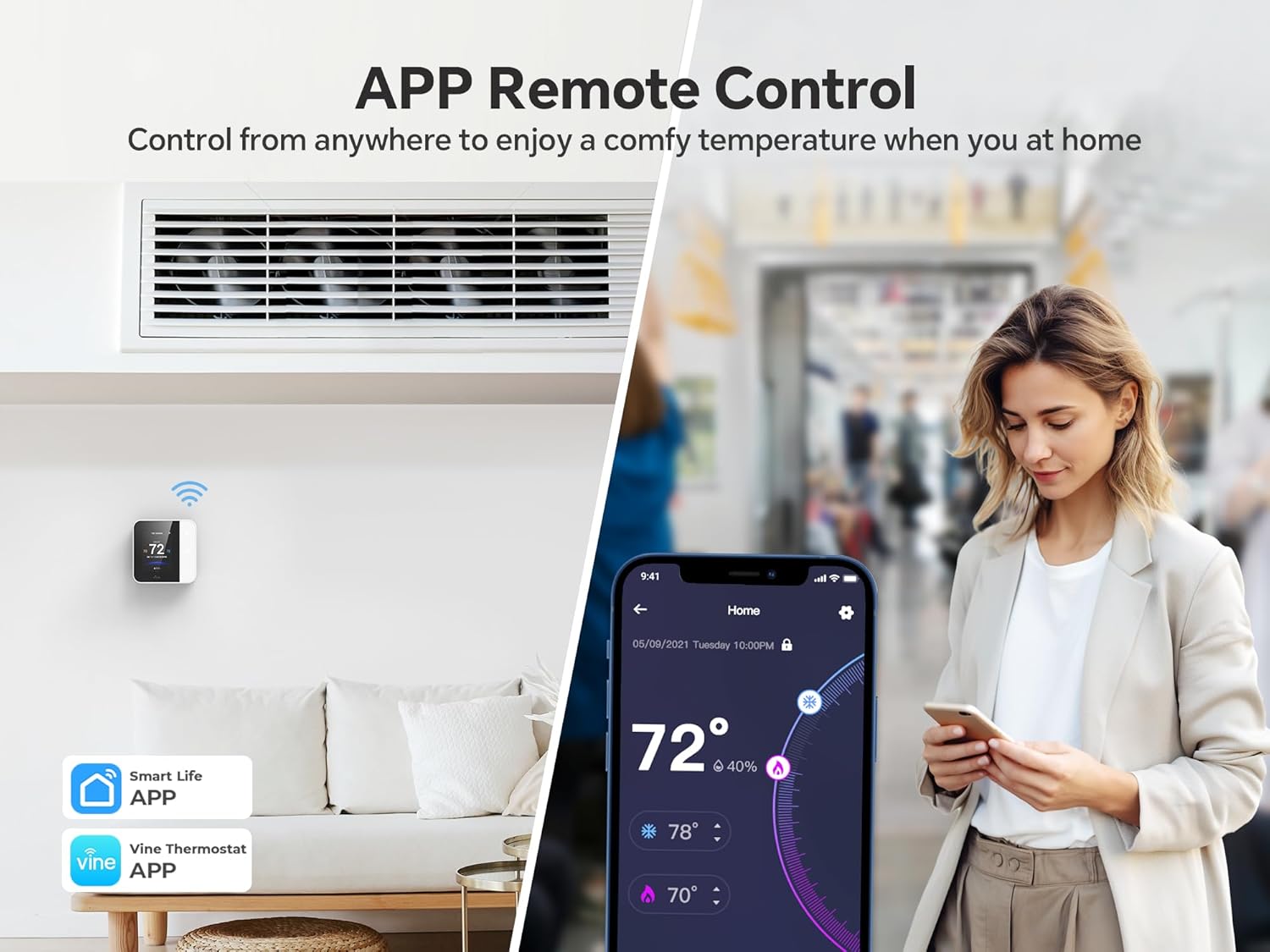
الشكل 7.2: Remote control functionality via the Vine Thermostat App, allowing temperature adjustments from any location.
7.4. التحكم الصوتي
The thermostat is compatible with Amazon Alexa and Google Assistant, enabling hands-free voice control. Simply use voice commands to adjust the temperature or change modes.
- "Alexa, set the room temperature to 72 degrees."
- "يا جوجل، ارفعي درجة الحرارة."

الشكل 7.3: Voice control integration with Amazon Alexa and Google Assistant for convenient temperature management.
7.5. Auto Home/Away with Geofencing
Leverage geofencing technology to automatically adjust the temperature based on your proximity to home. The thermostat can switch to an energy-saving "Away" mode when you leave and return to a comfortable "Home" setting before you arrive.

الشكل 7.4: Geofencing feature automatically adjusts thermostat settings as you enter or leave a predefined area.
7.6. Child Lock Functionality
Prevent unintended adjustments by children or others by activating the child lock feature through the mobile application. This locks the thermostat screen, requiring app access for changes.

الشكل 7.5: The child lock feature, activated via the app, prevents unauthorized changes directly on the thermostat screen.
8. الصيانة
Regular maintenance ensures optimal performance and longevity of your vine Smart Thermostat.
- تنظيف: Gently wipe the thermostat screen and body with a soft, damp قماش. تجنب استخدام المنظفات الكاشطة أو المذيبات.
- تذكيرات تغيير الفلتر: The thermostat app can provide reminders for HVAC filter changes. Follow your HVAC system manufacturer's recommendations for filter replacement.
- تحديثات البرامج: Ensure your Vine Thermostat App is updated to the latest version for new features and performance improvements. Firmware updates for the thermostat may also be available through the app.
9. استكشاف الأخطاء وإصلاحها
If you encounter issues with your vine Smart Thermostat, refer to the following common problems and solutions:
| مشكلة | السبب المحتمل | حل |
|---|---|---|
| شاشة الترموستات فارغة. | لا يوجد طاقة للترموستات. | Check the circuit breaker for your HVAC system and ensure it is ON. Verify C-wire connection. |
| لا يمكن الاتصال بشبكة Wi-Fi. | Incorrect Wi-Fi password, 5GHz network selected, or weak signal. | Ensure you are connecting to a 2.4GHz Wi-Fi network. Double-check the password. Move the router closer or use a Wi-Fi extender. |
| يبدو أن قراءة درجة الحرارة غير دقيقة. | Thermostat location, drafts, or calibration needed. | Ensure the thermostat is not in direct sunlight or near heat sources/drafts. Check app settings for temperature calibration options. |
| نظام التكييف لا يستجيب لمنظم الحرارة. | Incorrect wiring, power off, or system incompatibility. | Verify all wiring connections are secure and correct. Check power to the HVAC system. Re-confirm system compatibility. |
| التحكم الصوتي لا يعمل. | Incorrect linking with Alexa/Google Assistant, or network issues. | Ensure the vine thermostat is correctly linked in your Alexa or Google Home app. Check Wi-Fi connectivity for both the thermostat and smart speaker. |
10. المواصفات
| ميزة | التفاصيل |
|---|---|
| ماركة | كرمة |
| رقم الموديل | B0FFBC4MV4 |
| أبعاد المنتج | 0.98 بوصة عمق × 3.54 بوصة عرض × 3.54 بوصة ارتفاع |
| وزن العنصر | 10.5 أونصات |
| نوع وحدة التحكم | Amazon Alexa, Android, Google Assistant, iOS |
| المميزات الخاصة | Auto-Away Mode, Geofence Technology, Lockable, Programmable, Vacation Mode |
| استخدامات محددة | مكيف هواء، غلاية، فرن، مضخة حرارية |
| نوع التحكم في درجة الحرارة | التبريد والتدفئة |
| تكنولوجيا الاتصال | واي فاي (2.4 جيجاهرتز فقط) |
| مصدر الطاقة | Corded Electric (C-wire required) |
| نوع العرض | شاشة الكريستال السائل |
| طريقة التحكم | التطبيق، اللمس، الصوت |
| نوع التركيب | حامل الحائط |
11. الضمان والدعم
For warranty information, technical support, or any questions regarding your vine Smart Thermostat, please contact vine customer service.
- الشركة المصنعة: كرمة
- بائع: vine_sszn
- الدعم عبر الإنترنت: Refer to the vineconnected.com webالموقع للأسئلة الشائعة والموارد الإضافية.
- اتصال: If you have any questions, please feel free to contact us at any time. (Specific contact details like email/phone are not provided in the product data, so a general statement is used).


