1. المقدمة
شكرا لك على الشراءasing the ZEBRONICS Zeb Paradise Neo Wireless Headphones. This manual provides detailed instructions for setup, operation, and maintenance of your device. Please read this manual carefully before use to ensure proper functionality and to maximize your listening experience.
Key features of your Zeb Paradise Neo headphones include 40mm drivers for clear audio, up to 50 hours of playback, rapid charging, a dedicated gaming mode with low latency, three EQ modes, Environmental Noise Cancellation (ENC), and dual pairing capability.

Image 1.1: ZEBRONICS Zeb Paradise Neo Wireless Headphones. This image shows a front-side view of the black ZEBRONICS Zeb Paradise Neo wireless headphones, highlighting their sleek design and on-ear form factor.
2. محتويات العبوة
تأكد من وجود جميع العناصر في العبوة:
- ZEBRONICS Zeb Paradise Neo Wireless Headphones (1 Unit)
- USB Type-C Charging Cable (1 Unit)
- كابل AUX (وحدة واحدة)
- QR Code Guide (1 Unit)
3. انتهى المنتجview
تعرّف على مكونات سماعات الرأس:
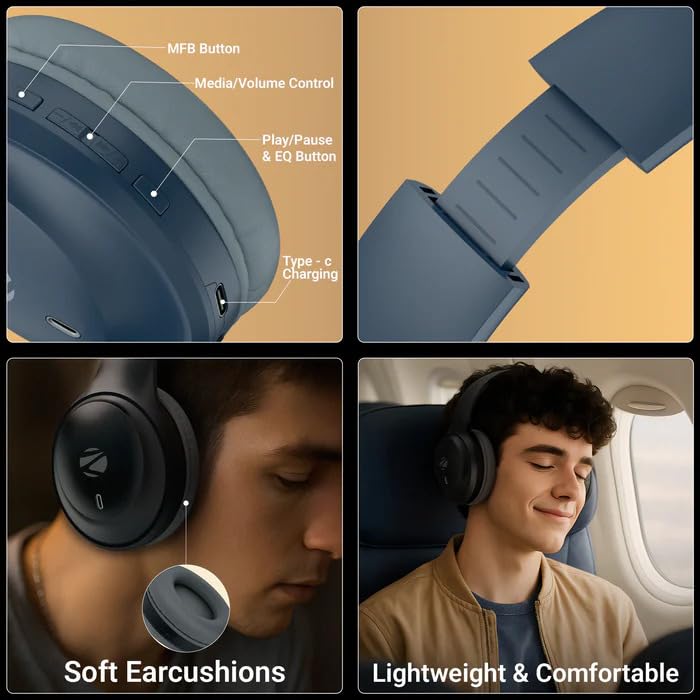
Image 3.1: Headphone Controls and Features. This image displays the various control buttons and features on the ZEBRONICS Zeb Paradise Neo headphones. It highlights the MFB (Multi-Function Button), Media/Volume Control buttons, Play/Pause & EQ Button, and the Type-C Charging port. It also shows the soft ear cushions and the lightweight, comfortable design.
- زر MFB: Multi-Function Button for power, pairing, and call management.
- Media/Volume Control: Buttons for adjusting volume and navigating tracks.
- Play/Pause & EQ Button: Controls playback and switches between EQ modes.
- منفذ شحن من النوع C: لتوصيل كابل الشحن.
- منفذ AUX: للاتصال الصوتي السلكي.
- ميكروفون: For call function and voice assistant.
4. الإعداد والشحن
4.1 الشحن الأولي
Before first use, fully charge the headphones. Connect the supplied USB Type-C charging cable to the headphone's charging port and the other end to a USB power adapter (not included) or a computer's USB port.
- A red LED indicator will illuminate during charging.
- The LED indicator will turn off once charging is complete.
- مدة الشحن حوالي ساعتين.
- Rapid charging provides approximately 7 hours of use from a 10-minute charge.
4.2 تشغيل/إيقاف التشغيل
- تشغيل الطاقة: Press and hold the MFB button for approximately 3 seconds until the LED indicator flashes blue.
- إيقاف التشغيل: Press and hold the MFB button for approximately 5 seconds until the LED indicator flashes red and then turns off.
5. تعليمات التشغيل
5.1 اقتران بلوتوث
- تأكد من شحن سماعات الرأس بالكامل وإيقاف تشغيلها.
- Press and hold the MFB button for approximately 5-7 seconds until the LED indicator flashes red and blue alternately. This indicates pairing mode.
- على جهازك المحمول، قم بتمكين Bluetooth وابحث عن الأجهزة المتاحة.
- Select "ZEB-PARADISE NEO" from the list of found devices.
- Once paired, the LED indicator will flash blue intermittently.
The headphones will automatically attempt to connect to the last paired device when powered on.
5.2 الاقتران المزدوج
The Zeb Paradise Neo supports dual pairing, allowing connection to two Bluetooth devices simultaneously.
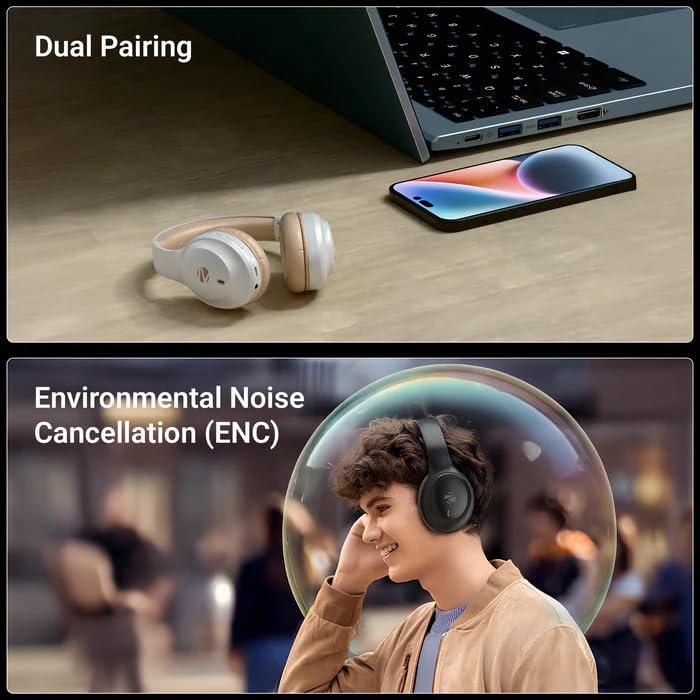
Image 5.1: Dual Pairing Capability. This image illustrates the dual pairing feature of the ZEBRONICS Zeb Paradise Neo headphones, showing them connected to both a laptop and a smartphone simultaneously. This allows seamless switching between audio sources.
- Pair the headphones with the first device (e.g., smartphone) as described in Section 5.1.
- قم بتعطيل البلوتوث على الجهاز الأول. ستعود سماعات الرأس إلى وضع الاقتران.
- Pair the headphones with the second device (e.g., laptop).
- أعد تفعيل البلوتوث على الجهاز الأول. يجب أن تكون سماعات الرأس الآن متصلة بالجهازين.
Audio will play from the device that is actively transmitting sound. You may need to manually select the headphones as the output device on one of the connected sources.
5.3 وظيفة الاتصال
- الرد/إنهاء المكالمة: اضغط على زر MFB مرة واحدة.
- رفض المكالمة: Press and hold the MFB button for approximately 2 seconds.
- إعادة الاتصال بالرقم الأخير: اضغط على زر MFB مرتين.
5.4 أوضاع المعادل
The headphones feature 3 Equalizer (EQ) modes to customize your audio experience. Press the Play/Pause & EQ button to cycle through the available modes (e.g., Bass Boost, Balanced, Treble Boost).
5.5 وضع الألعاب (زمن استجابة منخفض)
Activate Gaming Mode for reduced audio latency, ideal for gaming. Refer to the QR code guide for specific instructions on activating and deactivating Gaming Mode, as this may vary.
5.6 وضع AUX (اتصال سلكي)
To use the headphones with a wired connection, connect the supplied 3.5mm AUX cable to the headphone's AUX port and the other end to your audio source's 3.5mm audio jack. The headphones will automatically switch to AUX mode.
6. الصيانة
- تنظيف: استخدم قطعة قماش ناعمة وجافة لتنظيف سماعات الرأس. تجنب استخدام مواد كيميائية قاسية أو مواد كاشطة.
- تخزين: قم بتخزين سماعات الرأس في مكان بارد وجاف بعيدًا عن أشعة الشمس المباشرة ودرجات الحرارة القصوى.
- العناية بالبطارية: لإطالة عمر البطارية، تجنب تفريغ شحن سماعات الرأس بالكامل بشكل متكرر. اشحنها بانتظام، حتى في حال عدم استخدامها لفترات طويلة.
- التعرض للماء: These headphones are not waterproof. Avoid exposure to water or moisture.
7. استكشاف الأخطاء وإصلاحها
| مشكلة | الحل المحتمل |
|---|---|
| سماعات الرأس لا تعمل. | تأكد من شحن سماعات الرأس. وصّلها بمصدر طاقة وحاول مرة أخرى. |
| لا يمكن الاقتران بالجهاز. |
|
| لا يوجد صوت أو مستوى الصوت منخفض. |
|
| اتصال متقطع. |
|
8. المواصفات
| اسم الموديل | Paradise Neo (ZEB-WHP 11) |
| نسخة البلوتوث | 5.4 |
| لاسلكي المدى | 10 مترا (بدون عوائق) |
| حجم السائق | 40 ملم |
| معاوقة مكبر الصوت | 32 أوم |
| استجابة التردد | 20 هرتز - 20 كيلو هرتز |
| حساسية | 99dB ± 3dB |
| معاوقة الميكروفون | 2.2 كيلو أوم |
| حساسية الميكروفون | -38 ديسيبل ± 3 ديسيبل |
| وقت الشحن | 1.5 ساعات |
| وقت التشغيل | Up to 50 hours* (at 50% volume) |
| وقت التحدث | حتى 40 ساعة* |
| الوزن الصافي | 161 جرام |
| أبعاد المنتج (العرض × العمق × الارتفاع) | 18.8 x 8.4 x 21.5 cm (Package dimension) |
*Battery life may vary based on usage, volume levels, and environmental factors.
9. الضمان والدعم
For warranty information and customer support, please refer to the QR code guide included in your package or visit the official ZEBRONICS webموقع. احتفظ بإيصال الشراء الخاص بك لمطالبات الضمان.
Manufacturer: Zebronics India Pvt Ltd.
Country of Origin: India.


