1. المقدمة وما فوقview
Thank you for choosing the Ninkear L12Pro Gaming Mini PC. This compact yet powerful desktop computer is designed to deliver exceptional performance for a wide range of applications, from demanding gaming and 4K video editing to business productivity and multi-display setups. Featuring an Intel Core i9-12900HK processor, 32GB of RAM, and a 1TB NVMe SSD, the L12Pro offers a seamless and responsive computing experience. This manual provides essential information for setting up, operating, maintaining, and troubleshooting your new Mini PC.
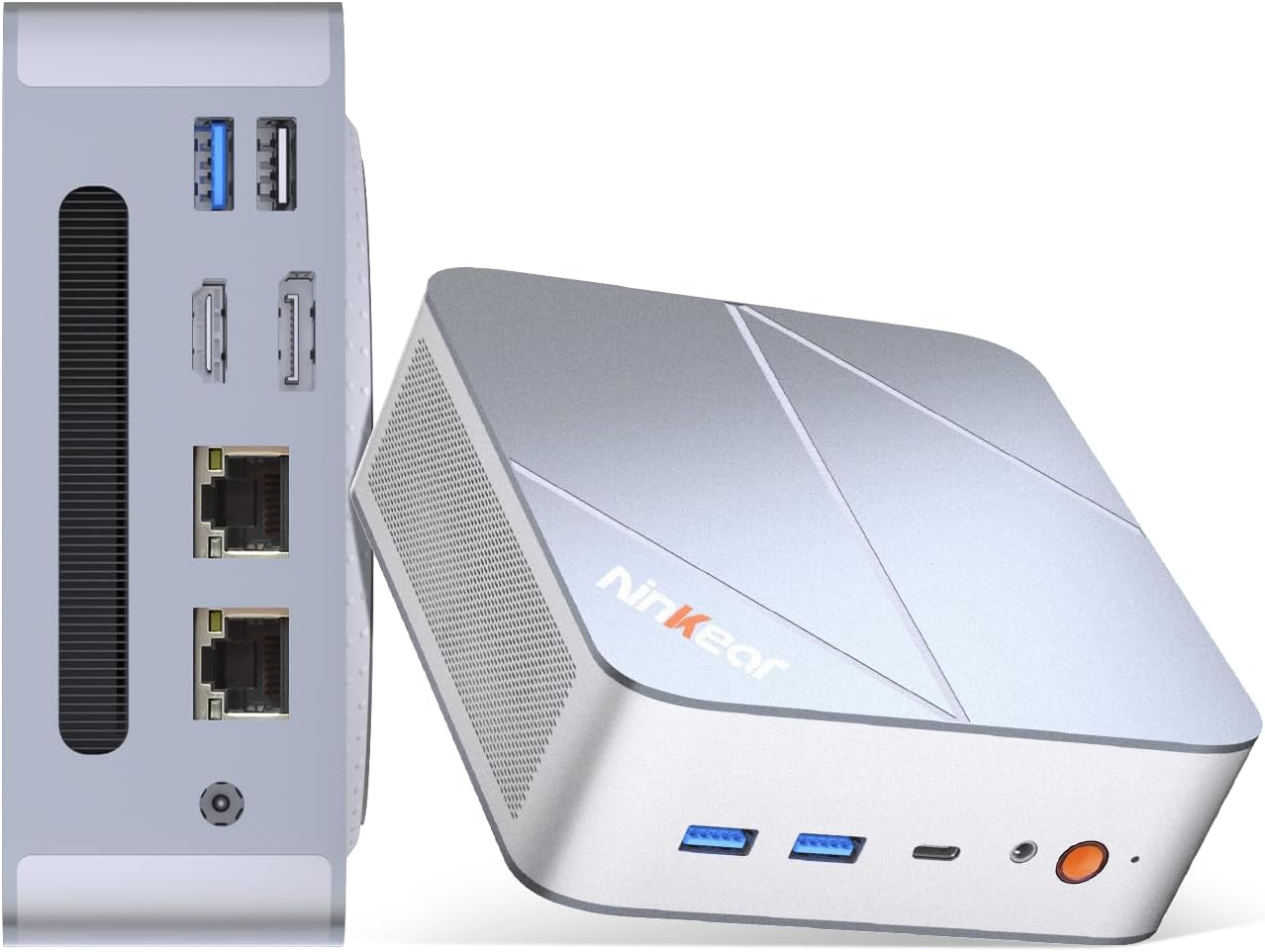
Figure 1.1: Ninkear L12Pro Mini PC - Front and Side View مع الموانئ.
2. مواصفات المنتج
- Lightning-Fast Performance: Powered by Intel’s 12th Gen i9-12900HK processor (14 cores, 20 threads, up to 5.0GHz), capable of handling 4K video editing, coding, and intensive multitasking.
- ذاكرة وتخزين عالي السرعة: Equipped with 32GB DDR4 RAM and an ultra-fast 1TB NVMe SSD for instant file access, smooth application performance, and rapid boot times.
- Triple 8K UHD Display Support: Create an immersive multi-screen setup with HDMI 2.0 (up to 4K@60Hz), DisplayPort 1.4 (up to 8K@60Hz), and USB4/Thunderbolt 4 (up to 8K@60Hz) outputs.
- تصميم صغير الحجم ومرن: Small form factor allows for versatile placement behind monitors, under desks, or in backpacks, offering powerful desktop capabilities in a portable size.
- الاتصال المتقدم: Features USB4.0, USB-C, WiFi 6, Bluetooth 5.2, dual 2.5G LAN ports, and multiple USB 3.2 Gen 2 and USB 2.0 ports for comprehensive peripheral support and high-speed data transfer.
- نظام تبريد فعال: Designed with an all-metal cooling system for quiet and efficient operation, ensuring stable performance even under heavy loads.
- مساحة تخزين قابلة للتوسعة: Supports additional M.2 NVMe PCIe SSD (up to 4TB) and an optional 2.5-inch HDD for expanded storage capacity.

الشكل 2.1: الميزات والمواصفات الرئيسيةview.

Figure 2.2: Triple 8K Display Setup for Enhanced Productivity.

Figure 2.3: Comprehensive Connectivity Options.
3. ماذا يوجد في الصندوق
عند فتح العبوة، يرجى التأكد من وجود جميع العناصر التالية:
- Ninkear L12Pro Mini PC
- كابل HDMI
- محول الطاقة
- دليل المستخدم (هذا المستند)
4. دليل الإعداد
Follow these steps to set up your Ninkear L12Pro Mini PC:
- Unpack the Mini PC: قم بإزالة جهاز الكمبيوتر المصغر وجميع الملحقات من العبوة بعناية.
- الاتصال بشاشة العرض:
- Connect one end of the HDMI cable (included) to the HDMI port on the Mini PC and the other end to an available HDMI input on your monitor or TV.
- For DisplayPort or USB4/Thunderbolt 4 connections, use appropriate cables (not included) to connect to compatible displays.
- For triple display setup, connect additional monitors using the available DisplayPort, USB4/Thunderbolt 4, or a USB-C to HDMI/DP adapter (not included).
- توصيل الأجهزة الطرفية:
- Plug your USB keyboard and mouse into any available USB ports on the Mini PC.
- If using wireless peripherals, ensure their receivers are plugged into a USB port.
- الاتصال بالطاقة: Plug the power adapter into the DC-in port on the Mini PC, then plug the other end into a power outlet.
- اتصال الشبكة (اختياري):
- For a wired connection, connect an Ethernet cable from your router or modem to one of the 2.5G LAN ports on the Mini PC.
- For a wireless connection, the Mini PC supports WiFi 6. You will configure this after the initial boot.
- التمهيد الأولي: Press the power button on the front of the Mini PC. The system will power on and begin the initial setup process for Windows 11 Pro. Follow the on-screen instructions to complete the operating system setup.
5. تعليمات التشغيل
5.1 تشغيل/إيقاف التشغيل
- تشغيل الطاقة: اضغط على زر الطاقة مرة واحدة.
- اغلق: انقر فوق زر البدء في نظام التشغيل Windows، ثم حدد الطاقة > إيقاف التشغيل.
- إعادة تشغيل: انقر فوق زر البدء في نظام التشغيل Windows، ثم حدد الطاقة > إعادة التشغيل.
- إيقاف التشغيل القسري: If the system is unresponsive, press and hold the power button for approximately 5-7 seconds until the unit powers off. Use this only as a last resort.
5.2 تكوين العرض
The Ninkear L12Pro supports up to three independent displays simultaneously. After connecting your monitors, Windows will typically detect them automatically. If not, or to configure display settings:
- انقر بزر الماوس الأيمن على منطقة فارغة على سطح المكتب.
- حدد "إعدادات العرض".
- From here, you can detect displays, arrange them, change resolution, and set display modes (Extend, Duplicate, Second screen only).
5.3 الاتصال بالشبكة
- سلكي (إيثرنت): Ensure an Ethernet cable is connected to one of the 2.5G LAN ports. Windows will automatically establish a connection.
- لاسلكي (واي فاي):
- Click the Wi-Fi icon in the system tray (bottom right of the taskbar).
- حدد شبكة Wi-Fi المطلوبة من القائمة.
- أدخل كلمة مرور الشبكة إذا طُلب منك ذلك وانقر فوق "اتصال".
5.4 توصيل الأجهزة الخارجية
The Mini PC offers a variety of ports for connecting external devices:
- منافذ USB: Use USB 3.2 Gen 2 ports for high-speed devices like external hard drives or SSDs, and USB 2.0 for standard peripherals like keyboards, mice, or printers.
- USB4/Thunderbolt 4: This versatile port supports high-speed data transfer (40Gbps), video output, and power delivery (with compatible devices).
- مقبس الصوت: قم بتوصيل سماعات الرأس أو مكبرات الصوت الخارجية بمقبس الصوت مقاس 3.5 ملم.
6. الصيانة
Proper maintenance ensures the longevity and optimal performance of your Ninkear L12Pro Mini PC:
- حافظ على فتحات التهوية نظيفة: Ensure the ventilation openings on the Mini PC are not obstructed. Blocked vents can lead to overheating and reduced performance.
- التنظيف المنتظم: استخدم قطعة قماش ناعمة وجافة لتنظيف الجزء الخارجي من جهاز الكمبيوتر الصغير. ولإزالة الغبار من فتحات التهوية، استخدم الهواء المضغوط. لا تستخدم المنظفات السائلة مباشرة على الجهاز.
- تحديثات البرامج: Regularly update your Windows operating system, drivers, and applications to ensure security, stability, and performance.
- الاغلاق الآمن: قم دائمًا بإيقاف تشغيل جهاز الكمبيوتر الصغير بشكل صحيح من خلال نظام التشغيل لمنع تلف البيانات.
- الظروف البيئية: Operate the Mini PC in a clean, dry environment, away from direct sunlight, excessive heat, and humidity.

Figure 6.1: Smart Cooling System for Quiet Operation.
7. استكشاف الأخطاء وإصلاحها
If you encounter issues with your Ninkear L12Pro Mini PC, refer to the following common problems and solutions:
| مشكلة | السبب المحتمل | حل |
|---|---|---|
| لا يوجد طاقة | محول الطاقة غير موصول؛ مشكلة في مأخذ الطاقة؛ محول الطاقة معطل. | Ensure power adapter is securely connected to the Mini PC and a working power outlet. Try a different outlet. |
| لا يوجد عرض | Monitor not connected; Incorrect input selected on monitor; Faulty cable; Display driver issue. | Check display cable connections. Ensure monitor is on and set to the correct input source (HDMI, DP, USB-C). Try a different cable or monitor. Update display drivers in Windows. |
| No Internet Connection (Wired) | Ethernet cable disconnected; Router/modem issue; Network driver issue. | Check Ethernet cable connection. Restart your router/modem. Check network adapter settings in Windows Device Manager. |
| لا يوجد اتصال بالإنترنت (واي فاي) | Wi-Fi disabled; Incorrect password; Router too far; Driver issue. | Ensure Wi-Fi is enabled in Windows. Re-enter Wi-Fi password. Move closer to the router. Update Wi-Fi drivers. |
| الأداء البطيء | Too many applications running; Overheating; Low disk space; Malware. | Close unnecessary applications. Ensure vents are clear. Free up disk space. Run a malware scan. |
8. المواصفات
Detailed technical specifications for the Ninkear L12Pro Mini PC:
| ميزة | التفاصيل |
|---|---|
| ماركة | نينكير |
| رقم الموديل | L12Pro |
| المعالج | Intel Core i9-12900HK (14 Cores, 20 Threads, up to 5.0GHz) |
| كبش | 32 جيجابايت DDR4 (قابلة للتوسعة حتى 64 جيجابايت) |
| تخزين | 1TB NVMe SSD (M.2 PCIe 3.0, Expandable up to 4TB) |
| معالج الرسوميات المساعد | رسومات Intel Iris Xe (96EU) |
| أقصى دقة للشاشة | 8K (7680x4320) via DisplayPort/USB4, 4K (4096x2160) via HDMI |
| مخرجات الفيديو | 1x HDMI 2.0, 1x DisplayPort 1.4, 1x USB4/Thunderbolt 4 |
| منافذ USB | 3x USB 3.2 Gen 2, 1x USB 2.0, 1x USB4/Thunderbolt 4 (Type-C) |
| شبكة | Dual 2.5G LAN (RJ45), WiFi 6 (802.11ax) |
| بلوتوث | بلوتوث 5.2 |
| نظام التشغيل | ويندوز 11 برو |
| وزن العنصر | 2.51 رطل (حوالي 1.14 كجم) |
| أبعاد | 10.44 × 6.73 × 2.79 بوصة (أبعاد العبوة) |
| لون | Premium Brushed Silver |
9. الضمان والدعم
The Ninkear L12Pro Mini PC comes with a standard manufacturer's warranty. For specific warranty terms and conditions, please refer to the documentation included with your purchase or visit the official Ninkear webموقع.
For technical support, troubleshooting assistance, or any inquiries regarding your product, please contact Ninkear customer service through their official channels.
الدعم عبر الإنترنت: قم بزيارة Ninkear Store on Amazon للاطلاع على الأسئلة الشائعة وخيارات الاتصال.


