1. المقدمة
This manual provides detailed instructions for the setup, operation, and maintenance of your MOBAPAD Huben2 Wireless Switch Controller Pro. Please read this manual thoroughly before using the product to ensure optimal performance and longevity.
2. معلومات السلامة
- احتفظ بجهاز التحكم بعيدًا عن الماء والسوائل الأخرى.
- لا تعرض وحدة التحكم لدرجات حرارة قصوى.
- تجنب إسقاط وحدة التحكم أو تعريضها لصدمات قوية.
- Do not attempt to disassemble or repair the controller yourself. Contact customer support for assistance.
- استخدم فقط كابل الشحن المقدم أو كابل USB-C معتمدًا للشحن.
3. محتويات العبوة
تأكد من وجود جميع العناصر في الحزمة الخاصة بك:
- MOBAPAD Huben2 Wireless Controller Pro
- كابل شحن USB-C
- Wireless Dongle (2.4G)
- PU Travel Case
- Replaceable D-pad (Cross/Circle)
- دليل التعليمات (هذا المستند)
4. تصميم وحدة التحكم
Familiarize yourself with the buttons and features of your Huben2 controller.

الشكل 4.1: الجبهة view of the MOBAPAD Huben2 Wireless Controller Pro. Shows the joysticks, face buttons (A, B, X, Y), D-pad, and central function buttons.
- العصي التناظرية اليسرى/اليمنى: Capacitive joysticks with 4,096-step precision.
- أزرار A/B/X/Y: Omron mechanical face buttons.
- وسادة D: Replaceable cross or circle D-pad.
- L1/R1 (أزرار الكتف): Standard shoulder buttons.
- L2/R2 (المحفزات): Dual-mode triggers (Hall Effect and Microswitch).
- أزرار M1/M2/M3/M4: Four programmable back buttons.
- زر الصفحة الرئيسة: Powers on/off and returns to system home screen.
- زر التقاط الشاشة: يلتقط لقطات الشاشة.
- أزرار الزائد/الناقص: Standard system menu buttons.
- زر توربو: Activates/deactivates turbo function.
- منفذ USB-C: للشحن والاتصال السلكي.

الشكل 4.2: خلفي view showing the four programmable M1, M2, M3, M4 back buttons.
5. الإعداد
5.1 شحن وحدة التحكم
Before first use, fully charge the controller. Connect the provided USB-C cable to the controller's USB-C port and the other end to a USB power source (e.g., console, PC, or USB wall adapter). The charging indicator will show the charging status.
- A full charge provides approximately 15 hours of gameplay.

Figure 5.1: The controller features a 1000mAh battery for extended gameplay.
5.2 أوضاع الاتصال
The Huben2 controller supports three connection methods:

Figure 5.2: The controller supports 2.4G wireless, Bluetooth, and wired connections across various platforms.
- 2.4G Wireless (via Dongle):
- Compatible with Windows PC, Steam, and Android TV.
- أدخل جهاز الاستقبال اللاسلكي بتردد 2.4 جيجا هرتز في منفذ USB الموجود على جهازك.
- قم بتشغيل وحدة التحكم. يجب أن تتصل تلقائيًا بجهاز الاستقبال.
- بلوتوث لاسلكي:
- Compatible with Nintendo Switch, Nintendo Switch 2, Android, and iOS devices.
- On your device, navigate to Bluetooth settings and enable Bluetooth.
- على وحدة التحكم، اضغط مع الاستمرار على زر اقتران البلوتوث (راجع تخطيط وحدة التحكم لمعرفة الموقع الدقيق) حتى تومض أضواء المؤشر بسرعة.
- Select "MOBAPAD Huben2" from the list of available devices on your system to pair.
- For Nintendo Switch, the controller can wake the console from sleep mode after initial pairing and firmware update via the Mobapad app.
- الاتصال السلكي:
- Compatible with Windows PC and Android TV.
- Connect the controller to your device using the USB-C cable. The controller will be recognized automatically.
6. تعليمات التشغيل
6.1 تشغيل/إيقاف التشغيل
- تشغيل الطاقة: اضغط على زر الصفحة الرئيسية.
- إيقاف التشغيل: Press and hold the Home button for 3-5 seconds. The controller will also power off automatically after a period of inactivity.
6.2 Dual Trigger Modes
The L2 and R2 triggers feature dual modes for different gaming experiences:

Figure 6.1: Visual representation of the 2mm Microswitch Trigger and 10mm Hall Linear Trigger modes.
- Microswitch Trigger (2mm): Provides a short, tactile click for rapid input, ideal for FPS games.
- Hall Effect Linear Trigger (10mm): Offers analog input with a longer travel distance, suitable for racing or simulation games.
- أوضاع التحويل: Use the physical switches located near the L2/R2 triggers to toggle between modes.
6.3 Customizable Features (Back Buttons, Macros, App Support)
The Huben2 controller offers extensive customization options:
- أزرار خلفية قابلة للبرمجة (M1-M4): Assign single button presses or complex macros to the four back buttons using the dedicated Mobapad PC/mobile application.
- Rapid-Fire Turbo Mode: Activate turbo functionality for any button. Refer to the Mobapad app or controller manual for specific button combinations to enable/disable.
- Mobapad App: Download the official Mobapad application for Windows or mobile devices to:
- Adjust joystick dead zones and response curves.
- قم بتخصيص شدة الاهتزاز.
- إنشاء وحدات الماكرو وإدارتها.
- قم بتحديث برنامج وحدة التحكم.
6.4 HD Rumble and ALPS Linear Motors
The controller features dual ALPS linear motors for precise HD Rumble feedback, reacting to in-game sound and motion with 0ms startup time.
6.5 6-Axis Motion Control
The integrated 6-axis motion sensor provides precise motion control for compatible games.

Figure 6.2: The controller's internal 6-axis sensing motors enable precise motion control.
6.6 Replaceable D-pad and Faceplate
The controller allows for customization of the D-pad and faceplate.
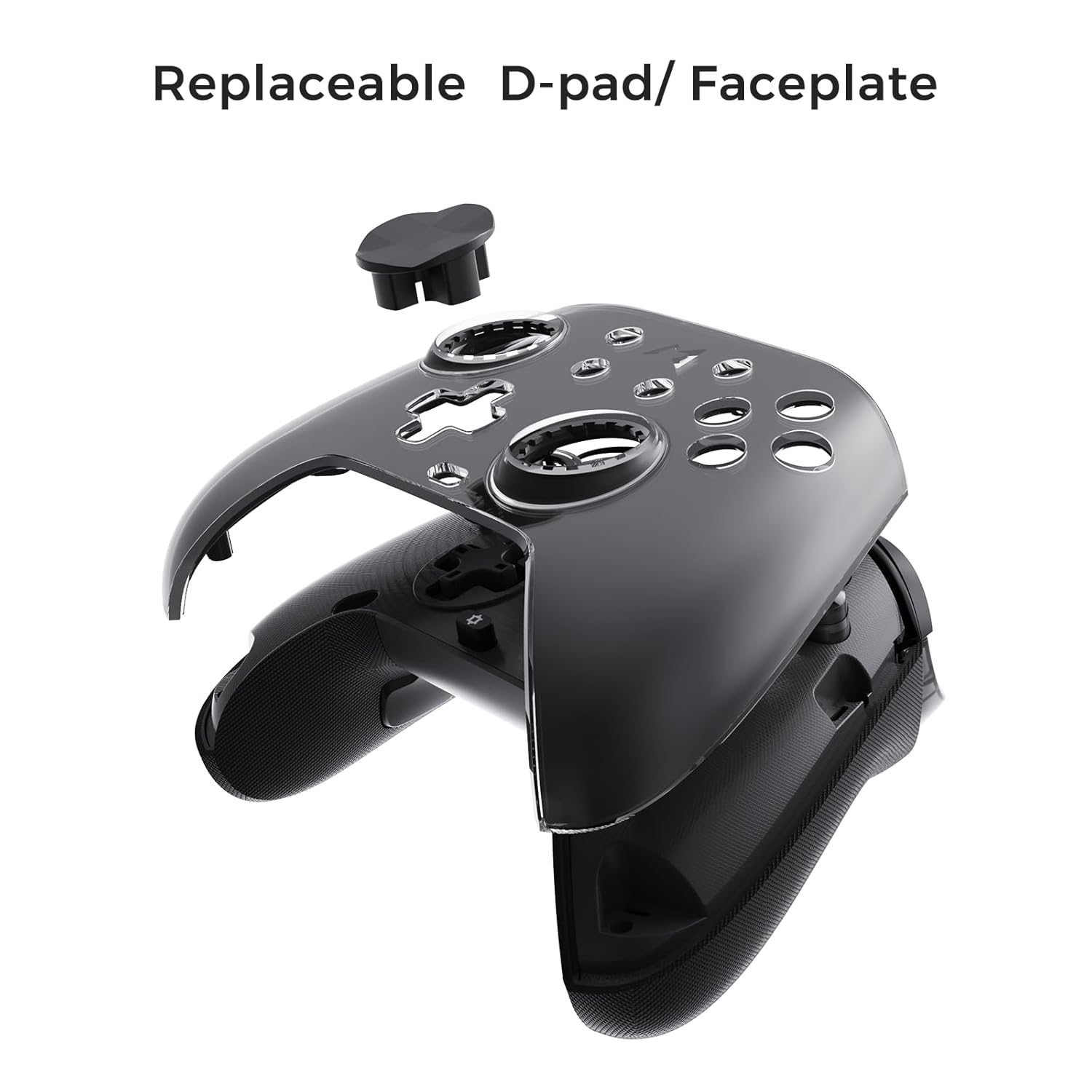
Figure 6.3: The D-pad and faceplate can be replaced for customization or preference.
- To replace the D-pad, gently remove the magnetic faceplate and then lift out the D-pad. Insert the desired D-pad (cross or circle) and reattach the faceplate.
7. الصيانة
- تنظيف: استخدم قطعة قماش ناعمة وجافة لتنظيف وحدة التحكم. لإزالة الأوساخ المستعصية، امسحها برفق.ampاغسل قطعة القماش بالماء. لا تستخدم مواد كيميائية قاسية أو منظفات كاشطة.
- تخزين: Store the controller in a cool, dry place, away from direct sunlight and extreme temperatures. When not in use for extended periods, store it in the provided PU travel case.
- العناية بالبطارية: لإطالة عمر البطارية، تجنب تفريغ وحدة التحكم بالكامل بشكل متكرر. اشحنها بانتظام، حتى لو لم تكن قيد الاستخدام المستمر.
8. استكشاف الأخطاء وإصلاحها
| مشكلة | السبب المحتمل | حل |
|---|---|---|
| وحدة التحكم لا تعمل بالطاقة. | بطارية منخفضة. | قم بشحن وحدة التحكم لمدة 30 دقيقة على الأقل. |
| لا يتصل جهاز التحكم لاسلكيًا. | Not in pairing mode; out of range; interference; incorrect mode selected. | Ensure controller is in pairing mode. Move closer to the device. Check for other wireless devices causing interference. Verify correct connection mode (2.4G or Bluetooth). |
| تأخر في الإدخال أو انقطاع في الاتصالات. | Wireless interference; low battery; outdated firmware. | Reduce distance to device. Charge controller. Update firmware via Mobapad app. Try wired connection. |
| الأزرار أو عصي التحكم لا تستجيب. | Software glitch; physical obstruction; calibration issue. | Restart the controller and the connected device. Check for physical debris. Calibrate joysticks via Mobapad app. |
| HD Rumble لا يعمل. | Feature disabled in game/system settings; low battery. | Ensure rumble is enabled in game and system settings. Charge controller. |
If you encounter issues not listed here, please refer to the official MOBAPAD support webالموقع أو الاتصال بخدمة العملاء.
9. المواصفات
| ميزة | التفاصيل |
|---|---|
| رقم الموديل | Mobapad Huben2 H6 |
| الاتصال | 2.4G لاسلكي، بلوتوث، سلكي (USB-C) |
| التوافق | Nintendo Switch, Nintendo Switch 2, Windows, Steam, Android, iOS |
| عصا التحكم | Capacitive, 4,096-step precision, 1000Hz polling rate |
| المحفزات | Dual Mode: 2mm Omron Microswitch, 10mm Hall Effect Linear |
| أزرار | Omron Mechanical Face Buttons, Programmable Back Buttons (M1-M4) |
| اهتزاز | Dual ALPS Linear Motors (HD Rumble) |
| التحكم في الحركة | 6 محور الجيروسكوب |
| سعة البطارية | 1000 مللي أمبير ليثيوم أيون |
| عمر البطارية | حتى 15 ساعة (تقريبًا) |
| أبعاد | 6.3 × 4.13 × 2.76 بوصة |
| وزن | 1.87 رطل |
10. الضمان والدعم
MOBAPAD products are designed and manufactured to the highest quality standards. For warranty information, technical support, or customer service inquiries, please visit the official MOBAPAD website or contact their authorized support channels. Please retain your proof of purchase for warranty claims.
Webموقع: Visit the MOBAPAD Store on Amazon


