1. معلومات هامة حول السلامة
يرجى قراءة جميع تعليمات السلامة قبل استخدام جهاز العرض. احتفظ بهذا الدليل للرجوع إليه مستقبلاً.
- لا تسد فتحات التهوية. تأكد من وجود مساحة كافية حول جهاز العرض لضمان تدفق الهواء بشكل صحيح.
- تجنب التعرض المباشر لضوء عدسة جهاز العرض.
- لا تضع جهاز العرض بالقرب من مصادر الحرارة أو في ضوء الشمس المباشر.
- استخدم فقط محول الطاقة المرفق بالجهاز.
- لا تحاول فتح جهاز العرض أو إصلاحه بنفسك. قم بإحالة جميع أعمال الصيانة إلى فنيين مؤهلين.
- احتفظ بالجهاز بعيدًا عن الماء أو السوائل الأخرى.
2. محتويات العبوة
تأكد من وجود جميع العناصر في العبوة:
- جهاز عرض ذكي للتلفزيون من نوع Aurzen Roku TV (D1R Cube)
- سلك الطاقة
- جهاز تحكم عن بعد (يتطلب بطاريتين AAA، غير مرفقتين)
- دليل المستخدم (هذا المستند)
3. انتهى المنتجview
جهاز العرض الذكي Aurzen D1R Cube صغير الحجم، مزود بنظام Roku TV مدمج للبث المباشر. يوفر دقة عرض 1080P Full HD، وتقنية Dolby Audio، ومحرك بصري محكم الإغلاق لضمان متانة ووضوح فائقين.
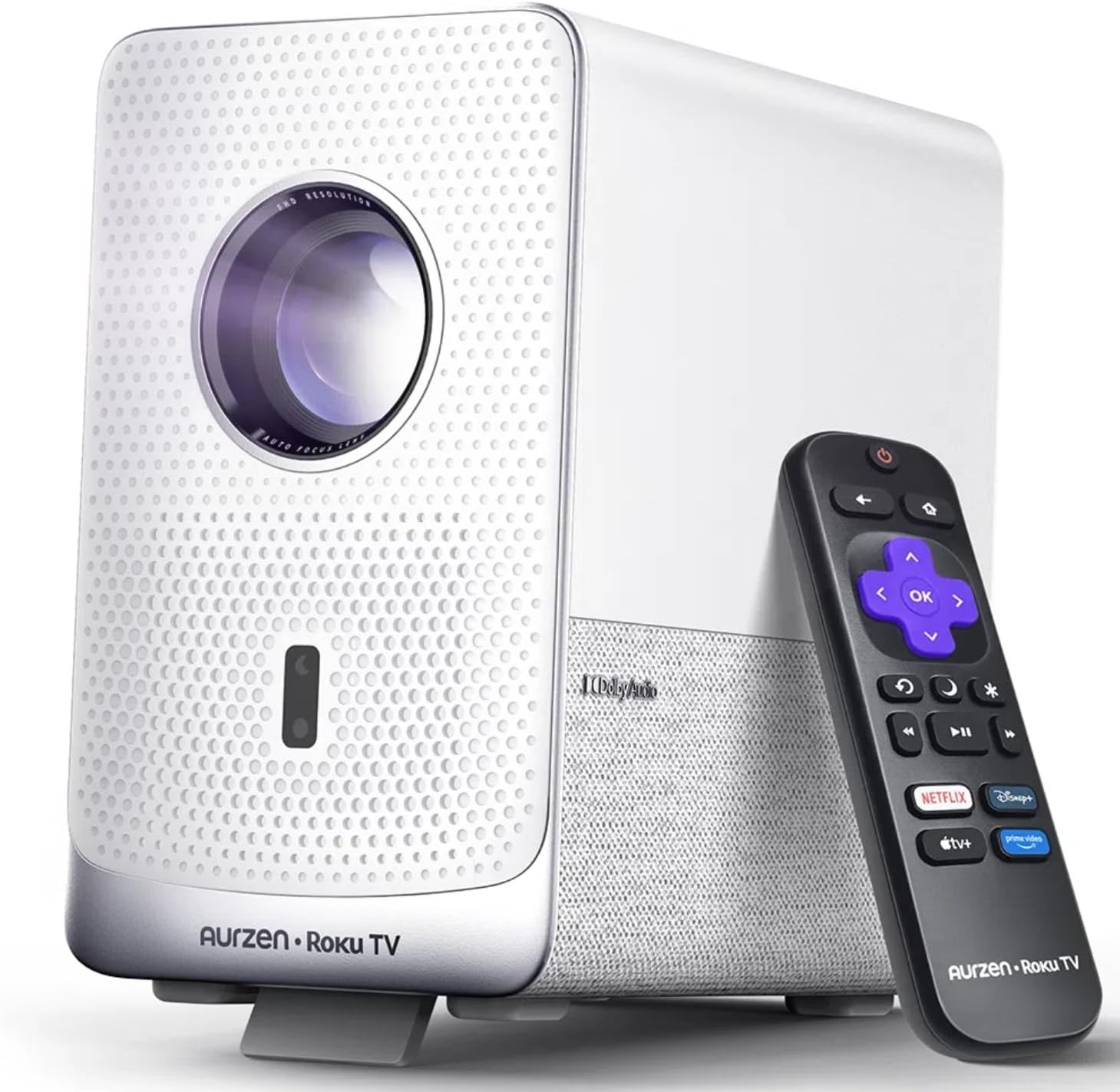
صورة: جهاز العرض الذكي Aurzen D1R Cube مع جهاز التحكم عن بعد الخاص به. يتميز جهاز العرض بلونه الأبيض ولوحة أمامية مزخرفة وعدسة مرئية.
المميزات الرئيسية:
- تلفزيون روكو المدمج: يمكنك الوصول إلى خدمات البث الشهيرة مباشرة.
- محرك بصري مغلق: يحمي من الغبار، ويحافظ على جودة الصورة، ويطيل عمرها الافتراضي.
- دقة 1080P FHD: يقدم صورًا واضحة ونقية.
- صوت دولبي: يوفر تجربة صوتية محسّنة.
- التركيز التلقائي وتصحيح الانحراف: ضبط تلقائي للصورة لإعداد سريع.
- واي فاي ثنائي النطاق وبلوتوث 5.2: من أجل اتصال سلس.
- آبل إيربلاي: مشاركة المحتوى بسهولة من أجهزة أبل.
- التوافق مع المنزل الذكي: يعمل مع Apple HomeKit و Siri و Alexa و Google Assistant.

صورة: رسم تخطيطي داخلي يوضح المحرك البصري المغلق لجهاز العرض Aurzen D1R Cube، مع تسليط الضوء على تصميمه المقاوم للغبار.
4. الإعداد
4.1 التعيين الأولي
ضع جهاز العرض على سطح ثابت ومستوٍ. للحصول على أفضل أداء viewضع جهاز العرض مباشرةً أمام سطح العرض (الجدار أو الشاشة). يتميز جهاز العرض بضبط تلقائي للصورة وتصحيح الانحراف لضبطها، ولكن يُنصح بوضعه بزاوية مستقيمة نسبيًا.

صورة: تمثيل مرئي لميزات التركيز التلقائي وتصحيح الانحراف التلقائي لجهاز العرض، توضح كيف يتم ضبط الصورة تلقائيًا لإنشاء عرض مستطيل مثالي.
4.2 توصيل الطاقة
- قم بتوصيل سلك الطاقة بمنفذ إدخال الطاقة الخاص بجهاز العرض.
- قم بتوصيل الطرف الآخر من سلك الطاقة بمأخذ كهربائي مناسب.
- سيتم تشغيل جهاز العرض تلقائيًا أو يمكن تشغيله باستخدام زر الطاقة الموجود على الجهاز أو جهاز التحكم عن بعد.
4.3 إعداد جهاز التحكم عن بعد
أدخل بطاريتين AAA (غير مرفقتين) في جهاز التحكم عن بُعد. تأكد من صحة القطبية. جهاز التحكم عن بُعد مُقترن مسبقًا بجهاز العرض.
4.4 الإعداد الأولي لتلفزيون Roku
عند تشغيل الجهاز لأول مرة، اتبع التعليمات التي تظهر على الشاشة لإعداد جهاز Roku TV الخاص بك. يتضمن ذلك ما يلي:
- اختيار اللغة الخاصة بك.
- الاتصال بشبكة واي فاي (يلزم وجود اتصال إنترنت مستقر).
- تفعيل حسابك على Roku. إذا لم يكن لديك حساب، فسيُطلب منك إنشاء حساب مجاني.
- تثبيت قنوات البث المطلوبة.
5. تعليمات التشغيل
5.1 تشغيل/إيقاف التشغيل
اضغط على زر الطاقة الموجود على جهاز العرض أو جهاز التحكم عن بعد لتشغيل الجهاز أو إيقاف تشغيله.
5.2 التنقل في الشاشة الرئيسية لجهاز Roku
استخدم لوحة التحكم وزر "موافق" على جهاز التحكم عن بُعد للتنقل في الشاشة الرئيسية لجهاز Roku. يمكنك الوصول إلى قنوات البث، والبحث عن المحتوى، وضبط الإعدادات.

صورة: لقطة شاشة للشاشة الرئيسية لتلفزيون Roku، تعرض أيقونات تطبيقات البث المختلفة وخيارات التنقل.
5.3 تطبيقات البث
تتيح منصة Roku TV الوصول إلى مجموعة واسعة من تطبيقات البث المباشر مثل Netflix وPrime Video وDisney+ وHulu وYouTube وغيرها. اختر تطبيقًا من الشاشة الرئيسية لبدء البث.

الصورة: عرض رسوميasing شعارات خدمات البث الشهيرة المختلفة المتوفرة على منصة Roku TV، بما في ذلك Netflix و Disney+ و Hulu.
5.4 توصيل الأجهزة الخارجية
يحتوي جهاز العرض على منافذ HDMI و USB لتوصيل الأجهزة الخارجية.
- HDMI: قم بتوصيل أجهزة الألعاب، أو مشغلات بلو راي، أو أي أجهزة أخرى تدعم منفذ HDMI. حدد مدخل HDMI المناسب من قائمة تلفزيون Roku.
- USB: لعب وسائل الإعلام file(صور، مقاطع فيديو، موسيقى) من جهاز تخزين USB.
5.5 اتصال البلوتوث
قم بتوصيل سماعات الرأس أو مكبرات الصوت بتقنية البلوتوث للحصول على تجربة صوتية محسّنة.
- انتقل إلى قائمة إعدادات تلفزيون Roku.
- حدد "أجهزة التحكم عن بعد والأجهزة" ثم "أجهزة البلوتوث".
- ضع جهاز Bluetooth في وضع الإقران.
- حدد جهازك من القائمة الموجودة على شاشة جهاز العرض لإقرانه.

صورة: رسم تخطيطي يوضح اتصال البلوتوث لجهاز العرض Aurzen D1R Cube، ويظهر اتصاله بأجهزة صوتية خارجية مختلفة.
5.6 Apple AirPlay
يمكنك مشاركة المحتوى بسهولة من أجهزة Apple الخاصة بك (iPhone و iPad و Mac) إلى جهاز العرض باستخدام Apple AirPlay.
- تأكد من أن جهاز Apple الخاص بك وجهاز العرض متصلان بنفس شبكة Wi-Fi.
- على جهاز Apple الخاص بك، افتح المحتوى الذي ترغب في مشاركته (مثل الصور ومقاطع الفيديو).
- اضغط على أيقونة البث (عادةً ما يكون مستطيلاً مع سهم يشير إلى الأعلى).
- اختر جهاز العرض Aurzen D1R Cube من قائمة الأجهزة المتاحة.

صورة: عائلة تشاهد محتوى معروضًا من جهاز أبل على شاشة كبيرة عبر تقنية أبل إيربلاي باستخدام جهاز العرض Aurzen D1R Cube.
5.7 التحكم الصوتي وتكامل المنزل الذكي
يدعم جهاز العرض التحكم الصوتي عبر تطبيق Roku للهواتف المحمولة وهو متوافق مع Apple HomeKit و Siri و Alexa و Google Assistant لتكامل أوسع مع المنزل الذكي.
- تطبيق Roku للجوال: قم بتنزيل تطبيق Roku للهواتف المحمولة لاستخدام الأوامر الصوتية والكتابة بسهولة والتحكم في جهاز العرض الخاص بك من هاتفك الذكي.
- مساعدو المنزل الذكي: قم بربط حساب Roku الخاص بك بنظام المنزل الذكي المفضل لديك (Apple Home، Amazon Alexa، Google Home) للتحكم في جهاز العرض باستخدام الأوامر الصوتية.
6. الصيانة
6.1 محرك بصري مغلق
تتميز كاميرا Aurzen D1R Cube بمحرك بصري محكم الإغلاق مصمم لمنع تراكم الغبار على المكونات الداخلية. هذا يقلل من الحاجة إلى التنظيف الداخلي الدوري ويساعد في الحفاظ على جودة صورة ثابتة مع مرور الوقت.

صورة: مقارنة جنبًا إلى جنب توضح الفرق في تراكم الغبار بين محرك بصري مغلق (يسار) ومحرك بصري مفتوح (يمين) بعد فترة من الاستخدام.
6.2 التنظيف العام
- الخارج: امسح الجزء الخارجي من جهاز العرض بقطعة قماش ناعمة وجافة. لا تستخدم المنظفات الكاشطة أو المذيبات.
- عدسة: نظّف عدسة جهاز العرض برفق باستخدام قطعة قماش مخصصة لتنظيف العدسات أو محلول تنظيف العدسات الخاص. تجنّب لمس العدسة بأصابعك.
- تهوية: تأكد من خلو فتحات التهوية من الغبار والحطام. استخدم فرشاة ناعمة أو هواء مضغوط لتنظيفها برفق إذا لزم الأمر.
6.3 التخزين
عند عدم استخدام جهاز العرض لفترات طويلة، يُنصح بتخزينه في مكان بارد وجاف، بعيدًا عن أشعة الشمس المباشرة ودرجات الحرارة القصوى. يُفضل استخدام غطاء أو حافظة واقية لمنع تراكم الغبار.
7. استكشاف الأخطاء وإصلاحها
إذا واجهت مشاكل مع جهاز العرض Aurzen D1R Cube، فراجع الحلول الشائعة التالية:
| مشكلة | الحل المحتمل |
|---|---|
| لا يوجد طاقة | تأكد من توصيل سلك الطاقة بإحكام بكل من جهاز العرض ومأخذ الكهرباء. اختبر المأخذ بجهاز آخر. |
| لا يوجد صورة | تأكد من تشغيل جهاز العرض. تحقق من تحديد مصدر الإدخال (HDMI، USB) بشكل صحيح. تأكد من إزالة غطاء العدسة. |
| صورة ضبابية | يحتوي جهاز العرض على خاصية التركيز التلقائي. إذا بقيت الصورة ضبابية، فحاول تغيير موضع جهاز العرض أو إعادة تشغيله لتفعيل التركيز التلقائي مرة أخرى. تأكد من نظافة العدسة. |
| لا يوجد صوت | تحقق من مستوى الصوت في جهاز العرض وأي أجهزة صوتية خارجية متصلة. تأكد من إقران الصوت عبر البلوتوث بشكل صحيح أو توصيل السماعات الخارجية بشكل سليم. |
| مشاكل الاتصال بشبكة Wi-Fi | تأكد من أن جهاز توجيه الواي فاي يعمل. أعد تشغيل جهاز العرض وجهاز التوجيه. تحقق من صحة كلمة مرور الواي فاي في إعدادات تلفزيون روكو. |
| جهاز التحكم عن بعد لا يستجيب | استبدل بطاريات AAA في جهاز التحكم عن بعد. تأكد من عدم وجود أي عوائق بين جهاز التحكم عن بعد وجهاز العرض. |
للحصول على مزيد من المساعدة، يرجى الرجوع إلى موارد الدعم عبر الإنترنت أو الاتصال بخدمة عملاء Aurzen.
8. المواصفات
المواصفات الفنية التفصيلية لجهاز العرض الذكي Aurzen D1R Cube:
| ميزة | مواصفة |
|---|---|
| ماركة | أورزن |
| نموذج | مكعب D1R |
| الحد الأقصى لدقة العرض | 1920 × 1080 (1080P FHD) |
| تكنولوجيا الاتصال | واي فاي (ثنائي النطاق 2.4 جيجاهرتز/5 جيجاهرتز)، بلوتوث 5.2، منفذ HDMI، منفذ USB، منفذ صوت |
| المميزات الخاصة | جهاز عرض ذكي Roku TV، محرك بصري مغلق، صوت دولبي، Apple AirPlay، متوافق مع المنزل الذكي |
| وزن العنصر | 5.68 رطل |
| أبعاد المنتج | 7.42 × 7 × 7.83 بوصة |
| لون | أبيض |
9. الضمان والدعم
9.1 ضمان المنتج
منتجات Aurzen مشمولة بضمان الشركة المصنعة. يرجى الرجوع إلى بطاقة الضمان المرفقة مع المنتج أو زيارة موقع Aurzen الرسمي. webالموقع لمعرفة شروط وأحكام الضمان المحددة.
9.2 دعم العملاء
للحصول على الدعم الفني، أو المساعدة في حل المشكلات، أو تقديم مطالبات الضمان، يرجى التواصل مع خدمة عملاء Aurzen عبر قنواتهم الرسمية. يمكنك العثور على مزيد من المعلومات وخيارات الاتصال على متجر علامة أورزن التجارية على أمازون.


