1. المقدمة
Thank you for choosing the KODAK V500 Video Light. This professional-grade video light is designed to provide powerful, adjustable illumination for various photography and videography needs. Featuring a wide color temperature range from 2800K to 6500K, a high Color Rendering Index (CRI) of 96, and dimmable brightness, the V500 ensures accurate and versatile lighting. Its lightweight design, intuitive LCD display, and wireless remote control make it an essential tool for both studio and on-location use.
2. تعليمات السلامة الهامة
Please read all safety instructions carefully before using the KODAK V500 Video Light. Failure to follow these instructions may result in electric shock, fire, or serious injury.
- لا operate the light with wet hands or in wet conditions.
- لا block the ventilation openings on the light fixture. Overheating can cause damage or fire.
- لا look directly into the light source when it is operating at high brightness. This can cause eye damage.
- Keep the light away from flammable materials and liquids.
- Ensure the light is securely mounted on a stable stand before operation.
- استخدم فقط محول الطاقة والملحقات المحددة.
- Disconnect the power supply before cleaning or when not in use.
- هذا المنتج ليس لعبة. يُحفظ بعيدًا عن متناول الأطفال.
- If any malfunction occurs, immediately disconnect power and contact customer support.
3. محتويات العبوة
تأكد من وجود جميع العناصر في الحزمة الخاصة بك:
- KODAK V500 Video Light Unit
- جهاز التحكم عن بعد اللاسلكي
- محول الطاقة
- عاكس قياسي
- دليل التعليمات
4. انتهى المنتجview
Familiarize yourself with the components of your KODAK V500 Video Light and its remote control.
4.1. KODAK V500 Video Light Unit
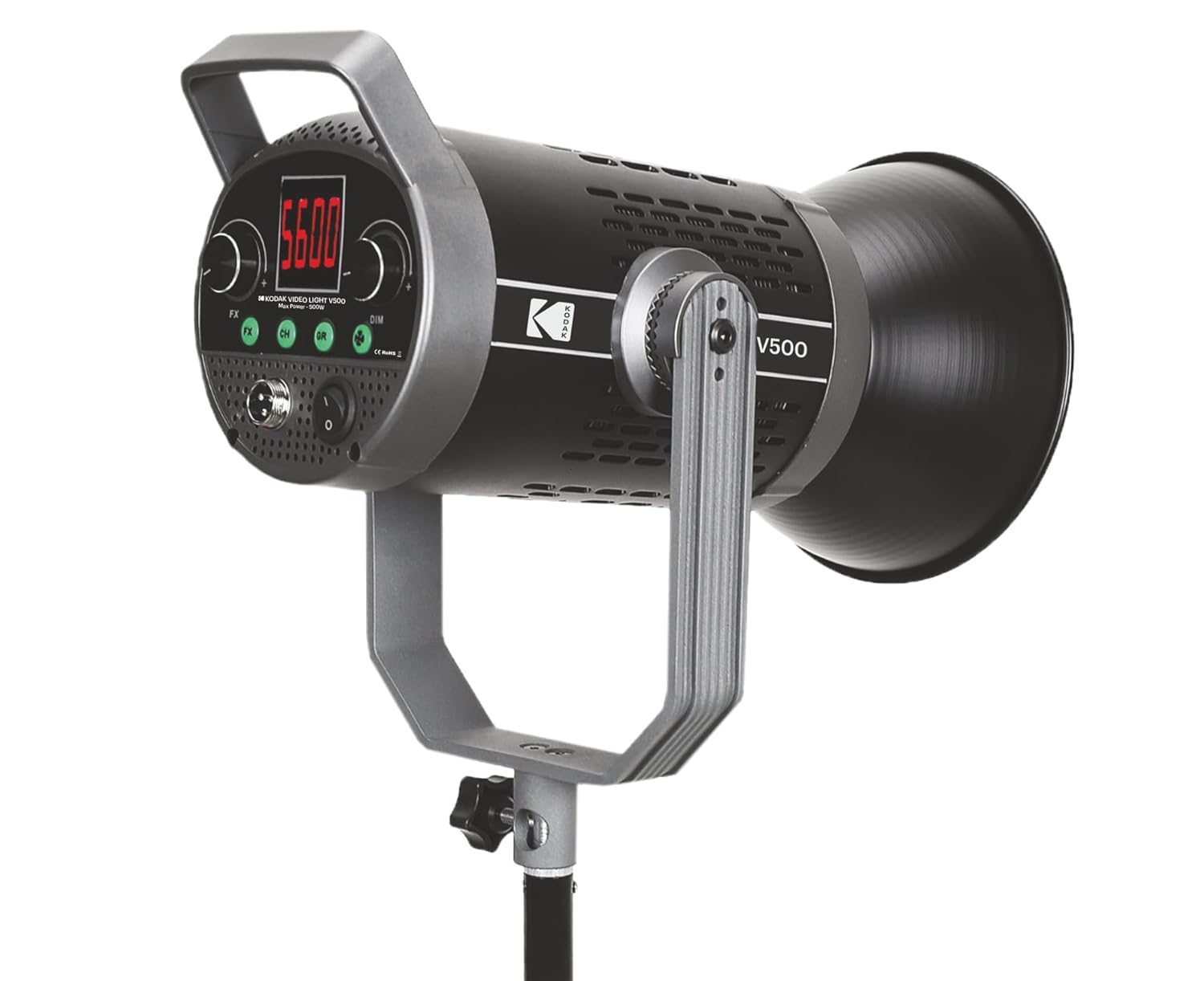
الشكل 1: أمام view of the KODAK V500 Video Light with reflector attached, mounted on a light stand.

الشكل 2: Rear control panel of the KODAK V500 Video Light.
- العاكس: Directs and focuses the light output.
- مصدر ضوء LED: High-power LED array.
- شريحة متزايدة: Allows attachment to a light stand and adjustment of tilt angle.
- مقبض القفل: Secures the light's tilt angle.
- شاشة LCD: Shows current settings such as color temperature, brightness, and channel/group.
- زر FX: Activates special effects modes (if available).
- CH/GR Buttons: Selects the operating channel or group for wireless control.
- الاتصال الهاتفي الخافت: Adjusts brightness intensity.
- الاتصال الهاتفي CCT: Adjusts color temperature (Correlated Color Temperature).
- مدخل الطاقة (DC IN): يتصل بمحول الطاقة.
- مفتاح التشغيل: يقوم بتشغيل أو إطفاء الضوء.
4.2. جهاز تحكم عن بعد لاسلكي

الشكل 3: KODAK V500 Wireless Remote Control.
- زر الطاقة: يقوم بتشغيل أو إطفاء الضوء.
- CCT/MODE Button: Switches between Color Temperature adjustment and other modes.
- زر SET: Confirms selections or enters menu.
- +/- الأزرار: Adjusts values (brightness, color temperature) or navigates menus.
- KODAK Logo: تحديد العلامة التجارية.
5. تعليمات الإعداد
Follow these steps to set up your KODAK V500 Video Light for use.
- تركيب الضوء:
- Attach the KODAK V500 Video Light to a compatible light stand using the mounting bracket.
- Tighten the locking knob on the light stand to secure the light.
- Adjust the tilt angle of the light using the locking knob on the light's mounting bracket, then tighten to secure.
- تركيب العاكس:
- Align the reflector with the front of the light unit.
- قم بتدوير العاكس في اتجاه عقارب الساعة حتى يستقر في مكانه بإحكام.
- توصيل الطاقة:
- Connect the power adapter cable to the DC IN port on the rear of the light unit.
- قم بتوصيل محول الطاقة بمأخذ كهربائي مناسب.
6. تعليمات التشغيل
Learn how to power on, adjust settings, and utilize the features of your KODAK V500 Video Light.
6.1. تشغيل / إيقاف التشغيل
اضغط على مفتاح الطاقة on the rear control panel of the light unit to turn the light ON or OFF. Alternatively, use the زر الطاقة على جهاز التحكم عن بعد اللاسلكي.
6.2. ضبط السطوع
The KODAK V500 offers dimmable brightness control:
- على وحدة الإضاءة: تدوير قرص خافت clockwise to increase brightness and counter-clockwise to decrease brightness. The brightness level will be displayed on the LCD.
- استخدام جهاز التحكم عن بعد: اضغط على +/- أزرار لضبط مستوى السطوع.
6.3. ضبط درجة حرارة اللون
The color temperature can be adjusted from 2800K (warm) to 6500K (cool):
- على وحدة الإضاءة: تدوير الاتصال الهاتفي CCT clockwise to increase the color temperature (cooler light) and counter-clockwise to decrease it (warmer light). The color temperature will be displayed on the LCD.
- استخدام جهاز التحكم عن بعد: اضغط على CCT/MODE Button to enter CCT adjustment mode, then use the +/- أزرار to change the color temperature.
6.4. Wireless Control (Channel and Group)
The KODAK V500 supports wireless control, allowing you to manage multiple lights simultaneously.
- Setting Channel (CH): اضغط على زر CH on the light unit or remote. Use the +/- أزرار (on remote) or DIM/CCT Dials (on light) to select a channel (e.g., 1-16). Ensure all lights you wish to control together are set to the same channel.
- Setting Group (GR): اضغط على زر GR on the light unit or remote. Use the +/- أزرار (on remote) or DIM/CCT Dials (on light) to select a group (e.g., A, B, C). This allows for independent control of lights within the same channel but different groups.
- الاقتران عن بعد: The remote should automatically pair with lights on the same channel and group. If not, ensure both the light and remote are set to the desired channel and group.
6.5. Special Effects (FX)
The KODAK V500 may include various special effects modes for creative lighting scenarios.
- اضغط على زر المؤثرات الصوتية on the light unit to cycle through available special effects.
- استخدم DIM/CCT Dials to adjust parameters within the selected effect, if applicable.
7. الصيانة
Proper maintenance ensures the longevity and optimal performance of your KODAK V500 Video Light.
- تنظيف: استخدم قطعة قماش ناعمة وجافة لمسح الجزء الخارجي من المصباح. بالنسبة للأوساخ المستعصية، استخدم قطعة قماش مبللة قليلاً.amp يمكن استخدام قطعة قماش، ثم قطعة قماش جافة. لا use harsh chemicals, solvents, or abrasive cleaners.
- تخزين: عند عدم الاستخدام، قم بتخزين المصباح في مكان بارد وجاف، بعيدًا عن أشعة الشمس المباشرة والرطوبة الزائدة.
- العناية بالعدسة: Keep the LED light source clean and free of dust. Use a lens blower or a soft brush to remove dust. Avoid touching the LED surface directly.
8. استكشاف الأخطاء وإصلاحها
If you encounter issues with your KODAK V500 Video Light, refer to the following common problems and solutions.
| مشكلة | السبب المحتمل | حل |
|---|---|---|
| الضوء لا يعمل. | No power supply; Power adapter not connected; Power switch off. | Ensure power adapter is securely connected and plugged into a working outlet. Check if the power switch is in the ON position. |
| جهاز التحكم عن بعد لا يعمل. | Remote batteries low/dead; Incorrect channel/group setting; Obstruction between remote and light. | Replace remote batteries. Ensure the remote and light are set to the same channel and group. Remove any obstructions. Operate within effective range. |
| لا يمكن تعديل السطوع أو درجة حرارة اللون. | Controls locked; Malfunction. | Check if any lock function is active (refer to advanced settings if applicable). If the issue persists, contact customer support. |
| ومضات الضوء أو سلوكه غير منتظم. | Unstable power supply; Overheating; Internal fault. | Ensure a stable power source. Allow the light to cool down if it has been operating for an extended period. If the problem continues, discontinue use and contact support. |
9. المواصفات
Detailed technical specifications for the KODAK V500 Video Light.
| ميزة | التفاصيل |
|---|---|
| رقم الموديل | رقم V500 |
| انتاج الطاقة | 500 واط |
| نطاق درجة حرارة اللون | 2800 كلفن - 6500 كلفن |
| مؤشر تجسيد اللون (CRI) | 96 |
| ضبط السطوع | قابلة للتعتيم |
| طريقة التحكم | On-board controls, Wireless Remote Control |
| أبعاد المنتج (الطول × العرض × الارتفاع) | 33.5 × 19.5 × 15.5 سم |
| وزن العنصر | 2.88 كجم |
| بلد المنشأ | الصين |
10. الضمان ودعم العملاء
KODAK products are manufactured to high-quality standards. For warranty information, please refer to the warranty card included with your product or visit the official KODAK webللحصول على المساعدة التقنية أو استكشاف الأخطاء وإصلاحها أو الاستفسارات المتعلقة بالخدمة، يرجى الاتصال بدعم عملاء كوداك.
جهة اتصال الشركة المصنعة:
BHATIA PHOTO INDUSTRIES PVT LTD
Floor No.3, Kundan House, Nehru Place, New Delhi, Delhi, 110019
جهة الاتصال: 9999535381
Email: Lapstuffmart204@gmail.com


