1. انتهى المنتجview
The VOOPOO Argus Klyc Kit is a compact and stylish pod system designed for both Mouth-to-Lung (MTL) and Restricted Direct-to-Lung (RDL) vaping. It features a built-in 1350mAh battery, offering up to 30W of adjustable power output. The device incorporates precise airflow adjustment and adaptive power for a customized vaping experience. Equipped with iCOSM CODE 2.0 flavor technology, it ensures a clean and consistent taste. A magnetic protective cap is included to maintain hygiene and prevent dust intrusion.
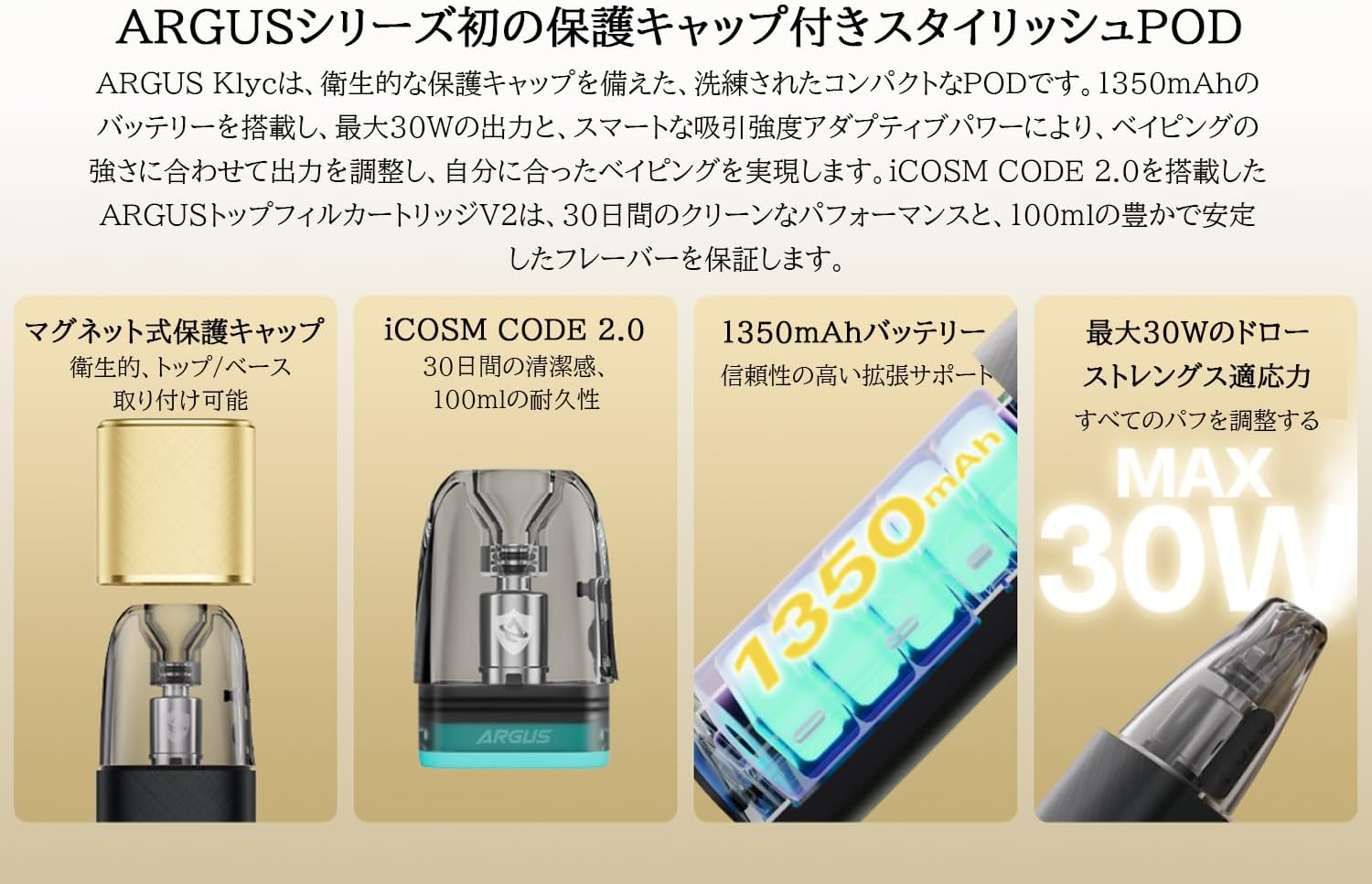
Image: The VOOPOO Argus Klyc Kit, showcasing its sleek design and magnetic protective cap.
المميزات الرئيسية:
- Magnetic Protective Cap: Ensures hygiene and prevents dust from entering the mouthpiece.
- تدفق الهواء قابل للتعديل: Customize your draw from loose to tight for various vaping preferences.
- 1350mAh Built-in Battery: Provides long-lasting vaping sessions with approximately 40-minute Type-C fast charging.
- 5-30W Variable Output: Supports both MTL and RDL vaping styles, compatible with all Argus replaceable pods.
- iCOSM CODE 2.0 Flavor Technology: Delivers a clean and stable flavor experience over extended use.
- ضوء مؤشر RGB: Clearly displays battery level (Red ≤20%, White >20%) and device status.
فيديو: أكثر منview of the iCOSM CODE 2.0 technology, highlighting its flavor and performance benefits.
2. ماذا يوجد في الصندوق
Upon unboxing your VOOPOO Argus Klyc Kit, you will find the following components:
- 1 x ARGUS Klyc Device
- 1 x ARGUS Top Fill Cartridge V2 0.7Ω (3mL capacity)
- 1 × كابل USB من النوع C
- 1 × دليل المستخدم
- 1 x ARGUS Pod Family Compatibility Guide

Image: All items included in the VOOPOO Argus Klyc Kit package.
Video: Unboxing the VOOPOO Argus Klyc Kit, showing the device, pod, cable, and documentation.
3. الإعداد
3.1. Install the Pod
- Remove the magnetic protective cap from the device.
- Insert the ARGUS Top Fill Cartridge V2 into the device. It will securely attach magnetically.

Image: The Argus Klyc device with the pod cartridge securely installed.
3.2. Fill with E-liquid
- Locate the top-fill port on the ARGUS Top Fill Cartridge V2.
- افتح القابس السيليكوني.
- Carefully fill the pod with your desired e-liquid through the filling port. Avoid overfilling.
- Close the silicone plug firmly to prevent leaks.
- After filling, wait at least 5-10 minutes before first use to allow the coil to saturate with e-liquid. This prevents dry hits and extends coil life.
Video: Demonstrates how to fill the ARGUS Top Fill Cartridge V2 with e-liquid.
3.3. شحن الجهاز
- قم بتوصيل كابل USB من النوع C المرفق بمنفذ الشحن الموجود على الجهاز.
- قم بتوصيل الطرف الآخر من الكابل بمصدر طاقة USB مناسب (مثل محول الحائط أو منفذ USB للكمبيوتر).
- The RGB indicator light will show the charging status. A full charge typically takes approximately 40 minutes.
Video: Shows the process of connecting the Type-C cable to charge the Argus Klyc device.
4. تعليمات التشغيل
4.1. تشغيل/إيقاف التشغيل
The Argus Klyc Kit is an auto-draw device, meaning it activates automatically when you inhale. There is no manual power button for turning the device on or off.
4.2. التدخين الإلكتروني
Simply inhale from the mouthpiece to activate the device and begin vaping. The device will automatically adjust the power output based on the pod's resistance and your draw strength.
Video: A user demonstrating the auto-draw vaping function of the Argus Klyc.
4.3. ضبط تدفق الهواء
The device features a side-mounted airflow adjustment slider. Move the slider to increase or decrease the airflow to achieve your preferred draw tightness.
Video: Illustrates how to adjust the airflow slider on the Argus Klyc device.
4.4. Indicator Light Meanings
The RGB indicator light provides visual feedback on the device's status:
- الضوء الأبيض: مستوى البطارية أعلى من 20%.
- الضوء الأحمر: Battery level is 20% or below, indicating a need for charging.
- الشحن: The light will indicate charging status and turn off when fully charged.
- Pod Insertion: Light may briefly illuminate upon successful pod insertion.
- التدخين الإلكتروني: The light will illuminate during a puff, with color variations indicating power output levels (Low, Mid, High).
Image: The Argus Klyc device showing the indicator light during operation.
5. الصيانة
5.1. تنظيف الجهاز
- Regularly wipe the device with a soft, dry cloth to remove dust and fingerprints.
- Clean the pod connection area on the device and the bottom of the pod with a cotton swab to ensure good contact.
- Use the magnetic protective cap when not in use to keep the mouthpiece clean.
5.2. Replacing the Pod
The ARGUS Top Fill Cartridge V2 has a built-in coil. When the e-liquid flavor diminishes or a burnt taste occurs, it indicates that the coil needs replacement. Replace the entire pod cartridge with a new one.
- Remove the old pod from the device.
- تخلص من الكبسولة القديمة بطريقة مسؤولة.
- Insert a new, filled ARGUS Top Fill Cartridge V2 into the device.
6. استكشاف الأخطاء وإصلاحها
- لا إنتاج بخار:
- تحقق مما إذا كانت البطارية مشحونة.
- Ensure the pod is correctly inserted and making contact.
- Verify the pod contains e-liquid.
- Replace the pod if the coil is burnt or old.
- تسرب:
- Ensure the silicone plug on the top-fill port is securely closed.
- Avoid overfilling the pod.
- Check for condensation in the pod connection area and clean if necessary.
- If leaking persists, replace the pod.
- الجهاز لا يشحن:
- تأكد من توصيل كابل Type-C بشكل صحيح بكل من الجهاز ومصدر الطاقة.
- حاول استخدام كابل شحن أو محول طاقة مختلف.
- Clean the charging port on the device.
7. المواصفات
| ميزة | التفاصيل |
|---|---|
| أبعاد الجهاز | 100.6 × 29.7 × 17.2 ملم |
| مادة الجهاز | سبائك الألومنيوم |
| طاقة الإخراج | 5-30 واط |
| حجم الإخراجtage | 3.2-4.2 فولت |
| مدى المقاومة | 0.3 أوم-3.0 أوم |
| سعة البطارية | 1350 مللي أمبير (مدمجة) |
| الشحن | Type-C 5V/1.2A (Approx. 40 minutes) |
| سعة الجراب | 3مل |
| Pod Material | بي سي تي جي |
| Pod Resistance (Included) | 0.7 أوم |
| Filling Method | Top-fill System |
| المميزات الخاصة | Magnetic Protective Cap, Adjustable Airflow, iCOSM CODE 2.0, RGB Indicator Light |

Image: Visual representation of the Argus Klyc Kit's dimensions and pod specifications.
8. الضمان والدعم
للحصول على معلومات الضمان ودعم العملاء، يرجى الرجوع إلى موقع VOOPOO الرسمي. webالموقع أو تواصل مع بائع التجزئة. احتفظ بإيصال الشراء كإثبات للشراء في حال وجود أي مطالبات بالضمان.


